Free space taking over HD

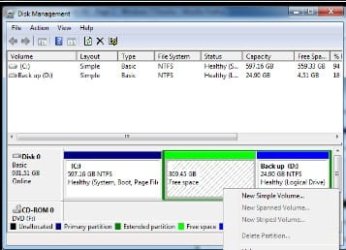
Should he create new Simple Volume of the Free space and then delete it with Backup?

I don't know how Backup got formatted Logical as I told him it needed to be Primary to be detected.

How about just deleting both at once, extending WIn7 into all but 30gb of unallocated space, then creating Primary partition for new backup image?
 
He won't be able to delete the extended partition until he deletes the logical partition in it.

A third party software, like Acronis would probably be able to do what he wants, but I do not think windows will.

I do not know if he can shrink the extended partition to match the front of the logical partition and leave the vacated space available.
 

My Computer

Computer Manufacturer/Model Number
Homebuilt
OS
Windows 7 x64
CPU
i7-2600K
Motherboard
Asus P8Z77-v Pro
Memory
8 G
Graphics Card(s)
GTX 480
Sound Card
Onboard
Monitor(s) Displays
LG W2753V
Screen Resolution
1920x1080
Hard Drives
Crucial M4 128 G SSD
So do you want me to deleted my back up partition and then do something LOL, then make a new one?
 

My Computer

Computer type
PC/Desktop
Computer Manufacturer/Model Number
Custom Build
OS
Windows 7 Professional 64bit
CPU
Intel Core i5 - 2500K @ 3.30GHz
Motherboard
Gigabyte Z77-HD3
Memory
4GB DDR3
Graphics Card(s)
EVGA Nvidia GeForce GT 740 2GB DDR3
Screen Resolution
1680 x 1050
Hard Drives
1T Samaung HD/ 1T toshiba external drive/ 1T western digital external drive/ 2T seagate external drive/ 250gb samaung SSD
PSU
Antec 430W
Keyboard
Microsoft Wireless Keyboard 800
Mouse
Microsoft Wireless Mouse 1000
Antivirus
AVG
Browser
Internet Explorer
See if Disk Mgmt will delete the Backup Partiition. You can save another image to a correct Primary formatted Backup Partition afterward.

If that makes Unallocated space, see if Win7 will extend into all but 30 gb of it.

Then create a 30gb Backup partition which is formatted Primary.

How does this sound?
 
The logical drive has already been deleted - that is why it is free space.

You should be able to delete the Extended partition with Disk Management.

Whatever you did to it with Partition Wizard may have caused a problem.

Can you delete it with PW ? I suspect not.

Otherwise, recreate the logical drive by rt clicking with PW, create - include all the space, Apply.

Then see if PW will delete it.
 

My Computers

System One System Two

  • Computer type
    PC/Desktop
    OS
    7 X64
    CPU
    i5 8400
    Motherboard
    gigabyte b365m ds3h
    Memory
    2x8gb 3200mhz
    Hard Drives
    various
    PSU
    pure power 11 400w cm
    Case
    Coolermaster
    Cooling
    cryorig m9i
  • Computer type
    PC/Desktop
    OS
    7x64
    CPU
    g5400
    Motherboard
    ga b365m ds3h
    Memory
    8gb ddr4 2400
    PSU
    xfx pro 450w
You would want to extend Win7 300 gb into the Unallocated space once you get it.

Disk Mgmt will create New Simple Volume in that in that Free space first to delete it..
 
it lets me deleted back up, So i delete it, and see if Windows 7 will extend?
 

My Computer

Computer type
PC/Desktop
Computer Manufacturer/Model Number
Custom Build
OS
Windows 7 Professional 64bit
CPU
Intel Core i5 - 2500K @ 3.30GHz
Motherboard
Gigabyte Z77-HD3
Memory
4GB DDR3
Graphics Card(s)
EVGA Nvidia GeForce GT 740 2GB DDR3
Screen Resolution
1680 x 1050
Hard Drives
1T Samaung HD/ 1T toshiba external drive/ 1T western digital external drive/ 2T seagate external drive/ 250gb samaung SSD
PSU
Antec 430W
Keyboard
Microsoft Wireless Keyboard 800
Mouse
Microsoft Wireless Mouse 1000
Antivirus
AVG
Browser
Internet Explorer
No -= don't do that.

Now you posted a screenie - it is easy.


a-screenie-2010-01-07_030432.jpg

You need Paragon for this - PW won't hack it.

Paragon Partition Manager Free Edition


Select Full Scale Launcher.

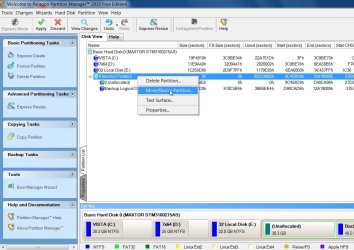
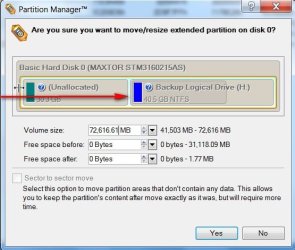
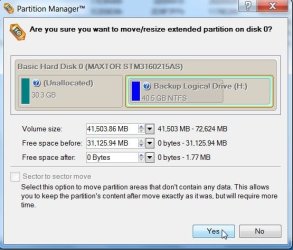
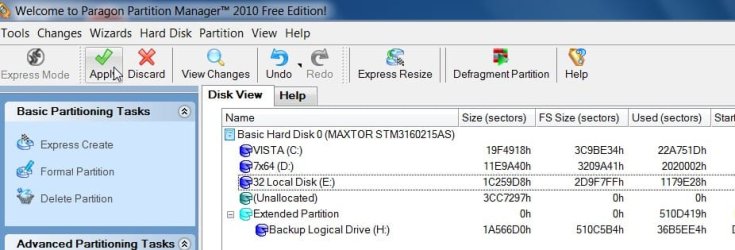
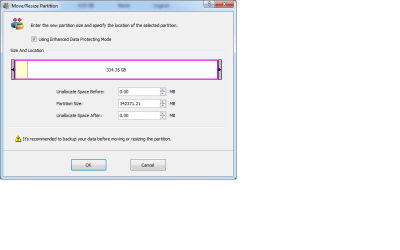
Rt click the extended partition , select move/resize - drag the Left edge over to include all the space. OK, Apply.
 

My Computers

System One System Two

  • Computer type
    PC/Desktop
    OS
    7 X64
    CPU
    i5 8400
    Motherboard
    gigabyte b365m ds3h
    Memory
    2x8gb 3200mhz
    Hard Drives
    various
    PSU
    pure power 11 400w cm
    Case
    Coolermaster
    Cooling
    cryorig m9i
  • Computer type
    PC/Desktop
    OS
    7x64
    CPU
    g5400
    Motherboard
    ga b365m ds3h
    Memory
    8gb ddr4 2400
    PSU
    xfx pro 450w
Otherwise, recreate the logical drive by rt clicking with PW, create - include all the space, Apply.

.

His screenshot shows that Disk Mgmt will create New SImple volume on that free space, so should he create a logical one to then delete along with Backup which is part of the extended?

If not you will need to use Partition Wizard.
 
2 things.

I dont know how to create a logical thing.


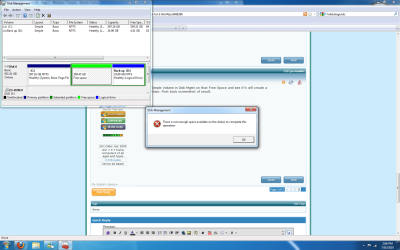
And it never let me create a new simple voloume, even when i make it small i get this

whoops soz for full screen screeny this time
 

Attachments

  • Untitled.png
    Untitled.png
    71.4 KB · Views: 14

My Computer

Computer type
PC/Desktop
Computer Manufacturer/Model Number
Custom Build
OS
Windows 7 Professional 64bit
CPU
Intel Core i5 - 2500K @ 3.30GHz
Motherboard
Gigabyte Z77-HD3
Memory
4GB DDR3
Graphics Card(s)
EVGA Nvidia GeForce GT 740 2GB DDR3
Screen Resolution
1680 x 1050
Hard Drives
1T Samaung HD/ 1T toshiba external drive/ 1T western digital external drive/ 2T seagate external drive/ 250gb samaung SSD
PSU
Antec 430W
Keyboard
Microsoft Wireless Keyboard 800
Mouse
Microsoft Wireless Mouse 1000
Antivirus
AVG
Browser
Internet Explorer
Get Paragon , Partition Wizard cannot do this.

Follow these instructions - it is simple:

AA-1-PAR-EXT-1-2010-01-07_031048.jpg

AA-PAR-EXT-2-2010-01-07_031212.jpg

AA-PAR-EXT-3-2010-01-07_031245.jpg

AA-PAR-EXT-4-2010-01-07_031355.jpg

That will shrink the Extended partition - without damaging the Backup drive.

I just did all that and took and posted the screenshots in the past few mins.

Also see my previous post.
 

My Computers

System One System Two

  • Computer type
    PC/Desktop
    OS
    7 X64
    CPU
    i5 8400
    Motherboard
    gigabyte b365m ds3h
    Memory
    2x8gb 3200mhz
    Hard Drives
    various
    PSU
    pure power 11 400w cm
    Case
    Coolermaster
    Cooling
    cryorig m9i
  • Computer type
    PC/Desktop
    OS
    7x64
    CPU
    g5400
    Motherboard
    ga b365m ds3h
    Memory
    8gb ddr4 2400
    PSU
    xfx pro 450w
Mitch is out of downloads for now, and I can't connect thru his router to remote it for him until he opens port 3389.

Mitch, open PWiz, rightclick Backup>Resize to see if it will let you slide the left border over to take up all the Free Space. OK but don't apply yet. Post back screenshot.

SIW2 is there a way to do this with PW?
 
what one do i download there is like a Million
 

My Computer

Computer type
PC/Desktop
Computer Manufacturer/Model Number
Custom Build
OS
Windows 7 Professional 64bit
CPU
Intel Core i5 - 2500K @ 3.30GHz
Motherboard
Gigabyte Z77-HD3
Memory
4GB DDR3
Graphics Card(s)
EVGA Nvidia GeForce GT 740 2GB DDR3
Screen Resolution
1680 x 1050
Hard Drives
1T Samaung HD/ 1T toshiba external drive/ 1T western digital external drive/ 2T seagate external drive/ 250gb samaung SSD
PSU
Antec 430W
Keyboard
Microsoft Wireless Keyboard 800
Mouse
Microsoft Wireless Mouse 1000
Antivirus
AVG
Browser
Internet Explorer

My Computers

System One System Two

  • Computer type
    PC/Desktop
    OS
    7 X64
    CPU
    i5 8400
    Motherboard
    gigabyte b365m ds3h
    Memory
    2x8gb 3200mhz
    Hard Drives
    various
    PSU
    pure power 11 400w cm
    Case
    Coolermaster
    Cooling
    cryorig m9i
  • Computer type
    PC/Desktop
    OS
    7x64
    CPU
    g5400
    Motherboard
    ga b365m ds3h
    Memory
    8gb ddr4 2400
    PSU
    xfx pro 450w
Is this right LOL
 

Attachments

  • Untitled.png
    Untitled.png
    12.5 KB · Views: 9
  • Untitled2.png
    Untitled2.png
    12.4 KB · Views: 9
  • Untitled3.png
    Untitled3.png
    42 KB · Views: 9

My Computer

Computer type
PC/Desktop
Computer Manufacturer/Model Number
Custom Build
OS
Windows 7 Professional 64bit
CPU
Intel Core i5 - 2500K @ 3.30GHz
Motherboard
Gigabyte Z77-HD3
Memory
4GB DDR3
Graphics Card(s)
EVGA Nvidia GeForce GT 740 2GB DDR3
Screen Resolution
1680 x 1050
Hard Drives
1T Samaung HD/ 1T toshiba external drive/ 1T western digital external drive/ 2T seagate external drive/ 250gb samaung SSD
PSU
Antec 430W
Keyboard
Microsoft Wireless Keyboard 800
Mouse
Microsoft Wireless Mouse 1000
Antivirus
AVG
Browser
Internet Explorer
GOOD JOB, MITCH!:party:

Now should he convert to Primary and shrink it back over to right?

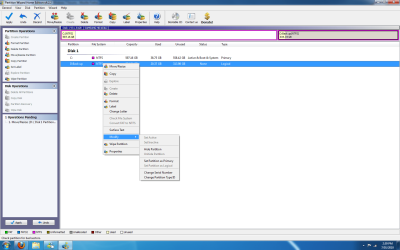
Mitch, do you see an option to Modify>Convert to Primary on their that is available?
 
but but i havent restarted computer for the effects to make a change
 

My Computer

Computer type
PC/Desktop
Computer Manufacturer/Model Number
Custom Build
OS
Windows 7 Professional 64bit
CPU
Intel Core i5 - 2500K @ 3.30GHz
Motherboard
Gigabyte Z77-HD3
Memory
4GB DDR3
Graphics Card(s)
EVGA Nvidia GeForce GT 740 2GB DDR3
Screen Resolution
1680 x 1050
Hard Drives
1T Samaung HD/ 1T toshiba external drive/ 1T western digital external drive/ 2T seagate external drive/ 250gb samaung SSD
PSU
Antec 430W
Keyboard
Microsoft Wireless Keyboard 800
Mouse
Microsoft Wireless Mouse 1000
Antivirus
AVG
Browser
Internet Explorer
Don't apply yet.

Right click Backup and see if Modify>Convert to Primary is available to select.
 
these are my options

Why does back up partition need so my GBS
 

Attachments

  • Untitled.png
    Untitled.png
    68.4 KB · Views: 9

My Computer

Computer type
PC/Desktop
Computer Manufacturer/Model Number
Custom Build
OS
Windows 7 Professional 64bit
CPU
Intel Core i5 - 2500K @ 3.30GHz
Motherboard
Gigabyte Z77-HD3
Memory
4GB DDR3
Graphics Card(s)
EVGA Nvidia GeForce GT 740 2GB DDR3
Screen Resolution
1680 x 1050
Hard Drives
1T Samaung HD/ 1T toshiba external drive/ 1T western digital external drive/ 2T seagate external drive/ 250gb samaung SSD
PSU
Antec 430W
Keyboard
Microsoft Wireless Keyboard 800
Mouse
Microsoft Wireless Mouse 1000
Antivirus
AVG
Browser
Internet Explorer
Back
Top