
Free up RAM

I'll say it again. People who want to free up ram are going backwards. Freeing up ram is essientially slowing down performance, not increasing it. Windows 7 makes use of ram on purpose, it's supposed to be doing what it's doing regarding ram. It makes ram much more useful than XP did and hence uses more ram. Windows 7 is always moving internally, trying to predict the users habits and moving information in and out of ram to suit this. Information can be retrieved from ram much quicker than from the hard drive so you want as much of your information stored in ram as possible, not less. One gig for Windows 7 is not enough. I have 6 gigs and regularly use more than 3. If I do more stuff, I'll use even more. Programs designed to free up ram are worthless and counterproductive. One of the fastest components (or should I say responsible for the fastest performance) in the computer is ram. Never can understand why people want to throttle it (by not using it's potential).

I understand that RAM is to be used. It's needed and it's good when it is being used. Though, when you're trying to run a program and can't because the OS is using all of the small amount you may have it's a way to get some back. Personally, I say go buy more RAM if you are having problems, but if you want a quick fix until that oh-so-loved tax return, the RAM compressor I mentioned is nice, or other methods.

The Game Booster I linked to doesn't actually free up RAM, but closes programs that run in the background that you may want to stop. It has a list, but also gives you some choices of programs running like Java. Things not needed to run intensive games. Other than my personal points, I agree with Mike, RAM being used is good. Otherwise why would you pay for it?
 

My Computer My Computer

OS
Seven 64 bit
CPU
Intel Core 2 Duo 2.66 @ 3.0
Motherboard
Nvidia 780i
Memory
6 GB
Graphics Card(s)
Geforce 9800 GTX+
Monitor(s) Displays
Hannspree 22" Widescreen
Screen Resolution
1680 x 1050
Hard Drives
500G
Keyboard
Razer Lycosa
We won't discuss a post I saw on another forum where the guy didn't want Windows (Vista at the time) to "use " all the ram, because it would increase the power/electricity usage. :doh:
 

My Computer My Computer

Computer type
PC/Desktop
Computer Manufacturer/Model Number
Me
OS
Win 7 Ultimate x64
CPU
FX-8350 @ 4.6 GHz so far
Motherboard
Asus M5A97 EVO
Memory
ADATA XPG V1 Series Black 8GB DDR3 1600
Graphics Card(s)
Sapphire R9 270x Dual-X
Sound Card
Xonar DGX w/ Corsair Vengence 1300
Monitor(s) Displays
Acer S232HL Abid
Screen Resolution
1920x1080
Hard Drives
120 GB OCZ Vertex 3
500 GB Seagate 7200.12
PSU
Antec Earthwatts 650W Green
Case
Antec Three Hundred
Cooling
Cooler Master 212 EVO
Keyboard
Logitech G510
Mouse
Logitech G500s
Internet Speed
35000/3000
Hey guys, I want to know if there is a way to free up RAM. I have 1 GB of slow RAM and it is at 60% full when idle. No programs running either. When I click on a few programs like OpenOffice and Chrome, it shoots up to about 80% full. Are there any non-essential processes that I can just kill in order to free this up (other than the programs I'm running)?

Thanks in advance!
On XP, I've used CleanMem. It worked well by freeing up ram for let's say Firefox which would/could jump up into the couple hundred megs fairly quick.
CleanMem v.1.4.2 | PcWinTech.com?
 

My Computer My Computer

Computer Manufacturer/Model Number
Averatec 6130HS-20
OS
Windows 7 Professional 32-bit (6.1, Build 7600)
CPU
Intel(R) Pentium(R) 4 3.00 GHz HT
Memory
2.0 GB
Graphics Card(s)
ATI Mobility Radeon 9600 64MB
Sound Card
Realtek AC'97 Audio
Screen Resolution
1280 x 800
Hard Drives
Seagate 96023A 60GB 7200RPM -
Seagate FreeAgentDesktop 250GB
Cooling
20 Inch Box Fan
Mouse
Targus PAWM10 Wireless Optical Laptop Mouse
I have 1 additional question. I have W7 Ultimate x64, and 2GB of RAM. When system boots up it already is using around 1GB although all processes counted together shows only about 500MB of RAM usage. Can some1 explain that to me? And... after I play some games (Americas Army in this example) even when I exit it still shows me that 90% of my ram is being used. Does this mean it's still within that memory?
Thx in advance for any explanations ^ ^

Yours newbie xD
 

My Computer My Computer

OS
Windows 7 Ultimate x64
Process Explorer

This is a good program for seeing exactly what is running on your computer. it is more in depth than Task Manager as you can look at each individual process.

For the other part. sometimes graphics cards use the Physical RAM. Also, integrated graphics dont have their own RAM so they use the Physical RAM. So if you have integrated graphics, then it is probably allocating RAM for that.

Welcome to Seven Forums hope this helps.
 

My Computer My Computer

Computer type
Laptop
Computer Manufacturer/Model Number
ASUS G60-RBBX05
OS
Win7 Home Premium 64x
CPU
Intel Core 2 Duo P7450 / 2.13 GHz (2.29 with Extreme Turbo)
Memory
4 GB PC-6400 Hyundai (2X2) at 800Mhz
Graphics Card(s)
NVIDIA GeForce GTX 260M 1GB DDR3 VRAM
Monitor(s) Displays
16" LED Backlit
Screen Resolution
1366 x 768 on laptop 1600x1050 max res on 22" external mon
Hard Drives
OCZ Agility 3 60GB SSD / 320 GB - Serial ATA-150 - 7200 rpm
PSU
6-cell Lithium ion { lasts 1.5 hours }
Case
ASUS G60 Laptop
Keyboard
Chicklet type back-lit (white light) keyboard
Mouse
Logitech G9 Laser Mouse 3200dpi and 1000 reports per minute
Internet Speed
Comcast 8.60mb/s up - 3.11mb/s down
Antivirus
MSE
Browser
Firefox
Other Info
General mid-budget gaming Comp. Low batterylife - High FrameRates - currently overheating problems :(

2nd Rig: Case: Rosewill BLACKHAWK Gaming ATX Mid Tower Computer Case

Mobo: GIGABYTE GA-990FXA-UD3
CPU: AMD FX-6200 Zambezi 3.8GHz (4.1GHz Turbo)
Heatsink: COOLER MASTER V8 CPU Cooler
RAM: Patriot Viper 3 8GB (2 x 4GB) 240-Pin DDR3 SDRAM 1866 (PC3 15000)
GPU: SAPPHIRE Radeon HD 6850 1GB 2
Thanks for the prog. Now it seems to be displaying the real amounts ^ ^ But still I don't know what is it with the game ram. I have radeon hd3650 with 512 ram... so it shouldn't use any of the computers.
 

My Computer My Computer

OS
Windows 7 Ultimate x64
I have 1 additional question. I have W7 Ultimate x64, and 2GB of RAM. When system boots up it already is using around 1GB although all processes counted together shows only about 500MB of RAM usage. Can some1 explain that to me? And... after I play some games (Americas Army in this example) even when I exit it still shows me that 90% of my ram is being used. Does this mean it's still within that memory?
Thx in advance for any explanations ^ ^

Yours newbie xD

Hey there

Just a drive by FYI

a-win 7 will cache more than half of available ram on boot. This both perfectly normal and desired.

b-win 7 64 bit minimum ram is 2 gigs so you are in factfo rcing it to use HD cache. what do you have that set to?

Ken
 

My Computer My Computer

Computer Manufacturer/Model Number
HP Pavillion dv-7 1005 Tx
OS
Win 8 Release candidate 8400
CPU
[email protected]
Memory
4 gigs
Graphics Card(s)
Nvidia 9600M
Sound Card
HD built-in
Monitor(s) Displays
17" Wxga
Screen Resolution
1440x900
Cooling
none
Internet Speed
45Mb down 5Mb up
ATI Radeon? HD 3600 Series Overview

I am not seeing what amount of RAM is being used by your card or that the card has its own dedicated RAM. If you could, please download and run GPU-Z

GPU-Z Video card GPU Information Utility

This will show all of your GPU's specs.

There is a good chance this card does not have its own ram. Its classification is mainly for HD video / and Gaming. Most HD Vid cards don't focus on gaming yet claim they are good for it.

Edit: Sry...Your card is 'good', its just main focus is HD video. You will be able to play games with it better than the Intel Integrated graphics, but it might not have its own ram so it is using your system ram. This would make sense in your case of playing games and seeing that much ram being used. if it doesn't have its own RAM your best bet is to upgrade the ram in your comp.

Can you update your profile with your system specs and post the screenshot of the GPU-Z
 

My Computer My Computer

Computer type
Laptop
Computer Manufacturer/Model Number
ASUS G60-RBBX05
OS
Win7 Home Premium 64x
CPU
Intel Core 2 Duo P7450 / 2.13 GHz (2.29 with Extreme Turbo)
Memory
4 GB PC-6400 Hyundai (2X2) at 800Mhz
Graphics Card(s)
NVIDIA GeForce GTX 260M 1GB DDR3 VRAM
Monitor(s) Displays
16" LED Backlit
Screen Resolution
1366 x 768 on laptop 1600x1050 max res on 22" external mon
Hard Drives
OCZ Agility 3 60GB SSD / 320 GB - Serial ATA-150 - 7200 rpm
PSU
6-cell Lithium ion { lasts 1.5 hours }
Case
ASUS G60 Laptop
Keyboard
Chicklet type back-lit (white light) keyboard
Mouse
Logitech G9 Laser Mouse 3200dpi and 1000 reports per minute
Internet Speed
Comcast 8.60mb/s up - 3.11mb/s down
Antivirus
MSE
Browser
Firefox
Other Info
General mid-budget gaming Comp. Low batterylife - High FrameRates - currently overheating problems :(

2nd Rig: Case: Rosewill BLACKHAWK Gaming ATX Mid Tower Computer Case

Mobo: GIGABYTE GA-990FXA-UD3
CPU: AMD FX-6200 Zambezi 3.8GHz (4.1GHz Turbo)
Heatsink: COOLER MASTER V8 CPU Cooler
RAM: Patriot Viper 3 8GB (2 x 4GB) 240-Pin DDR3 SDRAM 1866 (PC3 15000)
GPU: SAPPHIRE Radeon HD 6850 1GB 2
Mike89,
100% correct. Wish more people would listen to such statements.

"killer" aka ikilledkenny,
Let's get at the root of your problem which is 1GB of ram.
Expand your ram to the max which your computer can physically contain.
Computers do hunger and thirst after ram.
 

My Computer My Computer

Computer Manufacturer/Model Number
Toshiba Satellite S875D-S7239 laptop
OS
MS Windows 7 Ultimate SP1 64-bit
CPU
AMD A10-4600M
Motherboard
AMD Pumori (Socket FT1)
Memory
6.00 GB Dual-Channel DDR3 @ 798MHz (11-11-12-28)
Graphics Card(s)
AMD Radeon HD 7660G
Sound Card
High Definition Audio Device
Monitor(s) Displays
Generic PnP Monitor (1600x900@60Hz)
Screen Resolution
1600x900@60Hz
Hard Drives
SSD 119GB Corsair CSSD-V128GB2 ATA Device
Keyboard
Standard PS/2 Keyboard
Mouse
HP Wireless Optical Mobile Mouse Model FHA-3410
Internet Speed
What the local pub, local coffee shop offers.
Other Info
Optical Drive:MATSHITA BD-CMB UJ160B ATA Device


Also have an Asus ha1002xp netbook with Win 7 Ultimate installed.
lol All these posts are old old....Pokora22 had posted in it today so i was trying to help, if you have any suggestions, as I am about out of ideas, feel free to share. pokora22's post started on 24th post (4th post down on 3rd page)
 

My Computer My Computer

Computer type
Laptop
Computer Manufacturer/Model Number
ASUS G60-RBBX05
OS
Win7 Home Premium 64x
CPU
Intel Core 2 Duo P7450 / 2.13 GHz (2.29 with Extreme Turbo)
Memory
4 GB PC-6400 Hyundai (2X2) at 800Mhz
Graphics Card(s)
NVIDIA GeForce GTX 260M 1GB DDR3 VRAM
Monitor(s) Displays
16" LED Backlit
Screen Resolution
1366 x 768 on laptop 1600x1050 max res on 22" external mon
Hard Drives
OCZ Agility 3 60GB SSD / 320 GB - Serial ATA-150 - 7200 rpm
PSU
6-cell Lithium ion { lasts 1.5 hours }
Case
ASUS G60 Laptop
Keyboard
Chicklet type back-lit (white light) keyboard
Mouse
Logitech G9 Laser Mouse 3200dpi and 1000 reports per minute
Internet Speed
Comcast 8.60mb/s up - 3.11mb/s down
Antivirus
MSE
Browser
Firefox
Other Info
General mid-budget gaming Comp. Low batterylife - High FrameRates - currently overheating problems :(

2nd Rig: Case: Rosewill BLACKHAWK Gaming ATX Mid Tower Computer Case

Mobo: GIGABYTE GA-990FXA-UD3
CPU: AMD FX-6200 Zambezi 3.8GHz (4.1GHz Turbo)
Heatsink: COOLER MASTER V8 CPU Cooler
RAM: Patriot Viper 3 8GB (2 x 4GB) 240-Pin DDR3 SDRAM 1866 (PC3 15000)
GPU: SAPPHIRE Radeon HD 6850 1GB 2
Hey guys, I want to know if there is a way to free up RAM. I have 1 GB of slow RAM and it is at 60% full when idle. No programs running either. When I click on a few programs like OpenOffice and Chrome, it shoots up to about 80% full. Are there any non-essential processes that I can just kill in order to free this up (other than the programs I'm running)?

Thanks in advance!
On XP, I've used CleanMem. It worked well by freeing up ram for let's say Firefox which would/could jump up into the couple hundred megs fairly quick.
CleanMem v.1.4.2 | PcWinTech.com?

CleanMem seems to work equally as well for Win 7. At first I thought not since it would only free up about 40 to 50 mb. The other day, I decided to right click the shortcut > properties > compatibility and selected "Run this program as administrator". Once done with that, clicking CleanMem dropped the mem usage a ton.
 

My Computer My Computer

Computer Manufacturer/Model Number
Averatec 6130HS-20
OS
Windows 7 Professional 32-bit (6.1, Build 7600)
CPU
Intel(R) Pentium(R) 4 3.00 GHz HT
Memory
2.0 GB
Graphics Card(s)
ATI Mobility Radeon 9600 64MB
Sound Card
Realtek AC'97 Audio
Screen Resolution
1280 x 800
Hard Drives
Seagate 96023A 60GB 7200RPM -
Seagate FreeAgentDesktop 250GB
Cooling
20 Inch Box Fan
Mouse
Targus PAWM10 Wireless Optical Laptop Mouse
My card got it's own 512 as I said :P Here's a screen from GPUZ. (And it's is really pretty good for gaming - goes on with Crysis on high settings xD)
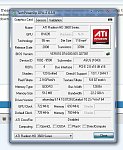

And for system cache I got windows default which is 2047 MB

EDIT: It seems to be some kind of bug. I noticed it doesn't happen every single time. And if it does, CleanMem does it's job perfectly.. so... I think it's kinda solved, although not fully eliminated ; )
 
Last edited:

My Computer My Computer

OS
Windows 7 Ultimate x64
post deleted - I just noticed that the poster is not even amongst us any more.
 

My Computer My Computer

Computer Manufacturer/Model Number
HP, Dell, Gateway, Toshiba - 4 laptops and 2 desktops
OS
Vista, Windows7, Mint Mate, Zorin, Windows 8
CPU
from 1.6GHz Duo to i7
Monitor(s) Displays
2x HP w2207
Hard Drives
5x HDD, 7x SSD, 12x Externals
Keyboard
with trackball - no mices
Mouse
Trackball mice
Internet Speed
DSL 6000
CleanMem seems to work equally as well for Win 7. At first I thought not since it would only free up about 40 to 50 mb. The other day, I decided to right click the shortcut > properties > compatibility and selected "Run this program as administrator". Once done with that, clicking CleanMem dropped the mem usage a ton.

And would just come right back to where it is at. CleanMem just balloons and forces everything else into the pagefile.
Don't think so.
 

My Computer My Computer

Computer Manufacturer/Model Number
Averatec 6130HS-20
OS
Windows 7 Professional 32-bit (6.1, Build 7600)
CPU
Intel(R) Pentium(R) 4 3.00 GHz HT
Memory
2.0 GB
Graphics Card(s)
ATI Mobility Radeon 9600 64MB
Sound Card
Realtek AC'97 Audio
Screen Resolution
1280 x 800
Hard Drives
Seagate 96023A 60GB 7200RPM -
Seagate FreeAgentDesktop 250GB
Cooling
20 Inch Box Fan
Mouse
Targus PAWM10 Wireless Optical Laptop Mouse
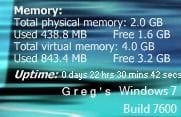
Just now run it, here's before
Capture.JPG

Here's after
Capture2.JPG
 

My Computer My Computer

Computer Manufacturer/Model Number
Averatec 6130HS-20
OS
Windows 7 Professional 32-bit (6.1, Build 7600)
CPU
Intel(R) Pentium(R) 4 3.00 GHz HT
Memory
2.0 GB
Graphics Card(s)
ATI Mobility Radeon 9600 64MB
Sound Card
Realtek AC'97 Audio
Screen Resolution
1280 x 800
Hard Drives
Seagate 96023A 60GB 7200RPM -
Seagate FreeAgentDesktop 250GB
Cooling
20 Inch Box Fan
Mouse
Targus PAWM10 Wireless Optical Laptop Mouse

My Computer My Computer

Computer Manufacturer/Model Number
HP, Dell, Gateway, Toshiba - 4 laptops and 2 desktops
OS
Vista, Windows7, Mint Mate, Zorin, Windows 8
CPU
from 1.6GHz Duo to i7
Monitor(s) Displays
2x HP w2207
Hard Drives
5x HDD, 7x SSD, 12x Externals
Keyboard
with trackball - no mices
Mouse
Trackball mice
Internet Speed
DSL 6000
Just now run it, here's before
View attachment 59507

Here's after
View attachment 59508
Sorry Greg, but that does not prove a thing. These programs are as useful as a shot in the knee. If you want to understand what is going on, you need an exact list of all the processes that have been quiesced.

It does if you know what you're doing and understand it as you say. You obviously do not understand CleanMem and what it does.

The images are meters and not just edited images of numbers. The other poster said that it forced the clean memory into pagefile. My response to that was that it doesn't and provided my proof.
 

My Computer My Computer

Computer Manufacturer/Model Number
Averatec 6130HS-20
OS
Windows 7 Professional 32-bit (6.1, Build 7600)
CPU
Intel(R) Pentium(R) 4 3.00 GHz HT
Memory
2.0 GB
Graphics Card(s)
ATI Mobility Radeon 9600 64MB
Sound Card
Realtek AC'97 Audio
Screen Resolution
1280 x 800
Hard Drives
Seagate 96023A 60GB 7200RPM -
Seagate FreeAgentDesktop 250GB
Cooling
20 Inch Box Fan
Mouse
Targus PAWM10 Wireless Optical Laptop Mouse
What proof? But if you religiously believe in it, so be it.
 

My Computer My Computer

Computer Manufacturer/Model Number
HP, Dell, Gateway, Toshiba - 4 laptops and 2 desktops
OS
Vista, Windows7, Mint Mate, Zorin, Windows 8
CPU
from 1.6GHz Duo to i7
Monitor(s) Displays
2x HP w2207
Hard Drives
5x HDD, 7x SSD, 12x Externals
Keyboard
with trackball - no mices
Mouse
Trackball mice
Internet Speed
DSL 6000
What proof? But if you religiously believe in it, so be it.

No it's not religion. I gave the proof in the screenshot. The pagefile actually shrunk contrary to what the other poster stated. Where's your proof that it does no good?
 

My Computer My Computer

Computer Manufacturer/Model Number
Averatec 6130HS-20
OS
Windows 7 Professional 32-bit (6.1, Build 7600)
CPU
Intel(R) Pentium(R) 4 3.00 GHz HT
Memory
2.0 GB
Graphics Card(s)
ATI Mobility Radeon 9600 64MB
Sound Card
Realtek AC'97 Audio
Screen Resolution
1280 x 800
Hard Drives
Seagate 96023A 60GB 7200RPM -
Seagate FreeAgentDesktop 250GB
Cooling
20 Inch Box Fan
Mouse
Targus PAWM10 Wireless Optical Laptop Mouse
Based on paging algorithms, the least-recently-used pages (those with cobwebs) will get bumped to the page file IF you end up swamping all of RAM. So, until something you are RUNNING or need ends up on the paging file, don't worry about what % of RAM is in use.
 

My Computer My Computer

Computer type
PC/Desktop
Computer Manufacturer/Model Number
Custom
OS
Windows 7
CPU
AMD Phenom II X2 (dual-core)
Motherboard
GA-MA785GM-US2H
Memory
4G
Graphics Card(s)
integrated ATI HD 4200
Sound Card
integrated
Monitor(s) Displays
Samsung 24"
Screen Resolution
1920x1080
Hard Drives
1 SSD - Samsung 840 - 500 GB - OS and DATA partitions
1 SSD - Intel 320 - 120 GB (used for backups) - Misc/BACKUP
1 SATA HD - WD, 500 GB - BACKUP
PSU
Ultra X4 500W
Case
Ultra X-blaster
Keyboard
Microsoft Digital Media Pro
Mouse
Logitech WIRED!
Internet Speed
15 Mbps FIOS
Back
Top