
rivrbyte17
New member
- Local time
- 9:16 AM
- Messages
- 11
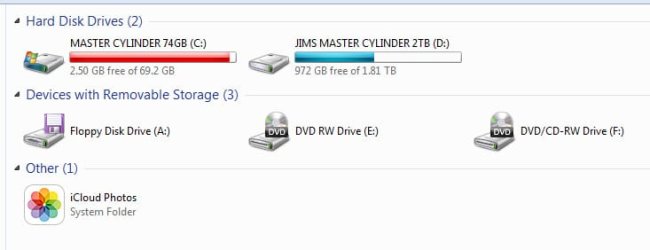
I have a WD Raptor 74GB, that I used mainly for apps, and programs, and whenever i have any downloaded music from amazon,or any videos fro pinnacle studio, I move them down to my secondart 2TB hard drive. I DO NOT use my boot drive for storage. So, How else can I add more space? Do I start deleting programs? Do i go out and just buy a bigger Boot Drive? I do have an extra WD 500 Internal that I had RMA exchanged from western digital, that I never added back onto my computer, but it's slower than the 74GB. I needed the raptor to open up programs faster. i can not afford a Solid State drive.
I have Windows 7 64 bit. In the old days with 32 bit WIN XP, I always used to delete useless temp files by going to the search prompt and type in .tmp, *.tmp, then delete all those temporary files to free up space.
In WIN 7 I don't see a lot of .tmp results, so I go to C:\ WINDOWS>TEMP folder, and there I see .TMP files to delete, but also want to know how safe it is to delete those other Chrome HDML Doc, HDMP, XML Document, SQM, and Text document files, which these text doc files are over 24,658 KB's.
Surely, I still do the Cookies, Internet Temp files, and the browser cashe removal, but I am dangerously low on my boot drive, as you see on the attachment.
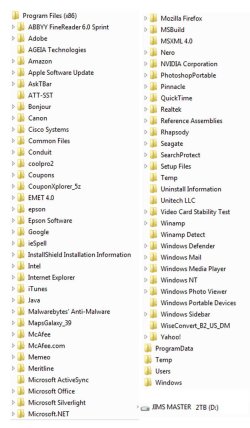
PROGRAM FILES> I HAVE 27 folders
PROGRAM FILES (X86) > I HAVE 65
FONTS> I HAVE 630
I only have 12 MY DOCUMENTS, No Cloud or iPod content, and nothing in my libraries taking up space.
I think I may have answered my own question....REFORMAT and REISTALL THE O.S. to a bigger hard drive, maybe a 150 GB, but not necessarily the 500 GB, I don't want to partition that, unless I could direct all of my hungry Video files to this partition on my C:\ partition. It's just if this drive crashes, i'm toast. Thank you for any help!
I have Windows 7 64 bit. In the old days with 32 bit WIN XP, I always used to delete useless temp files by going to the search prompt and type in .tmp, *.tmp, then delete all those temporary files to free up space.
In WIN 7 I don't see a lot of .tmp results, so I go to C:\ WINDOWS>TEMP folder, and there I see .TMP files to delete, but also want to know how safe it is to delete those other Chrome HDML Doc, HDMP, XML Document, SQM, and Text document files, which these text doc files are over 24,658 KB's.
Surely, I still do the Cookies, Internet Temp files, and the browser cashe removal, but I am dangerously low on my boot drive, as you see on the attachment.
PROGRAM FILES> I HAVE 27 folders
PROGRAM FILES (X86) > I HAVE 65
FONTS> I HAVE 630
I only have 12 MY DOCUMENTS, No Cloud or iPod content, and nothing in my libraries taking up space.
I think I may have answered my own question....REFORMAT and REISTALL THE O.S. to a bigger hard drive, maybe a 150 GB, but not necessarily the 500 GB, I don't want to partition that, unless I could direct all of my hungry Video files to this partition on my C:\ partition. It's just if this drive crashes, i'm toast. Thank you for any help!
Attachments
My Computer
At a glance
64 WIN 7 PRO
- Computer type
- PC/Desktop
- OS
- 64 WIN 7 PRO


