

Hello all!
I just started this task yesterday and decided to clean things up a bit.
I generally am very consistent about keeping a very lite and clean (virus free) and updated machine and have tried the day it came out of the box.
Just the other day I decided to tried to get down in the nook and crannies to get rid of any bloat ware, or cr*p ware I might have missed over the years.
I refered to this tutorial:
SlowComputer? Speed Up Your Windows Computer in 10 Easy Steps - YouTube
... and followed every step, some I have already been doing on a nearly weekly basis.
It basically is doing most stuff that Tune-Up Utilities does, which I also just installed and tried and let it do it's thing.
A couple reasons for all of this hub-bub is that I noticed my CPU is starting to show signs of struggling with a game and I keep noticing my CPU peaking at 100 percent every time I open something or load a web page.
Of course when I first got the machine, it worked like a dream but noticed performance slowly declining over the years. Finding myself saying, "It didn't used to do that before."
Getting more confused and annoyed at what it is, I think at this point my computer's poor hard drive is probably feeling chafed from all the scans and disk clean-ups.
The thing I have tried before I haven't done before is uninstall all of those Windows update programs installed on my computer. Stuff like Microsoft .NET, Windows Live!, Microsoft Visual Studio, C++ and SQL server stuff. I'm not a developer or publisher, so I don't need any of that stuff.
Also changing the msconfig file, to remove anything I felt I didn't need for start-up. So in doing this I noticed all the Services running and I'm like "Wow, is that normal?" and wondered if there is any I can get rid of. So I cropped together a screen shot of all the Services running in order of what is running at the top and what is stopped or disabled at the bottom. So I'm wondering, is there any I can get rid of? Or uninstall?
http://i695.photobucket.com/albums/vv313/sirMAXX77/misc/Services.png
... Yeah I changed to Windows Classic Theme too as another little nuance to save on a bit of RAM and posted a separate link cause it's a big image.
Edit: Oh darn it. I noticed a problem with the image. Hold on...
... Okay, I think that should be better, that image hosting site resizes images: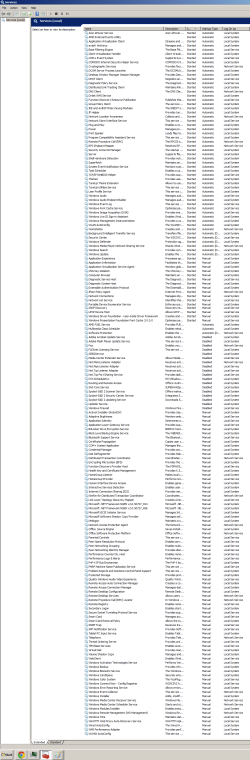
I just started this task yesterday and decided to clean things up a bit.
I generally am very consistent about keeping a very lite and clean (virus free) and updated machine and have tried the day it came out of the box.
Just the other day I decided to tried to get down in the nook and crannies to get rid of any bloat ware, or cr*p ware I might have missed over the years.
I refered to this tutorial:
SlowComputer? Speed Up Your Windows Computer in 10 Easy Steps - YouTube
... and followed every step, some I have already been doing on a nearly weekly basis.
It basically is doing most stuff that Tune-Up Utilities does, which I also just installed and tried and let it do it's thing.
A couple reasons for all of this hub-bub is that I noticed my CPU is starting to show signs of struggling with a game and I keep noticing my CPU peaking at 100 percent every time I open something or load a web page.
Of course when I first got the machine, it worked like a dream but noticed performance slowly declining over the years. Finding myself saying, "It didn't used to do that before."
Getting more confused and annoyed at what it is, I think at this point my computer's poor hard drive is probably feeling chafed from all the scans and disk clean-ups.
The thing I have tried before I haven't done before is uninstall all of those Windows update programs installed on my computer. Stuff like Microsoft .NET, Windows Live!, Microsoft Visual Studio, C++ and SQL server stuff. I'm not a developer or publisher, so I don't need any of that stuff.
Also changing the msconfig file, to remove anything I felt I didn't need for start-up. So in doing this I noticed all the Services running and I'm like "Wow, is that normal?" and wondered if there is any I can get rid of. So I cropped together a screen shot of all the Services running in order of what is running at the top and what is stopped or disabled at the bottom. So I'm wondering, is there any I can get rid of? Or uninstall?
http://i695.photobucket.com/albums/vv313/sirMAXX77/misc/Services.png
... Yeah I changed to Windows Classic Theme too as another little nuance to save on a bit of RAM and posted a separate link cause it's a big image.
Edit: Oh darn it. I noticed a problem with the image. Hold on...
... Okay, I think that should be better, that image hosting site resizes images:
My Computer
At a glance
Windows 7 Home Premium (64-bit)AMD E-350 1.6GHz8GBAMD Radeon HD 6320
- Computer type
- Laptop
- Computer Manufacturer/Model Number
- Acer Aspire 5253
- OS
- Windows 7 Home Premium (64-bit)
- CPU
- AMD E-350 1.6GHz
- Motherboard
- Acer Aspire v1.05
- Memory
- 8GB
- Graphics Card(s)
- AMD Radeon HD 6320
- Hard Drives
- Hitachi HTS545025B9A300 (250.06 GB)
- Antivirus
- avast! Antivirus
- Browser
- Goggle Chrome


