Freezes make me reboot

sirluca

New member
Member
Local time
10:55 PM
Messages
17
Hi my name is Luca, I'm italian, so forgive me if I can't speak english correctly.
Three weeks ago I bought a new computer (custom build).

From the beginning I've been experiencing an annoying problem:

My computer ramdomly freezes, both audio and video stops working properly: video freezes while audio loops for about 30 seconds then it stops playing.

This problem doesn't occur under specific circumstances.

I've tried to find the problem but I've ran out of ideas.
Here is what I've already tried:


HD tests:
-Windows Error Checking, result: no errors.

-WD Data Lifeguard Diagnostic for Windows, 3 times.
The computer froze during the first two test. The third time the test completed succesfully, result: no errors.

-HD Tune Pro 5.50 trial version, result: no errros.

RAM tests:
-Memtest86+ for 6-7 hours: three passes and half, result: no errors.

GPU and CPU tests:
-3dmark vantage test, here's the link: AMD Radeon R7 260X video card benchmark result - AMD FX-8320,Gigabyte Technology Co., Ltd. 970A-UD3P


I've tried to reinstall a different version of the O.S thinking that the previous .iso was corrupted; after checking the new one with a SHA1 test, I installed it properly.


I thought the problem was caused by a faulty drivers installation, so I've tried to reinstall the drivers after a fresh installation of the O.S. (I've used both drivers from the manufacturer's website and drivers found on the cds shipped with the hardware components)


I've read various problems regarding the drivers of my sound card . I've tried the latest original drivers and custom drivers: UNI Xonar Unified drivers. Currently I have the custom ones: v.164 rev.2, Low DPC latency installation.

(here's the link with more informations about these drivers: UNi Xonar Features - MaxedTech).

I've tried disabling the default sound from BIOS and not installing the motherboard audio drivers.
Under Device Manager -> Sound,video and game controllers, I currently have:
-AMD Hight Definition Audio Device
-ASUS Xonar DX Audio Device
I don't know where AMD Hight Definition Audio Device comes from (from the motherboard or the GPU), maybe they interfere with my sound card's drivers.

Windows detects that all driver are installed correctly and are up to date.

I've had also problems with windows's updates. After a fresh installation, one update always failed installing properly: KB2861208; I have followed this guide to fix: "0x8007066A" or "66A" error when you install .NET Framework updates

The problem was there were some updates for .NET Framework versions that I didn't have installed, I don't know why windows let me do these updates. This problem always shows up after a fresh installation of the O.S.


For further information I list minor issues, I don't know if they are somehow causing the freezes:

Errors that appear in the even viewer:
"Event filter with query "SELECT * FROM __InstanceModificationEvent WITHIN 60 WHERE TargetInstance ISA "Win32_Processor" AND TargetInstance.LoadPercentage > 99" could not be reactivated in namespace "//./root/CIMV2" because of error 0x80041003. Events cannot be delivered through this filter until the problem is corrected.” error (ID 10).

I used the hotfix 50688 to solve this , Event ID 10 is logged in the Application log after you install Service Pack 1 for Windows 7 or Windows Server 2008 R2.

However this hotfix causes these errors:

-“Name resolution for the name Microsoft Corporation timed out after none of the configured DNS servers responded.” ID: 1014

-“The client was unable to validate the following as active DNS server(s) that can service this client. The server(s) may be temporarily unavailable, or may be incorrectly configured. 8.8.8.8” ID 1006.


Sometimes, I don't know if it's related to these errors, my internet connection doesn't work. Using the throubleshoter utility I found that is a problem between my router(gateway) and external internet.

When rebooting after the freeze I get these errors in the event viewer:
-”The previous system shutdown at 16:48:43 on ‎12/‎09/‎2014 was unexpected.” ID: 6008
-”The system has rebooted without cleanly shutting down first. This error could be caused if the system stopped responding, crashed, or lost power unexpectedly.” ID: 41
-”Audit events have been dropped by the transport. 0” ID:1101 (only sometimes).


Here the spec:
-RAM DDR3 Corsair Vengeance Low Profile CML8GX3M2A1600C9 1600MHz 8GB (2x4GB) CL9
-Hard Disk Interno 3.5" Western Digital Caviar Blu 1TB 7200RPM 64MB SATA3
-CPU AMD FX-8320 8-Core Vishera 3.5GHz Socket AM3+ 16MB 125W Boxed
-Case Midi Corsair Carbide Series 200R Compact PC Gaming ATX Nero
-Motherboard Gigabyte GA-970A-UD3P Socket AM3+ AMD 970 DDR3 USB3 SATA3 ATX
-Heatsink CPU Raijintek Themis Socket Intel 775/1150/1155/1156/1366/2011 AMD FM2+/FM2/FM1/AM3+/AM3/AM2+/AM2
-PSU PC Thermaltake Hamburg 530W ATX 80+
-GPU ASUS R7260X-DC2-1GD5 Radeon R7 260X Core 1000MHz Memory GDDR5 6000MHz 1GB DVI HDMI DP
-Monitor Led 23.8" DELL U2414H UltraSharp 250cd/m² 8 ms Nero
-Speakers Edifier R1900Tii Plus 2.0/ 44W Rms/ Low-Noise Hi-Fi Amplifier
-Audio Card Asus Xonar DX/XD Scheda audio PCIe 2.0, canale 7.1

O.S. : Windows 7 Professional N 64bit SP1 U (media refresher)


I don't know what to do to find the problem.
 

My Computer

Computer type
PC/Desktop
Computer Manufacturer/Model Number
Custom Build
OS
Windows 7 Professional N x64 SP1 U (media refresh)
CPU
AMD FX(tm)-8320 Eight-Core Processor
Motherboard
Gigabyte GA-970A-UD3P
Memory
DDR3 Corsair Vengeance Low Profile CML8GX3M2A1600C9 (2x4GB)
Graphics Card(s)
ASUS R7260X-DC2-1GD5
Sound Card
ASUS Xonar DX/XD
Monitor(s) Displays
DELL U2414H UltraSharp
Screen Resolution
1920x1080
Hard Drives
WDC WD10 EZEX-08M2NA0 SATA Disk Device
PSU
Thermaltake Hamburg 530W ATX 80+
Case
Midi Corsair Carbide Series 200R Compact PC Gaming ATX Nero
Cooling
preinstalled from Case
Keyboard
KRAUN KR.T8 - KB-0503
Mouse
Microsoft Comfort Mouse 4500
Internet Speed
http://www.speedtest.net/my-result/3784231974
Antivirus
Comodo
Browser
Chrome
Other Info
Heatsink CPU Raijintek Themis
bump
 

My Computer

Computer type
PC/Desktop
Computer Manufacturer/Model Number
Custom Build
OS
Windows 7 Professional N x64 SP1 U (media refresh)
CPU
AMD FX(tm)-8320 Eight-Core Processor
Motherboard
Gigabyte GA-970A-UD3P
Memory
DDR3 Corsair Vengeance Low Profile CML8GX3M2A1600C9 (2x4GB)
Graphics Card(s)
ASUS R7260X-DC2-1GD5
Sound Card
ASUS Xonar DX/XD
Monitor(s) Displays
DELL U2414H UltraSharp
Screen Resolution
1920x1080
Hard Drives
WDC WD10 EZEX-08M2NA0 SATA Disk Device
PSU
Thermaltake Hamburg 530W ATX 80+
Case
Midi Corsair Carbide Series 200R Compact PC Gaming ATX Nero
Cooling
preinstalled from Case
Keyboard
KRAUN KR.T8 - KB-0503
Mouse
Microsoft Comfort Mouse 4500
Internet Speed
http://www.speedtest.net/my-result/3784231974
Antivirus
Comodo
Browser
Chrome
Other Info
Heatsink CPU Raijintek Themis
bump
 

My Computer

Computer type
PC/Desktop
Computer Manufacturer/Model Number
Custom Build
OS
Windows 7 Professional N x64 SP1 U (media refresh)
CPU
AMD FX(tm)-8320 Eight-Core Processor
Motherboard
Gigabyte GA-970A-UD3P
Memory
DDR3 Corsair Vengeance Low Profile CML8GX3M2A1600C9 (2x4GB)
Graphics Card(s)
ASUS R7260X-DC2-1GD5
Sound Card
ASUS Xonar DX/XD
Monitor(s) Displays
DELL U2414H UltraSharp
Screen Resolution
1920x1080
Hard Drives
WDC WD10 EZEX-08M2NA0 SATA Disk Device
PSU
Thermaltake Hamburg 530W ATX 80+
Case
Midi Corsair Carbide Series 200R Compact PC Gaming ATX Nero
Cooling
preinstalled from Case
Keyboard
KRAUN KR.T8 - KB-0503
Mouse
Microsoft Comfort Mouse 4500
Internet Speed
http://www.speedtest.net/my-result/3784231974
Antivirus
Comodo
Browser
Chrome
Other Info
Heatsink CPU Raijintek Themis
Run for awhile with a boot disk like http://www.sevenforums.com/tutorial...ate-live-cd-dvd-usb-use-emergency-backup.html with HD unplugged to eliminate the OS and HD as cause of problem. If problem persists it narrows it to hardware.

Otherwise try not forcing drivers into a driver-complete OS. Win7 provides the drivers during install and then after enabling Automatically deliver drivers via Windows Update (Step 3) to run all rounds of Important and Optional Updates. After each reboot, Check for Updates until there are no more. Then check Device manager for any missing drivers to import them from the Device's Support Downloads webpage. Only change drivers provided by Win7 if they cause performance issues.

I would also test your RAM overnight to stress it better.

Then if no joy work through the http://www.sevenforums.com/tutorials/220165-troubleshooting-steps-windows-7-a.html which should uncover the problem.
 
I'm going to do a fresh installation without forcing drivers as you said. Should I unplug the Audio Card and use default audio?
 

My Computer

Computer type
PC/Desktop
Computer Manufacturer/Model Number
Custom Build
OS
Windows 7 Professional N x64 SP1 U (media refresh)
CPU
AMD FX(tm)-8320 Eight-Core Processor
Motherboard
Gigabyte GA-970A-UD3P
Memory
DDR3 Corsair Vengeance Low Profile CML8GX3M2A1600C9 (2x4GB)
Graphics Card(s)
ASUS R7260X-DC2-1GD5
Sound Card
ASUS Xonar DX/XD
Monitor(s) Displays
DELL U2414H UltraSharp
Screen Resolution
1920x1080
Hard Drives
WDC WD10 EZEX-08M2NA0 SATA Disk Device
PSU
Thermaltake Hamburg 530W ATX 80+
Case
Midi Corsair Carbide Series 200R Compact PC Gaming ATX Nero
Cooling
preinstalled from Case
Keyboard
KRAUN KR.T8 - KB-0503
Mouse
Microsoft Comfort Mouse 4500
Internet Speed
http://www.speedtest.net/my-result/3784231974
Antivirus
Comodo
Browser
Chrome
Other Info
Heatsink CPU Raijintek Themis
If you think the Audio card is a problem then that would be a good idea. You can plug it in later to see.
 
After unplugging the audio card I did a fresh installation of the OS. My PC froze during the installation of Windows's updates, failing 2 updates. After that I changed from bios the CPU VCore Voltage value from "Auto" to the constant value of 1.2 V. "Auto" would raise the value to 1.4 or more (I read is too high). I also disabled the turbo boost mode.
Since it froze during the updating process, tomorrow I'll reinstall again.
 

My Computer

Computer type
PC/Desktop
Computer Manufacturer/Model Number
Custom Build
OS
Windows 7 Professional N x64 SP1 U (media refresh)
CPU
AMD FX(tm)-8320 Eight-Core Processor
Motherboard
Gigabyte GA-970A-UD3P
Memory
DDR3 Corsair Vengeance Low Profile CML8GX3M2A1600C9 (2x4GB)
Graphics Card(s)
ASUS R7260X-DC2-1GD5
Sound Card
ASUS Xonar DX/XD
Monitor(s) Displays
DELL U2414H UltraSharp
Screen Resolution
1920x1080
Hard Drives
WDC WD10 EZEX-08M2NA0 SATA Disk Device
PSU
Thermaltake Hamburg 530W ATX 80+
Case
Midi Corsair Carbide Series 200R Compact PC Gaming ATX Nero
Cooling
preinstalled from Case
Keyboard
KRAUN KR.T8 - KB-0503
Mouse
Microsoft Comfort Mouse 4500
Internet Speed
http://www.speedtest.net/my-result/3784231974
Antivirus
Comodo
Browser
Chrome
Other Info
Heatsink CPU Raijintek Themis
Try running with each RAM stick separately.

Did you stress test them overnight?
 
I reinstalled again, this time it installed every updates, I rebooted, opened windows update and it froze (there are 20 updates left that it didn't find the first time).
Now I'm running a memtest, it has been running for the whole night (no errors so far), I will stop it after 20 hours (I want to be sure RAMs are fine).
Anyway, there is something that came up in my mind: I've noticed the computer froze a lot of times while trying to execute exes that required admin privileges (to be more precise the computer froze when the UAC's windows showed up, that very moment when the screen flashes black), moreover these files are located on the secondary partition (partition used only for storing data).
So I was wondering, is it possible that something went wrong when creating partitions and it is causing all these freezes?
(At the moment I can't format the whole hard disk because I can't backup all data).
 

My Computer

Computer type
PC/Desktop
Computer Manufacturer/Model Number
Custom Build
OS
Windows 7 Professional N x64 SP1 U (media refresh)
CPU
AMD FX(tm)-8320 Eight-Core Processor
Motherboard
Gigabyte GA-970A-UD3P
Memory
DDR3 Corsair Vengeance Low Profile CML8GX3M2A1600C9 (2x4GB)
Graphics Card(s)
ASUS R7260X-DC2-1GD5
Sound Card
ASUS Xonar DX/XD
Monitor(s) Displays
DELL U2414H UltraSharp
Screen Resolution
1920x1080
Hard Drives
WDC WD10 EZEX-08M2NA0 SATA Disk Device
PSU
Thermaltake Hamburg 530W ATX 80+
Case
Midi Corsair Carbide Series 200R Compact PC Gaming ATX Nero
Cooling
preinstalled from Case
Keyboard
KRAUN KR.T8 - KB-0503
Mouse
Microsoft Comfort Mouse 4500
Internet Speed
http://www.speedtest.net/my-result/3784231974
Antivirus
Comodo
Browser
Chrome
Other Info
Heatsink CPU Raijintek Themis
Where did you get Win7 download exactly?

Go back to my first post in this thread and try running with a boot disk to see if the problem persists, with the HD unplugged if possible. This removes the OS and HD as cause.

Your data should always be backed up anyway. You may have a failing hard drive.

Please post back a screenshot of http://www.sevenforums.com/tutorial...nt-post-screen-capture-image.html#post2261610

Continue with the http://www.sevenforums.com/tutorials/220165-troubleshooting-steps-windows-7-a.html until all are completed or you find the cause.
 
I got it from Windows 7 Direct Download Links, Official Disk Images from Digital River, it's named
Windows 7 Professional x64 SP1 U (media refresh) english version (X17-59186.iso). I checked the iso with a SHA1 test.
Currently I'm still running memtest. It has done 8 passes without errors.
I'll wait for other passes to complete, after that I'll give you a screenshot of disk management and I'll try to boot from usb using a live version of linux.
 

My Computer

Computer type
PC/Desktop
Computer Manufacturer/Model Number
Custom Build
OS
Windows 7 Professional N x64 SP1 U (media refresh)
CPU
AMD FX(tm)-8320 Eight-Core Processor
Motherboard
Gigabyte GA-970A-UD3P
Memory
DDR3 Corsair Vengeance Low Profile CML8GX3M2A1600C9 (2x4GB)
Graphics Card(s)
ASUS R7260X-DC2-1GD5
Sound Card
ASUS Xonar DX/XD
Monitor(s) Displays
DELL U2414H UltraSharp
Screen Resolution
1920x1080
Hard Drives
WDC WD10 EZEX-08M2NA0 SATA Disk Device
PSU
Thermaltake Hamburg 530W ATX 80+
Case
Midi Corsair Carbide Series 200R Compact PC Gaming ATX Nero
Cooling
preinstalled from Case
Keyboard
KRAUN KR.T8 - KB-0503
Mouse
Microsoft Comfort Mouse 4500
Internet Speed
http://www.speedtest.net/my-result/3784231974
Antivirus
Comodo
Browser
Chrome
Other Info
Heatsink CPU Raijintek Themis
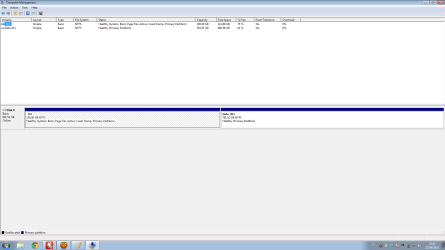
Here is the screenshot of Disk Management; I stopped memtest after 20 hours (9 passes and half, no errors).

DiskManagement.png
 

My Computer

Computer type
PC/Desktop
Computer Manufacturer/Model Number
Custom Build
OS
Windows 7 Professional N x64 SP1 U (media refresh)
CPU
AMD FX(tm)-8320 Eight-Core Processor
Motherboard
Gigabyte GA-970A-UD3P
Memory
DDR3 Corsair Vengeance Low Profile CML8GX3M2A1600C9 (2x4GB)
Graphics Card(s)
ASUS R7260X-DC2-1GD5
Sound Card
ASUS Xonar DX/XD
Monitor(s) Displays
DELL U2414H UltraSharp
Screen Resolution
1920x1080
Hard Drives
WDC WD10 EZEX-08M2NA0 SATA Disk Device
PSU
Thermaltake Hamburg 530W ATX 80+
Case
Midi Corsair Carbide Series 200R Compact PC Gaming ATX Nero
Cooling
preinstalled from Case
Keyboard
KRAUN KR.T8 - KB-0503
Mouse
Microsoft Comfort Mouse 4500
Internet Speed
http://www.speedtest.net/my-result/3784231974
Antivirus
Comodo
Browser
Chrome
Other Info
Heatsink CPU Raijintek Themis
I installed Ubuntu 14.04.01 LTS alongside with Windows 7. On Ubuntu I don't have any freezes (I have been using it for two weeks). I reinstalled also Windows (Windows 7 Professional 64bit RTM) but it keeps freezing while using it (I can't activate it because my key is for SP1).

I did a HD test with WD's software from DOS without errors.

On ubuntu I use open-source drivers for all my hardware.

I don't know what should I do to fix my problem... Any ideas?

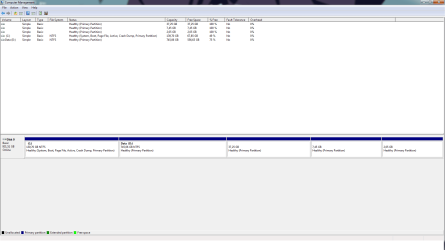
I attached the new screenshot of Disk Management.


Untitled.png

"C" partition is for Windows, "D" is a shared partition for data, the other three partitions are etx4 file systems for Ubuntu.
 

My Computer

Computer type
PC/Desktop
Computer Manufacturer/Model Number
Custom Build
OS
Windows 7 Professional N x64 SP1 U (media refresh)
CPU
AMD FX(tm)-8320 Eight-Core Processor
Motherboard
Gigabyte GA-970A-UD3P
Memory
DDR3 Corsair Vengeance Low Profile CML8GX3M2A1600C9 (2x4GB)
Graphics Card(s)
ASUS R7260X-DC2-1GD5
Sound Card
ASUS Xonar DX/XD
Monitor(s) Displays
DELL U2414H UltraSharp
Screen Resolution
1920x1080
Hard Drives
WDC WD10 EZEX-08M2NA0 SATA Disk Device
PSU
Thermaltake Hamburg 530W ATX 80+
Case
Midi Corsair Carbide Series 200R Compact PC Gaming ATX Nero
Cooling
preinstalled from Case
Keyboard
KRAUN KR.T8 - KB-0503
Mouse
Microsoft Comfort Mouse 4500
Internet Speed
http://www.speedtest.net/my-result/3784231974
Antivirus
Comodo
Browser
Chrome
Other Info
Heatsink CPU Raijintek Themis
You should be able to activate an actual Windows 7 OS which always includes SP1 (or it isn't Windows 7) with any legit Product Key. So your clear course of action is to back up, boot the latest official installer provided in http://www.sevenforums.com/tutorials/219487-clean-reinstall-factory-oem-windows-7-a.html#post1839164 (same for retail), delete C during the install to create and format a new partition for a perfect install.

Those steps compile everything that's worked best in tens of thousands of installs we've helped with here, and have been used by a million viewers without a single complaint. You'll get and keep a perfect install as long as you stick with the steps, tools and methods given.
 
Last edited:
I had a RTM version of Windows 7 without SP1 integrated. My key can only activate Windows with SP1 included or later versions:
"You might be using a product key that doesn't match the version of Windows 7 that's installed on your computer. Check the product key to make sure it is for the version that you are trying to activate. You can't use a product key for Windows 7 with Service Pack 1 (SP1) to activate a copy of Windows 7 without SP1".

However I don't think it's a problem related to the installation of Windows since it doesn't freeze in safe mode.
Furthermore, I've been using Ubuntu for two weeks, it didn't freeze once.
I guess is a problem related to drivers. I've been using the drivers downloaded from GIGABYTE's and ASUS's site (Motherboard and GPU).
I am going to try the latest drivers (Chipset and GPU) downloaded directly from AMD's site , LAN drivers from Realtek's site and so on.
 

My Computer

Computer type
PC/Desktop
Computer Manufacturer/Model Number
Custom Build
OS
Windows 7 Professional N x64 SP1 U (media refresh)
CPU
AMD FX(tm)-8320 Eight-Core Processor
Motherboard
Gigabyte GA-970A-UD3P
Memory
DDR3 Corsair Vengeance Low Profile CML8GX3M2A1600C9 (2x4GB)
Graphics Card(s)
ASUS R7260X-DC2-1GD5
Sound Card
ASUS Xonar DX/XD
Monitor(s) Displays
DELL U2414H UltraSharp
Screen Resolution
1920x1080
Hard Drives
WDC WD10 EZEX-08M2NA0 SATA Disk Device
PSU
Thermaltake Hamburg 530W ATX 80+
Case
Midi Corsair Carbide Series 200R Compact PC Gaming ATX Nero
Cooling
preinstalled from Case
Keyboard
KRAUN KR.T8 - KB-0503
Mouse
Microsoft Comfort Mouse 4500
Internet Speed
http://www.speedtest.net/my-result/3784231974
Antivirus
Comodo
Browser
Chrome
Other Info
Heatsink CPU Raijintek Themis
Why are you importing a bunch of drivers into a driver-complete OS? Win7 decides what drivers it wants, not a thousand different OEM's.

Read Clean Reinstall - Factory OEM Windows 7 as it pertains to drivers, which steps are printed in red so the can't be missed. A million readers have followed it without a single complaint about drivers or anything else. It is your ticket to getting and keeping a perfect install.
 
I have to install LAN driver manually.
Windows won't detect and download the others automatically (USB and AUDIO). For the GPU and CHIPSET I need to install complete package of drivers to be able to manage my GPU (settings like overscaling etc in CCC). I followed that guide mutiple times, still I get these freezes. Should I try to install only AMD Display Driver (with Windows) and not the full package? How can I manage the settings of my GPU later?
 

My Computer

Computer type
PC/Desktop
Computer Manufacturer/Model Number
Custom Build
OS
Windows 7 Professional N x64 SP1 U (media refresh)
CPU
AMD FX(tm)-8320 Eight-Core Processor
Motherboard
Gigabyte GA-970A-UD3P
Memory
DDR3 Corsair Vengeance Low Profile CML8GX3M2A1600C9 (2x4GB)
Graphics Card(s)
ASUS R7260X-DC2-1GD5
Sound Card
ASUS Xonar DX/XD
Monitor(s) Displays
DELL U2414H UltraSharp
Screen Resolution
1920x1080
Hard Drives
WDC WD10 EZEX-08M2NA0 SATA Disk Device
PSU
Thermaltake Hamburg 530W ATX 80+
Case
Midi Corsair Carbide Series 200R Compact PC Gaming ATX Nero
Cooling
preinstalled from Case
Keyboard
KRAUN KR.T8 - KB-0503
Mouse
Microsoft Comfort Mouse 4500
Internet Speed
http://www.speedtest.net/my-result/3784231974
Antivirus
Comodo
Browser
Chrome
Other Info
Heatsink CPU Raijintek Themis
If you need special settings only available in CCC (and not the OS) then I'd install it only after first testing if the problem goes away with only the driver and not CCC.

But first: Did you enable auto-hardware updating and run all rounds of Important and Optional Updates before importing any drivers other than LAN? This may take a day.

Make your reinstall a diagnostic install by testing for freezes after each step: LAN driver, each group of Updates after reboot, each program, each setting change. When do the freezes appear first?
 
I used this guide, http://www.sevenforums.com/installation-setup/282232-test-update-7-installation-media.html, to add updates to the Windows' .iso. Now I have just finished re-installing Windows and LAN drivers. I am updating Windows with Windows Update (it found 29 new updates). I am going to let Windows Updates do the job and only after I will install what is missed. I won't install for now AMD drivers (chipset,ahci and gpu) just to see if they are the problem.
 

My Computer

Computer type
PC/Desktop
Computer Manufacturer/Model Number
Custom Build
OS
Windows 7 Professional N x64 SP1 U (media refresh)
CPU
AMD FX(tm)-8320 Eight-Core Processor
Motherboard
Gigabyte GA-970A-UD3P
Memory
DDR3 Corsair Vengeance Low Profile CML8GX3M2A1600C9 (2x4GB)
Graphics Card(s)
ASUS R7260X-DC2-1GD5
Sound Card
ASUS Xonar DX/XD
Monitor(s) Displays
DELL U2414H UltraSharp
Screen Resolution
1920x1080
Hard Drives
WDC WD10 EZEX-08M2NA0 SATA Disk Device
PSU
Thermaltake Hamburg 530W ATX 80+
Case
Midi Corsair Carbide Series 200R Compact PC Gaming ATX Nero
Cooling
preinstalled from Case
Keyboard
KRAUN KR.T8 - KB-0503
Mouse
Microsoft Comfort Mouse 4500
Internet Speed
http://www.speedtest.net/my-result/3784231974
Antivirus
Comodo
Browser
Chrome
Other Info
Heatsink CPU Raijintek Themis
I found the problem: AMD GPU drivers. Using Linux (open drivers) or Windows with standard GPU drivers I don't have any freezes.
I tried the drivers from the GPU's cd, the ones downloaded from ASUS's site and the latest ones from AMD's site: they all cause these freezes.
I read somewhere the following suggestion: setting the Memory Clock (2D) of my GPU from 600Mhz to 1500Mhz.
After applying this tweak I've been running Windows since threee days without freezes. I think it's a problem related to power saving's settings of the drivers.
 

My Computer

Computer type
PC/Desktop
Computer Manufacturer/Model Number
Custom Build
OS
Windows 7 Professional N x64 SP1 U (media refresh)
CPU
AMD FX(tm)-8320 Eight-Core Processor
Motherboard
Gigabyte GA-970A-UD3P
Memory
DDR3 Corsair Vengeance Low Profile CML8GX3M2A1600C9 (2x4GB)
Graphics Card(s)
ASUS R7260X-DC2-1GD5
Sound Card
ASUS Xonar DX/XD
Monitor(s) Displays
DELL U2414H UltraSharp
Screen Resolution
1920x1080
Hard Drives
WDC WD10 EZEX-08M2NA0 SATA Disk Device
PSU
Thermaltake Hamburg 530W ATX 80+
Case
Midi Corsair Carbide Series 200R Compact PC Gaming ATX Nero
Cooling
preinstalled from Case
Keyboard
KRAUN KR.T8 - KB-0503
Mouse
Microsoft Comfort Mouse 4500
Internet Speed
http://www.speedtest.net/my-result/3784231974
Antivirus
Comodo
Browser
Chrome
Other Info
Heatsink CPU Raijintek Themis
Back
Top