Solved Fresh Install, not enough free resources DVD/Bluray Drive (Code 12)

Collin2011

New member
Member
VIP
Local time
3:24 PM
Messages
100
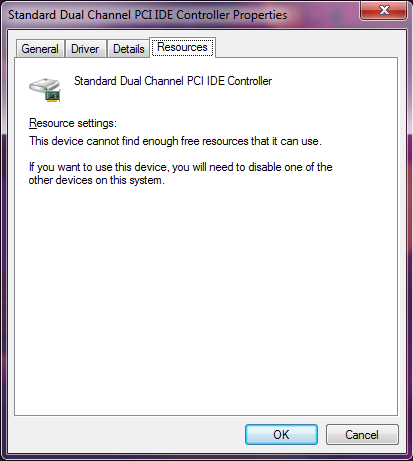
So I installed Windows 7 to my 1TB SSD last night, got it all up and running with drivers and stuffs then noticed my DVD/Bluray drive was missing. I used the device manager to scan for hardware changes, Windows Update would pop up for a moment, try to install the driver for the Standard Dual Channel PCI IDE Controller but fail.

There would be the :warn: symbol next to it, I would go to the properties and it would show this:

unknown.png


So I decided to unplug the Sata and power cord, swap them for a different one, unplug my BluRay drive, plug it back in after making physical adjustments. I reboot and it's working, then an hour or two later after rebooting again for new updates it did the same damn thing.

I have no idea what is going on, I really want to continue using Seven, but damn this is really annoying. I've had this problem before with Seven. It's non existent on 10.

My Specs are:

EVGA GTX 980TI 6GB
i7 6700K
16GB DDR4
1TB Samsung SSD (Not an M.2)

Not sure how much this will help but:

unknown.png
 

My Computer My Computer

At a glance

Windows 7 Ultimate x64 / Windows 10 Home x64Intel i7 6700K16GBGeForce GTX 980 TI
Computer type
PC/Desktop
Computer Manufacturer/Model Number
Custom Build
OS
Windows 7 Ultimate x64 / Windows 10 Home x64
CPU
Intel i7 6700K
Motherboard
ASRock Z170 Extreme7+ LGA 1151 Intel Z170 HDMI SATA 6Gb/s US
Memory
16GB
Graphics Card(s)
GeForce GTX 980 TI
Monitor(s) Displays
HP 25VX | AOC 27 Inch
Screen Resolution
1920x1080
Hard Drives
Windows 7: 250GB
Windows 10: 1TB
Storage: 3TB
PSU
CoolerMaster 700W
Case
ThermalTake Chaser MK-1
Cooling
Fan
Keyboard
Razer Blackwidow Chroma
Mouse
Razer Mamba
Antivirus
Kaspersky Total Security
Browser
Chrome
Is it ide or sata as the error is saying ide you need look at what its trying to use dma.irq etc and see if something else is using the same irq etc
 

My Computer My Computer

At a glance

win 8 32 bit
Computer type
PC/Desktop
OS
win 8 32 bit
Is it ide or sata as the error is saying ide you need look at what its trying to use dma.irq etc and see if something else is using the same irq etc

I've never heard of dma.irq, how do I go about checking them?
 

My Computer My Computer

At a glance

Windows 7 Ultimate x64 / Windows 10 Home x64Intel i7 6700K16GBGeForce GTX 980 TI
Computer type
PC/Desktop
Computer Manufacturer/Model Number
Custom Build
OS
Windows 7 Ultimate x64 / Windows 10 Home x64
CPU
Intel i7 6700K
Motherboard
ASRock Z170 Extreme7+ LGA 1151 Intel Z170 HDMI SATA 6Gb/s US
Memory
16GB
Graphics Card(s)
GeForce GTX 980 TI
Monitor(s) Displays
HP 25VX | AOC 27 Inch
Screen Resolution
1920x1080
Hard Drives
Windows 7: 250GB
Windows 10: 1TB
Storage: 3TB
PSU
CoolerMaster 700W
Case
ThermalTake Chaser MK-1
Cooling
Fan
Keyboard
Razer Blackwidow Chroma
Mouse
Razer Mamba
Antivirus
Kaspersky Total Security
Browser
Chrome
Your first screenshot click on resource
 

My Computer My Computer

At a glance

win 8 32 bit
Computer type
PC/Desktop
OS
win 8 32 bit

My Computer My Computer

At a glance

Windows 7 Ultimate x64 / Windows 10 Home x64Intel i7 6700K16GBGeForce GTX 980 TI
Computer type
PC/Desktop
Computer Manufacturer/Model Number
Custom Build
OS
Windows 7 Ultimate x64 / Windows 10 Home x64
CPU
Intel i7 6700K
Motherboard
ASRock Z170 Extreme7+ LGA 1151 Intel Z170 HDMI SATA 6Gb/s US
Memory
16GB
Graphics Card(s)
GeForce GTX 980 TI
Monitor(s) Displays
HP 25VX | AOC 27 Inch
Screen Resolution
1920x1080
Hard Drives
Windows 7: 250GB
Windows 10: 1TB
Storage: 3TB
PSU
CoolerMaster 700W
Case
ThermalTake Chaser MK-1
Cooling
Fan
Keyboard
Razer Blackwidow Chroma
Mouse
Razer Mamba
Antivirus
Kaspersky Total Security
Browser
Chrome
Hi,

its like 2 kids fighting over the same sweet.

As you got it working before do the same again but DISSABLE DRIVER UPDATES
via control panel > system > advanced system settings > device installation settings -- off.

note this is a workaround a Bios update might correct it by allocating more resources or moving it

Roy
 

My Computer My Computer

At a glance

W7 home premium 32bit/W7HP 64bit/w10 tp insid...E5300 dual core3gbNvidia Geforce 7100 Nforce 630i
Computer type
PC/Desktop
Computer Manufacturer/Model Number
medionl/Aspire 6930G/acer x55a
OS
W7 home premium 32bit/W7HP 64bit/w10 tp insider ring
CPU
E5300 dual core
Motherboard
medion MS7366
Memory
3gb
Graphics Card(s)
Nvidia Geforce 7100 Nforce 630i
Monitor(s) Displays
avixc
Internet Speed
n (isp resticted to 72)
Antivirus
mse/pands
Browser
palemoon
Other Info
Belkin Fd7050 n USB using Railink RT2870 drivers, more upto date
Hi,

its like 2 kids fighting over the same sweet.

As you got it working before do the same again but DISSABLE DRIVER UPDATES
via control panel > system > advanced system settings > device installation settings -- off.

note this is a workaround a Bios update might correct it by allocating more resources or moving it

Roy

So I unplugged the SATA/Power cables and re-plugged them into my Blu-Ray/DVD Drive. I also swapped out a power cable to my SSD. Rebooted and now it's working, but I am almost certain after windows updates it stopped working last time. I am unsure, will just have to wait and see what happens...

Thanks for your time, I really hope I don't have to come back.
 

My Computer My Computer

At a glance

Windows 7 Ultimate x64 / Windows 10 Home x64Intel i7 6700K16GBGeForce GTX 980 TI
Computer type
PC/Desktop
Computer Manufacturer/Model Number
Custom Build
OS
Windows 7 Ultimate x64 / Windows 10 Home x64
CPU
Intel i7 6700K
Motherboard
ASRock Z170 Extreme7+ LGA 1151 Intel Z170 HDMI SATA 6Gb/s US
Memory
16GB
Graphics Card(s)
GeForce GTX 980 TI
Monitor(s) Displays
HP 25VX | AOC 27 Inch
Screen Resolution
1920x1080
Hard Drives
Windows 7: 250GB
Windows 10: 1TB
Storage: 3TB
PSU
CoolerMaster 700W
Case
ThermalTake Chaser MK-1
Cooling
Fan
Keyboard
Razer Blackwidow Chroma
Mouse
Razer Mamba
Antivirus
Kaspersky Total Security
Browser
Chrome
Back
Top