'Not enough Free Resources'

RiD

New member
Local time
10:37 AM
Messages
42
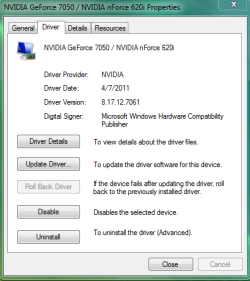
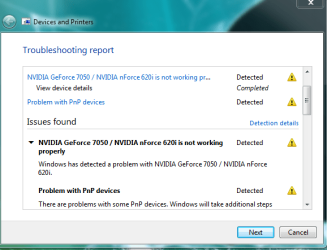
I just got a new monitor (Dell S2409W) And then noticed these errors on my graphics card panel. I'm not sure if this happened before I got the monitor but this is when i first noticed it. What do i do?
 

Attachments
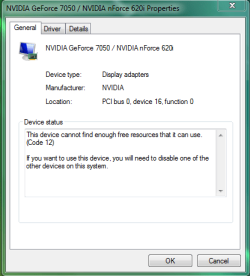
  • problem.PNG
    problem.PNG
    12.5 KB · Views: 14
  • problem2.PNG
    problem2.PNG
    14.2 KB · Views: 7
  • problem3.PNG
    problem3.PNG
    13.9 KB · Views: 9

My Computer

OS
Windows 7 Home Premium 64bit
Memory
4G
Graphics Card(s)
NVIDIA GEforce 210
Monitor(s) Displays
Dell S2409W
Screen Resolution
1920 X 1080
Hard Drives
600G
Need to sort something first. Are you using the onboard video as shown in those screen shots, or are you using the Geforce 210 listed in your specs? If it is the 210 then the fix for what you posted is to go into the bios and disable the onboard video.
 

My Computer

Computer type
PC/Desktop
Computer Manufacturer/Model Number
Me
OS
Win 7 Ultimate x64
CPU
FX-8350 @ 4.6 GHz so far
Motherboard
Asus M5A97 EVO
Memory
ADATA XPG V1 Series Black 8GB DDR3 1600
Graphics Card(s)
Sapphire R9 270x Dual-X
Sound Card
Xonar DGX w/ Corsair Vengence 1300
Monitor(s) Displays
Acer S232HL Abid
Screen Resolution
1920x1080
Hard Drives
120 GB OCZ Vertex 3
500 GB Seagate 7200.12
PSU
Antec Earthwatts 650W Green
Case
Antec Three Hundred
Cooling
Cooler Master 212 EVO
Keyboard
Logitech G510
Mouse
Logitech G500s
Internet Speed
35000/3000
Um.. i DO have the 7050 it came with my computer... as for the nForce? i dunno. i swear when I put my 2nd one in it was a GeForce 210 (hence my specs) can you help me figure out what graphics car i have if it didnt come with my computer? I cant remember what it was.
 
Last edited:

My Computer

OS
Windows 7 Home Premium 64bit
Memory
4G
Graphics Card(s)
NVIDIA GEforce 210
Monitor(s) Displays
Dell S2409W
Screen Resolution
1920 X 1080
Hard Drives
600G
The 7050 is onboard video, it is not a card. This is the Geforce 210,

Every PC needs good graphics.

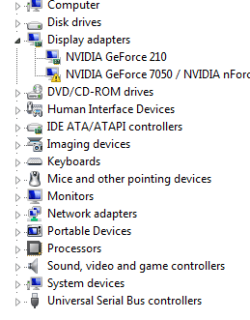
Do you have both showing in Device Manager?

This is an example of a computer with onboard video (#1) as well as a video card (#2),

H55.JPG

If your monitor is connected to #2 then you need to go into the bios and disable it.
 

My Computer

Computer type
PC/Desktop
Computer Manufacturer/Model Number
Me
OS
Win 7 Ultimate x64
CPU
FX-8350 @ 4.6 GHz so far
Motherboard
Asus M5A97 EVO
Memory
ADATA XPG V1 Series Black 8GB DDR3 1600
Graphics Card(s)
Sapphire R9 270x Dual-X
Sound Card
Xonar DGX w/ Corsair Vengence 1300
Monitor(s) Displays
Acer S232HL Abid
Screen Resolution
1920x1080
Hard Drives
120 GB OCZ Vertex 3
500 GB Seagate 7200.12
PSU
Antec Earthwatts 650W Green
Case
Antec Three Hundred
Cooling
Cooler Master 212 EVO
Keyboard
Logitech G510
Mouse
Logitech G500s
Internet Speed
35000/3000
Well, on mine, there is only one blue input to put it in, and thats the same one my last monitor was in... So will I have to go into the bios and disable it? And HOW do i get into the Bios? I have an Emachines. Please go more in depth, im a newb.
 

Attachments

  • problem4.PNG
    problem4.PNG
    21.6 KB · Views: 12
  • probkem5.PNG
    probkem5.PNG
    7 KB · Views: 10
Last edited:

My Computer

OS
Windows 7 Home Premium 64bit
Memory
4G
Graphics Card(s)
NVIDIA GEforce 210
Monitor(s) Displays
Dell S2409W
Screen Resolution
1920 X 1080
Hard Drives
600G
Good monitor, I have the same one :)

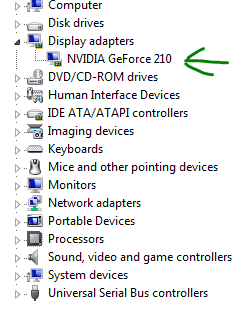
ahh, you don't need to worry RiD, you are using hybrid SLI, but your computer cannot handle it, you need to reboot your computer and load the bios, from there you need to go into integrated pheripherals and look for onboard GPU, disable it and that error will disappear along with the extra card.

Edit:

the nForce 7050 is the chipset of your computer, the drivers are loaded by default once you disable your onboard graphics card, you don't need to worry about that.
 

My Computer

Computer type
PC/Desktop
Computer Manufacturer/Model Number
Custom Build
OS
Windows 7 Ultimate x64 SP1
CPU
Intel Q6600 @ 2.6Ghz
Motherboard
Evga NF78-CK-132-A 3-Way SLI
Memory
4Gb DDR2 Corsair Dominator @ 800Mhz 5-5-5-15
Graphics Card(s)
EVGA 560 GTX SC FTW 1GB
Sound Card
Realtek HD 7.1 Audio, Plantronics GameCom780 7.1 Headset
Monitor(s) Displays
Dell S2409W
Screen Resolution
1920 x 1080
Hard Drives
SanDisk SDSSDHII-120G-G25 120GB SSD
Samsung 7200RPM 750Gb SATA
Samsung 850 EVO 120GB SSD
Western Digital Green 1TB 7200RPM
PSU
Xigmatek 750W Quad sli quad core 80% eff
Case
Antec 900 Gaming Case
Cooling
Zalman CNPS9700-NT NVIDIA Tritium
Keyboard
Logitech generic keyboard, MS wireless keyboard
Mouse
Razor Lachesis Banshee V2 Blue, 4000DPI, MS wireless mouse
Internet Speed
152Mb Virgin Media Fibre Optic
Antivirus
Microsoft Security Essentials
Browser
Google Chrome
Other Info
Wireless Gaming Receiver for Windows, Wireless Xbox 360 Pad
  • Like
Reactions: RiD
Fixed, Thanks!
 

My Computer

OS
Windows 7 Home Premium 64bit
Memory
4G
Graphics Card(s)
NVIDIA GEforce 210
Monitor(s) Displays
Dell S2409W
Screen Resolution
1920 X 1080
Hard Drives
600G
Delete or F2 likely. Start tapping one of them shortly after hitting the power button.
 

My Computer

Computer type
PC/Desktop
Computer Manufacturer/Model Number
Me
OS
Win 7 Ultimate x64
CPU
FX-8350 @ 4.6 GHz so far
Motherboard
Asus M5A97 EVO
Memory
ADATA XPG V1 Series Black 8GB DDR3 1600
Graphics Card(s)
Sapphire R9 270x Dual-X
Sound Card
Xonar DGX w/ Corsair Vengence 1300
Monitor(s) Displays
Acer S232HL Abid
Screen Resolution
1920x1080
Hard Drives
120 GB OCZ Vertex 3
500 GB Seagate 7200.12
PSU
Antec Earthwatts 650W Green
Case
Antec Three Hundred
Cooling
Cooler Master 212 EVO
Keyboard
Logitech G510
Mouse
Logitech G500s
Internet Speed
35000/3000
  • Like
Reactions: RiD
Delete or F2 likely. Start tapping one of them shortly after hitting the power button.
It was Delete. Thanks. So it should look like this?
 

Attachments

  • 00000000000000.PNG
    00000000000000.PNG
    6.8 KB · Views: 559

My Computer

OS
Windows 7 Home Premium 64bit
Memory
4G
Graphics Card(s)
NVIDIA GEforce 210
Monitor(s) Displays
Dell S2409W
Screen Resolution
1920 X 1080
Hard Drives
600G
correct, sorted :)
 

My Computer

Computer type
PC/Desktop
Computer Manufacturer/Model Number
Custom Build
OS
Windows 7 Ultimate x64 SP1
CPU
Intel Q6600 @ 2.6Ghz
Motherboard
Evga NF78-CK-132-A 3-Way SLI
Memory
4Gb DDR2 Corsair Dominator @ 800Mhz 5-5-5-15
Graphics Card(s)
EVGA 560 GTX SC FTW 1GB
Sound Card
Realtek HD 7.1 Audio, Plantronics GameCom780 7.1 Headset
Monitor(s) Displays
Dell S2409W
Screen Resolution
1920 x 1080
Hard Drives
SanDisk SDSSDHII-120G-G25 120GB SSD
Samsung 7200RPM 750Gb SATA
Samsung 850 EVO 120GB SSD
Western Digital Green 1TB 7200RPM
PSU
Xigmatek 750W Quad sli quad core 80% eff
Case
Antec 900 Gaming Case
Cooling
Zalman CNPS9700-NT NVIDIA Tritium
Keyboard
Logitech generic keyboard, MS wireless keyboard
Mouse
Razor Lachesis Banshee V2 Blue, 4000DPI, MS wireless mouse
Internet Speed
152Mb Virgin Media Fibre Optic
Antivirus
Microsoft Security Essentials
Browser
Google Chrome
Other Info
Wireless Gaming Receiver for Windows, Wireless Xbox 360 Pad
Back
Top