Front audio panel panning issue. Both sides playing at the same time.

ytbro00

New member
Local time
12:32 AM
Messages
4
Both my front audio ports detect devices I plug in. The issue is, both sides play at the same time even if the panning options are set to the middle to play both right and left. If I pan all the way to the right and test the right speaker for sound, it would result in both sides playing. Testing left would mute both naturally. Panning all the way to the left does the same thing. Plays both sides, if the left speaker is tested and naturally would mute both if the right is tested.

Microphones work with no problems and other devices are still being detected aside from the panning problem. All other headset experience the same panning issue including phone headsets.

I have installed the latest Realtek drivers, the back panel is working perfectly but my wired headset isn't that long which is why I'd prefer to use the front audio panels.

Motherboard: MSI Z87 MPOWER (Not the max one)
Case: Antec Three Hundred Two
 

My Computer My Computer

Computer type
PC/Desktop
OS
64
First question have you checked the headset to make sure its not the problem, rather than the PC? Try the headset in another computer or an MP3 player or phone, etc. to see how it works with something else.

Several possibilities, assuming the headset is not the problem. (1) the front panel connector that is plugged into the motherboard port (2) the front panel headphone/jack assembly.

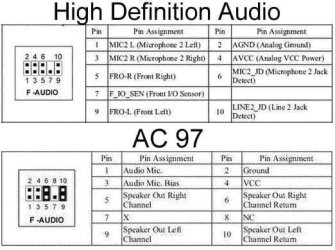
Many cases have both a "HD Audio" and an "AC97" connectors for the front panel headphone and mic jacks. Check and if you have both, try the one not being used to see if makes a difference (The HD Audio is the preferred connector as it has jack sensing).

Its a remote chance there is a problem with the front panel audio connection on the motherboard, so the case front panel assembly is the most likely problem. If you are capable, you can look into the front panel assembly and see if you can see anything obvious wrong or shorted and if you have an ohmmeter you could try to trace out the individual wires from the connector to the jack.
 

My Computer My Computer

Computer type
PC/Desktop
Computer Manufacturer/Model Number
My Own Build
OS
Windows 10 64 bit
CPU
Intel i7 6700K
Motherboard
ASUS ROG Maximus VIII Hero
Memory
16GB Corsair Dominator
Graphics Card(s)
Intel CPU Graphics
Sound Card
RealTek
Monitor(s) Displays
27" Dell S2719dgf
Screen Resolution
2560X1440
Hard Drives
1 TB Samsung 850 EVO SSD for Win 10 Pro
500GB Samsung 850 EVO SSD for Win 10 Insider
2 TB drive for backup
PSU
EVGA Supernova 750G2
Case
BeQuiet Silent Base 600
Cooling
Deepcool Captain 120EX
Keyboard
Microsoft Wireless 2000
Mouse
Microsoft wireless
Internet Speed
100 MB/sec (Cable)
Antivirus
Microsoft Defender and Malwarebytes
Browser
Edge/Firefox
Other Info
Cakewalk (Sonar) by BandLab and Studio One 4.1 Pro recording studio software. MOTU 896Mk3 Hybrid recording interface, Frontier Tranzport wireless control unit, Behringer X-Touch Control Surface.
Five USB connected optical drives for CD Audio production using Nero BurningROM
Yes, I've tried 3 different headsets and tired them on my laptop and phone as well. My headsets are working fine.

I only have HDA connectors on this case. It is the Antec Three Hundred Two. I connected it to my Z87 MPOWER's JAUD1, based on the manual that is the only place to put it as well as the only place it would fit.

I have checked the front panel, there seems to be nothing wrong with it.
 

My Computer My Computer

Computer type
PC/Desktop
OS
64
The motherboard (audio) would be a remote possibility. I would think its more the case wiring or front panel assembly. Just looking, unless its something obvious, won't tell you anything, It will require tracing out connections with an ohmmeter.

Same way with drivers/software only a very remote possibility.

I've had several cases develop problems in the front panel assembly, one was an audio problem (not the same problem as yours) and the others were a bad USB port and a bad case fan speed switch on another.

Unless you can trace everything out with an ohmmeter and prove its OK and nothing shorted together, you are "holding the bag" on what the problem is. You could buy a separate I/O panel with the headphone/mic jacks for testing.

Something similar to this, is relatively inexpensive for testing.
PC Computer Case PCB Front Panel USB 2.0 Audio Port Mic Earphone Cable Motherboard Connection Cable - Newegg.com
 

My Computer My Computer

Computer type
PC/Desktop
Computer Manufacturer/Model Number
My Own Build
OS
Windows 10 64 bit
CPU
Intel i7 6700K
Motherboard
ASUS ROG Maximus VIII Hero
Memory
16GB Corsair Dominator
Graphics Card(s)
Intel CPU Graphics
Sound Card
RealTek
Monitor(s) Displays
27" Dell S2719dgf
Screen Resolution
2560X1440
Hard Drives
1 TB Samsung 850 EVO SSD for Win 10 Pro
500GB Samsung 850 EVO SSD for Win 10 Insider
2 TB drive for backup
PSU
EVGA Supernova 750G2
Case
BeQuiet Silent Base 600
Cooling
Deepcool Captain 120EX
Keyboard
Microsoft Wireless 2000
Mouse
Microsoft wireless
Internet Speed
100 MB/sec (Cable)
Antivirus
Microsoft Defender and Malwarebytes
Browser
Edge/Firefox
Other Info
Cakewalk (Sonar) by BandLab and Studio One 4.1 Pro recording studio software. MOTU 896Mk3 Hybrid recording interface, Frontier Tranzport wireless control unit, Behringer X-Touch Control Surface.
Five USB connected optical drives for CD Audio production using Nero BurningROM
Is it possible to rewire the HDA cables itself? I only installed it as it is seeing as it is already wired. How will I be able to tell if it is correctly wired?

I've tried installing previous driver versions of realtek and even without the driver, microsoft's own detection, it still plays both sides.

I do have an ohmmeter but I'm not familiar with using it. I would try and see how to use it so I can check.

Thank you for the recommendation. I'd like to test out all the possible options I have before I have a bunch of parts laying around again. Sorry for the trouble.
 

My Computer My Computer

Computer type
PC/Desktop
OS
64
Here's a drawing. Pin 5 is right, 9 left and pin 2 is ground (common).
 

Attachments

  • attachment.jpg
    attachment.jpg
    38.8 KB · Views: 4

My Computer My Computer

Computer type
PC/Desktop
Computer Manufacturer/Model Number
My Own Build
OS
Windows 10 64 bit
CPU
Intel i7 6700K
Motherboard
ASUS ROG Maximus VIII Hero
Memory
16GB Corsair Dominator
Graphics Card(s)
Intel CPU Graphics
Sound Card
RealTek
Monitor(s) Displays
27" Dell S2719dgf
Screen Resolution
2560X1440
Hard Drives
1 TB Samsung 850 EVO SSD for Win 10 Pro
500GB Samsung 850 EVO SSD for Win 10 Insider
2 TB drive for backup
PSU
EVGA Supernova 750G2
Case
BeQuiet Silent Base 600
Cooling
Deepcool Captain 120EX
Keyboard
Microsoft Wireless 2000
Mouse
Microsoft wireless
Internet Speed
100 MB/sec (Cable)
Antivirus
Microsoft Defender and Malwarebytes
Browser
Edge/Firefox
Other Info
Cakewalk (Sonar) by BandLab and Studio One 4.1 Pro recording studio software. MOTU 896Mk3 Hybrid recording interface, Frontier Tranzport wireless control unit, Behringer X-Touch Control Surface.
Five USB connected optical drives for CD Audio production using Nero BurningROM
I see. It's the same as the one I saw in the manual. The only thing is, how will I know which pins are the correct ones to go in? They don't really have a label on the wire itself if I pull it out of the connector.
 

My Computer My Computer

Computer type
PC/Desktop
OS
64
Look at the drawing. One pin is missing and that can orient you on the pins and pin numbers.
 

My Computer My Computer

Computer type
PC/Desktop
Computer Manufacturer/Model Number
My Own Build
OS
Windows 10 64 bit
CPU
Intel i7 6700K
Motherboard
ASUS ROG Maximus VIII Hero
Memory
16GB Corsair Dominator
Graphics Card(s)
Intel CPU Graphics
Sound Card
RealTek
Monitor(s) Displays
27" Dell S2719dgf
Screen Resolution
2560X1440
Hard Drives
1 TB Samsung 850 EVO SSD for Win 10 Pro
500GB Samsung 850 EVO SSD for Win 10 Insider
2 TB drive for backup
PSU
EVGA Supernova 750G2
Case
BeQuiet Silent Base 600
Cooling
Deepcool Captain 120EX
Keyboard
Microsoft Wireless 2000
Mouse
Microsoft wireless
Internet Speed
100 MB/sec (Cable)
Antivirus
Microsoft Defender and Malwarebytes
Browser
Edge/Firefox
Other Info
Cakewalk (Sonar) by BandLab and Studio One 4.1 Pro recording studio software. MOTU 896Mk3 Hybrid recording interface, Frontier Tranzport wireless control unit, Behringer X-Touch Control Surface.
Five USB connected optical drives for CD Audio production using Nero BurningROM
Back
Top