Hi
I have been asking about this before but now the situation has changed.
My problem is a known problem for other people aswell.
Here it goes:
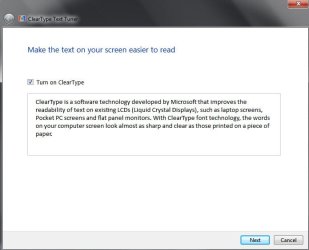
I am using IE 11 ( the latest updated ) and before the update i used IE 8 due the text on ect youtube or other sites that used IE text for standart was getting blurry/fuzzy and ruined my eyes and hurts my head reading the text. This was when i had AMD radeon 7950 card. Now i have a nvidia gtx 970 card but the problem with blurry/fuzzy text is still here..even this text is horrible to watch.
Then i tryed to use google crome and it helped a littel bit..only here the text appers a bit more gray and background like. And still a littel bit fuzzy.
Now today i instaled firefox and the text is SUPER FINE like it should be..back when i had IE 8.Nice and relaxing to read..NO FUZZY/BLURRY !!!
So why has IE 9, 10 and 11 and even Crome messed up the text so bad that people must have glasses or increase the windows system to use 125 % or worse in order to read the text like a old man who cant see well.
I heard it should be related with some kind of direct draw X font that should be better, but why did they create something so horrible that it is roulette if you get blurry/fuzzy text with ur setup and hardware. Maybe Bill gates wants every one to buy glasses in year 2020 so we can look like him..
I have been asking about this before but now the situation has changed.
My problem is a known problem for other people aswell.
Here it goes:
I am using IE 11 ( the latest updated ) and before the update i used IE 8 due the text on ect youtube or other sites that used IE text for standart was getting blurry/fuzzy and ruined my eyes and hurts my head reading the text. This was when i had AMD radeon 7950 card. Now i have a nvidia gtx 970 card but the problem with blurry/fuzzy text is still here..even this text is horrible to watch.
Then i tryed to use google crome and it helped a littel bit..only here the text appers a bit more gray and background like. And still a littel bit fuzzy.
Now today i instaled firefox and the text is SUPER FINE like it should be..back when i had IE 8.Nice and relaxing to read..NO FUZZY/BLURRY !!!
So why has IE 9, 10 and 11 and even Crome messed up the text so bad that people must have glasses or increase the windows system to use 125 % or worse in order to read the text like a old man who cant see well.
I heard it should be related with some kind of direct draw X font that should be better, but why did they create something so horrible that it is roulette if you get blurry/fuzzy text with ur setup and hardware. Maybe Bill gates wants every one to buy glasses in year 2020 so we can look like him..
My Computer
- Computer type
- PC/Desktop
- OS
- Microsoft Windows 7 Ultimate 64-bit 7601 Multiprocessor Free Service Pack 1
- CPU
- Intel(R) Core(TM) i7-3820 CPU @ 3.60GHz
- Motherboard
- ASUSTeK COMPUTER INC. RAMPAGE IV FORMULA
- Memory
- 16,00 GB
- Graphics Card(s)
- AMD Radeon HD 7900 Series
- Sound Card
- (1) Realtek High Definition Audio (2) AMD High Definition
- Screen Resolution
- 1920 x 1080 x 32 bits (4294967296 colors) @ 60 Hz
- Hard Drives
- (1) INTEL SSDSC2CW120A3 ATA Device (2) SAMSUNG HD103UJ ATA Device (3) SAMSUNG HD753LJ ATA Device