Game stops working... - The Sims 3

Tancy

New member
Local time
8:14 AM
Messages
12
Hey,

I have a problem with playing The Sims 3. I have installed almost all of the avaible expansions packs.
For let's say an hour or maybe longer I play it normally but then suddenly I get the message that the game has stop working. Sometimes in the game appears black color over some object and after that I can't save the game anymore.
My system requirements are above minimum.
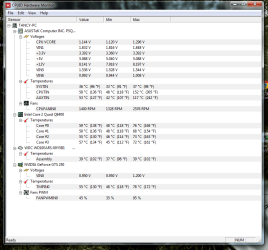
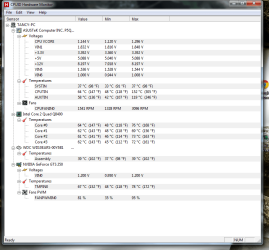
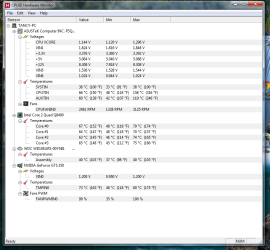
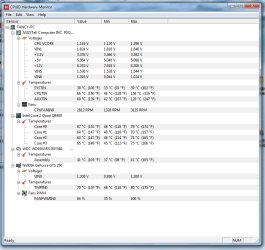
I was thinking that maybe I have overheating problem. So I use program CPUID HWMonitor before playing, while playing and after I get the stop working message.
What can I do?
 

Attachments

  • temp.1.png
    temp.1.png
    69 KB · Views: 1
  • temp.2.png
    temp.2.png
    52.7 KB · Views: 1
  • temp.3.png
    temp.3.png
    47.3 KB · Views: 1
  • temp.4.png
    temp.4.png
    55 KB · Views: 1
  • temp.5.png
    temp.5.png
    41 KB · Views: 1
  • temp.6.png
    temp.6.png
    47 KB · Views: 1

My Computer My Computer

At a glance

Windows 7 Professional 32 bitIntel(R) Core(TM)2 Quad CPU Q8400 2.66GHz (4 ...4096MB RAMNVIDIA GeForce GTS 250 1 GB
Computer type
PC/Desktop
OS
Windows 7 Professional 32 bit
CPU
Intel(R) Core(TM)2 Quad CPU Q8400 2.66GHz (4 CPUs), ~2.7GHz
Memory
4096MB RAM
Graphics Card(s)
NVIDIA GeForce GTS 250 1 GB
Sound Card
Realtek High Definition Audio
Screen Resolution
1280 x 1024
First thing I would suggest is filling out your System Specs so in the future, we can help you better.

Second, since you don't make any mention of it, I will suggest going to the manufacturer of your video and audio to download the latest drivers for it and saved them on a temp folder. If using Nvidia, uninstall the drivers from control panel, also uninstall the PhysX drivers, uninstall the audio drivers, then restart and go into Safe Mode, run CCleaner and clean your registry. Restart again and once at the desktop, wait for windows to install the generic drivers for each one, it may ask you to restart, if it doesn''t, go ahead and do so anyways, go to the Temp folder where you saved the drivers, right click on one of them and use "Run as an Administrator", do the same with the other driver and then restart again for good measure.

There are different methods to uninstall/clean install but this is how I do it and it works for me.
 

My Computer My Computer

At a glance

Windows 7 x64 (Ultimate)Intel i5-4670K8GBs Ripjaws 2133MhzAsus GTX660 (2GBs)
Computer type
PC/Desktop
Computer Manufacturer/Model Number
Custom Built... Intel/Nvidia/ASRock
OS
Windows 7 x64 (Ultimate)
CPU
Intel i5-4670K
Motherboard
ASRock Z87 Extreme 6
Memory
8GBs Ripjaws 2133Mhz
Graphics Card(s)
Asus GTX660 (2GBs)
Sound Card
Onboard Realtek HD
Monitor(s) Displays
Acer AL2216W
Screen Resolution
1680 x 1050
Hard Drives
Samsung 840 SSD 120GBs
Samsung 750GB 32MB cache
1.5 TB
PSU
PC Cooling 750w Silencer
Case
Thermaltake Spedo Advance
Cooling
Std Cooler
Keyboard
Logitech G15
Mouse
Logitech G9
Internet Speed
Comcast 20Mbit
Antivirus
Avast
Browser
Firefox
Have you got the latest graphic drivers from Nvidia for the GTS250?

Download them here if not: Drivers | GeForce
 

My Computer My Computer

At a glance

Windows 8.1 Pro x64Intel Core i7 4790k8GB Corsair Dominator 1600MHzMSI TwinFrozr GeForce GTX770
Computer type
PC/Desktop
Computer Manufacturer/Model Number
Custom Built
OS
Windows 8.1 Pro x64
CPU
Intel Core i7 4790k
Motherboard
MSI Z97S Krait Edition
Memory
8GB Corsair Dominator 1600MHz
Graphics Card(s)
MSI TwinFrozr GeForce GTX770
Sound Card
ASUS Xonar DX/XD 7.1
Monitor(s) Displays
Dell 24" S2409W + Dell 20" E207WFP
Screen Resolution
1920x1080 + 1680x1050
Hard Drives
1x 120GB OCZ Agility 3, 1x 750GB Western Digital Caviar Black, 1x 1TB Western Digital Caviar Blue
PSU
Corsair HX850 modular
Case
Fractal Design Define R4
Cooling
Corsair H60 w/ twin Corsair SP120 fans
Keyboard
Logitech G510S Keyboard
Mouse
Logitech G500S Laser Mouse
Internet Speed
40Mbps
Antivirus
Microsoft Security Essentials
Browser
Google Chrome
Other Info
LG Blu-Ray player
I just updated my System Specs.
I will try what AstaLaVista sugested and I will let you know if it worked.
I updated my drivers this spring (I will do it again now).

On the Nvidia page I read that my graphic card do not support DirectX 11, which I have installed. Is maybe this the problem?

And also I never install the PhysX drivers, I will also try to install it now.
 

My Computer My Computer

At a glance

Windows 7 Professional 32 bitIntel(R) Core(TM)2 Quad CPU Q8400 2.66GHz (4 ...4096MB RAMNVIDIA GeForce GTS 250 1 GB
Computer type
PC/Desktop
OS
Windows 7 Professional 32 bit
CPU
Intel(R) Core(TM)2 Quad CPU Q8400 2.66GHz (4 CPUs), ~2.7GHz
Memory
4096MB RAM
Graphics Card(s)
NVIDIA GeForce GTS 250 1 GB
Sound Card
Realtek High Definition Audio
Screen Resolution
1280 x 1024
I just updated my System Specs.
Great... now is easier to help

I will try what AstaLaVista sugested and I will let you know if it worked.
I updated my drivers this spring (I will do it again now).
Updating correctly is never a bad thing but, for the most part, I only do it when I have an issue or when the new drivers help with a game I am playing.

On the Nvidia page I read that my graphic card do not support DirectX 11, which I have installed. Is maybe this the problem?
No, all it means is that you won't be able to play dedicated DX11 games like Crysis 3.

The problem could be easily solved by getting newer drivers... this is what we are hoping for ;)

And also I never install the PhysX drivers, I will also try to install it now.
You don't necessarily have to install it manualy, it installs itself with the Nvidia drivers... most people tend to forget to uninstall them when they update their drivers and this can cause issues.


Apparently, Nvidia has a utility now that checks and installs your drivers correctly but I have yet to try it so I am going Old School on my recommending how to install your drivers. Besides, I find that with game issues, it is always recommended to get both audio and video drivers updated.
 

My Computer My Computer

At a glance

Windows 7 x64 (Ultimate)Intel i5-4670K8GBs Ripjaws 2133MhzAsus GTX660 (2GBs)
Computer type
PC/Desktop
Computer Manufacturer/Model Number
Custom Built... Intel/Nvidia/ASRock
OS
Windows 7 x64 (Ultimate)
CPU
Intel i5-4670K
Motherboard
ASRock Z87 Extreme 6
Memory
8GBs Ripjaws 2133Mhz
Graphics Card(s)
Asus GTX660 (2GBs)
Sound Card
Onboard Realtek HD
Monitor(s) Displays
Acer AL2216W
Screen Resolution
1680 x 1050
Hard Drives
Samsung 840 SSD 120GBs
Samsung 750GB 32MB cache
1.5 TB
PSU
PC Cooling 750w Silencer
Case
Thermaltake Spedo Advance
Cooling
Std Cooler
Keyboard
Logitech G15
Mouse
Logitech G9
Internet Speed
Comcast 20Mbit
Antivirus
Avast
Browser
Firefox
So I did everything that you sugested. The game didn't stop working but I get "error 12" - I couldn't save the game.

I was reading forums about this problem and someone said that 64-bit operating systems can save this problem.

When you look at my System Specs, whould 64-bit system work on my computer? Is it smart to install it?
 

My Computer My Computer

At a glance

Windows 7 Professional 32 bitIntel(R) Core(TM)2 Quad CPU Q8400 2.66GHz (4 ...4096MB RAMNVIDIA GeForce GTS 250 1 GB
Computer type
PC/Desktop
OS
Windows 7 Professional 32 bit
CPU
Intel(R) Core(TM)2 Quad CPU Q8400 2.66GHz (4 CPUs), ~2.7GHz
Memory
4096MB RAM
Graphics Card(s)
NVIDIA GeForce GTS 250 1 GB
Sound Card
Realtek High Definition Audio
Screen Resolution
1280 x 1024
I just updated my System Specs.
I will try what AstaLaVista sugested and I will let you know if it worked.
I updated my drivers this spring (I will do it again now).

On the Nvidia page I read that my graphic card do not support DirectX 11, which I have installed. Is maybe this the problem?

And also I never install the PhysX drivers, I will also try to install it now.

DirectX 11 (DX11) has nothing to do with your issue. And be aware that DX11 is native to windows 7, which means it's part of Windows 7 and can't be removed. With that, you should also know that DX11 is backwards compatible and as such, will play nicely with older DX versions (8, 9, 10, 10.1). By the way Sims 3 is a DX9 game so DX11 mode to run.

All that said, where did you get the game(s) from? And is the game patched to the latest version?

What "might" be happening is that Sims 3 and Windows 7 aren't getting along, but that's got nothing to do with DX11. I say might because I haven't looked into it yet. I'm kind of rushing just to post this. Will check later.

Also have a look here to see if anything there can help - http://www.sevenforums.com/gaming/77293-tips-troubleshooting-game-issues.html
 

My Computer My Computer

At a glance

Windows 10 ProIntel Core i7-4770K (3.5Ghz)32 gig Corsair Dominator Platinum (4x8Gig)Sapphire Tri-X R9 Fury
Computer type
PC/Desktop
Computer Manufacturer/Model Number
Custom built by me.
OS
Windows 10 Pro
CPU
Intel Core i7-4770K (3.5Ghz)
Motherboard
Gigabyte G1 Sniper 5 (F10 Bios)
Memory
32 gig Corsair Dominator Platinum (4x8Gig)
Graphics Card(s)
Sapphire Tri-X R9 Fury
Sound Card
Soundblaster ZXR
Monitor(s) Displays
NEC PA242W 24" LCD Monitor
Screen Resolution
1920 x 1200
Hard Drives
Primary - Samsung 850 Pro (512gig), Samsung 840 Pro (256gig), 2TB WD Caviar Black.
PSU
EVGA Supernova 1000 G2
Case
Cooler Master HAF X
Cooling
Corsair H100i with Corsair Air Series SP120 Quiet Fans
Keyboard
Logitech Wireless Wave
Mouse
Logitech Performance MX
Internet Speed
High Speed Cable
Antivirus
Norton Security
Browser
IE11
Other Info
Memory Timings - 1866MHz @ 9-9-9-27-1T @ 1.5 volts
Back
Top