
Games Explorer Folder - Restore Default Games

How to Restore the Default Games in Windows 7 Games Explorer Folder

   Information
This will show you how to restore the default Windows 7 More Games, Chess Titans, FreeCell, Hearts, Internet Backgammon, Internet Checkers, Internet Spades, Mahjong Titans, Minesweep, Purple Place, Solitaire, and Spider Solitaire games in the Games folder.

The Chess Titans, Internet Backgammon, Internet Checkers, Internet Spades, Mahjong Titans games are not available in the Windows 7 Starter and Home Basic editions.
   Note
The Games folder is central repository for games on your computer that also offers game updates, statistics, news feeds, WEI requirements, and more. For more information about the Games Explorer folder, see: Explore the features: Games Explorer
   Tip
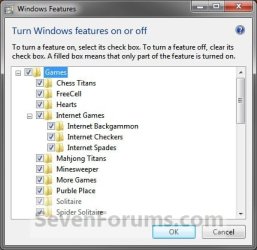
You will need to have the game unhidden, or default game checked in Windows Features, before it will be displayed in the Games folder. By default, Games is checked and turned on in all editions except the Professional and Enterprise editions.. You can also uncheck one of the default games to remove it from the Games explorer folder. This does not apply to installed 3rd party games.
Windows_Features.jpg


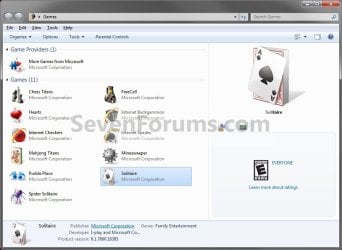
EXAMPLE: Games explorer folder
NOTE: You can open the Games folder by clicking on the Games button on the dark right side of the Start Menu, typing shell:games in the Start Menu search box and pressing enter, or navigating to the hidden C:\ProgramData\Microsoft\Windows\Start Menu\Programs\Games folder.
Default_Games_Explorer.jpg


Here's How:
1. To Restore All Default Games in the Games Explorer Folder
A) Click on the Download button below to download the file below.
Restore_All_Default_Games.zip

Download


B) Click on Save, and save the ZIP file to your desktop, then extract the .reg file from the ZIP file.

C) Go to step 15.
2. To Restore "More Games" to the Games Explorer Folder
A) Click on the Download button below to download the file below.
More_Games.reg

Download


B) Go to step 14.
3. To Restore "Chess Titans" to the Games Explorer Folder
A) Click on the Download button below to download the file below.
Chess_Titans.reg

Download


B) Go to step 14.
4. To Restore "FreeCell" to the Games Explorer Folder
A) Click on the Download button below to download the file below.
FreeCell.reg

Download


B) Go to step 14.
5. To Restore "Hearts" to the Games Explorer Folder
A) Click on the Download button below to download the file below.
Hearts.reg

Download


B) Go to step 14.
6. To Restore "Internet Backgammon" to the Games Explorer Folder
A) Click on the Download button below to download the file below.
Internet_Backgammon.reg

Download


B) Go to step 14.
7. To Restore "Internet Checkers" to the Games Explorer Folder
A) Click on the Download button below to download the file below.
Internet_Checkers.reg

Download


B) Go to step 14.
8. To Restore "Internet Spades" to the Games Explorer Folder
A) Click on the Download button below to download the file below.
Internet_Spades.reg

Download


B) Go to step 14.
9. To Restore "Mahjong Titans" to the Games Explorer Folder
A) Click on the Download button below to download the file below.
Mahjong_Titans.reg

Download


B) Go to step 14.
10. To Restore "Minesweeper" to the Games Explorer Folder
A) Click on the Download button below to download the file below.
Minesweeper.reg

Download


B) Go to step 14.
11. To Restore "Purple Place" to the Games Explorer Folder
A) Click on the Download button below to download the file below.
Purple_Place.reg

Download


B) Go to step 14.
12. To Restore "Solitaire" to the Games Explorer Folder
A) Click on the Download button below to download the file below.
Solitaire.reg

Download


B) Go to step 14.
13. To Restore "Spider Solitaire" to the Games Explorer Folder
A) Click on the Download button below to download the file below.
Spider_Solitaire.reg

Download


14. Click on Save, and save the .reg file to the desktop.

15. Right click on the downloaded .reg file and click on Merge.

16. Click on Run, Yes, Yes, and OK when prompted.

17. Close and reopen the Games explorer folder to apply and see the default game restored.

18. When done, you can delete the downloaded .reg file if you like.
That's it,
Shawn


Attachments

Last edited:
I think some people who get Windows 7 Professional will be "confused"

Games are not enabled by default in Pro. You have to go to "Programs and Features" then "Turn Windows features on or off" and enable games from there in Professional.

For anyone's information who may be searching for information about why their computer has no games listed.
 

My Computer

Computer Manufacturer/Model Number
Keeps changing - (Custom)
OS
Windows 7 Professional x64
CPU
Intel Core i7 860
Motherboard
Gigabyte GA-P55-UD4P
Memory
4GB DDR3 Mushkin 1600Mhz @ 7-8-7-20
Graphics Card(s)
MSI GTS250 1GB DDR3 Twin Frozr
Sound Card
Onboard realtek
Monitor(s) Displays
Samsung SyncMaster 24" P2450 + Samsung 20" 2033
Screen Resolution
1920 X 1080 and 1600 X 900 (#2 system 1440 X 900)
Hard Drives
Patriot Inferno 120GB SSD + 3 WD Blue 640GB drives
PSU
Corsair 750 HX Modular
Case
Lancool PC-K62
Cooling
Cooler Master TX3 CPU cooler and 4-140mm and 1-120mm case
Keyboard
Gigabyte USB keyboard
Mouse
Microsoft wireless laser mouse 5000
Internet Speed
7 Mb down 1.5 up
Other Info
System #2: AMD Phenom II X6 1055T (Freezer 7 Pro cooler) - Gigabyte 880GMA-UD2H - WD 500GB Black - 9500GT (1GB) 500W OCZ modular PSU - Antec 200 case. System #3 (LapTop) Core 2 Duo T6670 - 320GB 7200RPM HD - 4GB DDR3 RAM.
Thank you Nate. I added this in the TIP section. :)
 

My Computer

Computer type
PC/Desktop
Computer Manufacturer/Model Number
Self built custom
OS
64-bit Windows 11 Pro for Workstations
CPU
Intel i7-8700K OC'd to 5 GHz
Motherboard
ASUS ROG Maximus XI Formula Z390
Memory
64 GB (4x16GB) G.SKILL TridentZ RGB DDR4 3600 MHz
Graphics Card(s)
ASUS ROG-STRIX-GTX1080TI-O11G-GAMING
Sound Card
Integrated
Monitor(s) Displays
2 x Samsung Odyssey G7 27"
Screen Resolution
2560x1440
Hard Drives
1TB Samsung 990 PRO M.2,
4TB Samsung 990 PRO PRO M.2,
TerraMaster F8 SSD Plus NAS
PSU
Seasonic Prime Titanium 850W
Case
Thermaltake Core P3
Cooling
Corsair Hydro H115i
Keyboard
Logitech wireless K800
Mouse
Logitech MX Master 4
Internet Speed
2 Gb/s Download and 100 Mb/s Upload
Antivirus
Malwarebyte Anti-Malware Premium
Browser
Google Chrome
Other Info
Logitech Z625 speaker system,
Logitech BRIO 4K Pro webcam,
HP Color LaserJet Pro MFP M477fdn,
APC SMART-UPS RT 1000 XL - SURT1000XLI,
Galaxy S23 Plus phone
I think some people who get Windows 7 Professional will be "confused"

Games are not enabled by default in Pro. You have to go to "Programs and Features" then "Turn Windows features on or off" and enable games from there in Professional.

For anyone's information who may be searching for information about why their computer has no games listed.


nate42nd is correct, that is best solution to enable all default games
 

My Computer

OS
xp
Windows 7 Pro Games Disappeared

I reset the Games Active on the Control Panel per the posting and the games still sre not coming back. I do not know what to do next. Can someone help?
 

My Computer

OS
Windows 7 Pro
Hello Karen, and welcome to Seven Forums.

Did you already make sure that the games were turned on in Windows Features from the yellow TIP box at the top of the tutorial first? If they were, then try toggling them off and on to see if that may help.
 

My Computer

Computer type
PC/Desktop
Computer Manufacturer/Model Number
Self built custom
OS
64-bit Windows 11 Pro for Workstations
CPU
Intel i7-8700K OC'd to 5 GHz
Motherboard
ASUS ROG Maximus XI Formula Z390
Memory
64 GB (4x16GB) G.SKILL TridentZ RGB DDR4 3600 MHz
Graphics Card(s)
ASUS ROG-STRIX-GTX1080TI-O11G-GAMING
Sound Card
Integrated
Monitor(s) Displays
2 x Samsung Odyssey G7 27"
Screen Resolution
2560x1440
Hard Drives
1TB Samsung 990 PRO M.2,
4TB Samsung 990 PRO PRO M.2,
TerraMaster F8 SSD Plus NAS
PSU
Seasonic Prime Titanium 850W
Case
Thermaltake Core P3
Cooling
Corsair Hydro H115i
Keyboard
Logitech wireless K800
Mouse
Logitech MX Master 4
Internet Speed
2 Gb/s Download and 100 Mb/s Upload
Antivirus
Malwarebyte Anti-Malware Premium
Browser
Google Chrome
Other Info
Logitech Z625 speaker system,
Logitech BRIO 4K Pro webcam,
HP Color LaserJet Pro MFP M477fdn,
APC SMART-UPS RT 1000 XL - SURT1000XLI,
Galaxy S23 Plus phone
Yes, I followed those instructions and the only games that show up are Chess Titams and Mahjong Titans, even though all are checked! Very frustrating!
 

My Computer

OS
Windows 7 Pro
Karen,

If this happened not to long ago, then you may be able to do a system restore using a restore point dated when they were there to see if it can restore them for you.
 
Last edited:

My Computer

Computer type
PC/Desktop
Computer Manufacturer/Model Number
Self built custom
OS
64-bit Windows 11 Pro for Workstations
CPU
Intel i7-8700K OC'd to 5 GHz
Motherboard
ASUS ROG Maximus XI Formula Z390
Memory
64 GB (4x16GB) G.SKILL TridentZ RGB DDR4 3600 MHz
Graphics Card(s)
ASUS ROG-STRIX-GTX1080TI-O11G-GAMING
Sound Card
Integrated
Monitor(s) Displays
2 x Samsung Odyssey G7 27"
Screen Resolution
2560x1440
Hard Drives
1TB Samsung 990 PRO M.2,
4TB Samsung 990 PRO PRO M.2,
TerraMaster F8 SSD Plus NAS
PSU
Seasonic Prime Titanium 850W
Case
Thermaltake Core P3
Cooling
Corsair Hydro H115i
Keyboard
Logitech wireless K800
Mouse
Logitech MX Master 4
Internet Speed
2 Gb/s Download and 100 Mb/s Upload
Antivirus
Malwarebyte Anti-Malware Premium
Browser
Google Chrome
Other Info
Logitech Z625 speaker system,
Logitech BRIO 4K Pro webcam,
HP Color LaserJet Pro MFP M477fdn,
APC SMART-UPS RT 1000 XL - SURT1000XLI,
Galaxy S23 Plus phone
ok, so i've run your download to restore the games etc, have toggled the features switch & restarted the system then rechecked all of the games in features and it still wont work. I've gone in an re-set the permissions so that i have full control and show as the Owner but.....the only game that loads up is Chess Titans. Any further ideas?
 

My Computer

Computer Manufacturer/Model Number
Minds
OS
Windows 7 Home Premium, 32 bit
CPU
2.6 - P4
Memory
3GB
Graphics Card(s)
Radeon 6250
Monitor(s) Displays
Samsung 24" LED
Internet Speed
cable
Hellp Mike, and welcome to Seven Forums.

As above, if this just happened not to long ago, then you may be able to do a system restore using a restore point dated when they were there to see if it can restore them for you.

Hope this helps,
Shawn
 

My Computer

Computer type
PC/Desktop
Computer Manufacturer/Model Number
Self built custom
OS
64-bit Windows 11 Pro for Workstations
CPU
Intel i7-8700K OC'd to 5 GHz
Motherboard
ASUS ROG Maximus XI Formula Z390
Memory
64 GB (4x16GB) G.SKILL TridentZ RGB DDR4 3600 MHz
Graphics Card(s)
ASUS ROG-STRIX-GTX1080TI-O11G-GAMING
Sound Card
Integrated
Monitor(s) Displays
2 x Samsung Odyssey G7 27"
Screen Resolution
2560x1440
Hard Drives
1TB Samsung 990 PRO M.2,
4TB Samsung 990 PRO PRO M.2,
TerraMaster F8 SSD Plus NAS
PSU
Seasonic Prime Titanium 850W
Case
Thermaltake Core P3
Cooling
Corsair Hydro H115i
Keyboard
Logitech wireless K800
Mouse
Logitech MX Master 4
Internet Speed
2 Gb/s Download and 100 Mb/s Upload
Antivirus
Malwarebyte Anti-Malware Premium
Browser
Google Chrome
Other Info
Logitech Z625 speaker system,
Logitech BRIO 4K Pro webcam,
HP Color LaserJet Pro MFP M477fdn,
APC SMART-UPS RT 1000 XL - SURT1000XLI,
Galaxy S23 Plus phone
I did a System restore a few days ago. No change occurred. The icons are all in place. When i click on them, the system appears to be trying to find the game but then it simply stops searching. No error message appears. The only game that works when i click on the icon is Chess Titans.

My "upgrade" from XP to Windows 7 has been nothing short of a nightmare filled with numerous problems. This is the last problem to deal with....i hope.
 
Last edited:

My Computer

Computer Manufacturer/Model Number
Minds
OS
Windows 7 Home Premium, 32 bit
CPU
2.6 - P4
Memory
3GB
Graphics Card(s)
Radeon 6250
Monitor(s) Displays
Samsung 24" LED
Internet Speed
cable
If you have a retails Windows 7 installation DVD, then you might consider doing a repair install to hopefully fix this then.
 

My Computer

Computer type
PC/Desktop
Computer Manufacturer/Model Number
Self built custom
OS
64-bit Windows 11 Pro for Workstations
CPU
Intel i7-8700K OC'd to 5 GHz
Motherboard
ASUS ROG Maximus XI Formula Z390
Memory
64 GB (4x16GB) G.SKILL TridentZ RGB DDR4 3600 MHz
Graphics Card(s)
ASUS ROG-STRIX-GTX1080TI-O11G-GAMING
Sound Card
Integrated
Monitor(s) Displays
2 x Samsung Odyssey G7 27"
Screen Resolution
2560x1440
Hard Drives
1TB Samsung 990 PRO M.2,
4TB Samsung 990 PRO PRO M.2,
TerraMaster F8 SSD Plus NAS
PSU
Seasonic Prime Titanium 850W
Case
Thermaltake Core P3
Cooling
Corsair Hydro H115i
Keyboard
Logitech wireless K800
Mouse
Logitech MX Master 4
Internet Speed
2 Gb/s Download and 100 Mb/s Upload
Antivirus
Malwarebyte Anti-Malware Premium
Browser
Google Chrome
Other Info
Logitech Z625 speaker system,
Logitech BRIO 4K Pro webcam,
HP Color LaserJet Pro MFP M477fdn,
APC SMART-UPS RT 1000 XL - SURT1000XLI,
Galaxy S23 Plus phone
hello friends i am using 64 bit windows and the default games r not comin as u told to do help plz. thanks
 

My Computer

OS
windows 7 64bit
CPU
Amd Opteron Quad Core 1385
Motherboard
Asrock 890Gm Pro3
Memory
2Gb Corsair 1600mhz
Graphics Card(s)
ATI HD 420
Hello Shashi, and welcome to Seven Forums.

What edition of Windows 7 do you have, and what games are not being restored?

Did you check the yellow TIP box at the top of the tutorial to see if that may apply?
 

My Computer

Computer type
PC/Desktop
Computer Manufacturer/Model Number
Self built custom
OS
64-bit Windows 11 Pro for Workstations
CPU
Intel i7-8700K OC'd to 5 GHz
Motherboard
ASUS ROG Maximus XI Formula Z390
Memory
64 GB (4x16GB) G.SKILL TridentZ RGB DDR4 3600 MHz
Graphics Card(s)
ASUS ROG-STRIX-GTX1080TI-O11G-GAMING
Sound Card
Integrated
Monitor(s) Displays
2 x Samsung Odyssey G7 27"
Screen Resolution
2560x1440
Hard Drives
1TB Samsung 990 PRO M.2,
4TB Samsung 990 PRO PRO M.2,
TerraMaster F8 SSD Plus NAS
PSU
Seasonic Prime Titanium 850W
Case
Thermaltake Core P3
Cooling
Corsair Hydro H115i
Keyboard
Logitech wireless K800
Mouse
Logitech MX Master 4
Internet Speed
2 Gb/s Download and 100 Mb/s Upload
Antivirus
Malwarebyte Anti-Malware Premium
Browser
Google Chrome
Other Info
Logitech Z625 speaker system,
Logitech BRIO 4K Pro webcam,
HP Color LaserJet Pro MFP M477fdn,
APC SMART-UPS RT 1000 XL - SURT1000XLI,
Galaxy S23 Plus phone
Game Explorer Warning

Installing/running Windows Game Explorer has some side-effects. We just spent a week trying to figure out why many of our standalone games (ES4 etc) suddenly refused to start at all, unless our network was enabled. These are standalone, pre-Steam single-player games that do not require or even support network play. After checking the obvious settings we finally stumbled on a discussion elsewhere, explaining that Game Explorer goes looking for standalone games, and if it finds them, it will automatically try and pull images, ratings info etc from the internet when the games are started. If an internet connection is unavailable (network disconnected) or blocked (firewall etc), Game Explorer simply hangs, along with the game. Users are left with no game or any indication of what the problem is. Just an instance of the game's executable file and rundll32.exe stranded in their process list. At any point until these processes are manually killed or the system is rebooted, re-enabling the network connection also allows Game Explorer to continue loading the game, regardless of what else is being done on the PC at the time.

The solution offered (and that worked for us) was to rename gameux.dll in both \Windows\System32 and \Windows\SysWOW64. You'll first need to reclaim your file ownership and rename rights away from our good friend Mr. TrustedInstaller.

The obvious downside to this fix is that the games bundled with Games Explorer (Freecell etc) cannot run without gameux.dll. Thus our two apparent choices from Microsoft are to have none of these MS games, or lose the ability to play standalone non-Microsoft games without an active network connection.
 
Last edited:

My Computer

Computer type
PC/Desktop
OS
W7ProSP1x64
Back
Top