Getting screen duplicate issue

Dingles

New member
Local time
6:52 PM
Messages
2
Hey guys sorry if this is the wrong forum to post this.

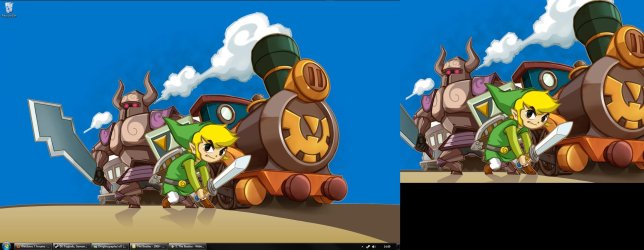
I've just recently installed W7 and have been getting random issues with my screen sometimes duplicating.

I've managed to get rid of it in the past few days with disabling a few things (I read elsewhere it was Windows gadgets causing the problem).
So I'm wondering if anyone else has this issue or had it and if so how did you fix it?

Many Thanks :D
 

Attachments

  • Duplicate.jpg
    Duplicate.jpg
    228.4 KB · Views: 24

My Computer

OS
Windows 7
Hi Dingles, welcome to the Seven Forums.

Your screenshot shows you have a dual display system in extended mode, screen one having resolution 1680*1050 and screen two a bit smaller, 1024*768.

I see no problem in your screenshot. Without third party software you can not have separate wallpapers in your displays. They use the same wallpaper both in duplicated and extended mode. Could your be a bit more precise in discribing your issue?

Kari
 

My Computer

Computer type
Laptop
Computer Manufacturer/Model Number
HP ENVY 17-1150eg
OS
Windows 10 Pro x64 EN-GB
CPU
1.6 GHz Intel Core i7-720QM Processor
Memory
6 GB
Graphics Card(s)
ATI Mobility Radeon HD 5850 Graphics
Sound Card
Beats sound system with integrated subwoofer
Monitor(s) Displays
17" laptop display, 22" LED and 32" Full HD TV through HDMI
Screen Resolution
1600*900 (1), 1920*1080 (2&3)
Hard Drives
Internal: 2 x 500 GB SATA Hard Disk Drive 7200 rpm
External: 2TB for backups, 3TB USB3 network drive for media
Cooling
As Envy runs a bit warm, I have it on a Cooler Master pad
Keyboard
Logitech diNovo Media Desktop Laser (bluetooth)
Mouse
Logitech Performance Mouse MX
Internet Speed
50/10 Mbps VDSL
Antivirus
Windows Defender 4.3.9431.0
Browser
Maxthon 3.5.2., IE11
Aha! I'm running a single display and have no idea why it was running dual screens for me. Due to the different resolutions I thought of it being a mess up somewhere.

Many thanks! all sorted now :)
 

My Computer

OS
Windows 7
You are welcome.
 

My Computer

Computer type
Laptop
Computer Manufacturer/Model Number
HP ENVY 17-1150eg
OS
Windows 10 Pro x64 EN-GB
CPU
1.6 GHz Intel Core i7-720QM Processor
Memory
6 GB
Graphics Card(s)
ATI Mobility Radeon HD 5850 Graphics
Sound Card
Beats sound system with integrated subwoofer
Monitor(s) Displays
17" laptop display, 22" LED and 32" Full HD TV through HDMI
Screen Resolution
1600*900 (1), 1920*1080 (2&3)
Hard Drives
Internal: 2 x 500 GB SATA Hard Disk Drive 7200 rpm
External: 2TB for backups, 3TB USB3 network drive for media
Cooling
As Envy runs a bit warm, I have it on a Cooler Master pad
Keyboard
Logitech diNovo Media Desktop Laser (bluetooth)
Mouse
Logitech Performance Mouse MX
Internet Speed
50/10 Mbps VDSL
Antivirus
Windows Defender 4.3.9431.0
Browser
Maxthon 3.5.2., IE11
Back
Top