MacEachaidh
Banned
- Local time
- 4:02 AM
- Messages
- 19
Hi all,
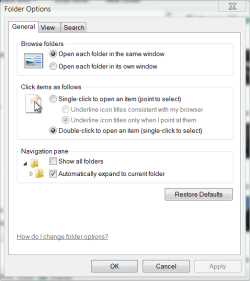
This might be a really dumb question, but in Windows 7 (Home Premium, no 3rd-party modifications), is there an easy way to get the tree pane on the left of an Explorer window to update to the current folder location?
For instance, if I navigate through folders using the folder icons on the right and the address bar at the top, the tree pane on the left still only shows the roots of each of the system's drives. How can I get the tree pane to expand to show my current location, without having to drill down through the tree manually, one level at a time?
Thanks for any help.
This might be a really dumb question, but in Windows 7 (Home Premium, no 3rd-party modifications), is there an easy way to get the tree pane on the left of an Explorer window to update to the current folder location?
For instance, if I navigate through folders using the folder icons on the right and the address bar at the top, the tree pane on the left still only shows the roots of each of the system's drives. How can I get the tree pane to expand to show my current location, without having to drill down through the tree manually, one level at a time?
Thanks for any help.
My Computer
- Computer Manufacturer/Model Number
- Components
- OS
- Windows 7 Home Premium 64bit
- CPU
- Intel i5-760 2.93 GHz
- Motherboard
- Gigabyte GA-P55-USB3
- Memory
- 6 GB
- Graphics Card(s)
- ATI Radeon HD5700
- Sound Card
- Realtek 5.1 onboard
- Monitor(s) Displays
- Samsung SyncMaster EX2220
- Screen Resolution
- 1920x1080
- Hard Drives
- 2 x WD SATA 1.5 TB
1 x WD USB2 (Ext.) 1.5 TB
1 x Samsung USB3 (Ext.) 2 TB
- Internet Speed
- 24 Mbps ADSL2+