
Getting your Nikon Coolscan to work on W7 x64

Thanks Kurt, glad you got it figured out. After reading your posts I kind of figured it was a port problem.

Happy scanning

Peace :cool:
 

My Computer My Computer

At a glance

Windows 10 ProIntel Core i7-4770K (3.5Ghz)32 gig Corsair Dominator Platinum (4x8Gig)Sapphire Tri-X R9 Fury
Computer type
PC/Desktop
Computer Manufacturer/Model Number
Custom built by me.
OS
Windows 10 Pro
CPU
Intel Core i7-4770K (3.5Ghz)
Motherboard
Gigabyte G1 Sniper 5 (F10 Bios)
Memory
32 gig Corsair Dominator Platinum (4x8Gig)
Graphics Card(s)
Sapphire Tri-X R9 Fury
Sound Card
Soundblaster ZXR
Monitor(s) Displays
NEC PA242W 24" LCD Monitor
Screen Resolution
1920 x 1200
Hard Drives
Primary - Samsung 850 Pro (512gig), Samsung 840 Pro (256gig), 2TB WD Caviar Black.
PSU
EVGA Supernova 1000 G2
Case
Cooler Master HAF X
Cooling
Corsair H100i with Corsair Air Series SP120 Quiet Fans
Keyboard
Logitech Wireless Wave
Mouse
Logitech Performance MX
Internet Speed
High Speed Cable
Antivirus
Norton Security
Browser
IE11
Other Info
Memory Timings - 1866MHz @ 9-9-9-27-1T @ 1.5 volts
Dear all,
Yesterday i managed to install and run my Coolscan IV ED on an Windows 7 64-Bit System. Now i have a fast and reliable imaging platform. The only problem I had, was to adjust the scanners.inf file (as mentioned in this thread ). Copy the line with LS-40 from the [Models] section to the [Models.ntamd64] section.

[Models]
; USB scanners
"Nikon LS-40" = USBScanner,USB\Vid_04b0&Pid_4000

;---------------- Duplicated from [Models]
[Models.ntamd64]
; USB scanners
"Nikon LS-40" = USBScanner,USB\Vid_04b0&Pid_4000


Thank you all for your help

Best Regards

Hans-Peter
 

My Computer My Computer

At a glance

Windows 7 64-Bit
OS
Windows 7 64-Bit
Thanks Han-Peter,

Glad to hear you was able to get it working with your additions. I might add that line in a later file update.

Thanks.
 

My Computer My Computer

At a glance

Windows 10 ProIntel Core i7-4770K (3.5Ghz)32 gig Corsair Dominator Platinum (4x8Gig)Sapphire Tri-X R9 Fury
Computer type
PC/Desktop
Computer Manufacturer/Model Number
Custom built by me.
OS
Windows 10 Pro
CPU
Intel Core i7-4770K (3.5Ghz)
Motherboard
Gigabyte G1 Sniper 5 (F10 Bios)
Memory
32 gig Corsair Dominator Platinum (4x8Gig)
Graphics Card(s)
Sapphire Tri-X R9 Fury
Sound Card
Soundblaster ZXR
Monitor(s) Displays
NEC PA242W 24" LCD Monitor
Screen Resolution
1920 x 1200
Hard Drives
Primary - Samsung 850 Pro (512gig), Samsung 840 Pro (256gig), 2TB WD Caviar Black.
PSU
EVGA Supernova 1000 G2
Case
Cooler Master HAF X
Cooling
Corsair H100i with Corsair Air Series SP120 Quiet Fans
Keyboard
Logitech Wireless Wave
Mouse
Logitech Performance MX
Internet Speed
High Speed Cable
Antivirus
Norton Security
Browser
IE11
Other Info
Memory Timings - 1866MHz @ 9-9-9-27-1T @ 1.5 volts
I'd like to thank sygnus21 for all his work on helping out his fellow Nikon Scanners. I just upgraded to Win7 only to find out that my Coolscan IV ED had just become a brick, until I found this thread and forum. Also quick shout-out to hans-peter for providing the precise fix to my dilemma (although it may be burried somewhere between here and page 1). Thanks!
 

My Computer My Computer

At a glance

Windows 7 Professional 64bitIntel® Core™ i5-760 2.8GHz8GB (2x4GB) Patriot DDR3 1333MHzATI® Radeon™ HD 5770 1GB GDDR5 DX11
Computer Manufacturer/Model Number
West Coast Custom Computer
OS
Windows 7 Professional 64bit
CPU
Intel® Core™ i5-760 2.8GHz
Motherboard
Asus P7P55D-E-LX
Memory
8GB (2x4GB) Patriot DDR3 1333MHz
Graphics Card(s)
ATI® Radeon™ HD 5770 1GB GDDR5 DX11
Sound Card
ATI + VIA
Monitor(s) Displays
#1) HP (LG) ZR22W #2) Optiquest Q1wb
Hard Drives
Kingston 128GB MLC SSD SATA II (C: boot)
1.0TB Western Digital Caviar Black SATA II
PSU
Corsair CMPSU-650TX
Case
Lian-Li PC-A06B
Cooling
XTS 100H Heatpipe Cooler
I'd like to thank sygnus21 for all his work on helping out his fellow Nikon Scanners. I just upgraded to Win7 only to find out that my Coolscan IV ED had just become a brick, until I found this thread and forum. Also quick shout-out to hans-peter for providing the precise fix to my dilemma (although it may be burried somewhere between here and page 1). Thanks!


Dear all,
Yesterday i managed to install and run my Coolscan IV ED on an Windows 7 64-Bit System. Now i have a fast and reliable imaging platform. The only problem I had, was to adjust the scanners.inf file (as mentioned in this thread ). Copy the line with LS-40 from the [Models] section to the [Models.ntamd64] section.

[Models]
; USB scanners
"Nikon LS-40" = USBScanner,USB\Vid_04b0&Pid_4000

;---------------- Duplicated from [Models]
[Models.ntamd64]
; USB scanners
"Nikon LS-40" = USBScanner,USB\Vid_04b0&Pid_4000


Thank you all for your help

Best Regards

Hans-Peter

There you go, linked together, forever :D

Thanks for the shout out, glad I was able to help.

Peace :cool:
 

My Computer My Computer

At a glance

Windows 10 ProIntel Core i7-4770K (3.5Ghz)32 gig Corsair Dominator Platinum (4x8Gig)Sapphire Tri-X R9 Fury
Computer type
PC/Desktop
Computer Manufacturer/Model Number
Custom built by me.
OS
Windows 10 Pro
CPU
Intel Core i7-4770K (3.5Ghz)
Motherboard
Gigabyte G1 Sniper 5 (F10 Bios)
Memory
32 gig Corsair Dominator Platinum (4x8Gig)
Graphics Card(s)
Sapphire Tri-X R9 Fury
Sound Card
Soundblaster ZXR
Monitor(s) Displays
NEC PA242W 24" LCD Monitor
Screen Resolution
1920 x 1200
Hard Drives
Primary - Samsung 850 Pro (512gig), Samsung 840 Pro (256gig), 2TB WD Caviar Black.
PSU
EVGA Supernova 1000 G2
Case
Cooler Master HAF X
Cooling
Corsair H100i with Corsair Air Series SP120 Quiet Fans
Keyboard
Logitech Wireless Wave
Mouse
Logitech Performance MX
Internet Speed
High Speed Cable
Antivirus
Norton Security
Browser
IE11
Other Info
Memory Timings - 1866MHz @ 9-9-9-27-1T @ 1.5 volts
Thank you for your instructions - Nikon Scan 4 works like a charm!
 

My Computer My Computer

At a glance

Windows 7 Ultimate x64
OS
Windows 7 Ultimate x64
Use Vuescan

I've used Nikon Scan for years first with a LS30 and now with a LS50 and although I bought VueScan when the LS30 was new I couldn't ever get on with it. Along with everyone I was very annoyed Nikon woudn't support 64bit and Ed Hamrick was able to do so.
I've just made an effort to understand VueScan and all I can say is it's AMAZING.
The quality of the scan far exceeds the Nikon Scan, it picks up very much more detail than NkScan and I would recommend anyone to use it.
It needs the options set up in the advanced for slide film and several other things to get the best, it sharpens cleans and auto white balance, for the first time I've not had to spend ages in PS after the Nikon scans.

sorry to go off the topic of nikon scan somewhat.
 

My Computer My Computer

At a glance

Windows RC 7100 x64, Vista Ultimate x64,Intel Q6700Corsair DDR3 4gbATI X1650
Computer Manufacturer/Model Number
Self Build
OS
Windows RC 7100 x64, Vista Ultimate x64,
CPU
Intel Q6700
Motherboard
Asus P5Q3 Deluxe wi-fi
Memory
Corsair DDR3 4gb
Graphics Card(s)
ATI X1650
Monitor(s) Displays
LCD
Hard Drives
WD 1500gb 10k
WD 320gb 7.5k
WD 320gb 7.5k
Samsung 750gb 7.5k
PSU
Enermax 500w
Case
Lian-Li PC-7B Plus
Cooling
Scythe Infinity
Keyboard
Logitech cordless
Mouse
Logitech cordless
Internet Speed
20meg Cable
Sorry but this thread is about getting the Nikon Scanner to work with the "Nikon scan" software under Windows 7 as indicated by the title of this thread... http://www.sevenforums.com/drivers/44994-getting-your-nikon-coolscan-work-w7-x64-17.html

And as posted earlier in this thread....

As for Vuescan, I'm keenly aware of it and usually recommend it to those who can't get their scanners working. It's a nice program because it covers a whole range of scanners from various manufacturers. I personally prefer Nikon Scan over it mainly because of the Digital ICE in the Nikon Scan software. Never could understand or get use to Vuscan's solution.

BTW I've had a current copy of Vuescan since 2002. In fact, if you search "Vuescan" on this site you'll see a large number of recommendations from me ;)

- http://www.sevenforums.com/drivers/22312-epson-perfection-1640su-driver-problem-2.html#post497053
- http://www.sevenforums.com/drivers/79182-canoscan-d1230u-driver-windows-7-a.html#post972680
- http://www.sevenforums.com/drivers/32568-canon-lide-50-scanner-wont-install-3.html

But... this thread is about getting the Nikon Scan software working under Windows 7 (for those who wish to do so)

Appreciate the input though.

Thanks
 

My Computer My Computer

At a glance

Windows 10 ProIntel Core i7-4770K (3.5Ghz)32 gig Corsair Dominator Platinum (4x8Gig)Sapphire Tri-X R9 Fury
Computer type
PC/Desktop
Computer Manufacturer/Model Number
Custom built by me.
OS
Windows 10 Pro
CPU
Intel Core i7-4770K (3.5Ghz)
Motherboard
Gigabyte G1 Sniper 5 (F10 Bios)
Memory
32 gig Corsair Dominator Platinum (4x8Gig)
Graphics Card(s)
Sapphire Tri-X R9 Fury
Sound Card
Soundblaster ZXR
Monitor(s) Displays
NEC PA242W 24" LCD Monitor
Screen Resolution
1920 x 1200
Hard Drives
Primary - Samsung 850 Pro (512gig), Samsung 840 Pro (256gig), 2TB WD Caviar Black.
PSU
EVGA Supernova 1000 G2
Case
Cooler Master HAF X
Cooling
Corsair H100i with Corsair Air Series SP120 Quiet Fans
Keyboard
Logitech Wireless Wave
Mouse
Logitech Performance MX
Internet Speed
High Speed Cable
Antivirus
Norton Security
Browser
IE11
Other Info
Memory Timings - 1866MHz @ 9-9-9-27-1T @ 1.5 volts
syngus21,

I've tried to install my coolscan 9000 on my windows 7 system. I've followed all the steps a couple times and it still isn't working out for me. When I get to step 6, I can't see how to cancel the driver installation. I can open up the dialog, but the only option I have is closing the dialog window.

When I go to the device manager, I don't see "unknown device", I get a "1394 OHCI Compliant Host Controller" under the IEEE 1394 Bus host controllers category. If I try to update the driver, windows tells me "The best software for your device is already installed". If I say I want to pick the driver from a disk and then use "Have disk...", then I get a message that says, "The folder you specified doesn't contain a compatible driver for your device. If the folder contains a driver, make sure it is designed to work with Windows fox x64-based systems."

I tried uninstalling the 1394 OHCI Compliant Host Controller and then using Add legacy hardware from the Action menu. I can choose scanners.inf and can select the 9000 from the list. It installs, but it gives me an error 10 - this device cannot start.

Can you see anything that I'm doing wrong?

Thanks for your help,
J
 

My Computer My Computer

At a glance

Windows 7 Ultimate x64
OS
Windows 7 Ultimate x64
Read this post and those after.... http://www.sevenforums.com/drivers/44994-getting-your-nikon-coolscan-work-w7-x64-16.html#post981696

Let me know if you still need help.

I get a "1394 OHCI Compliant Host Controller" under the IEEE 1394 Bus host controllers category.

If you have a firewire port on your system, you'll have this driver.


This has nothing to do with the fix you're using. Therefore there's nothing to be done with this driver. If you're trying to update it, you're messing with the wrong driver!

Again, look through the link I posted.
 

My Computer My Computer

At a glance

Windows 10 ProIntel Core i7-4770K (3.5Ghz)32 gig Corsair Dominator Platinum (4x8Gig)Sapphire Tri-X R9 Fury
Computer type
PC/Desktop
Computer Manufacturer/Model Number
Custom built by me.
OS
Windows 10 Pro
CPU
Intel Core i7-4770K (3.5Ghz)
Motherboard
Gigabyte G1 Sniper 5 (F10 Bios)
Memory
32 gig Corsair Dominator Platinum (4x8Gig)
Graphics Card(s)
Sapphire Tri-X R9 Fury
Sound Card
Soundblaster ZXR
Monitor(s) Displays
NEC PA242W 24" LCD Monitor
Screen Resolution
1920 x 1200
Hard Drives
Primary - Samsung 850 Pro (512gig), Samsung 840 Pro (256gig), 2TB WD Caviar Black.
PSU
EVGA Supernova 1000 G2
Case
Cooler Master HAF X
Cooling
Corsair H100i with Corsair Air Series SP120 Quiet Fans
Keyboard
Logitech Wireless Wave
Mouse
Logitech Performance MX
Internet Speed
High Speed Cable
Antivirus
Norton Security
Browser
IE11
Other Info
Memory Timings - 1866MHz @ 9-9-9-27-1T @ 1.5 volts
Hi,

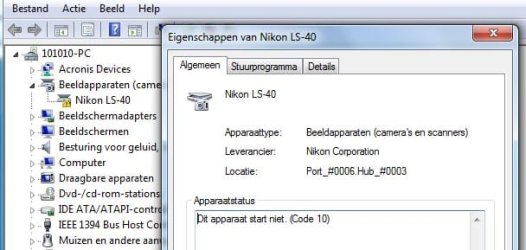
I'm still struggling to get my LS-40 running on W7 74 Bits via USB.
I 've copied the .inf file and the .dll file to the new directory Nikon.
The .inf file I used includes the LS-40 and is executed via Driver update.

After it is installed I get an error message that a fault occured during update of the driver. The device will not start (error code 10).

The LS40 still works on my old PC (XP 32 bits), so the equipment is OK.

Has anybody encoutered this problem and been able to solve it?

Regards, Yabbytail
 

My Computer My Computer

At a glance

windows 7 64bitsI5-7608 GBMSI Geforce 460
Computer Manufacturer/Model Number
home made
OS
windows 7 64bits
CPU
I5-760
Motherboard
ASUS P7P55DE Pro
Memory
8 GB
Graphics Card(s)
MSI Geforce 460
Hard Drives
samsung F1 1T
PSU
be quiet 480 W
Cooling
black
Hi Yabbytail,

This fix isn't really applicable to the LS-40 so I can't guarantee it'll work, but since your scanner is USB go back to step #4
4- Now install the Nikon Scan software you downloaded and after the installation, go to....
and make sure you take note of this....
NOTE: If your scanner is USB than the folder will be ScanUSB instead of Scan1394.

So... instead of.....

C:\Program Files (x86)\Common Files\Nikon\Driver\Scan1394

It would be....

C:\Program Files (x86)\Common Files\Nikon\Driver\ScanUSB


In short, since your scanner is USB, the folder you're looking for is ScanUSB

coppy NKScnUSD.dll from there and follow the instructions provided on the first page of this thread.

Let me know.

PS. You might want to have a look here.... http://www.sevenforums.com/drivers/44994-getting-your-nikon-coolscan-work-w7-x64-4.html#post601785
 

My Computer My Computer

At a glance

Windows 10 ProIntel Core i7-4770K (3.5Ghz)32 gig Corsair Dominator Platinum (4x8Gig)Sapphire Tri-X R9 Fury
Computer type
PC/Desktop
Computer Manufacturer/Model Number
Custom built by me.
OS
Windows 10 Pro
CPU
Intel Core i7-4770K (3.5Ghz)
Motherboard
Gigabyte G1 Sniper 5 (F10 Bios)
Memory
32 gig Corsair Dominator Platinum (4x8Gig)
Graphics Card(s)
Sapphire Tri-X R9 Fury
Sound Card
Soundblaster ZXR
Monitor(s) Displays
NEC PA242W 24" LCD Monitor
Screen Resolution
1920 x 1200
Hard Drives
Primary - Samsung 850 Pro (512gig), Samsung 840 Pro (256gig), 2TB WD Caviar Black.
PSU
EVGA Supernova 1000 G2
Case
Cooler Master HAF X
Cooling
Corsair H100i with Corsair Air Series SP120 Quiet Fans
Keyboard
Logitech Wireless Wave
Mouse
Logitech Performance MX
Internet Speed
High Speed Cable
Antivirus
Norton Security
Browser
IE11
Other Info
Memory Timings - 1866MHz @ 9-9-9-27-1T @ 1.5 volts
error code 10 for Coolscan IV (LS-40)

Thanks for your quick reply! I executed the procedure for USB, but stil get the error code 10. I found the following solution for a similar problem by Jaasland on social.technet.microsoft.com/Forums/en/w7itprohardware/thread (June 22, 2010). He succeeded (after encoutering the error code 10) in using his LS-40 on W7 64b by connecting it to his PC via an old USB hub capable of USB1.1. Appearantly the PC-USB connections gave the problem.
I still have to try this at home, but I will report my progress.

Yabbytail
 

My Computer My Computer

At a glance

windows 7 64bitsI5-7608 GBMSI Geforce 460
Computer Manufacturer/Model Number
home made
OS
windows 7 64bits
CPU
I5-760
Motherboard
ASUS P7P55DE Pro
Memory
8 GB
Graphics Card(s)
MSI Geforce 460
Hard Drives
samsung F1 1T
PSU
be quiet 480 W
Cooling
black
using his LS-40 on W7 64b by connecting it to his PC via an old USB hub capable of USB1.1. Appearantly the PC-USB connections gave the problem.

He's basically saying he had a bad cable.
 

My Computer My Computer

At a glance

Windows 10 ProIntel Core i7-4770K (3.5Ghz)32 gig Corsair Dominator Platinum (4x8Gig)Sapphire Tri-X R9 Fury
Computer type
PC/Desktop
Computer Manufacturer/Model Number
Custom built by me.
OS
Windows 10 Pro
CPU
Intel Core i7-4770K (3.5Ghz)
Motherboard
Gigabyte G1 Sniper 5 (F10 Bios)
Memory
32 gig Corsair Dominator Platinum (4x8Gig)
Graphics Card(s)
Sapphire Tri-X R9 Fury
Sound Card
Soundblaster ZXR
Monitor(s) Displays
NEC PA242W 24" LCD Monitor
Screen Resolution
1920 x 1200
Hard Drives
Primary - Samsung 850 Pro (512gig), Samsung 840 Pro (256gig), 2TB WD Caviar Black.
PSU
EVGA Supernova 1000 G2
Case
Cooler Master HAF X
Cooling
Corsair H100i with Corsair Air Series SP120 Quiet Fans
Keyboard
Logitech Wireless Wave
Mouse
Logitech Performance MX
Internet Speed
High Speed Cable
Antivirus
Norton Security
Browser
IE11
Other Info
Memory Timings - 1866MHz @ 9-9-9-27-1T @ 1.5 volts
Hi Signus 21,

I tried new cables as well as a generic hub. After deleting the driver en reinstalling it, still code 10; device cannot be started. My PC has a ASUS P7P55DE motherboard with USB 3.

Lukily my wife came home late tonight, so I plugged the LS-40 in her notebook W7, 64 b also. On that machine it works perfectly (I used the NikonUsbScanners.inf and . cat of www.fastpictureviewer.com based on your design).
So I'm convinced that you did a wonderfull job for all Nikon-scanner owners.
I really don't know who to blame for my own problems.....(see screendump, in (double)Dutch).

Thanks for your help!

Yabbytail
 

Attachments

  • LS-40 code 10.jpg
    LS-40 code 10.jpg
    49 KB · Views: 35

My Computer My Computer

At a glance

windows 7 64bitsI5-7608 GBMSI Geforce 460
Computer Manufacturer/Model Number
home made
OS
windows 7 64bits
CPU
I5-760
Motherboard
ASUS P7P55DE Pro
Memory
8 GB
Graphics Card(s)
MSI Geforce 460
Hard Drives
samsung F1 1T
PSU
be quiet 480 W
Cooling
black
I'm not exactly clear on what you're saying, but if the scanner works on your wife's pc, but not on yours, the problem is your PC.

You might want to try a different USB port. I'm sure all the ports on your motherboard are not usb 3.0, some of them have to be 2.0.

I have a gigabyte motherboard that also has USB 3.0 ports, but it aslo has 2.0 as well. In fact most of the USB ports (6) on my board are 2.0 while only 2 ports are 3.0

My point.... find a 2.0 port and see if the scanner works.

Also, did you see this post.... Getting your Nikon Coolscan to work on W7 x64

Anyways give this file a try - View attachment scanners.zip it incorporates the fix from the above post. I can't guarantee it'll work, but it's worth at try. I ask that you let me know the results.

Thanks
 

My Computer My Computer

At a glance

Windows 10 ProIntel Core i7-4770K (3.5Ghz)32 gig Corsair Dominator Platinum (4x8Gig)Sapphire Tri-X R9 Fury
Computer type
PC/Desktop
Computer Manufacturer/Model Number
Custom built by me.
OS
Windows 10 Pro
CPU
Intel Core i7-4770K (3.5Ghz)
Motherboard
Gigabyte G1 Sniper 5 (F10 Bios)
Memory
32 gig Corsair Dominator Platinum (4x8Gig)
Graphics Card(s)
Sapphire Tri-X R9 Fury
Sound Card
Soundblaster ZXR
Monitor(s) Displays
NEC PA242W 24" LCD Monitor
Screen Resolution
1920 x 1200
Hard Drives
Primary - Samsung 850 Pro (512gig), Samsung 840 Pro (256gig), 2TB WD Caviar Black.
PSU
EVGA Supernova 1000 G2
Case
Cooler Master HAF X
Cooling
Corsair H100i with Corsair Air Series SP120 Quiet Fans
Keyboard
Logitech Wireless Wave
Mouse
Logitech Performance MX
Internet Speed
High Speed Cable
Antivirus
Norton Security
Browser
IE11
Other Info
Memory Timings - 1866MHz @ 9-9-9-27-1T @ 1.5 volts
I think the problem of my desktop PC must be somewhere in the Windows installation.
The hardware works (scanner itself, USB ports, cables, other USB equipment works as well). The driver works (allbeit on other W7 64b PC's).
The PC is a one week old and I encountered some problems installing drivers for the motherbord.
I 'm now thinking of reinstalling the OS image and start again .....

Yabbytail
 

My Computer My Computer

At a glance

windows 7 64bitsI5-7608 GBMSI Geforce 460
Computer Manufacturer/Model Number
home made
OS
windows 7 64bits
CPU
I5-760
Motherboard
ASUS P7P55DE Pro
Memory
8 GB
Graphics Card(s)
MSI Geforce 460
Hard Drives
samsung F1 1T
PSU
be quiet 480 W
Cooling
black
If you do, and you use the file in my post above let me know what happens.

Thanks.
 

My Computer My Computer

At a glance

Windows 10 ProIntel Core i7-4770K (3.5Ghz)32 gig Corsair Dominator Platinum (4x8Gig)Sapphire Tri-X R9 Fury
Computer type
PC/Desktop
Computer Manufacturer/Model Number
Custom built by me.
OS
Windows 10 Pro
CPU
Intel Core i7-4770K (3.5Ghz)
Motherboard
Gigabyte G1 Sniper 5 (F10 Bios)
Memory
32 gig Corsair Dominator Platinum (4x8Gig)
Graphics Card(s)
Sapphire Tri-X R9 Fury
Sound Card
Soundblaster ZXR
Monitor(s) Displays
NEC PA242W 24" LCD Monitor
Screen Resolution
1920 x 1200
Hard Drives
Primary - Samsung 850 Pro (512gig), Samsung 840 Pro (256gig), 2TB WD Caviar Black.
PSU
EVGA Supernova 1000 G2
Case
Cooler Master HAF X
Cooling
Corsair H100i with Corsair Air Series SP120 Quiet Fans
Keyboard
Logitech Wireless Wave
Mouse
Logitech Performance MX
Internet Speed
High Speed Cable
Antivirus
Norton Security
Browser
IE11
Other Info
Memory Timings - 1866MHz @ 9-9-9-27-1T @ 1.5 volts
Hi Sygnus21,

After installing W7 from scratch I started off with using he same method I used on my wifes notebook. I was dissapointed to find out that it failed on my desktop.
After trying different ports and cable again; no succes.

Finally after using your proposal (that is; installing the nikonscan 4.03 and installing the sanner.inf and .dll copied from the common files) ; TADAA!

Well; thanks for your continous support and attention. You made my day:D

I hope this discussion will help others to keep trying too. It's worth it!
Thanks again and goodbye.

Yabbytail
 

My Computer My Computer

At a glance

windows 7 64bitsI5-7608 GBMSI Geforce 460
Computer Manufacturer/Model Number
home made
OS
windows 7 64bits
CPU
I5-760
Motherboard
ASUS P7P55DE Pro
Memory
8 GB
Graphics Card(s)
MSI Geforce 460
Hard Drives
samsung F1 1T
PSU
be quiet 480 W
Cooling
black
Finally after using your proposal (that is; installing the nikonscan 4.03 and installing the sanner.inf and .dll copied from the common files) ; TADAA!

Sorry, I'm confused :shock:

That was the whole purpose of writing those instructions. As for the Nikonscan software, I tell you to download it in step 1, than install it in step 4.

Anyways you got it working :)

BTW which inf file did you use? The one from my website, or the one I posted here?

Thanks
 

My Computer My Computer

At a glance

Windows 10 ProIntel Core i7-4770K (3.5Ghz)32 gig Corsair Dominator Platinum (4x8Gig)Sapphire Tri-X R9 Fury
Computer type
PC/Desktop
Computer Manufacturer/Model Number
Custom built by me.
OS
Windows 10 Pro
CPU
Intel Core i7-4770K (3.5Ghz)
Motherboard
Gigabyte G1 Sniper 5 (F10 Bios)
Memory
32 gig Corsair Dominator Platinum (4x8Gig)
Graphics Card(s)
Sapphire Tri-X R9 Fury
Sound Card
Soundblaster ZXR
Monitor(s) Displays
NEC PA242W 24" LCD Monitor
Screen Resolution
1920 x 1200
Hard Drives
Primary - Samsung 850 Pro (512gig), Samsung 840 Pro (256gig), 2TB WD Caviar Black.
PSU
EVGA Supernova 1000 G2
Case
Cooler Master HAF X
Cooling
Corsair H100i with Corsair Air Series SP120 Quiet Fans
Keyboard
Logitech Wireless Wave
Mouse
Logitech Performance MX
Internet Speed
High Speed Cable
Antivirus
Norton Security
Browser
IE11
Other Info
Memory Timings - 1866MHz @ 9-9-9-27-1T @ 1.5 volts
Back
Top