Getting your Nikon Coolscan to work on W7 x64

Thanks for the info. As most people don't use the Enterprise edition of Windows 10 your issue is unique. That said, thanks for the tip, and glad you was able to figure it out.

Peace :cool:
 

My Computer My Computer

At a glance

Windows 10 ProIntel Core i7-4770K (3.5Ghz)32 gig Corsair Dominator Platinum (4x8Gig)Sapphire Tri-X R9 Fury
Computer type
PC/Desktop
Computer Manufacturer/Model Number
Custom built by me.
OS
Windows 10 Pro
CPU
Intel Core i7-4770K (3.5Ghz)
Motherboard
Gigabyte G1 Sniper 5 (F10 Bios)
Memory
32 gig Corsair Dominator Platinum (4x8Gig)
Graphics Card(s)
Sapphire Tri-X R9 Fury
Sound Card
Soundblaster ZXR
Monitor(s) Displays
NEC PA242W 24" LCD Monitor
Screen Resolution
1920 x 1200
Hard Drives
Primary - Samsung 850 Pro (512gig), Samsung 840 Pro (256gig), 2TB WD Caviar Black.
PSU
EVGA Supernova 1000 G2
Case
Cooler Master HAF X
Cooling
Corsair H100i with Corsair Air Series SP120 Quiet Fans
Keyboard
Logitech Wireless Wave
Mouse
Logitech Performance MX
Internet Speed
High Speed Cable
Antivirus
Norton Security
Browser
IE11
Other Info
Memory Timings - 1866MHz @ 9-9-9-27-1T @ 1.5 volts
Thanks for the work a round. Managed to get the Nikon Coolscan 8000 working fine on Windows 10 (64 bit) by following your instructions to the letter. Well done you - thanks for the help.
 

My Computer My Computer

At a glance

64 bit Win 7
Computer type
PC/Desktop
OS
64 bit Win 7
Thank you. Glad it worked out for you.

Happy scanning :-)
 

My Computer My Computer

At a glance

Windows 10 ProIntel Core i7-4770K (3.5Ghz)32 gig Corsair Dominator Platinum (4x8Gig)Sapphire Tri-X R9 Fury
Computer type
PC/Desktop
Computer Manufacturer/Model Number
Custom built by me.
OS
Windows 10 Pro
CPU
Intel Core i7-4770K (3.5Ghz)
Motherboard
Gigabyte G1 Sniper 5 (F10 Bios)
Memory
32 gig Corsair Dominator Platinum (4x8Gig)
Graphics Card(s)
Sapphire Tri-X R9 Fury
Sound Card
Soundblaster ZXR
Monitor(s) Displays
NEC PA242W 24" LCD Monitor
Screen Resolution
1920 x 1200
Hard Drives
Primary - Samsung 850 Pro (512gig), Samsung 840 Pro (256gig), 2TB WD Caviar Black.
PSU
EVGA Supernova 1000 G2
Case
Cooler Master HAF X
Cooling
Corsair H100i with Corsair Air Series SP120 Quiet Fans
Keyboard
Logitech Wireless Wave
Mouse
Logitech Performance MX
Internet Speed
High Speed Cable
Antivirus
Norton Security
Browser
IE11
Other Info
Memory Timings - 1866MHz @ 9-9-9-27-1T @ 1.5 volts
Thank you so much for your guide. Nikon Scan 4.0 working perfectly with my 5000 ED. Very much appreciated.
 

My Computer My Computer

At a glance

Windows 10 Home 1909 x64
Computer type
PC/Desktop
Computer Manufacturer/Model Number
Zoostorm
OS
Windows 10 Home 1909 x64
Thank you; happy scanning :)
 

My Computer My Computer

At a glance

Windows 10 ProIntel Core i7-4770K (3.5Ghz)32 gig Corsair Dominator Platinum (4x8Gig)Sapphire Tri-X R9 Fury
Computer type
PC/Desktop
Computer Manufacturer/Model Number
Custom built by me.
OS
Windows 10 Pro
CPU
Intel Core i7-4770K (3.5Ghz)
Motherboard
Gigabyte G1 Sniper 5 (F10 Bios)
Memory
32 gig Corsair Dominator Platinum (4x8Gig)
Graphics Card(s)
Sapphire Tri-X R9 Fury
Sound Card
Soundblaster ZXR
Monitor(s) Displays
NEC PA242W 24" LCD Monitor
Screen Resolution
1920 x 1200
Hard Drives
Primary - Samsung 850 Pro (512gig), Samsung 840 Pro (256gig), 2TB WD Caviar Black.
PSU
EVGA Supernova 1000 G2
Case
Cooler Master HAF X
Cooling
Corsair H100i with Corsair Air Series SP120 Quiet Fans
Keyboard
Logitech Wireless Wave
Mouse
Logitech Performance MX
Internet Speed
High Speed Cable
Antivirus
Norton Security
Browser
IE11
Other Info
Memory Timings - 1866MHz @ 9-9-9-27-1T @ 1.5 volts
Of all the directions I found online, yours are the ONLY ones that worked. 4000ED working again with Win 10 Enterprise 1909. Thanks!
 

My Computer My Computer

At a glance

Windows 10 Enterprise
Computer type
PC/Desktop
OS
Windows 10 Enterprise
Cool and nice to know it's working with Enterprise as Enterprise can be fussy, especially with unsigned drivers.

Thanks. And thanks for the info.
 

My Computer My Computer

At a glance

Windows 10 ProIntel Core i7-4770K (3.5Ghz)32 gig Corsair Dominator Platinum (4x8Gig)Sapphire Tri-X R9 Fury
Computer type
PC/Desktop
Computer Manufacturer/Model Number
Custom built by me.
OS
Windows 10 Pro
CPU
Intel Core i7-4770K (3.5Ghz)
Motherboard
Gigabyte G1 Sniper 5 (F10 Bios)
Memory
32 gig Corsair Dominator Platinum (4x8Gig)
Graphics Card(s)
Sapphire Tri-X R9 Fury
Sound Card
Soundblaster ZXR
Monitor(s) Displays
NEC PA242W 24" LCD Monitor
Screen Resolution
1920 x 1200
Hard Drives
Primary - Samsung 850 Pro (512gig), Samsung 840 Pro (256gig), 2TB WD Caviar Black.
PSU
EVGA Supernova 1000 G2
Case
Cooler Master HAF X
Cooling
Corsair H100i with Corsair Air Series SP120 Quiet Fans
Keyboard
Logitech Wireless Wave
Mouse
Logitech Performance MX
Internet Speed
High Speed Cable
Antivirus
Norton Security
Browser
IE11
Other Info
Memory Timings - 1866MHz @ 9-9-9-27-1T @ 1.5 volts
Super helpful!


Many thanks..
 

My Computer My Computer

At a glance

Windows 10 64biti7
Computer type
PC/Desktop
Computer Manufacturer/Model Number
dell
OS
Windows 10 64bit
CPU
i7
Hi

I have a Coolscan V ED. I used these instructions a long time ago to get the scanner working on Win 7 and succeeded. Thanks!:-)

Now that I have a new PC with Win 10 64 Home, I've used these instructions again to get the scanner going. However, I've tried twice, and both times I've failed.

At instruction 7, when I look in Device Manager there is no Unknown Device listed, but LS-50 ED appears under Other Devices.

I get to instruction 9 and browse to the folder where the scanners.inf and NKScnUSD.dll files are, but when I click Next I get a popup that says "Windows was unable to install your LS-50 ED. Windows could not find drivers for your device".

My setup is:

Intel Core i7-9700k 3.6-4.6GHz 8 Core CPU
Adata 8GB DDR4 2666 DIMM
Gigabyte GA-Z390- series ATX Motherboard
Asus 24x DVD-RW Drive
Gigabyte GeForce GTX 1650 4GB GDDR5 Graphics Card
ADATA 1TB SX6000 Pro PCIe M.2 SSD
Windows 10 64-bit Home (currently v1909 build 18363.900)

I can't see that I'm doing anything wrong. I have bought Vuescan for my Epson flatbed scanner, but I'd really like to use the Nikon Scan with my V ED. And, yes, I did uninstall Vuescan before starting these instructions.

Any help would be much appreciated.

Thanks

Dave
 

My Computer My Computer

At a glance

Windows 10 Home 64-bit Home
Computer type
PC/Desktop
OS
Windows 10 Home 64-bit Home
Hi, DaveR1954,

As I pointed out on the first page - "This tutorial applies to the 4000, 5000, 8000, and 9000 series scanners". Anything else is a bonus.

With that, it's been ages since I used my 4000 LS. Its not even hooked up to my PC anymore. And the last time I used it (2.5 years ago) was to show you could get it running under 10.

Point? I'm in no position to troubleshoot these anymore and all I can go by now is what's posted in the procedures. That said, please make sure you pay attention to the warning prior to step 7 (if running Windows 10). Under step 7 pay attention to any weird unknown items or yellow exclamation marks appearing in Device Manager - perhaps that's what you're looking for. Then follow the procedures under step 7.

Step 9 depends on you following the warning in for step 7 if running Windows 10.

Hope this help, if not post back.
 

My Computer My Computer

At a glance

Windows 10 ProIntel Core i7-4770K (3.5Ghz)32 gig Corsair Dominator Platinum (4x8Gig)Sapphire Tri-X R9 Fury
Computer type
PC/Desktop
Computer Manufacturer/Model Number
Custom built by me.
OS
Windows 10 Pro
CPU
Intel Core i7-4770K (3.5Ghz)
Motherboard
Gigabyte G1 Sniper 5 (F10 Bios)
Memory
32 gig Corsair Dominator Platinum (4x8Gig)
Graphics Card(s)
Sapphire Tri-X R9 Fury
Sound Card
Soundblaster ZXR
Monitor(s) Displays
NEC PA242W 24" LCD Monitor
Screen Resolution
1920 x 1200
Hard Drives
Primary - Samsung 850 Pro (512gig), Samsung 840 Pro (256gig), 2TB WD Caviar Black.
PSU
EVGA Supernova 1000 G2
Case
Cooler Master HAF X
Cooling
Corsair H100i with Corsair Air Series SP120 Quiet Fans
Keyboard
Logitech Wireless Wave
Mouse
Logitech Performance MX
Internet Speed
High Speed Cable
Antivirus
Norton Security
Browser
IE11
Other Info
Memory Timings - 1866MHz @ 9-9-9-27-1T @ 1.5 volts
Trying to move from XP to Windows 10

Sygnus21 seems to have done a bang up job of maintaining this howto in spite of not having a working system.

- I followed the instructions on a vanilla Windows 10, and have successfully installed Nikon Scan 4.
- When I tried to update the firmware, it said it couldn't find Nikon Scan 3.
- I ploughed ahead and tried to run the Scan 4 software. It hung when trying to do a preview or scan with the dialog "Acquiring scan." Canceling doesn't work, and the process needs to be killed. Is this because of the firmware not being updated, I wonder.

It seems that the only thing I can do is to update the firmware. Does anyone have experience with this situation? Any way of getting Scan 3 to work on Windows 10?

In the worst case, I suppose I could revert to my XP setup (on a failing computer) and try to update the firmware there. My worry is that the XP system (which is having some power issues) might die in the middle of the update, potentially bricking the scanner.

Any words of wisdom accepted :-).
 

My Computer My Computer

At a glance

Windows 10
Computer type
PC/Desktop
OS
Windows 10
A quick update on the hang. It eventually times out and indicates that the scanner is not turned on (but that's not true--device manager shows the imaging device as expected).

- Right after the above, I went back to my XP setup (moved ieee card back, etc.), and started to (re)familiarizing myself with the scanner setup there. The scanner works as before. So, h/w is ok.
- Next I noticed that the preview window's title is "Nikon SUPER COOLSCAN 4000 ED 1.10 @ IEEE1394". Can't be a coincidence--it's referring to the firmware version on my scanner.
- Just before switching back to my XP setup, I saw that the last "Acquiring scan" window had timed out, indicating that the scanner was not powered up. Strange.

To net it all out about where I think I am:
- Successfully installed the Vista Scan 4 software on Windows 10 (or have I?)
- Drivers are installed, as device manager shows the Nikon scanner as an imaging device
- I think I have F/w v1.1 on my scanner (based on XP window title)
- The scanner is also producing a scan on XP
- So, now it's down to why is the software timing out on acquisition on Windows 10.

Cheers and any help appreciated.
 

My Computer My Computer

At a glance

Windows 10
Computer type
PC/Desktop
OS
Windows 10
Hi, DaveR1954,

As I pointed out on the first page - "This tutorial applies to the 4000, 5000, 8000, and 9000 series scanners". Anything else is a bonus.

With that, it's been ages since I used my 4000 LS. Its not even hooked up to my PC anymore. And the last time I used it (2.5 years ago) was to show you could get it running under 10.

Point? I'm in no position to troubleshoot these anymore and all I can go by now is what's posted in the procedures. That said, please make sure you pay attention to the warning prior to step 7 (if running Windows 10). Under step 7 pay attention to any weird unknown items or yellow exclamation marks appearing in Device Manager - perhaps that's what you're looking for. Then follow the procedures under step 7.

Step 9 depends on you following the warning in for step 7 if running Windows 10.

Hope this help, if not post back.


Hi


At my first attempt at this procedure, when I installed the Nikon Scan software, I installed all the drivers when prompted. You hadn't written any specific instructions about this step in the Nikon Scan installation process, so I just installed them all. Was this a mistake? Did this have any effect on Step 9 for this and later attempts? I know that when I went to Device Manager, there was no Unknown Device, but the LS-50 ED was listed.


At my next attempt at installing Nikon Scan, I opted to install only the appropriate drivers for my Coolscan V.


At my third attempt, I chose not to install any drivers.


None of these attempts have succeeded. I was very careful to disable the Driver Signature Enforcement as you instructed during each attempt.


I had a quick look in the inf file in Notepad, and the LS-50 is listed there.


I even went back to some old instructions I kept by Axel Rietschin about getting the LS-50 to work on Win 7 64-bit. When I used those files and attempted step 9, Win 10 found a driver but could not install it. When I use your files, Win 10 can't find a driver at all.


I'm stumped now. I'm resigned to using VueScan. But it's better than not being able to use the LS-50 at all!


Thanks for your help


Cheers


Dave
 

My Computer My Computer

At a glance

Windows 10 Home 64-bit Home
Computer type
PC/Desktop
OS
Windows 10 Home 64-bit Home
Hi guys, sorry for the delay, I'm not getting my notifications in a timely manner. Anyway...

msundaram
Sygnus21 seems to have done a bang up job of maintaining this howto in spite of not having a working system.

- I followed the instructions on a vanilla Windows 10, and have successfully installed Nikon Scan 4.
- When I tried to update the firmware, it said it couldn't find Nikon Scan 3.
- I ploughed ahead and tried to run the Scan 4 software. It hung when trying to do a preview or scan with the dialog "Acquiring scan." Canceling doesn't work, and the process needs to be killed. Is this because of the firmware not being updated, I wonder.

It seems that the only thing I can do is to update the firmware. Does anyone have experience with this situation? Any way of getting Scan 3 to work on Windows 10?

In the worst case, I suppose I could revert to my XP setup (on a failing computer) and try to update the firmware there. My worry is that the XP system (which is having some power issues) might die in the middle of the update, potentially bricking the scanner.

Any words of wisdom accepted :-).

I did my firmware update on my scanner while I was still running XP so I can't speak on updating it through Windows 7 and beyond. That said, at one point Nikon had a note stating only the XP OS could be used to update the firmware on their scanners, but that note has now been removed. Additionally a member posted sometime ago they were able to update the firmware under Windows 7 so... :confused:

That said, it would help to know what scanner you're talking about as not all have updates available.

A quick update on the hang. It eventually times out and indicates that the scanner is not turned on (but that's not true--device manager shows the imaging device as expected).

[snip]...

You issue is a bit confusing and all over the place. With that I need to know what scanner you have??? Additionally, if you're trying to get the scanner to work under Windows 10 you MUST follow the warning for step 7 (warning above step 7).

DaveR1954
Hi

At my first attempt at this procedure, when I installed the Nikon Scan software, I installed all the drivers when prompted. You hadn't written any specific instructions about this step in the Nikon Scan installation process, so I just installed them all. Was this a mistake? Did this have any effect on Step 9 for this and later attempts? I know that when I went to Device Manager, there was no Unknown Device, but the LS-50 ED was listed.

As I noted before, these procedures work best for the scanners listed. The LS 50 is an older scanner and may or may not work with these procedures. I've never owned or used an LS 50 so I can't say why what's happening. That said, a member did post they got their Coolscan V working, and I did add that info the to inf file you're downloading so...

Also, as Windows 10 evolves things change (especially for older hardware/software) and what once worked, may no longer work as new updates/upgrades are added to Windows 10.

That said, the instructions as written were based on getting my LS 4000 working under Windows 7, and ten eventually under Windows 10. They are step by step as taken to get the scanner working.

Also note the LS 4000 requires a FireWire card, where other models don't. You need to follow the procedures based on whether your scanner uses FireWire or USB and, and thus why it's important to pay attention to the warning under step 4.

Also, if running Windows 10, you MUST disable the driver signature enforcement as noted in the warning prior to step 7.

Again, these instructions were written based on the LS4000, but will also support the other models listed. Additionally, many have also had success get other models not listed working so I'm not sure what else there is to say.

For both you guys, please note the "Extra Info" links at the bottom of the tutorial as they may help solve any issues you may have. Lastly, you might go through this thread as there are lots of troubleshooting info here. Yes, the thread is long, and unfortunately as such, I don't even remember what's there so...

Let me know.

 

My Computer My Computer

At a glance

Windows 10 ProIntel Core i7-4770K (3.5Ghz)32 gig Corsair Dominator Platinum (4x8Gig)Sapphire Tri-X R9 Fury
Computer type
PC/Desktop
Computer Manufacturer/Model Number
Custom built by me.
OS
Windows 10 Pro
CPU
Intel Core i7-4770K (3.5Ghz)
Motherboard
Gigabyte G1 Sniper 5 (F10 Bios)
Memory
32 gig Corsair Dominator Platinum (4x8Gig)
Graphics Card(s)
Sapphire Tri-X R9 Fury
Sound Card
Soundblaster ZXR
Monitor(s) Displays
NEC PA242W 24" LCD Monitor
Screen Resolution
1920 x 1200
Hard Drives
Primary - Samsung 850 Pro (512gig), Samsung 840 Pro (256gig), 2TB WD Caviar Black.
PSU
EVGA Supernova 1000 G2
Case
Cooler Master HAF X
Cooling
Corsair H100i with Corsair Air Series SP120 Quiet Fans
Keyboard
Logitech Wireless Wave
Mouse
Logitech Performance MX
Internet Speed
High Speed Cable
Antivirus
Norton Security
Browser
IE11
Other Info
Memory Timings - 1866MHz @ 9-9-9-27-1T @ 1.5 volts
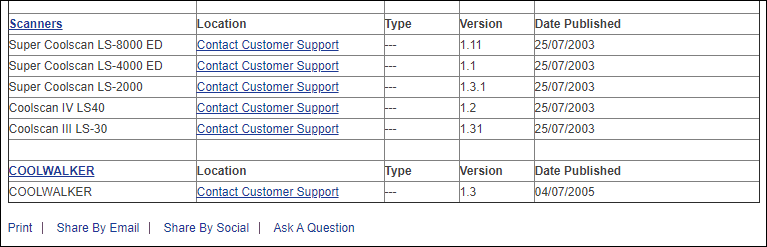
Firmware Availability Notice

Please be aware that Nikon in their infinite ways (deep sarcasm), now requires you to contact them for any firmware update files required to update your scanner. That is if you require a firmware update to get the Nikon Scan 4.0.3 software installed, you'll have to contact Nikon....

Firmware update for scanners.PNG

I do not have these or any way of obtaining them so you'll have to contact Nikon. With that, if your scanner is NOT listed in the above there was no firmware update released for it.

If you can not obtain the firmware needed for your scanner you could try Vuescan (paid program) and go from there. I am NOT a Vuescan spokesman and ONLY mention them because they are the ONLY other alternative.

Good luck and If anyone does contact Nikon for the firmware update please post your experience here.

Thanks, and sorry.
 

My Computer My Computer

At a glance

Windows 10 ProIntel Core i7-4770K (3.5Ghz)32 gig Corsair Dominator Platinum (4x8Gig)Sapphire Tri-X R9 Fury
Computer type
PC/Desktop
Computer Manufacturer/Model Number
Custom built by me.
OS
Windows 10 Pro
CPU
Intel Core i7-4770K (3.5Ghz)
Motherboard
Gigabyte G1 Sniper 5 (F10 Bios)
Memory
32 gig Corsair Dominator Platinum (4x8Gig)
Graphics Card(s)
Sapphire Tri-X R9 Fury
Sound Card
Soundblaster ZXR
Monitor(s) Displays
NEC PA242W 24" LCD Monitor
Screen Resolution
1920 x 1200
Hard Drives
Primary - Samsung 850 Pro (512gig), Samsung 840 Pro (256gig), 2TB WD Caviar Black.
PSU
EVGA Supernova 1000 G2
Case
Cooler Master HAF X
Cooling
Corsair H100i with Corsair Air Series SP120 Quiet Fans
Keyboard
Logitech Wireless Wave
Mouse
Logitech Performance MX
Internet Speed
High Speed Cable
Antivirus
Norton Security
Browser
IE11
Other Info
Memory Timings - 1866MHz @ 9-9-9-27-1T @ 1.5 volts
Trying to move from XP to Windows 10

sygnus21, sorry for not including that important detail. I am moving from XP with a Coolscan 4000 ED. So, all your instructions are spot on. I am dusting off the cobwebs from using this scanner about 5 years ago on XP. As of now:
- Win 10 shows that Nikon Coolscan 4000ED is the device at the other end of the IEEE1394 link. Used your instructions to allow unsigned driver etc. ("The warning above Step 7")
- I think I may have already updated the firmware, but could be wrong. In any case, I already had moved to Nikon Scan 4.0 on XP. When I now try to launch the firmware updater, it wants Nikon Scan 3. When I try to install Nikon Scan 3 on XP (from original disk image), it fails with an installer error. So, no joy in attempting to update firmware on my system as it stands. I uninstalled Nikon Scan 4 before doing this, so my XP system is in an indeterminate state.
- On Win 10, Nikon Scan 4 (the "Vista" software) times out when trying to scan, complaining that the scanner is powered down.

Unless there is a brainwave here, I am ready to chuck this one and move on to another solution.
 

My Computer My Computer

At a glance

Windows 10
Computer type
PC/Desktop
OS
Windows 10
Hi msundaram,

First off again, sorry for the late reply. For some reason I'm not getting any notifications of new posts to this thread. I've aske admin to look into it so hopefully that's sorted. Now to your issue...

I've linked to an article showing how to check your firmware version. Seeing we have the same scanner, that article should work. Be aware everything in those instructions are based on the Coolscan 4000ED.

With that, as I said, it's been years since I used to scanner and don't even have it connected to my PC anymore so my memory of troubleshooting it relies on what posted here.

Why the timeout I don't know, but just so we're clear, you need Nikon 4.0.3, which is linked. However with Nikon constantly changing things, you "may" need to create an account and log in to get the software. Regardless you MUST the 32-bit version of the Nikonscan software, version 4.0.3 for Vista. I can not speak for any other version.

And yes, in order to run 4.0.3, your firmware version must be 1.1 or the software won't work. Again, this is going on memory since I updated my firmware years ago when I was running XP.

Good luck. And I'll try to keep a closer eye on this thread.
 

My Computer My Computer

At a glance

Windows 10 ProIntel Core i7-4770K (3.5Ghz)32 gig Corsair Dominator Platinum (4x8Gig)Sapphire Tri-X R9 Fury
Computer type
PC/Desktop
Computer Manufacturer/Model Number
Custom built by me.
OS
Windows 10 Pro
CPU
Intel Core i7-4770K (3.5Ghz)
Motherboard
Gigabyte G1 Sniper 5 (F10 Bios)
Memory
32 gig Corsair Dominator Platinum (4x8Gig)
Graphics Card(s)
Sapphire Tri-X R9 Fury
Sound Card
Soundblaster ZXR
Monitor(s) Displays
NEC PA242W 24" LCD Monitor
Screen Resolution
1920 x 1200
Hard Drives
Primary - Samsung 850 Pro (512gig), Samsung 840 Pro (256gig), 2TB WD Caviar Black.
PSU
EVGA Supernova 1000 G2
Case
Cooler Master HAF X
Cooling
Corsair H100i with Corsair Air Series SP120 Quiet Fans
Keyboard
Logitech Wireless Wave
Mouse
Logitech Performance MX
Internet Speed
High Speed Cable
Antivirus
Norton Security
Browser
IE11
Other Info
Memory Timings - 1866MHz @ 9-9-9-27-1T @ 1.5 volts
Coolscan 4000ED and Windows 10 issue

Hi sygnus21,

Appreciate your getting back with any words of wisdom. At this point, I've decided to be done with the Nikon Coolscan 4000 ED scanner for now. Life's short and it's more important to attain goals. I'm looking at an Epson V600 to get my negatives scanned.
Since I have to leave behind my XP setup due to hardware problems, the only question I can ask (idly) is whether there is a log file produced by Scan 4.0 that I should be looking at for more information. I'm not totally giving up on this scanner, because as is always the case, something shows up to make it work.

Best

Mukesh
 

My Computer My Computer

At a glance

Windows 10
Computer type
PC/Desktop
OS
Windows 10
the only question I can ask (idly) is whether there is a log file produced by Scan 4.0 that I should be looking at for more information.

Again, I can't answer that question since I no longer use the scanner. And even when I was I never looked for a log file so I couldn't tell you where to look.


I'm not totally giving up on this scanner, because as is always the case, something shows up to make it work.

You've not answered the question of did you check the firmware? Help me help you. I can't help if you don't read my posts.
 

My Computer My Computer

At a glance

Windows 10 ProIntel Core i7-4770K (3.5Ghz)32 gig Corsair Dominator Platinum (4x8Gig)Sapphire Tri-X R9 Fury
Computer type
PC/Desktop
Computer Manufacturer/Model Number
Custom built by me.
OS
Windows 10 Pro
CPU
Intel Core i7-4770K (3.5Ghz)
Motherboard
Gigabyte G1 Sniper 5 (F10 Bios)
Memory
32 gig Corsair Dominator Platinum (4x8Gig)
Graphics Card(s)
Sapphire Tri-X R9 Fury
Sound Card
Soundblaster ZXR
Monitor(s) Displays
NEC PA242W 24" LCD Monitor
Screen Resolution
1920 x 1200
Hard Drives
Primary - Samsung 850 Pro (512gig), Samsung 840 Pro (256gig), 2TB WD Caviar Black.
PSU
EVGA Supernova 1000 G2
Case
Cooler Master HAF X
Cooling
Corsair H100i with Corsair Air Series SP120 Quiet Fans
Keyboard
Logitech Wireless Wave
Mouse
Logitech Performance MX
Internet Speed
High Speed Cable
Antivirus
Norton Security
Browser
IE11
Other Info
Memory Timings - 1866MHz @ 9-9-9-27-1T @ 1.5 volts
Trying to move from XP to Windows 10

Hi sygnus21,

I think I addressed the issue of firmware version 1.1 in my previous posts. On XP, when I had a working system, the window title said "Nikon SUPER COOLSCAN 4000 ED 1.10 @ IEEE1394" implying that I had F/W v1.1. I can't be certain that the Window title implies firmware version, of course.

At the moment, that's all I have on this topic. I had to dismantle my XP setup to try to run the firmware updater, which required Nikon Scan 3. Since I already was on Nikon Scan 4 on XP, I had to uninstall it. Then when I tried to install Nikon Scan 3, it errored out with an Installer Class not found (or similar). That's when I chucked it and said I'm done with this.

Net, net, I might not be at F/W v1.1. But short of some unknown steps on XP to get Nikon Scan 3 to work I cannot do much. I do appreciate your follow up. Do you know that lack of firmware 1.1 might cause communications timeouts on Windows 10?

Thanks
 

My Computer My Computer

At a glance

Windows 10
Computer type
PC/Desktop
OS
Windows 10
Back
Top