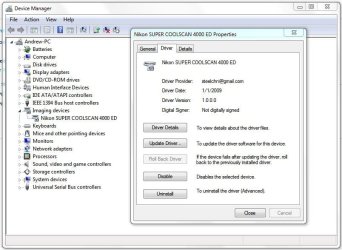
Getting your Nikon Coolscan to work on W7 x64

Why not just install Vuescan

I struggled for a few hours to follow your desc. about how to make my Coolscan V work, but with no success. (Thanks for your effort on the forum anyway.)

I managed to install the Nikon Scan 4.03 on my PC - download the scanner.inf file and looked into program files x86 where I found the Nikon folder, copied the dll, but my system just refused to accept the files in the "Nikon Files" folder as valid driver files. No idea why.

Then I installed a trial version of Vuescan and viola the scanner was recognized and worked again including with the Nikon Scan 4.03 for Vista. So I suppose the drivers from Vuescan must have done the trick.

I also vented my frustration to the Nikon support page here in Hong Kong about lack of willingness to update their drivers. Shame on Nikon.
(One more reason to do Canon Cameras)
:D
 

My Computer My Computer

At a glance

Windows 7 64 bitI7 Windows12GBATI Firepro 4600
OS
Windows 7 64 bit
CPU
I7 Windows
Motherboard
Gigabyte GA-x58A-UD3R
Memory
12GB
Graphics Card(s)
ATI Firepro 4600
Ford, Chevy, Vanilla, Chocolate, but Canon's scanners are in the same boat as Nikon's ;)
 

My Computer My Computer

At a glance

Windows 10 ProIntel Core i7-4770K (3.5Ghz)32 gig Corsair Dominator Platinum (4x8Gig)Sapphire Tri-X R9 Fury
Computer type
PC/Desktop
Computer Manufacturer/Model Number
Custom built by me.
OS
Windows 10 Pro
CPU
Intel Core i7-4770K (3.5Ghz)
Motherboard
Gigabyte G1 Sniper 5 (F10 Bios)
Memory
32 gig Corsair Dominator Platinum (4x8Gig)
Graphics Card(s)
Sapphire Tri-X R9 Fury
Sound Card
Soundblaster ZXR
Monitor(s) Displays
NEC PA242W 24" LCD Monitor
Screen Resolution
1920 x 1200
Hard Drives
Primary - Samsung 850 Pro (512gig), Samsung 840 Pro (256gig), 2TB WD Caviar Black.
PSU
EVGA Supernova 1000 G2
Case
Cooler Master HAF X
Cooling
Corsair H100i with Corsair Air Series SP120 Quiet Fans
Keyboard
Logitech Wireless Wave
Mouse
Logitech Performance MX
Internet Speed
High Speed Cable
Antivirus
Norton Security
Browser
IE11
Other Info
Memory Timings - 1866MHz @ 9-9-9-27-1T @ 1.5 volts
Hi Sygnus 21,

Just thought I would let you know that I have now got my Coolscan 4000 ED working with Nikon Scan 4. I had to disable my main HDD and install XP Professional 32-bit and then install Nikon Scan 3 on my second HDD. I then loaded the firmware again and hey presto the scanner burst into life. The PC was then rebooted with the main HDD back in place and after re-installing Nikon Scan 4 and updating the drivers in the Device Manager everything works fine.

Once again thank you again for all your replies and advice.

Regards.

Dave.
 

My Computer My Computer

At a glance

Windows 7 Ultimate x64Intel Core i7 93012gb OCZ DDR3 Triple Channel 1600mhzATI Radeon HD2600
Computer Manufacturer/Model Number
Clone
OS
Windows 7 Ultimate x64
CPU
Intel Core i7 930
Motherboard
Gigabyte GA-X58-UD5
Memory
12gb OCZ DDR3 Triple Channel 1600mhz
Graphics Card(s)
ATI Radeon HD2600
Sound Card
24-bit External Soundblaster-Live
Monitor(s) Displays
Samsung SyncMaster 2232BW
Hard Drives
Western Digital 640GB SATA3
Maxtor 160GB SATA2
4 x Buffalo 750GB Drivestation External drives
PSU
Corsair 620w Extreme
Case
Coolermaster Cosmos 1000
Cooling
Arctic Cooling Freezer 7 Pro Rev 2
I guess you're saying you had to use XP to update the firmware?

BTW I'm glad to hear you got it working now :)
 

My Computer My Computer

At a glance

Windows 10 ProIntel Core i7-4770K (3.5Ghz)32 gig Corsair Dominator Platinum (4x8Gig)Sapphire Tri-X R9 Fury
Computer type
PC/Desktop
Computer Manufacturer/Model Number
Custom built by me.
OS
Windows 10 Pro
CPU
Intel Core i7-4770K (3.5Ghz)
Motherboard
Gigabyte G1 Sniper 5 (F10 Bios)
Memory
32 gig Corsair Dominator Platinum (4x8Gig)
Graphics Card(s)
Sapphire Tri-X R9 Fury
Sound Card
Soundblaster ZXR
Monitor(s) Displays
NEC PA242W 24" LCD Monitor
Screen Resolution
1920 x 1200
Hard Drives
Primary - Samsung 850 Pro (512gig), Samsung 840 Pro (256gig), 2TB WD Caviar Black.
PSU
EVGA Supernova 1000 G2
Case
Cooler Master HAF X
Cooling
Corsair H100i with Corsair Air Series SP120 Quiet Fans
Keyboard
Logitech Wireless Wave
Mouse
Logitech Performance MX
Internet Speed
High Speed Cable
Antivirus
Norton Security
Browser
IE11
Other Info
Memory Timings - 1866MHz @ 9-9-9-27-1T @ 1.5 volts
I guess you're saying you had to use XP to update the firmware?

BTW I'm glad to hear you got it working now :)

Hi, Yes that is correct.

I am glad it is now working and can get on with scanning some of the 250,000 negatives that I have and get them stored on an external drive.

Dave.
 

My Computer My Computer

At a glance

Windows 7 Ultimate x64Intel Core i7 93012gb OCZ DDR3 Triple Channel 1600mhzATI Radeon HD2600
Computer Manufacturer/Model Number
Clone
OS
Windows 7 Ultimate x64
CPU
Intel Core i7 930
Motherboard
Gigabyte GA-X58-UD5
Memory
12gb OCZ DDR3 Triple Channel 1600mhz
Graphics Card(s)
ATI Radeon HD2600
Sound Card
24-bit External Soundblaster-Live
Monitor(s) Displays
Samsung SyncMaster 2232BW
Hard Drives
Western Digital 640GB SATA3
Maxtor 160GB SATA2
4 x Buffalo 750GB Drivestation External drives
PSU
Corsair 620w Extreme
Case
Coolermaster Cosmos 1000
Cooling
Arctic Cooling Freezer 7 Pro Rev 2

My Computer My Computer

At a glance

Windows 10 ProIntel Core i7-4770K (3.5Ghz)32 gig Corsair Dominator Platinum (4x8Gig)Sapphire Tri-X R9 Fury
Computer type
PC/Desktop
Computer Manufacturer/Model Number
Custom built by me.
OS
Windows 10 Pro
CPU
Intel Core i7-4770K (3.5Ghz)
Motherboard
Gigabyte G1 Sniper 5 (F10 Bios)
Memory
32 gig Corsair Dominator Platinum (4x8Gig)
Graphics Card(s)
Sapphire Tri-X R9 Fury
Sound Card
Soundblaster ZXR
Monitor(s) Displays
NEC PA242W 24" LCD Monitor
Screen Resolution
1920 x 1200
Hard Drives
Primary - Samsung 850 Pro (512gig), Samsung 840 Pro (256gig), 2TB WD Caviar Black.
PSU
EVGA Supernova 1000 G2
Case
Cooler Master HAF X
Cooling
Corsair H100i with Corsair Air Series SP120 Quiet Fans
Keyboard
Logitech Wireless Wave
Mouse
Logitech Performance MX
Internet Speed
High Speed Cable
Antivirus
Norton Security
Browser
IE11
Other Info
Memory Timings - 1866MHz @ 9-9-9-27-1T @ 1.5 volts
Windows 7 32 bit and Coolscan 5000

sygnus21 et al

Could not find this mentioned in the thread so just for record I went from XP to Windows 7 32 bit and did not need the new driver (or at least the device is not pointing to it).

I did put the new driver in the specified directory however when I connected the Coolscan Windows found it OK without any driver changes by me and I have completed some successful scans.

Having said that thanks for all the help. Next time I will go 64 bit.

Regards
Rick
 

My Computer My Computer

At a glance

Windows 7 32 bit
OS
Windows 7 32 bit
Hi Rick,

I'm not clear on what you're saying but from my experience Window 7 x64-bit requires the hacked drivers to work with the Nikon Scan software.

As for Windows 7 32-bit, I can't say what drivers would work as I've never used the 32-bit version of Win 7.

However.... I did use the 32-bit version of Vista and found that the only drivers that did work for the Nikon Scan software was the ones put out by Nikon for Windows Vista 32-bit. In short, the XP drivers/older Nikon Scan software would not under Vista 32 or 64-bit, nor Win 7 64-bit.

Peace.
 

My Computer My Computer

At a glance

Windows 10 ProIntel Core i7-4770K (3.5Ghz)32 gig Corsair Dominator Platinum (4x8Gig)Sapphire Tri-X R9 Fury
Computer type
PC/Desktop
Computer Manufacturer/Model Number
Custom built by me.
OS
Windows 10 Pro
CPU
Intel Core i7-4770K (3.5Ghz)
Motherboard
Gigabyte G1 Sniper 5 (F10 Bios)
Memory
32 gig Corsair Dominator Platinum (4x8Gig)
Graphics Card(s)
Sapphire Tri-X R9 Fury
Sound Card
Soundblaster ZXR
Monitor(s) Displays
NEC PA242W 24" LCD Monitor
Screen Resolution
1920 x 1200
Hard Drives
Primary - Samsung 850 Pro (512gig), Samsung 840 Pro (256gig), 2TB WD Caviar Black.
PSU
EVGA Supernova 1000 G2
Case
Cooler Master HAF X
Cooling
Corsair H100i with Corsair Air Series SP120 Quiet Fans
Keyboard
Logitech Wireless Wave
Mouse
Logitech Performance MX
Internet Speed
High Speed Cable
Antivirus
Norton Security
Browser
IE11
Other Info
Memory Timings - 1866MHz @ 9-9-9-27-1T @ 1.5 volts
Hi sygnus

Based on what I have seen here and elsewhere the hacked driver is required for 64 bit.

What I was saying was that the scanner worked with the Nikon supplied drivers when I connected the scanner and the OS was Windows 7, 32 bit. I think that you are saying the same thing. I had to download the Vista scan softare that you suggested because Windows 7 rejected the software that came with the scanner (version 4.0.2 for windows). I did not need the hacked driver for 32 bit Windows.

Having said that I would not have a working scanner if I had not found your thread.

Thanks again
Rick
 

My Computer My Computer

At a glance

Windows 7 32 bit
OS
Windows 7 32 bit
Yeah, I guess we are saying the same thing.

Thanks, I'm happy I was able to help.

Peace :cool:
 

My Computer My Computer

At a glance

Windows 10 ProIntel Core i7-4770K (3.5Ghz)32 gig Corsair Dominator Platinum (4x8Gig)Sapphire Tri-X R9 Fury
Computer type
PC/Desktop
Computer Manufacturer/Model Number
Custom built by me.
OS
Windows 10 Pro
CPU
Intel Core i7-4770K (3.5Ghz)
Motherboard
Gigabyte G1 Sniper 5 (F10 Bios)
Memory
32 gig Corsair Dominator Platinum (4x8Gig)
Graphics Card(s)
Sapphire Tri-X R9 Fury
Sound Card
Soundblaster ZXR
Monitor(s) Displays
NEC PA242W 24" LCD Monitor
Screen Resolution
1920 x 1200
Hard Drives
Primary - Samsung 850 Pro (512gig), Samsung 840 Pro (256gig), 2TB WD Caviar Black.
PSU
EVGA Supernova 1000 G2
Case
Cooler Master HAF X
Cooling
Corsair H100i with Corsair Air Series SP120 Quiet Fans
Keyboard
Logitech Wireless Wave
Mouse
Logitech Performance MX
Internet Speed
High Speed Cable
Antivirus
Norton Security
Browser
IE11
Other Info
Memory Timings - 1866MHz @ 9-9-9-27-1T @ 1.5 volts
CoolScan 9000ED Win7 x64

Followed your instructions to the letter. My new Nikon CoolScan 9000ED now works on Windows 7 x64 Professional. Many thanks. :)
 

My Computer My Computer

At a glance

Windows 7 x64 ProfessionalIntel Core 2 Quad CPU Q8200 @ 2.33GHz4.00 GBATI Radeon HD 4350
Computer Manufacturer/Model Number
Dell/Inspiron 537S
OS
Windows 7 x64 Professional
CPU
Intel Core 2 Quad CPU Q8200 @ 2.33GHz
Motherboard
Dell/Inspiron 537S
Memory
4.00 GB
Graphics Card(s)
ATI Radeon HD 4350
Sound Card
Realtek High Definition Audio
Monitor(s) Displays
1) Philips Brilliance 200 P3, 2) Dell S2409W, 3) Dell S2409W
Hard Drives
Western Digital WD5000AAKS-75V0A0 (500 GB)
Thanks. Happy to see this thread still serves a purpose.

Peace :cool:
 

My Computer My Computer

At a glance

Windows 10 ProIntel Core i7-4770K (3.5Ghz)32 gig Corsair Dominator Platinum (4x8Gig)Sapphire Tri-X R9 Fury
Computer type
PC/Desktop
Computer Manufacturer/Model Number
Custom built by me.
OS
Windows 10 Pro
CPU
Intel Core i7-4770K (3.5Ghz)
Motherboard
Gigabyte G1 Sniper 5 (F10 Bios)
Memory
32 gig Corsair Dominator Platinum (4x8Gig)
Graphics Card(s)
Sapphire Tri-X R9 Fury
Sound Card
Soundblaster ZXR
Monitor(s) Displays
NEC PA242W 24" LCD Monitor
Screen Resolution
1920 x 1200
Hard Drives
Primary - Samsung 850 Pro (512gig), Samsung 840 Pro (256gig), 2TB WD Caviar Black.
PSU
EVGA Supernova 1000 G2
Case
Cooler Master HAF X
Cooling
Corsair H100i with Corsair Air Series SP120 Quiet Fans
Keyboard
Logitech Wireless Wave
Mouse
Logitech Performance MX
Internet Speed
High Speed Cable
Antivirus
Norton Security
Browser
IE11
Other Info
Memory Timings - 1866MHz @ 9-9-9-27-1T @ 1.5 volts
Nikon Coolscan 5000 under Windows 7 64-bit

Easy solution and works perfectly. Sygnus21, thank you very much. :). Alfred
 

My Computer My Computer

At a glance

Windows 7 Pro 64 bitIntel Core 2 Quad6 GBGTX 275
OS
Windows 7 Pro 64 bit
CPU
Intel Core 2 Quad
Motherboard
Asus P5
Memory
6 GB
Graphics Card(s)
GTX 275
Monitor(s) Displays
IIyama ProLite E2403
Screen Resolution
1920 x 1200
Hard Drives
5 x WD 4TB
Thanks :)
 

My Computer My Computer

At a glance

Windows 10 ProIntel Core i7-4770K (3.5Ghz)32 gig Corsair Dominator Platinum (4x8Gig)Sapphire Tri-X R9 Fury
Computer type
PC/Desktop
Computer Manufacturer/Model Number
Custom built by me.
OS
Windows 10 Pro
CPU
Intel Core i7-4770K (3.5Ghz)
Motherboard
Gigabyte G1 Sniper 5 (F10 Bios)
Memory
32 gig Corsair Dominator Platinum (4x8Gig)
Graphics Card(s)
Sapphire Tri-X R9 Fury
Sound Card
Soundblaster ZXR
Monitor(s) Displays
NEC PA242W 24" LCD Monitor
Screen Resolution
1920 x 1200
Hard Drives
Primary - Samsung 850 Pro (512gig), Samsung 840 Pro (256gig), 2TB WD Caviar Black.
PSU
EVGA Supernova 1000 G2
Case
Cooler Master HAF X
Cooling
Corsair H100i with Corsair Air Series SP120 Quiet Fans
Keyboard
Logitech Wireless Wave
Mouse
Logitech Performance MX
Internet Speed
High Speed Cable
Antivirus
Norton Security
Browser
IE11
Other Info
Memory Timings - 1866MHz @ 9-9-9-27-1T @ 1.5 volts
Nikon LS4000 W7 64 Pro - Doesn't work

Hello Signus, I read very carrefully all your advices, and I managed to get my ls4000 nikon scanner recognised by my laptop workin with W7 pro 64, updating the driver as you said...

But, then, When I go in nikon scan 4.03, the scanner is recognized , but the buton to scan is not active(green) so I can't launch any scan...

Of course I tried several times to reinstall everything... nothing works... any idea about what to do ??

Best regards

Philippe
 

My Computer My Computer

At a glance

Windows 7 professionnal 64
OS
Windows 7 professionnal 64
It should be working; I don't understand why it's not. Sorry. Are you sure the film strip holders are fully inserted into the scanner, or that the film is being read?

Also, make sure the driver is installed...

Nikon Scan Software.JPG
 

My Computer My Computer

At a glance

Windows 10 ProIntel Core i7-4770K (3.5Ghz)32 gig Corsair Dominator Platinum (4x8Gig)Sapphire Tri-X R9 Fury
Computer type
PC/Desktop
Computer Manufacturer/Model Number
Custom built by me.
OS
Windows 10 Pro
CPU
Intel Core i7-4770K (3.5Ghz)
Motherboard
Gigabyte G1 Sniper 5 (F10 Bios)
Memory
32 gig Corsair Dominator Platinum (4x8Gig)
Graphics Card(s)
Sapphire Tri-X R9 Fury
Sound Card
Soundblaster ZXR
Monitor(s) Displays
NEC PA242W 24" LCD Monitor
Screen Resolution
1920 x 1200
Hard Drives
Primary - Samsung 850 Pro (512gig), Samsung 840 Pro (256gig), 2TB WD Caviar Black.
PSU
EVGA Supernova 1000 G2
Case
Cooler Master HAF X
Cooling
Corsair H100i with Corsair Air Series SP120 Quiet Fans
Keyboard
Logitech Wireless Wave
Mouse
Logitech Performance MX
Internet Speed
High Speed Cable
Antivirus
Norton Security
Browser
IE11
Other Info
Memory Timings - 1866MHz @ 9-9-9-27-1T @ 1.5 volts
LS4000 - nikon scan not operating

Yes, the driver is installed...

I use the automatic feeder 200, which is workin perfect on xp machine...

There the green button is just grey with W7

Should this coming from the cable which is different between the 2 machines because I use a 6pins firewire on the scanner side and mini 4 pins firewire on the laptop side... ?
 

My Computer My Computer

At a glance

Windows 7 professionnal 64
OS
Windows 7 professionnal 64
Should this coming from the cable which is different between the 2 machines because I use a 6pins firewire on the scanner side and mini 4 pins firewire on the laptop side... ?

I'm not sure what you mean, but if you're using a different cable configuration then what was designed for the scanner, than yes it could be the problem.

Other than that I don't know why the software isn't working. My setup works just fine.

Sorry.
 

My Computer My Computer

At a glance

Windows 10 ProIntel Core i7-4770K (3.5Ghz)32 gig Corsair Dominator Platinum (4x8Gig)Sapphire Tri-X R9 Fury
Computer type
PC/Desktop
Computer Manufacturer/Model Number
Custom built by me.
OS
Windows 10 Pro
CPU
Intel Core i7-4770K (3.5Ghz)
Motherboard
Gigabyte G1 Sniper 5 (F10 Bios)
Memory
32 gig Corsair Dominator Platinum (4x8Gig)
Graphics Card(s)
Sapphire Tri-X R9 Fury
Sound Card
Soundblaster ZXR
Monitor(s) Displays
NEC PA242W 24" LCD Monitor
Screen Resolution
1920 x 1200
Hard Drives
Primary - Samsung 850 Pro (512gig), Samsung 840 Pro (256gig), 2TB WD Caviar Black.
PSU
EVGA Supernova 1000 G2
Case
Cooler Master HAF X
Cooling
Corsair H100i with Corsair Air Series SP120 Quiet Fans
Keyboard
Logitech Wireless Wave
Mouse
Logitech Performance MX
Internet Speed
High Speed Cable
Antivirus
Norton Security
Browser
IE11
Other Info
Memory Timings - 1866MHz @ 9-9-9-27-1T @ 1.5 volts
It works !

Hello signus, finally I found what was going wrong : it was
 

My Computer My Computer

At a glance

Windows 7 professionnal 64
OS
Windows 7 professionnal 64
It works !

Hello signus, finally I found what was going wrong : it was just the automatic feeder sf200 which was not plug enough in the scanner, then, the software was not working ok...

Everything seems to be fine now !

Best regards and thank you very much for your help

Philippe
 

My Computer My Computer

At a glance

Windows 7 professionnal 64
OS
Windows 7 professionnal 64
Back
Top