Getting your Nikon Coolscan to work on W7 x64

Hi there
Great stuff -- but a really SIMPLE way is to run it in an XP Virtual Machine -- then the original software and drivers work 100%.

Not decrying your efforts as its GREAT WORK but just pointing out that if some people struggle to get this working then the Virtual Machine is a perfectly viable option.

Vmware player is FREE and easy to set up as is Virtual Box (I prefere vmware as I have more experience of their products).

Look on the Virtualisation section if you need more help in setting up Virtual Machines.

I wouldn't recommend XP Mode for this single application however.

You only need to define a SMALL 512MB XP virtual machine --. Once you've got the scan then use your normal Picture editing software (Photoshop etc.) on the HOST W7 x-64 machine.

Cheers
jimbo
 

My Computer My Computer

At a glance

Linux CENTOS 7 / various Windows OS'es and se...Intel i7 Intel i58GB, 16GBOn Motherboard
Computer type
PC/Desktop
Computer Manufacturer/Model Number
Custom built, several laptops HP/ASUS
OS
Linux CENTOS 7 / various Windows OS'es and servers
CPU
Intel i7 Intel i5
Memory
8GB, 16GB
Graphics Card(s)
On Motherboard
Sound Card
Realtek HD audio
Monitor(s) Displays
Apple Cinema display, Samsung LCD
Screen Resolution
1920 X 1080
Hard Drives
4 X 1TB SATA
Mouse
Toshiba wireless laser
Internet Speed
> 20MB up
Hi Jimbo,

The purpose of this post/thread is to provide simple procedures for those with Nikon's film scanners listed here to get them up and running. In this instance they are a much simpler and easier solution as opposed to setting up a virtual machine.

In short, the procedures posted here DO work for the scanners listed, therefore a Virtual Machine in this instance is not needed.

And in those rare instances where the procedures don't work (weird issues), there's always Vuescan from Hamrick, which again, doesn't require the complications of a virtual machine. VM's may be simple to you and me, but....

Most of the clients here are photographers who aren't necessarily interested in setting up virtual machines. And again, isn't needed here.

As a photographer myself as well as a computer enthusiast, I would much prefer the have my photo software in a host machine, which is why I wrote my procedures here.

Not saying what you propose wouldn’t work, I’m simply saying they are not needed here.

Thanks.
 

My Computer My Computer

At a glance

Windows 10 ProIntel Core i7-4770K (3.5Ghz)32 gig Corsair Dominator Platinum (4x8Gig)Sapphire Tri-X R9 Fury
Computer type
PC/Desktop
Computer Manufacturer/Model Number
Custom built by me.
OS
Windows 10 Pro
CPU
Intel Core i7-4770K (3.5Ghz)
Motherboard
Gigabyte G1 Sniper 5 (F10 Bios)
Memory
32 gig Corsair Dominator Platinum (4x8Gig)
Graphics Card(s)
Sapphire Tri-X R9 Fury
Sound Card
Soundblaster ZXR
Monitor(s) Displays
NEC PA242W 24" LCD Monitor
Screen Resolution
1920 x 1200
Hard Drives
Primary - Samsung 850 Pro (512gig), Samsung 840 Pro (256gig), 2TB WD Caviar Black.
PSU
EVGA Supernova 1000 G2
Case
Cooler Master HAF X
Cooling
Corsair H100i with Corsair Air Series SP120 Quiet Fans
Keyboard
Logitech Wireless Wave
Mouse
Logitech Performance MX
Internet Speed
High Speed Cable
Antivirus
Norton Security
Browser
IE11
Other Info
Memory Timings - 1866MHz @ 9-9-9-27-1T @ 1.5 volts
Hello signus, finally I found what was going wrong : it was just the automatic feeder sf200 which was not plug enough in the scanner, then, the software was not working ok...

Everything seems to be fine now !

Best regards and thank you very much for your help

Philippe

Hi Phillippe,

That's why I asked this question....

Are you sure the film strip holders are fully inserted into the scanner, or that the film is being read?

Anyways I'm happy you got it working :)

Happy scanning.

Peace :cool:
 

My Computer My Computer

At a glance

Windows 10 ProIntel Core i7-4770K (3.5Ghz)32 gig Corsair Dominator Platinum (4x8Gig)Sapphire Tri-X R9 Fury
Computer type
PC/Desktop
Computer Manufacturer/Model Number
Custom built by me.
OS
Windows 10 Pro
CPU
Intel Core i7-4770K (3.5Ghz)
Motherboard
Gigabyte G1 Sniper 5 (F10 Bios)
Memory
32 gig Corsair Dominator Platinum (4x8Gig)
Graphics Card(s)
Sapphire Tri-X R9 Fury
Sound Card
Soundblaster ZXR
Monitor(s) Displays
NEC PA242W 24" LCD Monitor
Screen Resolution
1920 x 1200
Hard Drives
Primary - Samsung 850 Pro (512gig), Samsung 840 Pro (256gig), 2TB WD Caviar Black.
PSU
EVGA Supernova 1000 G2
Case
Cooler Master HAF X
Cooling
Corsair H100i with Corsair Air Series SP120 Quiet Fans
Keyboard
Logitech Wireless Wave
Mouse
Logitech Performance MX
Internet Speed
High Speed Cable
Antivirus
Norton Security
Browser
IE11
Other Info
Memory Timings - 1866MHz @ 9-9-9-27-1T @ 1.5 volts
Hi there
I used the VM method for a Canon LIDE scanner -- The files are shared with the Host so I can use photoshop or whatever after I've scanned my image.

I like the original scanner software as it gives me all sorts of extra controls when scanning photos or especially old negatives and 35 mm slides. Vuescan doesn't offer this complexity and the scanner won't even work on VISTA let alone W7. But its still a good piece of hardware so I'm not junking it yet.

All I was suggesting that using a Virtual Machine is a perfectly feasable (and these days not difficult) process to use if you DON'T want to mess around with registry hacks etc.

(Start vmware player and the Create Virtual Machine Wizard will guide anybody through it VERY simply and painlessly).

Your method is GREAT for the Nikon scanner --not an issue but was just pointing out another alternative where apart from scanning the user might actually want to use the SCANNER SOFTWARE itself as well before starting their photo application such as Photoshop.

Some of the older scanner software also won't run on W7 either -- so I wasn't just considering the driver

Actually I love photography myself too and have even dabbled in a few Paid commission shots.

Great Pro shooters section BTW on this forum. Often computer issues come up on the forum too.
http://www.fredmiranda.com

Cheers
jimbo
 

My Computer My Computer

At a glance

Linux CENTOS 7 / various Windows OS'es and se...Intel i7 Intel i58GB, 16GBOn Motherboard
Computer type
PC/Desktop
Computer Manufacturer/Model Number
Custom built, several laptops HP/ASUS
OS
Linux CENTOS 7 / various Windows OS'es and servers
CPU
Intel i7 Intel i5
Memory
8GB, 16GB
Graphics Card(s)
On Motherboard
Sound Card
Realtek HD audio
Monitor(s) Displays
Apple Cinema display, Samsung LCD
Screen Resolution
1920 X 1080
Hard Drives
4 X 1TB SATA
Mouse
Toshiba wireless laser
Internet Speed
> 20MB up
Your method is GREAT for the Nikon scanner --not an issue but was just pointing out another alternative where apart from scanning the user might actually want to use the SCANNER SOFTWARE itself as well before starting their photo application such as Photoshop.

Some of the older scanner software also won't run on W7 either -- so I wasn't justt considering the driver.

Jimbo, while I understand where you’re coming from be aware that the procedures I posted are actually for the "Nikon Scan" software (ver 4.0.3). If you use Vuescan, the scanner will work as Vuescan has it's own driver for the scanner for all version of Win 7 & Vista.

The "Nikon" software won't work without its driver under Win 7 or Vista x64... that's the problem.

BTW have you seen any of the Nikon film scanners? They're strictly for scanning film/slides That's it. Here’s the Super Coolscan 5000ED. I have the older Super Coolscan 4000ED.

Anyways these scanners run/ran about $1000 dollars. And what’s effed up is that Nikon refuses to support Windows 7 or Vista x64!!! Thus the hacked driver.

Anyways this post was used to help write my procedures here.

I appreciate the input though.

Peace :cool:
 

My Computer My Computer

At a glance

Windows 10 ProIntel Core i7-4770K (3.5Ghz)32 gig Corsair Dominator Platinum (4x8Gig)Sapphire Tri-X R9 Fury
Computer type
PC/Desktop
Computer Manufacturer/Model Number
Custom built by me.
OS
Windows 10 Pro
CPU
Intel Core i7-4770K (3.5Ghz)
Motherboard
Gigabyte G1 Sniper 5 (F10 Bios)
Memory
32 gig Corsair Dominator Platinum (4x8Gig)
Graphics Card(s)
Sapphire Tri-X R9 Fury
Sound Card
Soundblaster ZXR
Monitor(s) Displays
NEC PA242W 24" LCD Monitor
Screen Resolution
1920 x 1200
Hard Drives
Primary - Samsung 850 Pro (512gig), Samsung 840 Pro (256gig), 2TB WD Caviar Black.
PSU
EVGA Supernova 1000 G2
Case
Cooler Master HAF X
Cooling
Corsair H100i with Corsair Air Series SP120 Quiet Fans
Keyboard
Logitech Wireless Wave
Mouse
Logitech Performance MX
Internet Speed
High Speed Cable
Antivirus
Norton Security
Browser
IE11
Other Info
Memory Timings - 1866MHz @ 9-9-9-27-1T @ 1.5 volts
Hi there
I was actually thinking about buying one of these -- a dedicated Film scanner will give much better results than a flatbed (even a decent one) and i've got literally 1000's of slides.

I'd like to digitise these before they get lost or damaged and are gone for good.

I can get a good USED model for around 150 USD so I'll go for that. Some people are ready to sling out anything even if it is 100% operational and comparable to anything currently availavble.

Strange Nikon not supporting stuff that costs around 1000 USD -- but its not just Nikon.

Canon's software is equally cludgy at times too -- These Camera manufacturers should perhaps get a few Photographers who know something about computers on board.

Thanks for the info on the film scanners.

Cheers
jimbo
 

My Computer My Computer

At a glance

Linux CENTOS 7 / various Windows OS'es and se...Intel i7 Intel i58GB, 16GBOn Motherboard
Computer type
PC/Desktop
Computer Manufacturer/Model Number
Custom built, several laptops HP/ASUS
OS
Linux CENTOS 7 / various Windows OS'es and servers
CPU
Intel i7 Intel i5
Memory
8GB, 16GB
Graphics Card(s)
On Motherboard
Sound Card
Realtek HD audio
Monitor(s) Displays
Apple Cinema display, Samsung LCD
Screen Resolution
1920 X 1080
Hard Drives
4 X 1TB SATA
Mouse
Toshiba wireless laser
Internet Speed
> 20MB up
What's even more baffling is how easy it was to produce a hacked file that allows the scanners to work under 7.

As to the originator of the hacked file, that honor goes to Steel Chn. All I did was add a line for the 5000, compile it, and host it on my website for download.

Anyways this "How To" is for all those wanting to get their very expensive piece of equipment working on a modern operating system.

In addition to the thanks I get here, I also get quite a few thank you e-mails through my website as well.

That’s good enough for me.

Peace :cool:
 

My Computer My Computer

At a glance

Windows 10 ProIntel Core i7-4770K (3.5Ghz)32 gig Corsair Dominator Platinum (4x8Gig)Sapphire Tri-X R9 Fury
Computer type
PC/Desktop
Computer Manufacturer/Model Number
Custom built by me.
OS
Windows 10 Pro
CPU
Intel Core i7-4770K (3.5Ghz)
Motherboard
Gigabyte G1 Sniper 5 (F10 Bios)
Memory
32 gig Corsair Dominator Platinum (4x8Gig)
Graphics Card(s)
Sapphire Tri-X R9 Fury
Sound Card
Soundblaster ZXR
Monitor(s) Displays
NEC PA242W 24" LCD Monitor
Screen Resolution
1920 x 1200
Hard Drives
Primary - Samsung 850 Pro (512gig), Samsung 840 Pro (256gig), 2TB WD Caviar Black.
PSU
EVGA Supernova 1000 G2
Case
Cooler Master HAF X
Cooling
Corsair H100i with Corsair Air Series SP120 Quiet Fans
Keyboard
Logitech Wireless Wave
Mouse
Logitech Performance MX
Internet Speed
High Speed Cable
Antivirus
Norton Security
Browser
IE11
Other Info
Memory Timings - 1866MHz @ 9-9-9-27-1T @ 1.5 volts
Still Having problems with coolscan 4000

Thanks for all the help on this forum. I followed the procedure on the exposed visions site. However the scanner never shows up in the Device Manager. I am using windows ultimate x64 and firewire. I have a board I installed for the firewire. The Device Manger shows the Texas Instruments 1394 to be working fine. The connections and cable are all OK. Any suggestions??
Thanks,
Kurt
 

My Computer My Computer

At a glance

Windows 7 ultimatex64
OS
Windows 7 ultimatex64

My Computer My Computer

At a glance

Windows 10 ProIntel Core i7-4770K (3.5Ghz)32 gig Corsair Dominator Platinum (4x8Gig)Sapphire Tri-X R9 Fury
Computer type
PC/Desktop
Computer Manufacturer/Model Number
Custom built by me.
OS
Windows 10 Pro
CPU
Intel Core i7-4770K (3.5Ghz)
Motherboard
Gigabyte G1 Sniper 5 (F10 Bios)
Memory
32 gig Corsair Dominator Platinum (4x8Gig)
Graphics Card(s)
Sapphire Tri-X R9 Fury
Sound Card
Soundblaster ZXR
Monitor(s) Displays
NEC PA242W 24" LCD Monitor
Screen Resolution
1920 x 1200
Hard Drives
Primary - Samsung 850 Pro (512gig), Samsung 840 Pro (256gig), 2TB WD Caviar Black.
PSU
EVGA Supernova 1000 G2
Case
Cooler Master HAF X
Cooling
Corsair H100i with Corsair Air Series SP120 Quiet Fans
Keyboard
Logitech Wireless Wave
Mouse
Logitech Performance MX
Internet Speed
High Speed Cable
Antivirus
Norton Security
Browser
IE11
Other Info
Memory Timings - 1866MHz @ 9-9-9-27-1T @ 1.5 volts
Thanks for your response. I had read those posts. The problem is I never see the device as you should in step 6. Since it is a new computer and new firewire board, I checked the 1394 Texas Instrument drivers and tried the "legacy" setting but no change. Do you think I should try to take the board out of the old computer and replace the new one? Are there any other settings on the board I should check. Everything else detailed in your steps worked fine. I have tried rebooting, turning the scanner off and on and a new cable but it is acting as if it is not connected.
Thanks again for your help. I really like the scanner and am glad you have taken the time and effort to help people with this situation.

I too have an Epson 2200 and as I understand it the update for windows 7 only works with the USB and not firewire, correct?
 

My Computer My Computer

At a glance

Windows 7 ultimatex64
OS
Windows 7 ultimatex64
Thanks for your response. I had read those posts. The problem is I never see the device as you should in step 6. Since it is a new computer and new firewire board, I checked the 1394 Texas Instrument drivers and tried the "legacy" setting but no change. Do you think I should try to take the board out of the old computer and replace the new one? Are there any other settings on the board I should check. Everything else detailed in your steps worked fine. I have tried rebooting, turning the scanner off and on and a new cable but it is acting as if it is not connected.

OK, to be clear - Do you see the Texas Instrument in device manager? If yes, and there are no yellow marks, it's all good.

As to this "The problem is I never see the device as you should in step 6." I'm not sure what you mean? This is step 6...

6- Cancel any dialogue boxes looking for drivers if they appear.

Also, what do you mean when you say you tried the lagacy setting?

I too have an Epson 2200 and as I understand it the update for windows 7 only works with the USB and not firewire, correct?

Honestly I've never used the firewire connection for the printer so I can't say. Have you actually tried it? Let me know.

Thanks.
 

My Computer My Computer

At a glance

Windows 10 ProIntel Core i7-4770K (3.5Ghz)32 gig Corsair Dominator Platinum (4x8Gig)Sapphire Tri-X R9 Fury
Computer type
PC/Desktop
Computer Manufacturer/Model Number
Custom built by me.
OS
Windows 10 Pro
CPU
Intel Core i7-4770K (3.5Ghz)
Motherboard
Gigabyte G1 Sniper 5 (F10 Bios)
Memory
32 gig Corsair Dominator Platinum (4x8Gig)
Graphics Card(s)
Sapphire Tri-X R9 Fury
Sound Card
Soundblaster ZXR
Monitor(s) Displays
NEC PA242W 24" LCD Monitor
Screen Resolution
1920 x 1200
Hard Drives
Primary - Samsung 850 Pro (512gig), Samsung 840 Pro (256gig), 2TB WD Caviar Black.
PSU
EVGA Supernova 1000 G2
Case
Cooler Master HAF X
Cooling
Corsair H100i with Corsair Air Series SP120 Quiet Fans
Keyboard
Logitech Wireless Wave
Mouse
Logitech Performance MX
Internet Speed
High Speed Cable
Antivirus
Norton Security
Browser
IE11
Other Info
Memory Timings - 1866MHz @ 9-9-9-27-1T @ 1.5 volts
Once again thanks for responding. The Device Manager shows the TI 1394 device as working fine without ayellow triangle. If I go to the Update Driver for that device there is an option to update to a "legacy"1394 protocol.
I also should have said step 7 is the one that doesn't work in that I don't see the scanner or any yellow triangles.

As far as the printer, I have used the firewire on the old XP system to connect it for years. However I do have the firewire board from the old computer that handled the scanner and the printer. I have both of those plugged into the new board runninng W7 but since the printer update seems to only apply to a USB port I can't tell if the new firewire is working with any of my previous pieces of equipment.
I hope I answered your questions.
Kurt
 

My Computer My Computer

At a glance

Windows 7 ultimatex64
OS
Windows 7 ultimatex64
OK, you don't need to do anything to the TI drivers. Those should be there if you have firewire. The drivers you need to update are the ones for the actual scanner... see image below....


Now, AFTER you install the Scan Software, reboot the system, than...

5- Power up the scanner and make sure the Firewire or USB cable is connected to the computer.

6- Cancel any dialogue boxes looking for drivers if they appear.

7- Go to Device Manager – Control Panel, Device Manager and look for the "Unknown Device" (your scanner) with the yellow triangle.

8- Right click on it and choose "Update Driver Software" then choose "Browse my computer for driver software"

9- Click "Browse" and find the location or folder where you put the scanners.inf file. Example: C:\Program Files (x86)\Nikon\NkScan4\Nikon Files and click "Next" This will/should install the driver (scanners.inf) you extracted from the zip file for your scanner.

10- That’s it – Your Nikon Scan software should now be fully functional.


Let me know
 

My Computer My Computer

At a glance

Windows 10 ProIntel Core i7-4770K (3.5Ghz)32 gig Corsair Dominator Platinum (4x8Gig)Sapphire Tri-X R9 Fury
Computer type
PC/Desktop
Computer Manufacturer/Model Number
Custom built by me.
OS
Windows 10 Pro
CPU
Intel Core i7-4770K (3.5Ghz)
Motherboard
Gigabyte G1 Sniper 5 (F10 Bios)
Memory
32 gig Corsair Dominator Platinum (4x8Gig)
Graphics Card(s)
Sapphire Tri-X R9 Fury
Sound Card
Soundblaster ZXR
Monitor(s) Displays
NEC PA242W 24" LCD Monitor
Screen Resolution
1920 x 1200
Hard Drives
Primary - Samsung 850 Pro (512gig), Samsung 840 Pro (256gig), 2TB WD Caviar Black.
PSU
EVGA Supernova 1000 G2
Case
Cooler Master HAF X
Cooling
Corsair H100i with Corsair Air Series SP120 Quiet Fans
Keyboard
Logitech Wireless Wave
Mouse
Logitech Performance MX
Internet Speed
High Speed Cable
Antivirus
Norton Security
Browser
IE11
Other Info
Memory Timings - 1866MHz @ 9-9-9-27-1T @ 1.5 volts
That is what I did however the scanner never shows up in the Device Manager. I transfered the files as instructed just fine. Without the scanner ever showing up, I can't update the scanner drivers(step 7 on). That is why I thought the firewire wasn't working since it acts as though it is not even connected.
 

My Computer My Computer

At a glance

Windows 7 ultimatex64
OS
Windows 7 ultimatex64
Uninstall the software and go through the steps again.

Actaully, before doing that, when you plug the scanner in via the firewire cable, does Windows ask for a driver?

And perhaps I missed it, but what model scanner is this???
 

My Computer My Computer

At a glance

Windows 10 ProIntel Core i7-4770K (3.5Ghz)32 gig Corsair Dominator Platinum (4x8Gig)Sapphire Tri-X R9 Fury
Computer type
PC/Desktop
Computer Manufacturer/Model Number
Custom built by me.
OS
Windows 10 Pro
CPU
Intel Core i7-4770K (3.5Ghz)
Motherboard
Gigabyte G1 Sniper 5 (F10 Bios)
Memory
32 gig Corsair Dominator Platinum (4x8Gig)
Graphics Card(s)
Sapphire Tri-X R9 Fury
Sound Card
Soundblaster ZXR
Monitor(s) Displays
NEC PA242W 24" LCD Monitor
Screen Resolution
1920 x 1200
Hard Drives
Primary - Samsung 850 Pro (512gig), Samsung 840 Pro (256gig), 2TB WD Caviar Black.
PSU
EVGA Supernova 1000 G2
Case
Cooler Master HAF X
Cooling
Corsair H100i with Corsair Air Series SP120 Quiet Fans
Keyboard
Logitech Wireless Wave
Mouse
Logitech Performance MX
Internet Speed
High Speed Cable
Antivirus
Norton Security
Browser
IE11
Other Info
Memory Timings - 1866MHz @ 9-9-9-27-1T @ 1.5 volts
OK, I'll try that. When I plug the scanner in windows doesn't change at all. It never asks for drivers or even acts like anything was plugged in. It is the 4000 model.
 

My Computer My Computer

At a glance

Windows 7 ultimatex64
OS
Windows 7 ultimatex64
OK, I'll try that. When I plug the scanner in windows doesn't change at all. It never asks for drivers or even acts like anything was plugged in. It is the 4000 model.

Are you sure the cable or firewire port is functioning? Have anything to test them?

I had another poster who had basically had the same issue and it turned out to be the scanner. Make sure things are in working order.
 

My Computer My Computer

At a glance

Windows 10 ProIntel Core i7-4770K (3.5Ghz)32 gig Corsair Dominator Platinum (4x8Gig)Sapphire Tri-X R9 Fury
Computer type
PC/Desktop
Computer Manufacturer/Model Number
Custom built by me.
OS
Windows 10 Pro
CPU
Intel Core i7-4770K (3.5Ghz)
Motherboard
Gigabyte G1 Sniper 5 (F10 Bios)
Memory
32 gig Corsair Dominator Platinum (4x8Gig)
Graphics Card(s)
Sapphire Tri-X R9 Fury
Sound Card
Soundblaster ZXR
Monitor(s) Displays
NEC PA242W 24" LCD Monitor
Screen Resolution
1920 x 1200
Hard Drives
Primary - Samsung 850 Pro (512gig), Samsung 840 Pro (256gig), 2TB WD Caviar Black.
PSU
EVGA Supernova 1000 G2
Case
Cooler Master HAF X
Cooling
Corsair H100i with Corsair Air Series SP120 Quiet Fans
Keyboard
Logitech Wireless Wave
Mouse
Logitech Performance MX
Internet Speed
High Speed Cable
Antivirus
Norton Security
Browser
IE11
Other Info
Memory Timings - 1866MHz @ 9-9-9-27-1T @ 1.5 volts
I did try the scanner back in the old computer and it works. The only other firewire peripheral I have is the printer and that doesn't work in windows 7. I'll try the unistall and if that doesn't work I'll try to put the firewire board from the old computer in the new one. I'll let you know what happens.
Thanks for your help so far.
Kurt
 

My Computer My Computer

At a glance

Windows 7 ultimatex64
OS
Windows 7 ultimatex64
I did try the scanner back in the old computer and it works. The only other firewire peripheral I have is the printer and that doesn't work in windows 7.

Uh... if your firewire peripherals aren't working in Windows 7, you have either a bad port or drivers for your peripherals need updating.

Firewire ports should be working just as well as your USB ports.

Can you post a screen shot of your device manager?

Thanks.

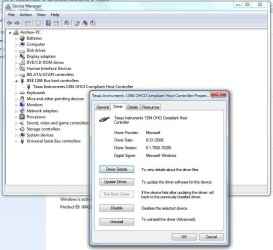
Here’s my 1394 firewire info under device manager…

1394 Firewire driver.JPG

As you can see It's working just fine.
 

My Computer My Computer

At a glance

Windows 10 ProIntel Core i7-4770K (3.5Ghz)32 gig Corsair Dominator Platinum (4x8Gig)Sapphire Tri-X R9 Fury
Computer type
PC/Desktop
Computer Manufacturer/Model Number
Custom built by me.
OS
Windows 10 Pro
CPU
Intel Core i7-4770K (3.5Ghz)
Motherboard
Gigabyte G1 Sniper 5 (F10 Bios)
Memory
32 gig Corsair Dominator Platinum (4x8Gig)
Graphics Card(s)
Sapphire Tri-X R9 Fury
Sound Card
Soundblaster ZXR
Monitor(s) Displays
NEC PA242W 24" LCD Monitor
Screen Resolution
1920 x 1200
Hard Drives
Primary - Samsung 850 Pro (512gig), Samsung 840 Pro (256gig), 2TB WD Caviar Black.
PSU
EVGA Supernova 1000 G2
Case
Cooler Master HAF X
Cooling
Corsair H100i with Corsair Air Series SP120 Quiet Fans
Keyboard
Logitech Wireless Wave
Mouse
Logitech Performance MX
Internet Speed
High Speed Cable
Antivirus
Norton Security
Browser
IE11
Other Info
Memory Timings - 1866MHz @ 9-9-9-27-1T @ 1.5 volts
I figured it out!! When I was looking in the device manager at the firewire port (with no errors) it was showing the one port that came preinstalled on the computer. Since I needed two ports(the Nikon and the Epson) I installed a PCI card with three firewire ports. The problem was that the device manager was not showing that card and in fact that card wasn't working. When I plugged the Nikon scanner into the original single port, everything worked as you described. I am changing the Epson to USB so I will only need the one firewire port for the scanner.
Thank you so much for your help and enabling all of us to use our scanners!
:D
Kurt
 

My Computer My Computer

At a glance

Windows 7 ultimatex64
OS
Windows 7 ultimatex64
Back
Top