\gl2br.mbr and \ubuntu\winboot\wubildr.mbr

Sanzen

New member
Local time
4:37 PM
Messages
6
I tried installing debian awhile back and it failed.
Got the following error upon trying to boot.
\gl2br.mbr
status: 0xc0000098
yARmPun.jpg
I reinstalled Windows and my drivers and left it alone for awhile.

I tried installing ubuntu alongside windows. The desktop version so to speak and got the following error upon booting.
\ubuntu\winboot\wubildr.mbr
status: 0xc0000098
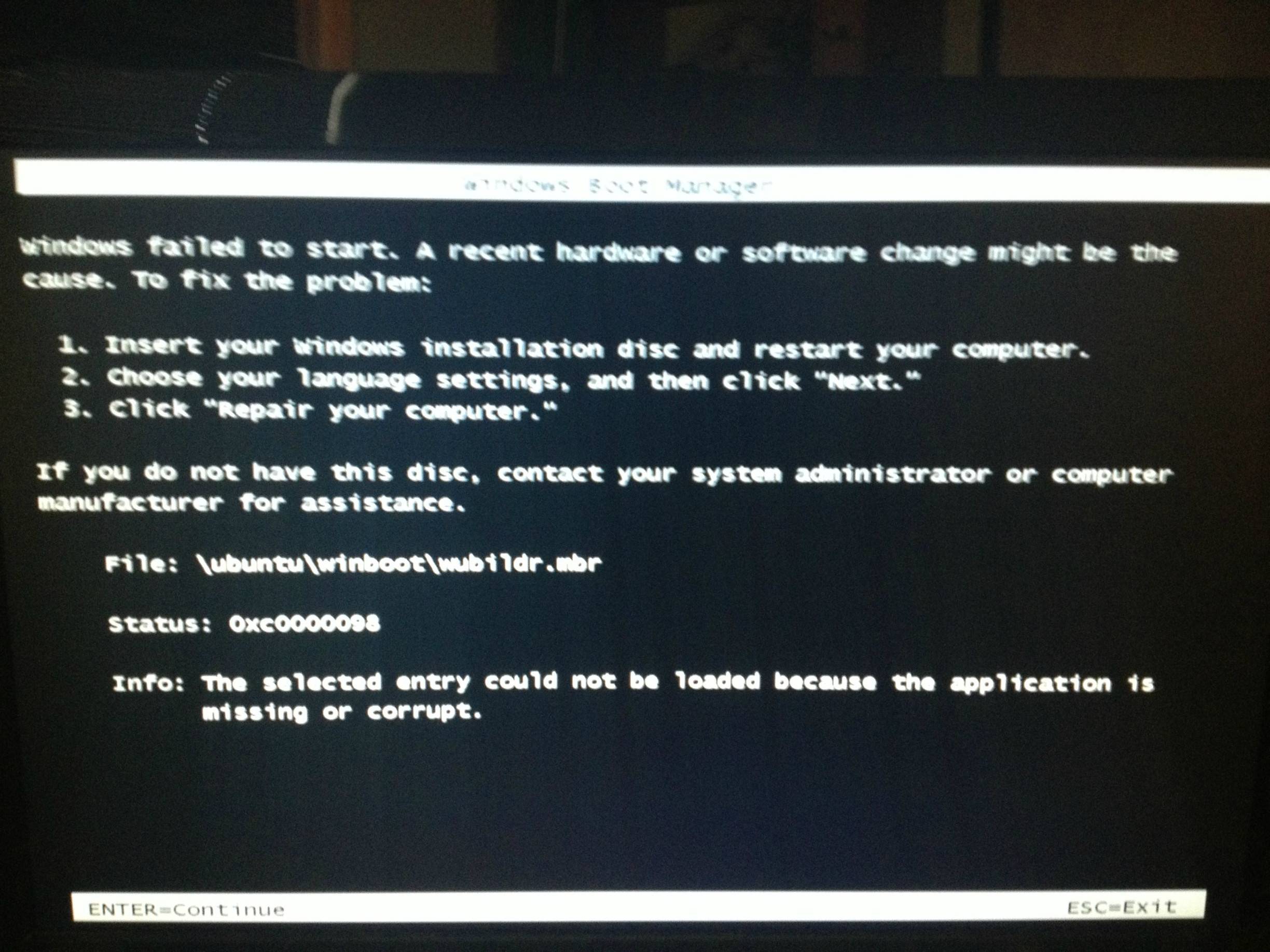
KLxAv8P.jpg

So obvioulsy the key to all this is status: 0xc0000098 but windows still works fine.
Can someone please explain to me why this is happening?
I know how to repair windows and thats not what I am asking.
I am asking why this is happening and is there a way to stop it from happening so I can put linux on my laptop.


Asus N56Z
Win7 Ultimate 64bit
Version 6.1.7601 Service Pack 1 Build 7601
Processor: Intel(R) Core(TM) i7-3740QM CPU @ 2.70GHz, 2701 Mhz, 4 Core(s), 8 Logical Processor(s)
BIOS Version/Date: American Megatrends Inc. N56VZ.204, 5/11/2012
Boot Device \Device\HarddiskVolume1
Ram: 16gbs
 

My Computer My Computer

At a glance

Windows 7 Ultimate x64Intel Core i7-3740QM @ 2.70 GHz16gbNVUDIA GeForce GT 650M
Computer Manufacturer/Model Number
ASUS N56Z
OS
Windows 7 Ultimate x64
CPU
Intel Core i7-3740QM @ 2.70 GHz
Memory
16gb
Graphics Card(s)
NVUDIA GeForce GT 650M
Screen Resolution
1920x1080
Hard Drives
500gb at 7200rpm
500gb Seagate External
Mouse
Logitech MX Performance
Well.. if you want support for linux... then.. Go to forums that give support for their distro's?
 

My Computer My Computer

At a glance

Windows 7 professional X64AMD A10-5800K OC@ 4.4Ghz.8GB Kingston HyperX Blu 1333mhzXFX HD7870 2GB Core Edition
Computer type
PC/Desktop
OS
Windows 7 professional X64
CPU
AMD A10-5800K OC@ 4.4Ghz.
Motherboard
Gigabyte F2A85X-UP4
Memory
8GB Kingston HyperX Blu 1333mhz
Graphics Card(s)
XFX HD7870 2GB Core Edition
Monitor(s) Displays
Acer AL2216W
Screen Resolution
1680x1050
Hard Drives
Seagate Barracuda 500gb 7200rpm
Seagate Barracuda 1.5TB 7200rpm
PSU
Cooler Master Silent Pro M 850W
Case
Thermaltake Commander MS-I
Cooling
Cooler Master N520
Mouse
Logitech M504
Internet Speed
10Mbps
Well.. if you want support for linux... then.. Go to forums that give support for their distro's?
Well considering the files are .mbr and it boots to "windows boot manager" I would have to say its a problem with windows. Hence the reason I posted here.
Thanks for all the help though Erick.
 

My Computer My Computer

At a glance

Windows 7 Ultimate x64Intel Core i7-3740QM @ 2.70 GHz16gbNVUDIA GeForce GT 650M
Computer Manufacturer/Model Number
ASUS N56Z
OS
Windows 7 Ultimate x64
CPU
Intel Core i7-3740QM @ 2.70 GHz
Memory
16gb
Graphics Card(s)
NVUDIA GeForce GT 650M
Screen Resolution
1920x1080
Hard Drives
500gb at 7200rpm
500gb Seagate External
Mouse
Logitech MX Performance
2 Options

I see 2 options. :(

Option 1 ("Nuke the site from orbit")

  1. Clean all of the partitions off of your HDD and repartition.
  2. Pre-partition and format your HDD using GParted (from the Live Ubuntu CD).
  3. Next install the Windows operating system(s) (starting with the oldest version first: XP > W7). Don't let Windows reformat your partitions.
  4. Finally install Linux.
That method has always worked for me. :)

Option 2
If you want to try to fix the error, you'll have to wait for one of the HDD experts to drop by this thread.

They'll want to see a screenshot of your "Disk Management" window.
Can you post a screenshot of the maximised "Disk Management" window?
 

My Computer My Computer

At a glance

W7 Ultimate SP1, LM19.2 MATE, W10 Home 1703, ...AMD Phenom II x6 1100T, 3.3 GHz12GB DDR3 1333 G-Skill (4GB x 2), G-Skill (2G...NVIDIA GeForce GTX 660
Computer type
PC/Desktop
Computer Manufacturer/Model Number
n/a
OS
W7 Ultimate SP1, LM19.2 MATE, W10 Home 1703, W10 Pro 1703 VM, #All 64 bit
CPU
AMD Phenom II x6 1100T, 3.3 GHz
Motherboard
ASUS M4A88T-M/USB3 (AM3)
Memory
12GB DDR3 1333 G-Skill (4GB x 2), G-Skill (2GB x 2)
Graphics Card(s)
NVIDIA GeForce GTX 660
Sound Card
Realtek?
Monitor(s) Displays
Samsung S23B350
Screen Resolution
1920x1080
Hard Drives
WD Green 2TB (SATA), WD Green 3TB (SATA), WD Blue 4TB (SATA), WD Blue 6TB (SATA)
PSU
Cooler Master
Case
Antec GX300 Tower
Cooling
3x Antec TRICOOL 120mm Fans
Mouse
Wired Optical
Internet Speed
DSL
Antivirus
Avast
Browser
Pale Moon (64 bit)
Other Info
2018-12-27 Upgraded HDDs
2015-12-10 Upgraded case, graphics card, storage
2015-08-15 Upgraded motherboard & RAM
2015-07-15 Upgraded LM17.1 to LM17.2
I see 2 options. :(

Option 1 ("Nuke the site from orbit")

  1. Clean all of the partitions off of your HDD and repartition.
  2. Pre-partition and format your HDD using GParted (from the Live Ubuntu CD).
  3. Next install the Windows operating system(s) (starting with the oldest version first: XP > W7). Don't let Windows reformat your partitions.
  4. Finally install Linux.
That method has always worked for me. :)

Option 2
If you want to try to fix the error, you'll have to wait for one of the HDD experts to drop by this thread.

They'll want to see a screenshot of your "Disk Management" window.
Can you post a screenshot of the maximised "Disk Management" window?

Option 1 sounds quite complicated for me at least and I need it for school most days.

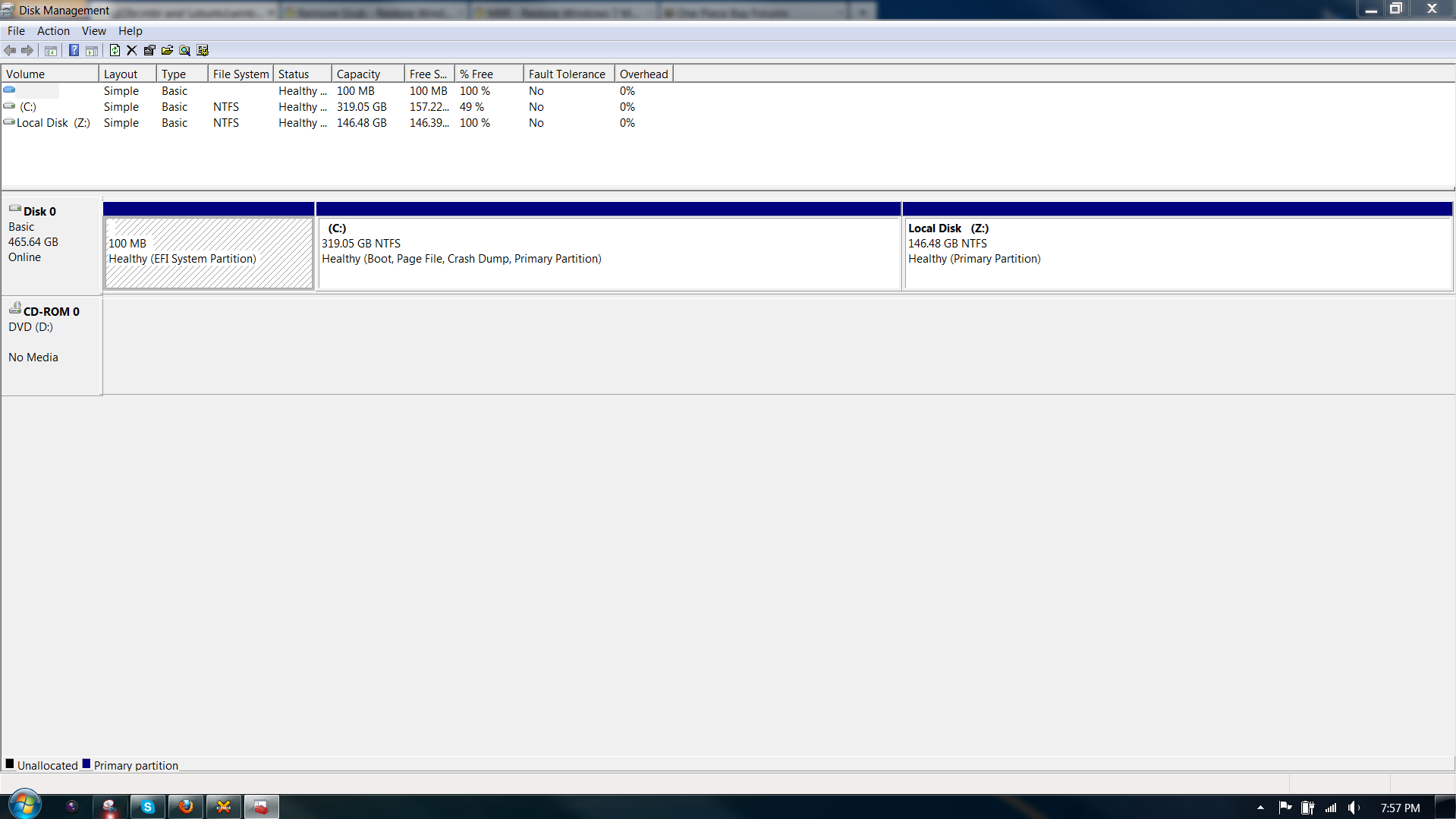
Option 2 hope this is what you meant.
a2Qe2X5.png
 

My Computer My Computer

At a glance

Windows 7 Ultimate x64Intel Core i7-3740QM @ 2.70 GHz16gbNVUDIA GeForce GT 650M
Computer Manufacturer/Model Number
ASUS N56Z
OS
Windows 7 Ultimate x64
CPU
Intel Core i7-3740QM @ 2.70 GHz
Memory
16gb
Graphics Card(s)
NVUDIA GeForce GT 650M
Screen Resolution
1920x1080
Hard Drives
500gb at 7200rpm
500gb Seagate External
Mouse
Logitech MX Performance
I see 2 options. :(

Option 1 ("Nuke the site from orbit")

  1. Clean all of the partitions off of your HDD and repartition.
  2. Pre-partition and format your HDD using GParted (from the Live Ubuntu CD).
  3. Next install the Windows operating system(s) (starting with the oldest version first: XP > W7). Don't let Windows reformat your partitions.
  4. Finally install Linux.
That method has always worked for me. :)

Option 2
If you want to try to fix the error, you'll have to wait for one of the HDD experts to drop by this thread.

They'll want to see a screenshot of your "Disk Management" window.
Can you post a screenshot of the maximised "Disk Management" window?

Option 1 sounds quite complicated for me at least and I need it for school most days.

It's easier than it sounds, however you will need a Windows Install DVD.

The hardest part is guessing how much space to allocate to the partitions.
That is obviously dependent on how much space you need for programs, games and user files.

Option 2 hope this is what you meant.
a2Qe2X5.png

That is exactly what they will want to see. :)

It also provides more circumstantial evidence for my personal theory.
In the posts I've read (I haven't read every post) where there have been problems dual booting Linux and Windows, the "System Reserved" partition has been present on the poster's HDD.

gregrocker knows how to fix this sort of problem.
 

My Computer My Computer

At a glance

W7 Ultimate SP1, LM19.2 MATE, W10 Home 1703, ...AMD Phenom II x6 1100T, 3.3 GHz12GB DDR3 1333 G-Skill (4GB x 2), G-Skill (2G...NVIDIA GeForce GTX 660
Computer type
PC/Desktop
Computer Manufacturer/Model Number
n/a
OS
W7 Ultimate SP1, LM19.2 MATE, W10 Home 1703, W10 Pro 1703 VM, #All 64 bit
CPU
AMD Phenom II x6 1100T, 3.3 GHz
Motherboard
ASUS M4A88T-M/USB3 (AM3)
Memory
12GB DDR3 1333 G-Skill (4GB x 2), G-Skill (2GB x 2)
Graphics Card(s)
NVIDIA GeForce GTX 660
Sound Card
Realtek?
Monitor(s) Displays
Samsung S23B350
Screen Resolution
1920x1080
Hard Drives
WD Green 2TB (SATA), WD Green 3TB (SATA), WD Blue 4TB (SATA), WD Blue 6TB (SATA)
PSU
Cooler Master
Case
Antec GX300 Tower
Cooling
3x Antec TRICOOL 120mm Fans
Mouse
Wired Optical
Internet Speed
DSL
Antivirus
Avast
Browser
Pale Moon (64 bit)
Other Info
2018-12-27 Upgraded HDDs
2015-12-10 Upgraded case, graphics card, storage
2015-08-15 Upgraded motherboard & RAM
2015-07-15 Upgraded LM17.1 to LM17.2
Thanks, any chance you could link him to the thread? I can't pm or vm him since I am so new.
I would greatly appreciate it.

I have forgotten how to use vBulletin 3.8.
Been using the 4.x series for so long now. lol
 

My Computer My Computer

At a glance

Windows 7 Ultimate x64Intel Core i7-3740QM @ 2.70 GHz16gbNVUDIA GeForce GT 650M
Computer Manufacturer/Model Number
ASUS N56Z
OS
Windows 7 Ultimate x64
CPU
Intel Core i7-3740QM @ 2.70 GHz
Memory
16gb
Graphics Card(s)
NVUDIA GeForce GT 650M
Screen Resolution
1920x1080
Hard Drives
500gb at 7200rpm
500gb Seagate External
Mouse
Logitech MX Performance
Did you follow special steps to install Linux to an EFI BIOS? These are only coming online full stream now and each is different, so it can be complicated.

To attempt to repair Win7, boot into Win7 installation DVD in UEFI mode to run Startup Repair as shown in UEFI (Unified Extensible Firmware Interface) - Install Windows 7 with - Windows 7 Forums.

If you cannot repair Win7 and still want the dual boot what I would do is is Bypass UEFI to Install WIn7 to an MBR disk and then Dual Boot - Windows 7 and Linux - Windows 7 Forums.

If you want to reinstall Win7 in EFI mode because it won't repair then follow the steps to reinstall in UEFI (Unified Extensible Firmware Interface) - Install Windows 7 with - Windows 7 Forums
 
Did you follow special steps to install Linux to an EFI BIOS? These are only coming online full stream now and each is different, so it can be complicated.

To attempt to repair Win7, boot into Win7 installation DVD in UEFI mode to run Startup Repair as shown in UEFI (Unified Extensible Firmware Interface) - Install Windows 7 with - Windows 7 Forums.

If you cannot repair Win7 and still want the dual boot what I would do is is Bypass UEFI to Install WIn7 to an MBR disk and then Dual Boot - Windows 7 and Linux - Windows 7 Forums.

If you want to reinstall Win7 in EFI mode because it won't repair then follow the steps to reinstall in UEFI (Unified Extensible Firmware Interface) - Install Windows 7 with - Windows 7 Forums

I did not follow special steps.
I don't know what the difference between an EFI bios and a regular bios is.

Is there a way to get a different bios than EFI?
 

My Computer My Computer

At a glance

Windows 7 Ultimate x64Intel Core i7-3740QM @ 2.70 GHz16gbNVUDIA GeForce GT 650M
Computer Manufacturer/Model Number
ASUS N56Z
OS
Windows 7 Ultimate x64
CPU
Intel Core i7-3740QM @ 2.70 GHz
Memory
16gb
Graphics Card(s)
NVUDIA GeForce GT 650M
Screen Resolution
1920x1080
Hard Drives
500gb at 7200rpm
500gb Seagate External
Mouse
Logitech MX Performance
EFI is the future, it's replacing BIOS on all mobos. You needed to understand it before installing Linux, and now you need to understand it to repair your Win7, reinstall in UEFI mode, or abandon UEFI to reinstall Win7 normally.

First watch this video to understand EFI BIOS:


Then look over the tutorials offering you repair, reinstall and Dual Boot choices in my last post and ask back any questions you have.

Many have done this and decided to Bypass UEFI to Install WIn7 so you can do that if it's not something you want to deal with yet and can't repair Win7 in UEFI mode.
 
EFI is the future, it's replacing BIOS on all mobos.

First watch this video to understand EFI BIOS:


Then look over the tutorials offering you repair, reinstall and Dual Boot choices in my last post and ask back any questions you have.

Thank you
 

My Computer My Computer

At a glance

Windows 7 Ultimate x64Intel Core i7-3740QM @ 2.70 GHz16gbNVUDIA GeForce GT 650M
Computer Manufacturer/Model Number
ASUS N56Z
OS
Windows 7 Ultimate x64
CPU
Intel Core i7-3740QM @ 2.70 GHz
Memory
16gb
Graphics Card(s)
NVUDIA GeForce GT 650M
Screen Resolution
1920x1080
Hard Drives
500gb at 7200rpm
500gb Seagate External
Mouse
Logitech MX Performance
Back
Top