
Google Chrome doesn't work anymore ...

kittleboy

New member
Local time
5:29 AM
Messages
65
Location
Temporarily India - But not Indian
Hello my friends,
One day, suddenly,
when i opened the chrome, it didn't open any web page;
And i almost waited for 5 minutes.. nothing
 

My Computer

Computer Manufacturer/Model Number
What is this, I chose every part myself
OS
7 Ultimate 32Bit
Graphics Card(s)
Onboard :(( - I love games
Hard Drives
I think 160GB
Keyboard
Microsoft
Mouse
Microsoft
Internet Speed
384kbps - Download Speed around 40kbps
Does IE work?
 

My Computer

OS
Windows 7
CPU
i5-750
Motherboard
Asus
Memory
4GB DDR3 1600
Graphics Card(s)
GT220
Try uninstalling it and installing it again. You wont lose your browsing data if you choose to not remove it during un-installation.

Also were you using a Beta or Dev version, or were you using the 'Stable' version?
 

My Computer

Computer Manufacturer/Model Number
Custom | Whitebox
OS
Windows 7 Ultimate, OS X 10.7, Ubuntu 11.04
CPU
Intel E6750 @ 3.80GHz
Motherboard
Gigabyte GA-EP45-UD3L (Revision 1.1)
Memory
2x2GB & 2x1GB (6GB) OCZ Reaper 1066MHz @ 1080MHz
Graphics Card(s)
EVGA nVidia GTX 260 896mb (216 Core) FTW Edition
Sound Card
Realtek ALC888
Monitor(s) Displays
21" VIZIO TV
Screen Resolution
1680x1050 @ 60Hz
Hard Drives
Western Digital WD6401AALS - 640GB
Hitachi HDP725016GLA380 - 160GB
PSU
Corsair 750W
Case
NZXT Nemesis Elite
Cooling
Thermaltake SpinQ
Keyboard
Logitech Wireless S520
Mouse
Logitech Wireless S520 - Microsoft Wireless Arc Mouse
Internet Speed
Download: 20mbps, Upload: 3mbps
Yes, IE works, Mozilla works.
I uninstalled and re-install it again and tried both beta and stable version;
but it doesn't work....
 

My Computer

Computer Manufacturer/Model Number
What is this, I chose every part myself
OS
7 Ultimate 32Bit
Graphics Card(s)
Onboard :(( - I love games
Hard Drives
I think 160GB
Keyboard
Microsoft
Mouse
Microsoft
Internet Speed
384kbps - Download Speed around 40kbps
Very strange. Try uninstalling, rebooting. Then manually deleting all the Chrome files from Program Files and from your profile. Then reboot again, then try reinstalling. I'm guessing something is corrupt and not uninstalling.
 

My Computer

OS
Windows 7
CPU
i5-750
Motherboard
Asus
Memory
4GB DDR3 1600
Graphics Card(s)
GT220
I'd say uninstall it and everything else you get the option too.

Go to folder options and show all then C:\Users\username\AppData\Local and delete the google folder.

If you have ccleaner or any other utility that scans registery leftovers run it.

Start again with fresh install of chrome.

You will lose any bookmarks etc but I suppose it's better than losing chrome.
 

My Computer

Computer Manufacturer/Model Number
Custom Build.
OS
Windows 7 Ultimate x64.
CPU
i5 760 @ 4.2Ghz. 1.18v
Motherboard
Gigabyte - H55M-USB3
Memory
4g Corsair xms3 ddr3, 1600Mhz.
Graphics Card(s)
Gigabyte GTX-560Ti soc edition
Sound Card
Asus Xonar Dx - Logitech Z5500.
Monitor(s) Displays
Acer 22" LCD Wide screen 1680-1050 -Samsung 42" Plasma....
Screen Resolution
1680/1050 -----1920/1080p.
Hard Drives
2x 2TB Seagate Go Flex,
1x 1TB Seagate,
1x 640WD Black,
x16 Gig sandisc flash drive,
1x8Gig sandisc flash drive.
PSU
XigmaTek 80plus NRP-PC702 - 700w dual 30a.
Case
Venus Gamers Midi Tower Case with LED Display
Cooling
Arctic Freezer 7 Pro Rev 2... x2 Arctic F8 case fans........
Keyboard
Logitech G15-v2 Gaming.
Mouse
Microsoft Sidewinder X8.
Internet Speed
Virgin Media - 50mb down- 8mb up.
Other Info
x2 Xbox 360 wireless controllers...

Dual layer optical disc drive...

Chrome 79million

A.V = MSE
I'd say uninstall it and everything else you get the option too.

Go to folder options and show all then C:\Users\username\AppData\Local and delete the google folder.

If you have ccleaner or any other utility that scans registery leftovers run it.

Start again with fresh install of chrome.

You will lose any bookmarks etc but I suppose it's better than losing chrome.

Ok, I did all
even clean my registry with Tuneup Utility latest version, restart, instal latest version of chrome from google website... and guess what

IT IS STILL NOT WORKING :huh:
 

My Computer

Computer Manufacturer/Model Number
What is this, I chose every part myself
OS
7 Ultimate 32Bit
Graphics Card(s)
Onboard :(( - I love games
Hard Drives
I think 160GB
Keyboard
Microsoft
Mouse
Microsoft
Internet Speed
384kbps - Download Speed around 40kbps
Try this, create a new account. Login with that account and see if it works. If it works on the other account then yor profile is corrupt.
 

My Computer

OS
Windows 7
CPU
i5-750
Motherboard
Asus
Memory
4GB DDR3 1600
Graphics Card(s)
GT220
Try this, create a new account. Login with that account and see if it works. If it works on the other account then yor profile is corrupt.

Didn't work :huh:
 

My Computer

Computer Manufacturer/Model Number
What is this, I chose every part myself
OS
7 Ultimate 32Bit
Graphics Card(s)
Onboard :(( - I love games
Hard Drives
I think 160GB
Keyboard
Microsoft
Mouse
Microsoft
Internet Speed
384kbps - Download Speed around 40kbps
Well well well,
I don't know why, but I just updated my windows, and it is working now
 

My Computer

Computer Manufacturer/Model Number
What is this, I chose every part myself
OS
7 Ultimate 32Bit
Graphics Card(s)
Onboard :(( - I love games
Hard Drives
I think 160GB
Keyboard
Microsoft
Mouse
Microsoft
Internet Speed
384kbps - Download Speed around 40kbps
Good to hear, had me stumped. Haven't had any issues with Chrome other than certain websites (i.e. Technet)
 

My Computer

OS
Windows 7
CPU
i5-750
Motherboard
Asus
Memory
4GB DDR3 1600
Graphics Card(s)
GT220
Seem's to have been mysterious but as long as you got it sorted.
 

My Computer

Computer Manufacturer/Model Number
Custom Build.
OS
Windows 7 Ultimate x64.
CPU
i5 760 @ 4.2Ghz. 1.18v
Motherboard
Gigabyte - H55M-USB3
Memory
4g Corsair xms3 ddr3, 1600Mhz.
Graphics Card(s)
Gigabyte GTX-560Ti soc edition
Sound Card
Asus Xonar Dx - Logitech Z5500.
Monitor(s) Displays
Acer 22" LCD Wide screen 1680-1050 -Samsung 42" Plasma....
Screen Resolution
1680/1050 -----1920/1080p.
Hard Drives
2x 2TB Seagate Go Flex,
1x 1TB Seagate,
1x 640WD Black,
x16 Gig sandisc flash drive,
1x8Gig sandisc flash drive.
PSU
XigmaTek 80plus NRP-PC702 - 700w dual 30a.
Case
Venus Gamers Midi Tower Case with LED Display
Cooling
Arctic Freezer 7 Pro Rev 2... x2 Arctic F8 case fans........
Keyboard
Logitech G15-v2 Gaming.
Mouse
Microsoft Sidewinder X8.
Internet Speed
Virgin Media - 50mb down- 8mb up.
Other Info
x2 Xbox 360 wireless controllers...

Dual layer optical disc drive...

Chrome 79million

A.V = MSE
Thanks a lot my friends.
 

My Computer

Computer Manufacturer/Model Number
What is this, I chose every part myself
OS
7 Ultimate 32Bit
Graphics Card(s)
Onboard :(( - I love games
Hard Drives
I think 160GB
Keyboard
Microsoft
Mouse
Microsoft
Internet Speed
384kbps - Download Speed around 40kbps
But now, There's another problem, I can't fix the silverlight,
I have installed silverlight several times, but chrome seems that doesn't recognize it at all, every time that i go to microsoft website ( it is written download the silverlight and experience better ... )
WHY?!
it say's it is installed well, and other browsers work well too, IE and Mozilla
 

My Computer

Computer Manufacturer/Model Number
What is this, I chose every part myself
OS
7 Ultimate 32Bit
Graphics Card(s)
Onboard :(( - I love games
Hard Drives
I think 160GB
Keyboard
Microsoft
Mouse
Microsoft
Internet Speed
384kbps - Download Speed around 40kbps
hi i too was facing the same problem as above user but after deleting the google chorm and realated folder from the users\app \local data im able to install fresh copy of chorme thanks it helped me alot
 

My Computer

OS
windows 7 32bit
I have been experiencing the same problem till yesterday, and at last I've solved it. I can use Chrome now.

Right Click to Google Chrome exe file, select Properties. In the opened window select Compatibility column, Set Compatibility Mode to Windows 7. Mine was set to Windows XP SP2, that was the problem...

Regards,

Ekrem Polat
 

My Computer

OS
Windows 7 x64
how do you update windows? Probably a stupid question
Welcome to the Seven Forums.
There are no stupid questions.
Feel free to ask anything.

The Windows Update process normally happens without you having to do anything. Most of these updates fix security flaws in the Windows Operating System... so it is important that they get installed.

In the video below, I show what you might see if you happen to be on a computer that has never checked for these updates. Hopefully, you will not see the same screens. Hopefully, updates were not turned off on your computer. The video shows how to get to the screen that checks for updates. Once that window comes up, you may need to click in the link in the upper left hand corner named "Check for updates". After the Windows Update process completes a scan of your computer to see what (if any) updates are needed, if you see a button named "Install Updates" - please click on the button and let the process do its thing :-)


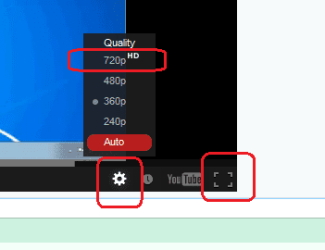
Once you click play on the video above, click on:
...the little gear
...then 720p HD
...then the square in the lower right

full-screen.png
 

My Computer

Computer type
Laptop
Computer Manufacturer/Model Number
Employer provided Dell Latitude
OS
W7 Pro SP1 64bit
CPU
i7
Memory
8GB
Graphics Card(s)
Intel HD Graphics
Hard Drives
crappy SSD
Antivirus
Employer mandated Symantec Endpoint Protection
Browser
Pale Moon 64bit, IE11 64bit & Chrome 64bit
Back
Top