GPU high heat

Frikster

New member
Member
VIP
Local time
11:15 AM
Messages
135
Location
Macedonia
Hi.
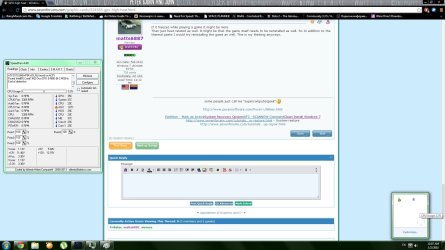
So recently i noticed i am having this issue WAY too much and that is games freezing, lagging, delaying etc.
So today i decided to download speedfan and play a game and see what happens.Had to make sure GPU is the graphics card .
I attached an image of the heat list that is current.
My system spec are on my profile.
Is this bad, how bad and what can i do to reduce the problem / fix the issue.
Thank you very much !
edit:
maybe the problem can be in something else. The pc is 3 years old from december
 

Attachments
  • Image 1.jpg
    Image 1.jpg
    181.4 KB · Views: 19

My Computer

Computer type
PC/Desktop
OS
Windows 7 64bit
CPU
i5 6600 3.3 GHz
Motherboard
ASUS B150M-A
Memory
16gb HyperX Fury 2x8gb
Graphics Card(s)
Gigabyte G1 Gaming 1060
Monitor(s) Displays
Samsung SyncMaster B2330HD
Screen Resolution
1920 x 1080
Hard Drives
1tb Toshiba
PSU
Corsair builder VS550
Case
SAMA Assasin
Cooling
Stock
Keyboard
A4Tech KB-28G
Mouse
X7 X-710BK
Internet Speed
99 Mbps
Antivirus
Malwarebytes
Browser
Chrome
Other Info
Nothing at the moment
Eh; where is the image? there is no image shown in this thread? Also; does your gpu/graphics card have a fan on it? If so, I might want to take a few moments and blow the dust off the fan blades not just for the graphics card; but for the rest of the system as well. Also, check in your bios to see if there is a setting(s) to able you to change the speed of the graphics card fan if it has a fan. Yes it can be bad if the card overheats too often as heat, dust, and dirt, are a computer compoent's enemy because they inhibit the proper operation of the fans etc.
 

My Computer

Computer type
PC/Desktop
Computer Manufacturer/Model Number
custom built
OS
Windows 7 ultimate 64-bit
CPU
Intel I7 2600K 3.4ghz
Motherboard
Asus Evo P8P67
Memory
Corsair 16gb ddr3 1600mhz
Graphics Card(s)
Nvidia Geforce gt 430
Sound Card
Sound Blaster Titanium x-fi pci express
Monitor(s) Displays
Dell E198WFP
Hard Drives
1 western digital 2TB drive.
PSU
Antec 1200 watt
Case
Inwin Dragon Rider
Cooling
6 case supplied cooling fans
Keyboard
logitech mk700
Mouse
logitech m705
Internet Speed
25-50mbps download; 10mbps upload(i think)
Antivirus
avg free 2014
Browser
mozilla firefox
Other Info
Also have a pretty bad speaker setup which is a klipsch promedia 5.1 surround speaker setup with huge subwoofer and lg blu ray player/writer. Also a hp officejet pro 8600 plus wireless all in one and a logitech s7500 webcam.
Which games are you trying to play? What settings?
 

My Computer

Computer type
Laptop
Computer Manufacturer/Model Number
Packard Bell
OS
Windows 7 Home Premium 64Bit
CPU
AMD A6-3420M 1.5GHZ OC - 2.0GHZ
Memory
4GB DDR3 1600MHZ
Graphics Card(s)
AMD RADEON 6520G+AMD RADEON HD7470M 1GB DDR3
Screen Resolution
1366x768
Hard Drives
500GB SATA
Internet Speed
18Mb Unlimited
Antivirus
AVAST!
Browser
MOZILLA FIREFOX
Hi.
So recently i noticed i am having this issue WAY too much and that is games freezing, lagging, delaying etc.
So today i decided to download speedfan and play a game and see what happens.Had to make sure GPU is the graphics card .
I attached an image of the heat list that is current.
My system spec are on my profile.
Is this bad, how bad and what can i do to reduce the problem / fix the issue.
Thank you very much !
edit:
maybe the problem can be in something else. The pc is 3 years old from december

PC might be 3 years old but that Video card isn't ,Bottom line that card is at least 6 Years old and my hunch would be the TIM or Thermal paste has simply quit doing the job that and Gpu fan is clogged up those are the only factors for a heating up GPU unless it is out of control heat and shoots up so high it shuts down

In your case you might need to reapply paste and clean the card and fans
 

My Computer

Computer type
PC/Desktop
Computer Manufacturer/Model Number
CoreI7-6700K MrFingerIII Special Builds
OS
Windows 10 Home Premium 64bit sp1
CPU
Intel I7-6700K @ 4.6 Ghz 1.344 volts everyday OC
Motherboard
Asrock Fatality K6 Z170 Socket 1151
Memory
32GB G-Skill TridentZ 3200mhz 16-18-18-38 DDR4
Graphics Card(s)
Sli Gigabyte Windforce GTX 980 G1
Sound Card
AC97 Creative Rage Tactic 3D Headphones Bluetooth
Monitor(s) Displays
27" Asus ROG Swift PG278Q G-Sync 48" Vizio Smart HD TV
Screen Resolution
2560x1440p 27"- 48" Currently Gaming at 2560x1440p Res 2K
Hard Drives
250GB Samsung Evo840SSD Seagate baracuda 500 GB WD Mybook 500Gb 1TB Seagate Barracuda
PSU
HX1050w Corsair Silver 80plus certified crosfire/sli
Case
Enthod Pro Full Tower
Cooling
Corsair H110i GT 280 mm High Performance WaterBlock
Keyboard
Logitech wireless keyboard
Mouse
Logitech wireless mouse
Internet Speed
Cox Cable 100+ mb
Antivirus
WebRoot Spysweeper with Antivirus
Browser
IE-10, Chrome, Opera
Other Info
My Other Rig is a AMD FX8320E @4.6Ghz 16GB Ballistic Sport Ram
Mobo Asrock Fatality 990FX 120GB OCZ SSD 1TB Seagate Barracuda Corsair H75 Cooling PSU Corsair CX750
GPU GTX Gigabyte 970G1
Clean the whole rig as a first step then note the changes in temps and go from there. Do you have more fan location options and are you sure all fans are spinning up?
 

My Computer

Computer type
PC/Desktop
Computer Manufacturer/Model Number
A blend of brains, brawn and dumb luck.
OS
Windows 7 Ultimate 64
CPU
i7 3770k OC'd 4.6 @ 1.17v, also FX 8120 & i5 miniITX
Motherboard
MSI P67A-GD80 b3
Memory
32 gb G.Skill Sniper DDR3 10-12-12-31 @ 2133
Graphics Card(s)
XFX Radeon 7870 2GB DDR5
Sound Card
Sound Blaster Z Series Card
Monitor(s) Displays
(2) LG LED 23" 1920 x 1080 2ms Monitors via mini d-port
Screen Resolution
1680 X 1050 p
Hard Drives
Samsung 256 gb 830 SSD sata III
(1) 1 tb WD Black
(2) 1 tb Hitachi deskmates/sata II
(2) 1 tb WD green/sata II
(2) 3 tb Seagate Barracuda
(1) 120 gb OCZ Vertex SS
(1) Drobo 5N w/5 Seagate 3tb
PSU
EVGA modular 1000G2 80% gold rating & APC 1200 RS
Case
CoolerMaster Storm Styker
Cooling
7 case fans 140mm & 120mm, NZXT Kraken X60
Keyboard
(2) Logitech Illuminated Keyboards (1) usb (1) wireless
Mouse
Logitech G700 & T-BC21 - nano nx for the laptop
Internet Speed
Basic 120mbps down
Antivirus
Trend Micro Titanium Max Security & Malwarebytes Premium
Browser
Chrome and IE 10
Other Info
5 Noctua case fans + 3 Noctua in p/p on NZXT cooler
Integrated hot swap drive bays for 2.5" Drives
(2) Lite-on dvd/cd/Blu Ray optical 22X
Integrated fan controller and led on/off
HP Officejet Pro 8630 all-n-one
Hot-swappable 3.5" hard drive bay
Netgear Nighthawk router
Asus USB 3 & sata 6 PCIe card
Vantec IDE to sata adptr./Ultra sata adptr
Lenovo L420 i5 lappy with m sata
Drobo 5N advanced NAS
I have 3 fans . 1 on the processor, 1 external next to the graphics card and one on the card itself. I will clean all the dust ( even tho there isnt much on it ) and see what happens.
I am trying to play world of warcraft, the game freezes my pc even on lowest setting after just a few seconds in the game. Trying to play mighty quest for epic loot, game lags and delays after i use certain spells on 2-3 enemies, freezes like hell after i fight large mobs of enemies .. ALL ON LOW SETTINGS but 1920x1080 resolution ( native for my pc ).

BIOS ? i am not touching something i have no idea what to do there and how to use it. I dont wanna break my pc :)
 

My Computer

Computer type
PC/Desktop
OS
Windows 7 64bit
CPU
i5 6600 3.3 GHz
Motherboard
ASUS B150M-A
Memory
16gb HyperX Fury 2x8gb
Graphics Card(s)
Gigabyte G1 Gaming 1060
Monitor(s) Displays
Samsung SyncMaster B2330HD
Screen Resolution
1920 x 1080
Hard Drives
1tb Toshiba
PSU
Corsair builder VS550
Case
SAMA Assasin
Cooling
Stock
Keyboard
A4Tech KB-28G
Mouse
X7 X-710BK
Internet Speed
99 Mbps
Antivirus
Malwarebytes
Browser
Chrome
Other Info
Nothing at the moment
If it freezes while playing a game it might be more
Than just heat related as well. It might be that the game itself needs to be reinstalled as well. So In addition to the thermal paste I would try reinstalling the game as well. This is my thinking anyways.
 

My Computer

Computer type
PC/Desktop
Computer Manufacturer/Model Number
custom built
OS
Windows 7 ultimate 64-bit
CPU
Intel I7 2600K 3.4ghz
Motherboard
Asus Evo P8P67
Memory
Corsair 16gb ddr3 1600mhz
Graphics Card(s)
Nvidia Geforce gt 430
Sound Card
Sound Blaster Titanium x-fi pci express
Monitor(s) Displays
Dell E198WFP
Hard Drives
1 western digital 2TB drive.
PSU
Antec 1200 watt
Case
Inwin Dragon Rider
Cooling
6 case supplied cooling fans
Keyboard
logitech mk700
Mouse
logitech m705
Internet Speed
25-50mbps download; 10mbps upload(i think)
Antivirus
avg free 2014
Browser
mozilla firefox
Other Info
Also have a pretty bad speaker setup which is a klipsch promedia 5.1 surround speaker setup with huge subwoofer and lg blu ray player/writer. Also a hp officejet pro 8600 plus wireless all in one and a logitech s7500 webcam.
Had a freind with a 8800gt and he had some great overheating issues, He ended up getting a new gou after he said he had cleaned it.. I got the gpu case open and i saw that dust had formed a wall around the fan so the air couldnt get anywhere. so yeah. there i clearly saw why it overheated. The main reason for overheating is dust etc becouse Almost every gpu is designed to run fine at 100% even if it seems very hot but there is no crashes etc and the gpu is completely clean then the chip is made to run that hot and it is no problem. there are a few exeptions though like the 9800GT that overheated like a boss

Make sure to take a can or go out to the garage and use the air compressor to clean the computer atleast 2-3 times a year depending on how bad the airflow and how hot the components tend to get.
 

My Computer

Computer type
PC/Desktop
Computer Manufacturer/Model Number
Custom Built
OS
Windows 10 64Bit
CPU
Intel i7 6700K Cooled by Noctua NH-U14S
Motherboard
ASUS Z170 Pro Gaming
Memory
16GB 2133MHZ DDR4 Corsair
Graphics Card(s)
ASUS Direct CUII OC GTX 660
Sound Card
Supreme FX (On-Board)
Monitor(s) Displays
1: 24" Asus 144hz 2: 21.5" Benq 3: 20" Hp 2009m
Screen Resolution
1:1920x1080 2:1920x1080 3:1600:900
Hard Drives
Primary/OS: Samsung 850 EVO SSD 250GB
Secondary/Main: Seagate 1TB SSHD 3.5"
Media/Backups: WD Green 2TB HDD 3.5"
PSU
Corsair RM 650W
Case
Fractal Design R4
Cooling
2 140mm Noctua NF-A14 ULN, Noctua NH-U14S Cpu cooler
Keyboard
Corsair K70 RGB
Mouse
ROCCAT Kone XTD
Internet Speed
100 Mbit/s Download 100MBit/s Upload
Antivirus
F-Secure SAFE
Browser
Chrome, Firefox
Other Info
I hope hanging up your harddrives in rubber-bands for noise reasons isn't too harmful for the drives :S, but eh, rather silence than lasting drives.. :|
It is not game related. I have tried a bunch of stuff and it is not possible that the game works on my friends pc which is 5 times slower and about 4 more years older than mine ( maybe more ).
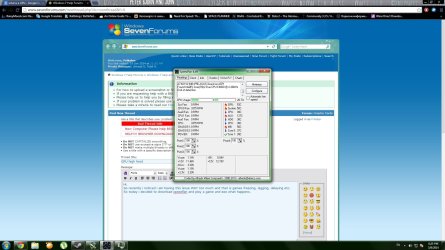
Attached another image
Just finished cleaning the card, a ton of dust came out and is gone now. Now i started the pc and this is what i see.. no icons on a bunch of stuff..
Should i grab my hammer to "fix" the pc or there is an alternative
 

Attachments

  • image 2.jpg
    image 2.jpg
    171.4 KB · Views: 11

My Computer

Computer type
PC/Desktop
OS
Windows 7 64bit
CPU
i5 6600 3.3 GHz
Motherboard
ASUS B150M-A
Memory
16gb HyperX Fury 2x8gb
Graphics Card(s)
Gigabyte G1 Gaming 1060
Monitor(s) Displays
Samsung SyncMaster B2330HD
Screen Resolution
1920 x 1080
Hard Drives
1tb Toshiba
PSU
Corsair builder VS550
Case
SAMA Assasin
Cooling
Stock
Keyboard
A4Tech KB-28G
Mouse
X7 X-710BK
Internet Speed
99 Mbps
Antivirus
Malwarebytes
Browser
Chrome
Other Info
Nothing at the moment
I have 3 fans . 1 on the processor, 1 external next to the graphics card and one on the card itself. I will clean all the dust ( even tho there isnt much on it ) and see what happens.
I am trying to play world of warcraft, the game freezes my pc even on lowest setting after just a few seconds in the game. Trying to play mighty quest for epic loot, game lags and delays after i use certain spells on 2-3 enemies, freezes like hell after i fight large mobs of enemies .. ALL ON LOW SETTINGS but 1920x1080 resolution ( native for my pc ).

BIOS ? i am not touching something i have no idea what to do there and how to use it. I dont wanna break my pc :)

The gpu you have is a very weak gpu. low settings is probably the only graphics you will get up to and the game can freeze becouse of driver issues. Try updating all the drivers but be careful so you dont get the wrong drivers, Also try running a gpu benchmark and look carefully at the temps and fan speeds while maxing the gpu ( you can use msi afterburner for this ) if you see that it is a heating issue even if the gpu is clean from dust try underclocking the card but then gaming is a total bye bye.. i suggest getting a cheap 7750-7770 or a GT 610, 620, 630, 640 or even a GTX 650 if you got the money and the psu can handle it. Theese cards exept the GTX 650 and possibly 7770 may not work if you dont have a psu with PCIe power but the GT 640 will and that card is really strong compared to yours and it draws like no power. and its roughly 100$ or 70£.
 

My Computer

Computer type
PC/Desktop
Computer Manufacturer/Model Number
Custom Built
OS
Windows 10 64Bit
CPU
Intel i7 6700K Cooled by Noctua NH-U14S
Motherboard
ASUS Z170 Pro Gaming
Memory
16GB 2133MHZ DDR4 Corsair
Graphics Card(s)
ASUS Direct CUII OC GTX 660
Sound Card
Supreme FX (On-Board)
Monitor(s) Displays
1: 24" Asus 144hz 2: 21.5" Benq 3: 20" Hp 2009m
Screen Resolution
1:1920x1080 2:1920x1080 3:1600:900
Hard Drives
Primary/OS: Samsung 850 EVO SSD 250GB
Secondary/Main: Seagate 1TB SSHD 3.5"
Media/Backups: WD Green 2TB HDD 3.5"
PSU
Corsair RM 650W
Case
Fractal Design R4
Cooling
2 140mm Noctua NF-A14 ULN, Noctua NH-U14S Cpu cooler
Keyboard
Corsair K70 RGB
Mouse
ROCCAT Kone XTD
Internet Speed
100 Mbit/s Download 100MBit/s Upload
Antivirus
F-Secure SAFE
Browser
Chrome, Firefox
Other Info
I hope hanging up your harddrives in rubber-bands for noise reasons isn't too harmful for the drives :S, but eh, rather silence than lasting drives.. :|
If i am gonna get a new card i am gonna get a whole PC. Getting something new isnt exactly a solution right now and of course the easiest way to fix something is to get a new one.
 

My Computer

Computer type
PC/Desktop
OS
Windows 7 64bit
CPU
i5 6600 3.3 GHz
Motherboard
ASUS B150M-A
Memory
16gb HyperX Fury 2x8gb
Graphics Card(s)
Gigabyte G1 Gaming 1060
Monitor(s) Displays
Samsung SyncMaster B2330HD
Screen Resolution
1920 x 1080
Hard Drives
1tb Toshiba
PSU
Corsair builder VS550
Case
SAMA Assasin
Cooling
Stock
Keyboard
A4Tech KB-28G
Mouse
X7 X-710BK
Internet Speed
99 Mbps
Antivirus
Malwarebytes
Browser
Chrome
Other Info
Nothing at the moment
It is not game related. I have tried a bunch of stuff and it is not possible that the game works on my friends pc which is 5 times slower and about 4 more years older than mine ( maybe more ).
Attached another image
Just finished cleaning the card, a ton of dust came out and is gone now. Now i started the pc and this is what i see.. no icons on a bunch of stuff..
Should i grab my hammer to "fix" the pc or there is an alternative

AUX 127c? wow. i really... really hope that is missreading... also nah. Try upgrading some hardware and update the drivers as much as you can becouse thats a big problem with older computers. The hammer wont make you very much happier sorry. I had one of thoose computers for 4 years and im glad its over
 

My Computer

Computer type
PC/Desktop
Computer Manufacturer/Model Number
Custom Built
OS
Windows 10 64Bit
CPU
Intel i7 6700K Cooled by Noctua NH-U14S
Motherboard
ASUS Z170 Pro Gaming
Memory
16GB 2133MHZ DDR4 Corsair
Graphics Card(s)
ASUS Direct CUII OC GTX 660
Sound Card
Supreme FX (On-Board)
Monitor(s) Displays
1: 24" Asus 144hz 2: 21.5" Benq 3: 20" Hp 2009m
Screen Resolution
1:1920x1080 2:1920x1080 3:1600:900
Hard Drives
Primary/OS: Samsung 850 EVO SSD 250GB
Secondary/Main: Seagate 1TB SSHD 3.5"
Media/Backups: WD Green 2TB HDD 3.5"
PSU
Corsair RM 650W
Case
Fractal Design R4
Cooling
2 140mm Noctua NF-A14 ULN, Noctua NH-U14S Cpu cooler
Keyboard
Corsair K70 RGB
Mouse
ROCCAT Kone XTD
Internet Speed
100 Mbit/s Download 100MBit/s Upload
Antivirus
F-Secure SAFE
Browser
Chrome, Firefox
Other Info
I hope hanging up your harddrives in rubber-bands for noise reasons isn't too harmful for the drives :S, but eh, rather silence than lasting drives.. :|
Nothing is connected so AUX is reading wrong temperatures. Disregard that part.

Everything is up to date
 

My Computer

Computer type
PC/Desktop
OS
Windows 7 64bit
CPU
i5 6600 3.3 GHz
Motherboard
ASUS B150M-A
Memory
16gb HyperX Fury 2x8gb
Graphics Card(s)
Gigabyte G1 Gaming 1060
Monitor(s) Displays
Samsung SyncMaster B2330HD
Screen Resolution
1920 x 1080
Hard Drives
1tb Toshiba
PSU
Corsair builder VS550
Case
SAMA Assasin
Cooling
Stock
Keyboard
A4Tech KB-28G
Mouse
X7 X-710BK
Internet Speed
99 Mbps
Antivirus
Malwarebytes
Browser
Chrome
Other Info
Nothing at the moment
If i am gonna get a new card i am gonna get a whole PC. Getting something new isnt exactly a solution right now and of course the easiest way to fix something is to get a new one.

Accually.. No the easiest way isnt really to get a completely new computer. Well if you got the money then that may work but upgrading can come REAL far.
I plugged a new psu and a GTX 660 into my 4 year old machine with 4Gb ddr2, 3 core 2.4Ghz amd phenom cpu and that thing maxed out litterarly everything. Though i did not use the gpu's full potential due to cpu bottlenecks.
 

My Computer

Computer type
PC/Desktop
Computer Manufacturer/Model Number
Custom Built
OS
Windows 10 64Bit
CPU
Intel i7 6700K Cooled by Noctua NH-U14S
Motherboard
ASUS Z170 Pro Gaming
Memory
16GB 2133MHZ DDR4 Corsair
Graphics Card(s)
ASUS Direct CUII OC GTX 660
Sound Card
Supreme FX (On-Board)
Monitor(s) Displays
1: 24" Asus 144hz 2: 21.5" Benq 3: 20" Hp 2009m
Screen Resolution
1:1920x1080 2:1920x1080 3:1600:900
Hard Drives
Primary/OS: Samsung 850 EVO SSD 250GB
Secondary/Main: Seagate 1TB SSHD 3.5"
Media/Backups: WD Green 2TB HDD 3.5"
PSU
Corsair RM 650W
Case
Fractal Design R4
Cooling
2 140mm Noctua NF-A14 ULN, Noctua NH-U14S Cpu cooler
Keyboard
Corsair K70 RGB
Mouse
ROCCAT Kone XTD
Internet Speed
100 Mbit/s Download 100MBit/s Upload
Antivirus
F-Secure SAFE
Browser
Chrome, Firefox
Other Info
I hope hanging up your harddrives in rubber-bands for noise reasons isn't too harmful for the drives :S, but eh, rather silence than lasting drives.. :|
Lets. Stick to the main problem that currently is happening. No icons.
Posted 17 min ago, page 1. Look at it :)
 

My Computer

Computer type
PC/Desktop
OS
Windows 7 64bit
CPU
i5 6600 3.3 GHz
Motherboard
ASUS B150M-A
Memory
16gb HyperX Fury 2x8gb
Graphics Card(s)
Gigabyte G1 Gaming 1060
Monitor(s) Displays
Samsung SyncMaster B2330HD
Screen Resolution
1920 x 1080
Hard Drives
1tb Toshiba
PSU
Corsair builder VS550
Case
SAMA Assasin
Cooling
Stock
Keyboard
A4Tech KB-28G
Mouse
X7 X-710BK
Internet Speed
99 Mbps
Antivirus
Malwarebytes
Browser
Chrome
Other Info
Nothing at the moment
Lets. Stick to the main problem that currently is happening. No icons.
Posted 17 min ago, page 1. Look at it :)

Um.. Yeahh.. That looks normal cough..
Did you recently download new drivers?
How did you clean the card?
Have you tried turning it off and on again :huh:
 

My Computer

Computer type
PC/Desktop
Computer Manufacturer/Model Number
Custom Built
OS
Windows 10 64Bit
CPU
Intel i7 6700K Cooled by Noctua NH-U14S
Motherboard
ASUS Z170 Pro Gaming
Memory
16GB 2133MHZ DDR4 Corsair
Graphics Card(s)
ASUS Direct CUII OC GTX 660
Sound Card
Supreme FX (On-Board)
Monitor(s) Displays
1: 24" Asus 144hz 2: 21.5" Benq 3: 20" Hp 2009m
Screen Resolution
1:1920x1080 2:1920x1080 3:1600:900
Hard Drives
Primary/OS: Samsung 850 EVO SSD 250GB
Secondary/Main: Seagate 1TB SSHD 3.5"
Media/Backups: WD Green 2TB HDD 3.5"
PSU
Corsair RM 650W
Case
Fractal Design R4
Cooling
2 140mm Noctua NF-A14 ULN, Noctua NH-U14S Cpu cooler
Keyboard
Corsair K70 RGB
Mouse
ROCCAT Kone XTD
Internet Speed
100 Mbit/s Download 100MBit/s Upload
Antivirus
F-Secure SAFE
Browser
Chrome, Firefox
Other Info
I hope hanging up your harddrives in rubber-bands for noise reasons isn't too harmful for the drives :S, but eh, rather silence than lasting drives.. :|
Normal ? I cant click on any of those or open them , doesnt say for any what it actually is.
The windows downloaded drivers i guess for something, it installed stuff, no idea what it was for.
I used the power of blowing to clean it . Dont have any other tools at my disposal but its very clean now, used a smooth brush as well.

I did try and its ok now.
Guess if there is anything else i cant resolve will just write here. Will mark as solved when i do tests with it about crashes , freezes etc.
 

My Computer

Computer type
PC/Desktop
OS
Windows 7 64bit
CPU
i5 6600 3.3 GHz
Motherboard
ASUS B150M-A
Memory
16gb HyperX Fury 2x8gb
Graphics Card(s)
Gigabyte G1 Gaming 1060
Monitor(s) Displays
Samsung SyncMaster B2330HD
Screen Resolution
1920 x 1080
Hard Drives
1tb Toshiba
PSU
Corsair builder VS550
Case
SAMA Assasin
Cooling
Stock
Keyboard
A4Tech KB-28G
Mouse
X7 X-710BK
Internet Speed
99 Mbps
Antivirus
Malwarebytes
Browser
Chrome
Other Info
Nothing at the moment
Normal ? I cant click on any of those or open them , doesnt say for any what it actually is.
The windows downloaded drivers i guess for something, it installed stuff, no idea what it was for.
I used the power of blowing to clean it . Dont have any other tools at my disposal but its very clean now, used a smooth brush as well.

I did try and its ok now.
Guess if there is anything else i cant resolve will just write here. Will mark as solved when i do tests with it about crashes , freezes etc.

So everything works?
Then nice. Glad everything got fixed
 

My Computer

Computer type
PC/Desktop
Computer Manufacturer/Model Number
Custom Built
OS
Windows 10 64Bit
CPU
Intel i7 6700K Cooled by Noctua NH-U14S
Motherboard
ASUS Z170 Pro Gaming
Memory
16GB 2133MHZ DDR4 Corsair
Graphics Card(s)
ASUS Direct CUII OC GTX 660
Sound Card
Supreme FX (On-Board)
Monitor(s) Displays
1: 24" Asus 144hz 2: 21.5" Benq 3: 20" Hp 2009m
Screen Resolution
1:1920x1080 2:1920x1080 3:1600:900
Hard Drives
Primary/OS: Samsung 850 EVO SSD 250GB
Secondary/Main: Seagate 1TB SSHD 3.5"
Media/Backups: WD Green 2TB HDD 3.5"
PSU
Corsair RM 650W
Case
Fractal Design R4
Cooling
2 140mm Noctua NF-A14 ULN, Noctua NH-U14S Cpu cooler
Keyboard
Corsair K70 RGB
Mouse
ROCCAT Kone XTD
Internet Speed
100 Mbit/s Download 100MBit/s Upload
Antivirus
F-Secure SAFE
Browser
Chrome, Firefox
Other Info
I hope hanging up your harddrives in rubber-bands for noise reasons isn't too harmful for the drives :S, but eh, rather silence than lasting drives.. :|
Get a can of compressed air and blow the insides again (you said a ton of dust was removed just by blowing)

Don't use a small brush! That might dislodge a wire or other component requiring you to check connections and reseat a memory stick or card. Use the can of air to clean and do a thorough job (don't just blow it around, blow it out of the case)

The aux temp - hmmm - that's an internal component 127 C is not good. Try another uility to read that temp.
Speccy is a good one: http://www.sevenforums.com/tutorials/311593-speccy-publish-snapshot-your-system-specs.html
If it's a misread or the sensor is giving bad feedback, the Speccy "2nd opinion" might provide more information.

Anyway, your GPU temp dropped form 53 C to 35 C, your first dusting seemed to have helped (or the fans kicked on) :)

The system is running well now - right?
If it freezes /crashes again follow these posting instructions:
http://www.sevenforums.com/tutorials/92394-sf-diagnostic-tool-using-troubleshooting.html
Members will want to see the output, so pay attention to Step 7.

Thanks

Bill
.
 

My Computer

Computer type
Laptop
Computer Manufacturer/Model Number
HP Pavilion dv6-6c10us
OS
x64 (6.3.9600) Win8.1 Pro & soon dual boot x64 (6.1.7601) Win7_SP1 HomePrem
CPU
AMD A6-3420M APU with Radeon(tm) HD Graphics
Motherboard
Hewlett-Packard 1805
Memory
6.00 GB
Graphics Card(s)
AMD Radeon(TM) HD 6520G
Sound Card
(1) AMD High Definition Audio Device (2) IDT High Definiti
Monitor(s) Displays
HP W2072a 20" LCD (1600 x 900) @ 60 Hz
Screen Resolution
1366 x 768 x 32 bits (4294967296 colors) @ 60 Hz
Hard Drives
ST640LM0 00 HM641JI SATA Disk Device
Keyboard
Logitech k520 wireless KB
Mouse
Logitech m320 wireless mouse (bundled with KB)
Internet Speed
15/5 | 54 MB Wireless 'n'
Antivirus
Realtime: Defender or Avast | On-demand: Malwarebytes, ESET
Browser
IE 11 on Win8, IE 10 on win 7
Other Info
Media: [Gimp, Audacity, VLC] || Comm: [WEmail 2012, Skype] || Productivity: [OpenOffice,| Textpad] || Utils: [Sysinternals, cCleaner, Speccy, Defraggler]
The aux temp - hmmm - that's an internal component 127 C is not good. Try another uility to read that temp.

.

Phantom reading. The sensor chip supports something, but there is no sensor attached. Speedfan for as good as it can be is essentially a one-size-fits-all program, and doesn't filter out things like this.
 

My Computer

Computer type
PC/Desktop
Computer Manufacturer/Model Number
Me
OS
Win 7 Ultimate x64
CPU
FX-8350 @ 4.6 GHz so far
Motherboard
Asus M5A97 EVO
Memory
ADATA XPG V1 Series Black 8GB DDR3 1600
Graphics Card(s)
Sapphire R9 270x Dual-X
Sound Card
Xonar DGX w/ Corsair Vengence 1300
Monitor(s) Displays
Acer S232HL Abid
Screen Resolution
1920x1080
Hard Drives
120 GB OCZ Vertex 3
500 GB Seagate 7200.12
PSU
Antec Earthwatts 650W Green
Case
Antec Three Hundred
Cooling
Cooler Master 212 EVO
Keyboard
Logitech G510
Mouse
Logitech G500s
Internet Speed
35000/3000
Back
Top