
GrantAdminFullControl REG problem

takuro1103

New member
Local time
3:50 AM
Messages
44
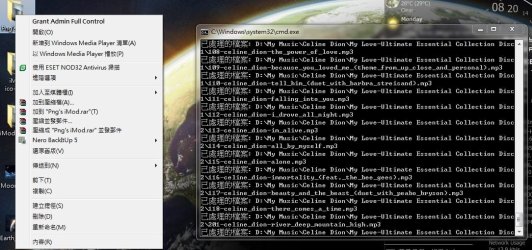
hi everyone, i have got some problem on adding the GrantAdminFullControl reg. for right click folder, right, i have download a adding the GrantAdminFullControl reg. on the net, after i added it, i double click on any folder and try to open it but it will not open, i only open a C:\Windows\system32\cmd.exe window and just like loading something, after it loaded, it nothing happened, it happened on all folder after added the reg., but it can open it fine after removed the reg. i think there is some mistake on the registry but can any tell me how to fix this problem as i want to add GrantAdminFullControl reg. by right click, thanks.

the added GrantAdminFullControl reg. contain:-

Code:
Windows Registry Editor Version 5.00
 
[HKEY_CLASSES_ROOT\*\shell\runas]
@="Grant Admin Full Control"
"NoWorkingDirectory"=""
 
[HKEY_CLASSES_ROOT\*\shell\runas\command]
@="cmd.exe /c takeown /f \"%1\" && icacls \"%1\" /grant administrators:F"
"IsolatedCommand"="cmd.exe /c takeown /f \"%1\" && icacls \"%1\" /grant administrators:F"
 
[HKEY_CLASSES_ROOT\exefile\shell\runas2]
@="Grant Admin Full Control"
"NoWorkingDirectory"=""
 
[HKEY_CLASSES_ROOT\exefile\shell\runas2\command]
@="cmd.exe /c takeown /f \"%1\" && icacls \"%1\" /grant administrators:F"
"IsolatedCommand"="cmd.exe /c takeown /f \"%1\" && icacls \"%1\" /grant administrators:F"
 
[HKEY_CLASSES_ROOT\Directory\shell\runas]
@="Grant Admin Full Control"
"NoWorkingDirectory"=""
 
[HKEY_CLASSES_ROOT\Directory\shell\runas\command]
@="cmd.exe /c takeown /f \"%1\" /r /d y && icacls \"%1\" /grant administrators:F /t"
"IsolatedCommand"="cmd.exe /c takeown /f \"%1\" /r /d y && icacls \"%1\" /grant administrators:F /t"

and there is a screenshot for reference which might help

thanks everyone~
 

Attachments
  • 未命名.jpg
    未命名.jpg
    110.4 KB · Views: 235

My Computer

OS
windows 7
Hi takuro1103,
Remove the reg entry you previously added and see here. (rename the Add_Take_Ownership.download - Add_Take_Ownership.reg)
 

My Computer

Computer Manufacturer/Model Number
HP Touchsmart IQ771.uk
OS
Windows 7 Ultimate x64
CPU
AMD Turion(tm) 64 X2 Mobile Technology TL-56
Motherboard
ASUS Pheonix
Memory
3GB Nanya PC2-6400 DDR2-SDRAM SO-DIM (400MHz)
Graphics Card(s)
NVIDIA GeForce Go 7600 256MB GDDR3 SDRAM
Sound Card
High Definition Intergrated NVIDIA MCP51
Monitor(s) Displays
46" Sony Bravia HDTV
Screen Resolution
1600x1200
Hard Drives
1.5TB Samsug
320GB Seagate ST3320820AS - SATA 3Gb/s 8MB
500GB Maxtor Basics STM305003EHD301-RK
Internet Speed
↓6.32 Mb/s ↑0.35 Mb/s ↔26ms
Other Info
BIOS - American Megatrends Inc. 5.07
Ethernet Port - NVIDIA nForce 10/100/1000 Mbps
DVD Drive - TSSTcorp DVDR/RW TS-T632L
Hi takuro1103,
Remove the reg entry you previously added and see here. (rename the Add_Take_Ownership.download - Add_Take_Ownership.reg)

thanks, i have done it by removed the previous Take Ownership reg by using the removing reg. from your given link, and re-add the Take Ownership downloaded from your link, but the CMD.exe things is still going on.....:cry:
 

My Computer

OS
windows 7
The remove.reg from my link isn't written to remove the reg file you added. You said that you removed it before and the command prompt issue stopped. Repeat the steps you took before & once things are normal again, add the reg entry in the link i gave.
 

My Computer

Computer Manufacturer/Model Number
HP Touchsmart IQ771.uk
OS
Windows 7 Ultimate x64
CPU
AMD Turion(tm) 64 X2 Mobile Technology TL-56
Motherboard
ASUS Pheonix
Memory
3GB Nanya PC2-6400 DDR2-SDRAM SO-DIM (400MHz)
Graphics Card(s)
NVIDIA GeForce Go 7600 256MB GDDR3 SDRAM
Sound Card
High Definition Intergrated NVIDIA MCP51
Monitor(s) Displays
46" Sony Bravia HDTV
Screen Resolution
1600x1200
Hard Drives
1.5TB Samsug
320GB Seagate ST3320820AS - SATA 3Gb/s 8MB
500GB Maxtor Basics STM305003EHD301-RK
Internet Speed
↓6.32 Mb/s ↑0.35 Mb/s ↔26ms
Other Info
BIOS - American Megatrends Inc. 5.07
Ethernet Port - NVIDIA nForce 10/100/1000 Mbps
DVD Drive - TSSTcorp DVDR/RW TS-T632L
The remove.reg from my link isn't written to remove the reg file you added. You said that you removed it before and the command prompt issue stopped. Repeat the steps you took before & once things are normal again, add the reg entry in the link i gave.
yes, this is what i have done, i removed the previous reg. and everythings is fine, folder can open normally by double click it. then i add the reg. from your link and it back to the cmd.exe thing when i double click folder again...
 

My Computer

OS
windows 7
It sounds to me like the registry has been inadvertently changed. Do you have a backup of the registry? If so, restore it.
 

My Computer

Computer Manufacturer/Model Number
HP Touchsmart IQ771.uk
OS
Windows 7 Ultimate x64
CPU
AMD Turion(tm) 64 X2 Mobile Technology TL-56
Motherboard
ASUS Pheonix
Memory
3GB Nanya PC2-6400 DDR2-SDRAM SO-DIM (400MHz)
Graphics Card(s)
NVIDIA GeForce Go 7600 256MB GDDR3 SDRAM
Sound Card
High Definition Intergrated NVIDIA MCP51
Monitor(s) Displays
46" Sony Bravia HDTV
Screen Resolution
1600x1200
Hard Drives
1.5TB Samsug
320GB Seagate ST3320820AS - SATA 3Gb/s 8MB
500GB Maxtor Basics STM305003EHD301-RK
Internet Speed
↓6.32 Mb/s ↑0.35 Mb/s ↔26ms
Other Info
BIOS - American Megatrends Inc. 5.07
Ethernet Port - NVIDIA nForce 10/100/1000 Mbps
DVD Drive - TSSTcorp DVDR/RW TS-T632L
It sounds to me like the registry has been inadvertently changed. Do you have a backup of the registry? If so, restore it.
sorry...i don't have a back up....is there a chance that i can export my current registry and upload here so that buddy can see where is the error??
 

My Computer

OS
windows 7
Probably not the best idea. Are you getting anything interesting in the Event Viewer?
 

My Computer

Computer Manufacturer/Model Number
HP Touchsmart IQ771.uk
OS
Windows 7 Ultimate x64
CPU
AMD Turion(tm) 64 X2 Mobile Technology TL-56
Motherboard
ASUS Pheonix
Memory
3GB Nanya PC2-6400 DDR2-SDRAM SO-DIM (400MHz)
Graphics Card(s)
NVIDIA GeForce Go 7600 256MB GDDR3 SDRAM
Sound Card
High Definition Intergrated NVIDIA MCP51
Monitor(s) Displays
46" Sony Bravia HDTV
Screen Resolution
1600x1200
Hard Drives
1.5TB Samsug
320GB Seagate ST3320820AS - SATA 3Gb/s 8MB
500GB Maxtor Basics STM305003EHD301-RK
Internet Speed
↓6.32 Mb/s ↑0.35 Mb/s ↔26ms
Other Info
BIOS - American Megatrends Inc. 5.07
Ethernet Port - NVIDIA nForce 10/100/1000 Mbps
DVD Drive - TSSTcorp DVDR/RW TS-T632L
In the Start Menu search box, type event. Event Viewer will pop up, left click it.
In the left hand pane of Event Viewer, left click to expand Custom Views & Windows Logs. Go through each of them to see if something relevant can be found in the middle pane.
If you find something and think it may help, export it (right hand pane), zip it and upload it.
 

My Computer

Computer Manufacturer/Model Number
HP Touchsmart IQ771.uk
OS
Windows 7 Ultimate x64
CPU
AMD Turion(tm) 64 X2 Mobile Technology TL-56
Motherboard
ASUS Pheonix
Memory
3GB Nanya PC2-6400 DDR2-SDRAM SO-DIM (400MHz)
Graphics Card(s)
NVIDIA GeForce Go 7600 256MB GDDR3 SDRAM
Sound Card
High Definition Intergrated NVIDIA MCP51
Monitor(s) Displays
46" Sony Bravia HDTV
Screen Resolution
1600x1200
Hard Drives
1.5TB Samsug
320GB Seagate ST3320820AS - SATA 3Gb/s 8MB
500GB Maxtor Basics STM305003EHD301-RK
Internet Speed
↓6.32 Mb/s ↑0.35 Mb/s ↔26ms
Other Info
BIOS - American Megatrends Inc. 5.07
Ethernet Port - NVIDIA nForce 10/100/1000 Mbps
DVD Drive - TSSTcorp DVDR/RW TS-T632L
In the Start Menu search box, type event. Event Viewer will pop up, left click it.
In the left hand pane of Event Viewer, left click to expand Custom Views & Windows Logs. Go through each of them to see if something relevant can be found in the middle pane.
If you find something and think it may help, export it (right hand pane), zip it and upload it.
there are alot of error shown but i don't see any related to it, may be i just not keen on watching it, fine, i give up...:(
 

My Computer

OS
windows 7
Maybe in the future it is best that you DO NOT mess with this stuff? These permissions that are assigned are done so for a reason. Messing with them will only cause problems.
 

My Computer

Computer type
PC/Desktop
Computer Manufacturer/Model Number
Alienware Aurora ALX R4
OS
Windows 10 Pro (x64)
CPU
Intel Core i7-3930K (3.2GHz - 4.5GHz)
Motherboard
Alienware Aurora-R4 x79
Memory
4x Samsung 4GB PC3-12800 DDR3 (16GB 1600MHz)
Graphics Card(s)
Nvidia Geforce GTX 690
Sound Card
SteelSeries Siberia Elite
Monitor(s) Displays
Dell UltraSharp U3011
Screen Resolution
2560x1600
Hard Drives
Samsung 850 Pro 256 GB, Seagate 1TB Desktop Hybrid HDD, 2x Western Digital 4TB Green HDD
PSU
875W Some Dell PSU <.<
Case
Alienware Aurora ALX
Cooling
Custom Liquid Cooling (EK CPU & GPU blocks) dual EK 480RAD
Keyboard
Logitech G710+ Mechanical
Mouse
Logitech G700s
Internet Speed
Verizon Fios (50 mbps average)
Other Info
Server: Intel NUC D54250WYK: i5-4250U, 16GB, 256 GB mSATA, Windows Server 2012 R2
Maybe in the future it is best that you DO NOT mess with this stuff? These permissions that are assigned are done so for a reason. Messing with them will only cause problems.

yes, i understand, but that key is really helpful without doing much to get the control right, and i'm sure i have done that before and it work fine, but today i try to use it again and it disappear so i re-do the reg. again, and cmd.exe. problem occured...:o
 

My Computer

OS
windows 7
In the Start Menu search box, type event. Event Viewer will pop up, left click it.
In the left hand pane of Event Viewer, left click to expand Custom Views & Windows Logs. Go through each of them to see if something relevant can be found in the middle pane.
If you find something and think it may help, export it (right hand pane), zip it and upload it.
there are alot of error shown but i don't see any related to it, may be i just not keen on watching it, fine, i give up...:(

Not keen on watching it and helping with your end of the bargain eh?
I now stand by logicearth's comment!
 

My Computer

Computer Manufacturer/Model Number
HP Touchsmart IQ771.uk
OS
Windows 7 Ultimate x64
CPU
AMD Turion(tm) 64 X2 Mobile Technology TL-56
Motherboard
ASUS Pheonix
Memory
3GB Nanya PC2-6400 DDR2-SDRAM SO-DIM (400MHz)
Graphics Card(s)
NVIDIA GeForce Go 7600 256MB GDDR3 SDRAM
Sound Card
High Definition Intergrated NVIDIA MCP51
Monitor(s) Displays
46" Sony Bravia HDTV
Screen Resolution
1600x1200
Hard Drives
1.5TB Samsug
320GB Seagate ST3320820AS - SATA 3Gb/s 8MB
500GB Maxtor Basics STM305003EHD301-RK
Internet Speed
↓6.32 Mb/s ↑0.35 Mb/s ↔26ms
Other Info
BIOS - American Megatrends Inc. 5.07
Ethernet Port - NVIDIA nForce 10/100/1000 Mbps
DVD Drive - TSSTcorp DVDR/RW TS-T632L
In the Start Menu search box, type event. Event Viewer will pop up, left click it.
In the left hand pane of Event Viewer, left click to expand Custom Views & Windows Logs. Go through each of them to see if something relevant can be found in the middle pane.
If you find something and think it may help, export it (right hand pane), zip it and upload it.
there are alot of error shown but i don't see any related to it, may be i just not keen on watching it, fine, i give up...:(

Not keen on watching it and helping with your end of the bargain eh?
I now stand by logicearth's comment!
no, if i have done something wrong please forgive me, i'm just saying the i'm not good on computer, and i just don't know what are those error on the event viewer...:p
 

My Computer

OS
windows 7
REMOVE grant admin full control.reg from Context Menu.
- Dbseven
 

My Computer

Computer Manufacturer/Model Number
Home build
OS
Windows 7 Pro 64Bit
CPU
AMD Phenom II 965
Motherboard
Biostar 790GXE
Memory
Corsair XMS2 4GB PC6400 DDR2 800MHz Memory Upgrade - 2x2048M
Graphics Card(s)
GeForce 9500 GT Video Card, 1GB DDR2
Sound Card
Realtek Digital Audio 6.1
Monitor(s) Displays
Acer X223W
Screen Resolution
680Hx1050H
Hard Drives
WDC WD1002-FAEX-00Z3A0 1000GB SATA2 64MB CACHE
WDC WD2002-FAEX-007BA0 2000GB SATA2 64MB CACHE
PSU
Ultra X4 750-Watt Modular Power Supply - 135mm Fan, ATX
Case
CoolerMaster Elite 300 (Black)
Cooling
Enermax 120mm HiVolocity, CoolerMaster
Keyboard
Logitech Deluxe 250 (PS/2)
Mouse
Logitech Optical Mouse 852149-0000 (PS/2)
Internet Speed
AT&T (3Gb/s: so they claim)
Other Info
Logitech C600 Webcam HD, Logitech
Logitech Z-4(3-driver) 40 watts 2.1 Speakers w/subwoofer
Back
Top