
Graphics Card - Install New Card

How to Install a New Graphics Card

   Warning
When working inside of your computer, you should always wear an anti-static wristband . If you shock an electrical component, you could PERMANENTLY DAMAGE THE COMPONENT and void your warranty!


Things to consider when purchasing a new card:

-Motherboard Compatibility (AGP, PCI, PCIe, PCIe 2.0 x16, PCIe 2.1 x16)
-Graphics Ports (most new video cards now include a VGA to DVI adapter, so this is less of a worry)​

-Power Supply (it needs to have enough to power the card and everything else)
-Case Space (with newer high end cards, there can be little room left. I have a N260GTX in a Full tower case, and it BARELY fits. Make sure to measure your case)​
-Money vs Power (This is for you to determine, I WILL NOT cover this)

Things you will need to install your new card:
-Phillips Screwdriver (sometimes varies depending on the case)
-Anti-static wristband​
-New Graphics Card
-About 30 minutes​
-New video card drivers (on CD or downloaded beforehand)

Steps:

If you have onboard graphics on your motherboard, you should disable this is BIOS before you install your new card.
To do this, you must restart your computer. When the OEM logo (or BIOS) comes up, press one of the keys shown at the bottom, usually F1, DEL, ESC, etc. It should be labeled, ENTER SETUP.
Navigation is done with the arrow keys here. Scroll to the advanced tab, and look for a graphics setting, and disable it.
NOTE: This CANNOT be done through Windows (or any other OS), it MUST be done through BIOS.

1) Remove your old graphics card drivers. There are a few ways to do this, but I will cover the default Windows way:
a) Open Device Manager (Computer, right click Properties, Device Manager)
b) Select Display Adapters
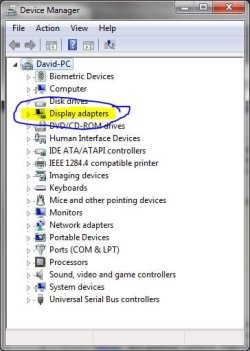
Device Manager.JPG
c) Right click Properties, and go to the Driver Tab, and click Uninstall.
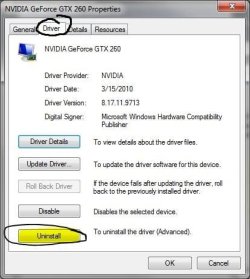
Properties.JPG
2) Turn off your computer, and unplug the power cord from the Power supply unit. It is also a good idea to remove all the plugs from the back of the computer, and take the unit to a non-static workplace, like a wood workbench. Carpet and metal is not recommended.

3) Pull out the old graphics card. Some motherboards (and cards) have a release catch on them, usually under the card, to the inside of the motherboard.​


4) Put in the new card. Push it in with firm, steady pressure until it drops in snugly. Wiggle the card GENTLY to see if the base is loose. Plug in the power plug from the PSU (not all cards need this, some use one 6 pin, some one 8 pin, some two 6 pins, some two 8 pins. Look at your card and your manual to find out)​

5) Screw the card into the case, and put the case back together​

6) Turn on the computer, and install the new drivers.​

Your new graphics card is installed and ready to go!

If you would like to keep your old graphics card, put it in the anti-static bag that your new card came in to keep it safe.​

If you want to get rid of it, take it to your local computer outlet and ask them if they will dispose of it for you. Computer components CANNOT just be thrown away, they need to be disposed of properly.

   Information
Neither I (Lorbob75), nor Seven Forums (Windows 7 Forums) take responsibility should your card be damaged or destroyed if you follow this advice. We do not advise installing a new video card unless you know what you are doing, and are willing to risk your video card.

Graphics Card series:

1. How a Graphics Card Works
2. AGP vs PCI
4. How to Overclock Your Card
5. How to Test NVIDIA/AMD Performance with OCCT


--------------------​

I hope this Tutorial helped a whole bunch of you!

~Lordbob
 
Last edited by a moderator:
Good info. :) I was wondering if maybe you could add what sockets are compatible with what graphics card and how it would be done if you have a built in graphics and then you add a graphics card. Basically thats the info I'm looking for haha :D

My PC has built in graphics and I want to put on a new graphics card thats suppose to be PCIe v 2.0 but on my com, the slot is a v 1.0. So would that work?

Thanks
 

My Computer

OS
xp sp2
Very good questions Window7 (nice name).

First off, most new graphics cards are PCIe 2.0 x16 or 2.1 x16. Same with most newer mobos. The best way to tell this is to look at the box of your graphics card, and it should tell you the slot type. For your motherboard, get the model number and look it up online (I like newegg) and it will tell you what it has.
Generally, PCIe is backwards compatible, so it should work.

Second, you will need to disable onboard video through the BIOS. I don't know exactly how to do this, as each mobo is different, and I don't have onboard, so I cannot check mine. In my past experiences, it will auto disable itself when you install it, but it is best to check.

I will add that above as well.

~Lordbob
 

My Computer

Computer Manufacturer/Model Number
Hera
OS
Windows 7 Ultimate x64, Mint 9
CPU
Intel i5-2500k
Motherboard
ASUS P8P67 Pro
Memory
2x 4Gb Corsair VENGEANCE DDR3-1600
Graphics Card(s)
NVidia GeForce N260GTX Twin Frozr
Sound Card
Realtek HD OnBoard Audio
Monitor(s) Displays
ASUS 24" Monitor
Screen Resolution
1920x1080
Hard Drives
G.SKILL Phoenix Series 60GB SATA II MLC Internal Solid State Drive (SSD)
SAMSUNG Spinpoint F3R 1TB 7200 RPM 32MB Cache SATA II
PSU
Cooler Master Real Power Pro 750W
Case
Cooler Master Haf 932
Cooling
Fans
Keyboard
Razer Tarantula
Mouse
Razer Lachesis
Internet Speed
not fast enough
Thank you for your reply :)

That was very helpful. I've read a few times too that they're mostly downward compatible and I was happy to read your reassuring message :) I guess I'll be getting a new graphics card now.

Thanks again
 

My Computer

OS
xp sp2
Lordbob useful info here but I have a question. If you disable onboard video won't this mean you have no display for deletion of old driver and install of new? Is there any reason the new card and drivers can't be installed first?

I guess the advice is similar for soundcards but temporary loss of sound is not a problem. I am doing a partial upgrade later this week (MB, sound and possibly video).
 

My Computer

Computer Manufacturer/Model Number
Mixture
OS
Win 7 Home Premium 64 bit
CPU
Phenom II X4 955 BE
Motherboard
GA-MA785GM-US2H
Memory
8GB Kingston DDR2 800
Graphics Card(s)
Sapphire HD5670 1GB.
Sound Card
Asus Xonar Essence ST
Monitor(s) Displays
Samsung P2350
Screen Resolution
1920x1080
Hard Drives
Seagate 1TB
Hitachi 1TB

WD 500GB external
PSU
Corsair VX550W
Case
Cooler Master Silio 500
Cooling
Noctua NH-U9B SE2
Keyboard
Logitech
Mouse
Evoluent Vertimouse 3 (wireless)
Internet Speed
ADSL2+
Lordbob useful info here but I have a question. If you disable onboard video won't this mean you have no display for deletion of old driver and install of new? Is there any reason the new card and drivers can't be installed first?

I guess the advice is similar for soundcards but temporary loss of sound is not a problem. I am doing a partial upgrade later this week (MB, sound and possibly video).
Well, typically when you install a card it will default to the PCIe slot for graphics. Disabling onboard video is actually not necessary, but still recommended. You also would disable it AFTER installing the new card.

~Lordbob
 

My Computer

Computer Manufacturer/Model Number
Hera
OS
Windows 7 Ultimate x64, Mint 9
CPU
Intel i5-2500k
Motherboard
ASUS P8P67 Pro
Memory
2x 4Gb Corsair VENGEANCE DDR3-1600
Graphics Card(s)
NVidia GeForce N260GTX Twin Frozr
Sound Card
Realtek HD OnBoard Audio
Monitor(s) Displays
ASUS 24" Monitor
Screen Resolution
1920x1080
Hard Drives
G.SKILL Phoenix Series 60GB SATA II MLC Internal Solid State Drive (SSD)
SAMSUNG Spinpoint F3R 1TB 7200 RPM 32MB Cache SATA II
PSU
Cooler Master Real Power Pro 750W
Case
Cooler Master Haf 932
Cooling
Fans
Keyboard
Razer Tarantula
Mouse
Razer Lachesis
Internet Speed
not fast enough
Great tut David :) Glad to see I'm not the only one who can't draw circles properly with a mouse ;)
 

My Computer

Computer type
PC/Desktop
Computer Manufacturer/Model Number
Medion Erazer (note to self: insert model number) - with custom additions
OS
Windows 10 Pro x64
CPU
Intel Core i5 7400 @ 3.00GHz
Motherboard
OEM supllied with PC
Memory
8GB 2133Mhz DDR4 (OEM supplied)
Graphics Card(s)
Gygabyte Windforce GTX 1050Ti (Factory Overclocked)
Sound Card
Realtek
Monitor(s) Displays
Acer Al1980 + HKC
Screen Resolution
1360*768(HKC) / 1280*1024(Acer)
Hard Drives
1TB Toshiba
1TB WD Caviar Green
120GB Samsung Evo 840
PSU
OEM supplied (no power rating on case)
Case
OEM Supplied
Cooling
Stock
Keyboard
Logitech Wireless
Mouse
Logitect Wireless
Internet Speed
40Mb/s Down 10Mb/s Up
Antivirus
Defender
Browser
Firefox

My Computer

Computer Manufacturer/Model Number
Hera
OS
Windows 7 Ultimate x64, Mint 9
CPU
Intel i5-2500k
Motherboard
ASUS P8P67 Pro
Memory
2x 4Gb Corsair VENGEANCE DDR3-1600
Graphics Card(s)
NVidia GeForce N260GTX Twin Frozr
Sound Card
Realtek HD OnBoard Audio
Monitor(s) Displays
ASUS 24" Monitor
Screen Resolution
1920x1080
Hard Drives
G.SKILL Phoenix Series 60GB SATA II MLC Internal Solid State Drive (SSD)
SAMSUNG Spinpoint F3R 1TB 7200 RPM 32MB Cache SATA II
PSU
Cooler Master Real Power Pro 750W
Case
Cooler Master Haf 932
Cooling
Fans
Keyboard
Razer Tarantula
Mouse
Razer Lachesis
Internet Speed
not fast enough
Great tut David :) Glad to see I'm not the only one who can't draw circles properly with a mouse ;)
Is there anyone who can??!?!?

~Lordbob

haha very true. On a Non OT matter (yeah I know :shock:) Is it possible to run a card and say On Board Graphics at the same time on dual monitors?
 

My Computer

Computer type
PC/Desktop
Computer Manufacturer/Model Number
Medion Erazer (note to self: insert model number) - with custom additions
OS
Windows 10 Pro x64
CPU
Intel Core i5 7400 @ 3.00GHz
Motherboard
OEM supllied with PC
Memory
8GB 2133Mhz DDR4 (OEM supplied)
Graphics Card(s)
Gygabyte Windforce GTX 1050Ti (Factory Overclocked)
Sound Card
Realtek
Monitor(s) Displays
Acer Al1980 + HKC
Screen Resolution
1360*768(HKC) / 1280*1024(Acer)
Hard Drives
1TB Toshiba
1TB WD Caviar Green
120GB Samsung Evo 840
PSU
OEM supplied (no power rating on case)
Case
OEM Supplied
Cooling
Stock
Keyboard
Logitech Wireless
Mouse
Logitect Wireless
Internet Speed
40Mb/s Down 10Mb/s Up
Antivirus
Defender
Browser
Firefox

My Computer

Computer Manufacturer/Model Number
Hera
OS
Windows 7 Ultimate x64, Mint 9
CPU
Intel i5-2500k
Motherboard
ASUS P8P67 Pro
Memory
2x 4Gb Corsair VENGEANCE DDR3-1600
Graphics Card(s)
NVidia GeForce N260GTX Twin Frozr
Sound Card
Realtek HD OnBoard Audio
Monitor(s) Displays
ASUS 24" Monitor
Screen Resolution
1920x1080
Hard Drives
G.SKILL Phoenix Series 60GB SATA II MLC Internal Solid State Drive (SSD)
SAMSUNG Spinpoint F3R 1TB 7200 RPM 32MB Cache SATA II
PSU
Cooler Master Real Power Pro 750W
Case
Cooler Master Haf 932
Cooling
Fans
Keyboard
Razer Tarantula
Mouse
Razer Lachesis
Internet Speed
not fast enough
Thanks again for the Tut LB.

Quick question... my card didnt come with any screws. or indeed anywhere to screw it in! it just sort of sits in the PCI-E slot, seems to be secure... but im worrying about it now ;) Do they always come with screws?
 

My Computer

Computer type
PC/Desktop
Computer Manufacturer/Model Number
Medion Erazer (note to self: insert model number) - with custom additions
OS
Windows 10 Pro x64
CPU
Intel Core i5 7400 @ 3.00GHz
Motherboard
OEM supllied with PC
Memory
8GB 2133Mhz DDR4 (OEM supplied)
Graphics Card(s)
Gygabyte Windforce GTX 1050Ti (Factory Overclocked)
Sound Card
Realtek
Monitor(s) Displays
Acer Al1980 + HKC
Screen Resolution
1360*768(HKC) / 1280*1024(Acer)
Hard Drives
1TB Toshiba
1TB WD Caviar Green
120GB Samsung Evo 840
PSU
OEM supplied (no power rating on case)
Case
OEM Supplied
Cooling
Stock
Keyboard
Logitech Wireless
Mouse
Logitect Wireless
Internet Speed
40Mb/s Down 10Mb/s Up
Antivirus
Defender
Browser
Firefox
Thanks again for the Tut LB.

Quick question... my card didnt come with any screws. or indeed anywhere to screw it in! it just sort of sits in the PCI-E slot, seems to be secure... but im worrying about it now ;) Do they always come with screws?
The cards themselves usually dont, but there should be a small hole in the top of the bracket where it sits on the case.

~Lordbob
 

My Computer

Computer Manufacturer/Model Number
Hera
OS
Windows 7 Ultimate x64, Mint 9
CPU
Intel i5-2500k
Motherboard
ASUS P8P67 Pro
Memory
2x 4Gb Corsair VENGEANCE DDR3-1600
Graphics Card(s)
NVidia GeForce N260GTX Twin Frozr
Sound Card
Realtek HD OnBoard Audio
Monitor(s) Displays
ASUS 24" Monitor
Screen Resolution
1920x1080
Hard Drives
G.SKILL Phoenix Series 60GB SATA II MLC Internal Solid State Drive (SSD)
SAMSUNG Spinpoint F3R 1TB 7200 RPM 32MB Cache SATA II
PSU
Cooler Master Real Power Pro 750W
Case
Cooler Master Haf 932
Cooling
Fans
Keyboard
Razer Tarantula
Mouse
Razer Lachesis
Internet Speed
not fast enough
ohhh... thats why it doesnt need screws... I have a clamp type thing that locks into place. I think thats doing the job instead
 

My Computer

Computer type
PC/Desktop
Computer Manufacturer/Model Number
Medion Erazer (note to self: insert model number) - with custom additions
OS
Windows 10 Pro x64
CPU
Intel Core i5 7400 @ 3.00GHz
Motherboard
OEM supllied with PC
Memory
8GB 2133Mhz DDR4 (OEM supplied)
Graphics Card(s)
Gygabyte Windforce GTX 1050Ti (Factory Overclocked)
Sound Card
Realtek
Monitor(s) Displays
Acer Al1980 + HKC
Screen Resolution
1360*768(HKC) / 1280*1024(Acer)
Hard Drives
1TB Toshiba
1TB WD Caviar Green
120GB Samsung Evo 840
PSU
OEM supplied (no power rating on case)
Case
OEM Supplied
Cooling
Stock
Keyboard
Logitech Wireless
Mouse
Logitect Wireless
Internet Speed
40Mb/s Down 10Mb/s Up
Antivirus
Defender
Browser
Firefox
ohhh... thats why it doesnt need screws... I have a clamp type thing that locks into place. I think thats doing the job instead
Yeah, that will be fine. Mine is that way too (I don't like how loose it is).

~Lordbob
 

My Computer

Computer Manufacturer/Model Number
Hera
OS
Windows 7 Ultimate x64, Mint 9
CPU
Intel i5-2500k
Motherboard
ASUS P8P67 Pro
Memory
2x 4Gb Corsair VENGEANCE DDR3-1600
Graphics Card(s)
NVidia GeForce N260GTX Twin Frozr
Sound Card
Realtek HD OnBoard Audio
Monitor(s) Displays
ASUS 24" Monitor
Screen Resolution
1920x1080
Hard Drives
G.SKILL Phoenix Series 60GB SATA II MLC Internal Solid State Drive (SSD)
SAMSUNG Spinpoint F3R 1TB 7200 RPM 32MB Cache SATA II
PSU
Cooler Master Real Power Pro 750W
Case
Cooler Master Haf 932
Cooling
Fans
Keyboard
Razer Tarantula
Mouse
Razer Lachesis
Internet Speed
not fast enough
Thanks for your help :cool: I've given you some rep

Now I just have to figure out why they gave me a DVI to VGA convertor when it already has a VGA slot AND a DVI slot.
 

My Computer

Computer type
PC/Desktop
Computer Manufacturer/Model Number
Medion Erazer (note to self: insert model number) - with custom additions
OS
Windows 10 Pro x64
CPU
Intel Core i5 7400 @ 3.00GHz
Motherboard
OEM supllied with PC
Memory
8GB 2133Mhz DDR4 (OEM supplied)
Graphics Card(s)
Gygabyte Windforce GTX 1050Ti (Factory Overclocked)
Sound Card
Realtek
Monitor(s) Displays
Acer Al1980 + HKC
Screen Resolution
1360*768(HKC) / 1280*1024(Acer)
Hard Drives
1TB Toshiba
1TB WD Caviar Green
120GB Samsung Evo 840
PSU
OEM supplied (no power rating on case)
Case
OEM Supplied
Cooling
Stock
Keyboard
Logitech Wireless
Mouse
Logitect Wireless
Internet Speed
40Mb/s Down 10Mb/s Up
Antivirus
Defender
Browser
Firefox
Thanks for your help :cool: I've given you some rep

Now I just have to figure out why they gave me a DVI to VGA convertor when it already has a VGA slot AND a DVI slot.
In case you have 2 monitors with only 1 type of plug.

~Lordbob
 

My Computer

Computer Manufacturer/Model Number
Hera
OS
Windows 7 Ultimate x64, Mint 9
CPU
Intel i5-2500k
Motherboard
ASUS P8P67 Pro
Memory
2x 4Gb Corsair VENGEANCE DDR3-1600
Graphics Card(s)
NVidia GeForce N260GTX Twin Frozr
Sound Card
Realtek HD OnBoard Audio
Monitor(s) Displays
ASUS 24" Monitor
Screen Resolution
1920x1080
Hard Drives
G.SKILL Phoenix Series 60GB SATA II MLC Internal Solid State Drive (SSD)
SAMSUNG Spinpoint F3R 1TB 7200 RPM 32MB Cache SATA II
PSU
Cooler Master Real Power Pro 750W
Case
Cooler Master Haf 932
Cooling
Fans
Keyboard
Razer Tarantula
Mouse
Razer Lachesis
Internet Speed
not fast enough
Good info :)

I like to disable onboard video after I install the card, but that's just me. Regarding, using both onboard graphics and a graphics card? My experience has been that it depends on the mobo. Mine won't.
 

My Computer

Computer Manufacturer/Model Number
ATX Custom Build 2012
OS
Windows 7 Enterprise x64 SP1
CPU
Intel Core i3-2100 @ 3.10GHz
Motherboard
Intel DH67CL desktop ATX
Memory
10 GB DDR3
Graphics Card(s)
Asus EAH5450 series (Radeon)
Monitor(s) Displays
Samsung SyncMaster 226BW, Samsung Syncmaster P2450H
Screen Resolution
226BW: 1680 x 1050 & P2450H: 1920 x 1080
Hard Drives
Western Digital 320 GB sata (boot), Samsung 640 GB sata, Seagate 2 TB sata (data)
PSU
Cooler Master Extreme Power Plus 500W
Case
Thermaltake V3 Black Edition
Cooling
stock cooling with added intake fan
Keyboard
HP Wireless Elite Keyboard Wireless Keyboard
Mouse
Microsoft Touch
Internet Speed
Comcast Cable business class <=18Mb {averages 12Mb}
Other Info
Optical drives: LG SuperMulti Blue, HP DVD 1260T
Other: Kensington Bluetooth Receiver
Network: Buffalo Wireless N USB, DLink N router/DLink Ethernet Switch/DLink Xtreme N wireless bridge
Printer: HP Photosmart Plus, HP Officejet Pro 8600 Plus
PCs: HP dv6-3040us (7 x64 SP1), HP DM4-2165dx (7 x64 SP1), HP Pavilion zv6130us (7 x86), Apple Macbook Air (Lion)
************
Ok I tried installing a ATI graphics card to my computer and I left the video on auto since it didn't have an option to disable it. I turn it on and all I see is a black screen and I can hear the HD after a while loading the OS. What is going on with the card? I also disabled the on-board video from the device manager.
 

My Computer

Computer Manufacturer/Model Number
Dell Dimension 3000
OS
Windows 7 Home Premium 32-bit
CPU
Intel Pentium 4 Processor 2.8GHz Prescott 90mm Technology
Motherboard
Dell Computer Corp. 0F8403 (Microprocessor)
Memory
1.00GB Dual-Channel DDR @ 166MHz (2.5-3-3-7)
Graphics Card(s)
82865G Graphics Controller
Sound Card
SoundMax Integrated Digital Audio
Monitor(s) Displays
Dell E171FP
Screen Resolution
1280x1024
Hard Drives
156GB Western Digital WDC WD1600AAJB-56WRAQ ATA Device
Case
Dell Dimesion 3000 Stock Case
Keyboard
Dell RT7D20
Mouse
HP R41126
Internet Speed
8 Mbps(Downloading) 1Mbps(Uploading)
Does the screen work if you plug it into the onboard video?

~Lordbob
 

My Computer

Computer Manufacturer/Model Number
Hera
OS
Windows 7 Ultimate x64, Mint 9
CPU
Intel i5-2500k
Motherboard
ASUS P8P67 Pro
Memory
2x 4Gb Corsair VENGEANCE DDR3-1600
Graphics Card(s)
NVidia GeForce N260GTX Twin Frozr
Sound Card
Realtek HD OnBoard Audio
Monitor(s) Displays
ASUS 24" Monitor
Screen Resolution
1920x1080
Hard Drives
G.SKILL Phoenix Series 60GB SATA II MLC Internal Solid State Drive (SSD)
SAMSUNG Spinpoint F3R 1TB 7200 RPM 32MB Cache SATA II
PSU
Cooler Master Real Power Pro 750W
Case
Cooler Master Haf 932
Cooling
Fans
Keyboard
Razer Tarantula
Mouse
Razer Lachesis
Internet Speed
not fast enough
Yes.
 

My Computer

Computer Manufacturer/Model Number
Dell Dimension 3000
OS
Windows 7 Home Premium 32-bit
CPU
Intel Pentium 4 Processor 2.8GHz Prescott 90mm Technology
Motherboard
Dell Computer Corp. 0F8403 (Microprocessor)
Memory
1.00GB Dual-Channel DDR @ 166MHz (2.5-3-3-7)
Graphics Card(s)
82865G Graphics Controller
Sound Card
SoundMax Integrated Digital Audio
Monitor(s) Displays
Dell E171FP
Screen Resolution
1280x1024
Hard Drives
156GB Western Digital WDC WD1600AAJB-56WRAQ ATA Device
Case
Dell Dimesion 3000 Stock Case
Keyboard
Dell RT7D20
Mouse
HP R41126
Internet Speed
8 Mbps(Downloading) 1Mbps(Uploading)
Back
Top