
Graphics Card - Install New Card

How to Install a New Graphics Card

   Warning
When working inside of your computer, you should always wear an anti-static wristband . If you shock an electrical component, you could PERMANENTLY DAMAGE THE COMPONENT and void your warranty!


Things to consider when purchasing a new card:

-Motherboard Compatibility (AGP, PCI, PCIe, PCIe 2.0 x16, PCIe 2.1 x16)
-Graphics Ports (most new video cards now include a VGA to DVI adapter, so this is less of a worry)​

-Power Supply (it needs to have enough to power the card and everything else)
-Case Space (with newer high end cards, there can be little room left. I have a N260GTX in a Full tower case, and it BARELY fits. Make sure to measure your case)​
-Money vs Power (This is for you to determine, I WILL NOT cover this)

Things you will need to install your new card:
-Phillips Screwdriver (sometimes varies depending on the case)
-Anti-static wristband​
-New Graphics Card
-About 30 minutes​
-New video card drivers (on CD or downloaded beforehand)

Steps:

If you have onboard graphics on your motherboard, you should disable this is BIOS before you install your new card.
To do this, you must restart your computer. When the OEM logo (or BIOS) comes up, press one of the keys shown at the bottom, usually F1, DEL, ESC, etc. It should be labeled, ENTER SETUP.
Navigation is done with the arrow keys here. Scroll to the advanced tab, and look for a graphics setting, and disable it.
NOTE: This CANNOT be done through Windows (or any other OS), it MUST be done through BIOS.

1) Remove your old graphics card drivers. There are a few ways to do this, but I will cover the default Windows way:
a) Open Device Manager (Computer, right click Properties, Device Manager)
b) Select Display Adapters
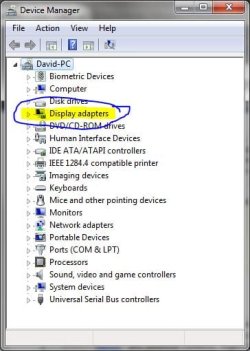
Device Manager.JPG
c) Right click Properties, and go to the Driver Tab, and click Uninstall.
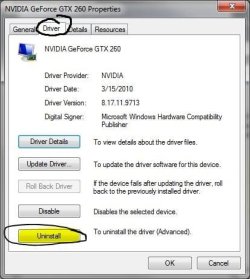
Properties.JPG
2) Turn off your computer, and unplug the power cord from the Power supply unit. It is also a good idea to remove all the plugs from the back of the computer, and take the unit to a non-static workplace, like a wood workbench. Carpet and metal is not recommended.

3) Pull out the old graphics card. Some motherboards (and cards) have a release catch on them, usually under the card, to the inside of the motherboard.​


4) Put in the new card. Push it in with firm, steady pressure until it drops in snugly. Wiggle the card GENTLY to see if the base is loose. Plug in the power plug from the PSU (not all cards need this, some use one 6 pin, some one 8 pin, some two 6 pins, some two 8 pins. Look at your card and your manual to find out)​

5) Screw the card into the case, and put the case back together​

6) Turn on the computer, and install the new drivers.​

Your new graphics card is installed and ready to go!

If you would like to keep your old graphics card, put it in the anti-static bag that your new card came in to keep it safe.​

If you want to get rid of it, take it to your local computer outlet and ask them if they will dispose of it for you. Computer components CANNOT just be thrown away, they need to be disposed of properly.

   Information
Neither I (Lorbob75), nor Seven Forums (Windows 7 Forums) take responsibility should your card be damaged or destroyed if you follow this advice. We do not advise installing a new video card unless you know what you are doing, and are willing to risk your video card.

Graphics Card series:

1. How a Graphics Card Works
2. AGP vs PCI
4. How to Overclock Your Card
5. How to Test NVIDIA/AMD Performance with OCCT


--------------------​

I hope this Tutorial helped a whole bunch of you!

~Lordbob
 
Last edited by a moderator:

My Computer My Computer

Computer Manufacturer/Model Number
Hera
OS
Windows 7 Ultimate x64, Mint 9
CPU
Intel i5-2500k
Motherboard
ASUS P8P67 Pro
Memory
2x 4Gb Corsair VENGEANCE DDR3-1600
Graphics Card(s)
NVidia GeForce N260GTX Twin Frozr
Sound Card
Realtek HD OnBoard Audio
Monitor(s) Displays
ASUS 24" Monitor
Screen Resolution
1920x1080
Hard Drives
G.SKILL Phoenix Series 60GB SATA II MLC Internal Solid State Drive (SSD)
SAMSUNG Spinpoint F3R 1TB 7200 RPM 32MB Cache SATA II
PSU
Cooler Master Real Power Pro 750W
Case
Cooler Master Haf 932
Cooling
Fans
Keyboard
Razer Tarantula
Mouse
Razer Lachesis
Internet Speed
not fast enough
It looks like its not letting me since the card is not in the socket right now. If I switch from the card to the on board while the card is in the socket it will still give me the black screen.
 

My Computer My Computer

Computer Manufacturer/Model Number
Dell Dimension 3000
OS
Windows 7 Home Premium 32-bit
CPU
Intel Pentium 4 Processor 2.8GHz Prescott 90mm Technology
Motherboard
Dell Computer Corp. 0F8403 (Microprocessor)
Memory
1.00GB Dual-Channel DDR @ 166MHz (2.5-3-3-7)
Graphics Card(s)
82865G Graphics Controller
Sound Card
SoundMax Integrated Digital Audio
Monitor(s) Displays
Dell E171FP
Screen Resolution
1280x1024
Hard Drives
156GB Western Digital WDC WD1600AAJB-56WRAQ ATA Device
Case
Dell Dimesion 3000 Stock Case
Keyboard
Dell RT7D20
Mouse
HP R41126
Internet Speed
8 Mbps(Downloading) 1Mbps(Uploading)
It looks like its not letting me since the card is not in the socket right now. If I switch from the card to the on board while the card is in the socket it will still give me the black screen.
Odd. Is there another computer you could try the card in?

~Lordbob
 

My Computer My Computer

Computer Manufacturer/Model Number
Hera
OS
Windows 7 Ultimate x64, Mint 9
CPU
Intel i5-2500k
Motherboard
ASUS P8P67 Pro
Memory
2x 4Gb Corsair VENGEANCE DDR3-1600
Graphics Card(s)
NVidia GeForce N260GTX Twin Frozr
Sound Card
Realtek HD OnBoard Audio
Monitor(s) Displays
ASUS 24" Monitor
Screen Resolution
1920x1080
Hard Drives
G.SKILL Phoenix Series 60GB SATA II MLC Internal Solid State Drive (SSD)
SAMSUNG Spinpoint F3R 1TB 7200 RPM 32MB Cache SATA II
PSU
Cooler Master Real Power Pro 750W
Case
Cooler Master Haf 932
Cooling
Fans
Keyboard
Razer Tarantula
Mouse
Razer Lachesis
Internet Speed
not fast enough
Unfortunately no.
 

My Computer My Computer

Computer Manufacturer/Model Number
Dell Dimension 3000
OS
Windows 7 Home Premium 32-bit
CPU
Intel Pentium 4 Processor 2.8GHz Prescott 90mm Technology
Motherboard
Dell Computer Corp. 0F8403 (Microprocessor)
Memory
1.00GB Dual-Channel DDR @ 166MHz (2.5-3-3-7)
Graphics Card(s)
82865G Graphics Controller
Sound Card
SoundMax Integrated Digital Audio
Monitor(s) Displays
Dell E171FP
Screen Resolution
1280x1024
Hard Drives
156GB Western Digital WDC WD1600AAJB-56WRAQ ATA Device
Case
Dell Dimesion 3000 Stock Case
Keyboard
Dell RT7D20
Mouse
HP R41126
Internet Speed
8 Mbps(Downloading) 1Mbps(Uploading)
Nice tutorial man, I'll have to check my BIOS and disable onboard graphics!!
 

My Computer My Computer

Computer type
PC/Desktop
Computer Manufacturer/Model Number
Self Made =)
OS
Windows 7 Ultimate 64x
CPU
AMD Phenom II X6 1090T
Motherboard
GA-870A-UD3
Memory
8GB DDR3
Graphics Card(s)
NVIDIA GTX 570 SC
Monitor(s) Displays
BenQ XL2420T
Screen Resolution
1980x1080
Hard Drives
Western Digital 500GB
Barracuda 1TB
PSU
Corsair 850W
Case
Cooler Master 690 II Advanced
Mouse
Logitech MX518
I have a problem in this !
i cannot find anything named "grpahics settings" on bios to disable!
And My monitor display doesnt come wen i connect the cord to the gfx card.
What could possibly be the problem?
I have win7 , geforce gt 240 card, intel 945 motherbrd,
 

My Computer My Computer

OS
Windows 7 32
ANd the card works on my frnd;s comp!
Which has almost the same config.
 

My Computer My Computer

OS
Windows 7 32
Make sure you have installed the graphics drivers. In the BIOS, look for a setting about VGA and change it to PCIe.

~Lordbob
 

My Computer My Computer

Computer Manufacturer/Model Number
Hera
OS
Windows 7 Ultimate x64, Mint 9
CPU
Intel i5-2500k
Motherboard
ASUS P8P67 Pro
Memory
2x 4Gb Corsair VENGEANCE DDR3-1600
Graphics Card(s)
NVidia GeForce N260GTX Twin Frozr
Sound Card
Realtek HD OnBoard Audio
Monitor(s) Displays
ASUS 24" Monitor
Screen Resolution
1920x1080
Hard Drives
G.SKILL Phoenix Series 60GB SATA II MLC Internal Solid State Drive (SSD)
SAMSUNG Spinpoint F3R 1TB 7200 RPM 32MB Cache SATA II
PSU
Cooler Master Real Power Pro 750W
Case
Cooler Master Haf 932
Cooling
Fans
Keyboard
Razer Tarantula
Mouse
Razer Lachesis
Internet Speed
not fast enough
Back
Top