scythempress,
Ransomware...bad news! A fake alert pretending to be from the United States Department of Justice, stating they have detected the user was viewing child pornography, etc.
Got a USB pen drive?
If so, let's use
HitmanPro.Kickstart on the troubled computer, scan it for malware, and remove any infection that is present.
Also, you may want to print these instructions, so they are available to follow.
Load the
USB flash drive with
HitmanPro.Kickstart as follows...
Note: the contents of the USB flash drive are
erased during this process!
Use the clean (non-infected) computer, and
download:
HitmanPro.Kickstart - Anti ransomware, politievirus, bundestrojaner, Reveton, BKA, GVU - SurfRight
Under Download (on the right) select the program applicable to the infected system: 64-bit or 32-bit
When HitmanPro opens, click the
KickStart icon at the bottom of the screen.
:ar: Plug in the
USB flash drive.
When the USB flash drive is detected, a selection screen is presented.
Select the USB flash drive from the choices, and press:
Install Kickstart
A warning that all contents of the selected flash drive will erase is presented.
Press:
Yes
As the HitmanPro.Kickstart files are loaded, a progress indicator is shown on the screen.
Once the process is completed a screen is presented with the contents of HitmanPro.Kickstart
:ar: Remove the USB flash drive from the
clean computer and press:
Close
:info: Now, with the problem
computer shut down, plug the USB flash drive into a USB port, and turn on the power.
When the computer starts, press the key that brings up the Boot Menu. (On some machines its F12, F10, or F2)
From there, select to boot from the USB drive. (It may say 'Removable Drive' in the options.)
Info:
How to Remove Ransomware - Select Real Security
Once you select the USB flash drive to boot from, press:
Enter
A
KickStart prompt with USB boot options appears.
Select:
1 (Bypass the Master Boot Record (Default))
The system continues to boot from the hard drive and starts Windows.
If you get a message stating that Windows failed to start, etc., just select:
Start Windows Normally
When Windows boots, you either get a logon screen, or the Desktop is started.
If you see a logon screen with your User name, logon with it.
In the next prompt, to start the program without installing to the local hard disk, select the option to do
: One-time scan to check the computer
To start scanning for malware press:
Next
If malware is detected, the program shows what malware is present on the system using a red framed screen as shown below:
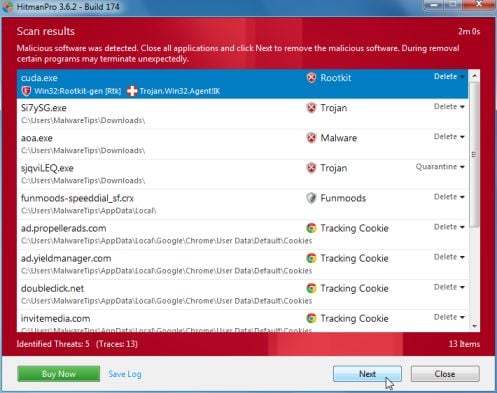
Select
Next to quarantine the malware into a secure storage where it can no longer start.
At the next screen, activate the 30-day free license:
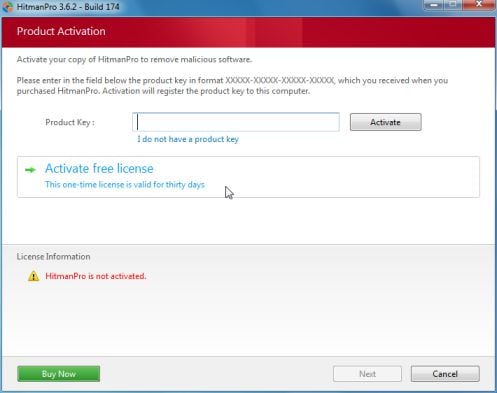
After successful activation (30 days), press:
Next
A screen indicating that the malware was successfully disabled or removed is presented.
Press:
Next
To obtain a report of the scan results, press:
Save log
Save the Notepad log!!
It has a name such as:
HitmanPro_xxxxxxxx_xxxx
Remove the USB drive, and press:
Reboot
If no malware is found, press:
Close
After
HitmanPro.Kickstart is done, you should be back into normal Windows.
:ar: Please post the
HitmanPro log in your reply.




 rb: button and right-click Computer .Select Properties . Look for System Type: which will say 32-bit Operating System or 64-bit Operating System
