
Solved GTX 460 Overclocking

logo897

New member
Member
VIP
Local time
5:31 AM
Messages
422
Hello all,

I just have a question on overclocking my gtx 460.

I used msi afterburner and novabench, following what this guy did: https://www.youtube.com/watch?v=byE2JCMV_Ko


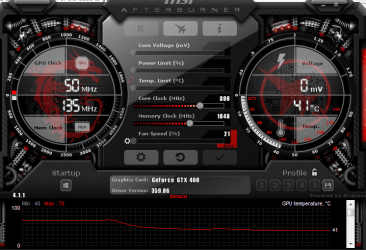
I didn't copy his overclocking mhz only his programs because mine crashed when I did his. I included a pic of my current overclock. The standard core clock was 750 which I made to 880 and that's all I changed.

Now for the question:

Am I able to up it any more? What do you recommend? I can't up the core clock anymore though mainly because of it crashes when it goes past 880.

Also, will I have problems with my psu now since it requires more power? I'm thinking on Christmas day I'm going to buy a corsair cx750m, replacing my corsair cx600m.

Thank you in advance!
 

Attachments
  • Capture.PNG
    Capture.PNG
    99.1 KB · Views: 1

My Computer

Computer type
PC/Desktop
Computer Manufacturer/Model Number
Maingear Custom PC
OS
Windows 7 Pro
CPU
Intel Core i7 2600k @4.6Ghz
Motherboard
Gigabyte GA-Z68X-UD4-B3
Memory
16 GB DDR3 1600mhz
Graphics Card(s)
EVGA GTX 980Ti
Sound Card
Onboard
Monitor(s) Displays
Curved MSI 144hz 1ms
Screen Resolution
1920x1080
Hard Drives
250GB Samsung 860 Evo SSD
PSU
Seasonic 650 Watts Gold Rating
Case
Custom Maingear Case
Cooling
60mm Maingear Liquid Cooling CPU
Keyboard
Basic Wireless Keyboard
Mouse
Basic Wireless Mouse
Antivirus
Microsoft Security Essentials
Browser
Google Chrome (Latest Version)
Am I able to up it any more? What do you recommend? I can't up the core clock anymore though mainly because of it crashes when it goes past 880.
I recommend that you don't go any higher. A nearly 16% OC is pretty respectable. Also, if it's crashing beyond 880, that should tell you something. "It doesn't like going any higher."

You could fiddle with the voltages and raise the clock speed a little higher, but then you're looking at heat dissipation issues, because more voltage equals more heat, and you only have a single fan on that card (I believe). Is it worth possibly damaging the card? Or is this just a challenge to see how high you can go? If it's your primary card, I wouldn't push it too hard. Don't OC what you can't afford to replace.

Also, OCing can be fickle. All graphics cards and CPUs are not created equally. A high overclock on one card may be impossible on another.

Also, I think I would recommend that you not buy a CX series Corsair supply. It's sort of their low end.
They make better models in their TX and RX series. Other brands such as EVGA, and Seasonic are also worth a look.
 

My Computer

Computer type
PC/Desktop
Computer Manufacturer/Model Number
Mellon Labs (custom build)
OS
Win 7 Pro x64/Win 10 Pro x64 dual boot
CPU
AMD FX 8350 Vishera @ 4200
Motherboard
ASUS M5A97 R2.0
Memory
16 GB Mushkin Blackline DDR3-2400 @ 1866 (9-10-10-10-31)
Graphics Card(s)
XFX Radeon R9 280 Double D Black Edition
Sound Card
Realtek HD Audio on MB. Sounds great.
Monitor(s) Displays
Acer 24", Acer 22"
Screen Resolution
3840 x 1080
Hard Drives
1 x Mushkin Chronos 120 GB SSD (Win 10)
1 x Samsung 850 EVO 250 GB SSD (Win 7)
1 x WD 1TB SATA Blue
1 x WD 1TB SATA Green
PSU
Corsair TX-750
Case
CoolerMaster HAF 912+
Cooling
Coolermaster Seidon 240M Liquid AIO. 6 case fans
Keyboard
Logitech G710+
Mouse
Logitech G500s
Internet Speed
Much better since I got fiber, but still way overpriced.
Antivirus
MSE, Malware Bytes for scanning
Browser
Firefox
Other Info
Corsair VOID USB headphones.

A Mellon Labs X-1 - LCD Smartie driven system status display.

Brought to you by the letter E
Ah, alright, I understand. Thank you!
 

My Computer

Computer type
PC/Desktop
Computer Manufacturer/Model Number
Maingear Custom PC
OS
Windows 7 Pro
CPU
Intel Core i7 2600k @4.6Ghz
Motherboard
Gigabyte GA-Z68X-UD4-B3
Memory
16 GB DDR3 1600mhz
Graphics Card(s)
EVGA GTX 980Ti
Sound Card
Onboard
Monitor(s) Displays
Curved MSI 144hz 1ms
Screen Resolution
1920x1080
Hard Drives
250GB Samsung 860 Evo SSD
PSU
Seasonic 650 Watts Gold Rating
Case
Custom Maingear Case
Cooling
60mm Maingear Liquid Cooling CPU
Keyboard
Basic Wireless Keyboard
Mouse
Basic Wireless Mouse
Antivirus
Microsoft Security Essentials
Browser
Google Chrome (Latest Version)
Your spec show a Nvidia GeForce GTX 860. Did you change your video card or is this a different computer?
 

My Computer

Computer type
PC/Desktop
Computer Manufacturer/Model Number
Home made Desktop
OS
Windows 10 Pro. 64/ version 1709 Windows 7 Pro/64
CPU
Intel i7-6800K @ 4.3
Motherboard
ASUS X-99 Deluxe II
Memory
Corsair Platinum 16 gig @2400
Graphics Card(s)
EVGA GTX 1070 OC
Monitor(s) Displays
Asus 27" LED LCD/VE278Q
Screen Resolution
1920-1080 or 1280-720 HDMI
Hard Drives
INTEL SSD 730-240 Gb Sata 3.0/
PSU
EVGA Platium 1200W
Case
Phanteks Luxe Tempered Glass 8 fans/ one radiator
Cooling
XSPC/ Water Cooled CPU
Keyboard
Das 4 Professional
Mouse
Logitech M705/MX Anywhere 2-S
Internet Speed
100 mbits
Antivirus
Microsoft Security Essentials/ Malwarebytes Premium 3.0/ SAS
Browser
I.E. 11 default/Firefox/ ISP Time Warner Cable/Spectrum
Other Info
LG BluRay Burner/
Sound system-KLipsch-THX/
Icy Dock ssd Hot Swap bays.
Oh yes, that was my gaming laptop I had. Sorry, have to change that.
 

My Computer

Computer type
PC/Desktop
Computer Manufacturer/Model Number
Maingear Custom PC
OS
Windows 7 Pro
CPU
Intel Core i7 2600k @4.6Ghz
Motherboard
Gigabyte GA-Z68X-UD4-B3
Memory
16 GB DDR3 1600mhz
Graphics Card(s)
EVGA GTX 980Ti
Sound Card
Onboard
Monitor(s) Displays
Curved MSI 144hz 1ms
Screen Resolution
1920x1080
Hard Drives
250GB Samsung 860 Evo SSD
PSU
Seasonic 650 Watts Gold Rating
Case
Custom Maingear Case
Cooling
60mm Maingear Liquid Cooling CPU
Keyboard
Basic Wireless Keyboard
Mouse
Basic Wireless Mouse
Antivirus
Microsoft Security Essentials
Browser
Google Chrome (Latest Version)
Back
Top