
HAF 922 fan setup

Razor505

New member
Local time
9:45 PM
Messages
231
Hi, I want to have the best airflow at the same time lesser dust build up, I heard if you have more intake than exhaust it makes a positive air pressure in the case. Here is a picture of my fan setup:
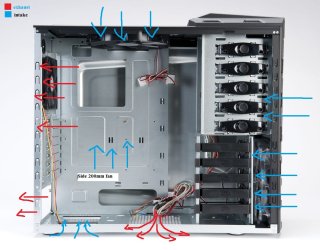
Case_CoolermasterGuts_full.jpg
My CPU cooler is a Noctua NH-D14 which is taking air from the front and blowing it to the back.
 

My Computer

Computer type
PC/Desktop
Computer Manufacturer/Model Number
Acer Aspire AM3400-E2212
OS
Windows 7 Home Premium x64
CPU
AMD Athlon II x4 635 Quad-Core
Motherboard
AMD 880G
Memory
4GB DDR3
Graphics Card(s)
ASUS GTX 650Ti OC
Monitor(s) Displays
Samsung SyncMaster 740B
Screen Resolution
1280 x 1024
Hard Drives
1TB Seagate Internal Hard Drive x1
500GB Iomega Desktop External Hard Drive x1
3TB Toshiba Desktop External Hard Drive x1
250GB Western Digital Internal Hard Drive x1
PSU
Crosair CX500 Builders Series (500 Watts)
Case
Acer
Cooling
Stock Fan
Keyboard
Acer
Mouse
Acer
Internet Speed
100 Mbps
Antivirus
Windows Defender
My belief is, any fan drawing air in should have a dust filter, the fan up top should be exhausting air, not bringing it in.
 

My Computer

Computer type
PC/Desktop
Computer Manufacturer/Model Number
Skylake Special #666
OS
Windows 10 Pro x64
CPU
Intel Core i7 6700K
Motherboard
Asus Sabertooth Z170 Mark 1
Memory
GSkill TridentZ RGB 16GB 3600 16-16-16-36
Graphics Card(s)
EVGA GTX 980 Ti SC x2
Sound Card
Realtek High Definition
Monitor(s) Displays
AOC G2460PG
Screen Resolution
1920 x 1080 144Hz
Hard Drives
Samsung 860 Pro 256GB, Seagate Barracuda 4TB x2
PSU
EVGA 1000 P2, EVGA White Custom Braided Cables
Case
Corsair Vengeance C70 Gunmetal Black
Cooling
Corsair H100i v2, Corsair ML120 x2, Thermal Grizzly Kryonaut
Keyboard
Logitech G910 Orion Spectrum
Mouse
Logitech G700s
Internet Speed
Verizon Fios Quantum Gateway 75/75
Antivirus
Windows Defender, Malwarebytes Free 3.8.3
Browser
Chrome
Other Info
Corsair SP120 x4, LG Blu-ray Drive, Durabrand HT-395 100 Watt Dolby Digital Amp, Corsair H2100 Wireless 7.1 Headset
Plus one on the top fan extracting warm case air. No harm with experimentation !
 

My Computer

Computer type
PC/Desktop
Computer Manufacturer/Model Number
A blend of brains, brawn and dumb luck.
OS
Windows 7 Ultimate 64
CPU
i7 3770k OC'd 4.6 @ 1.17v, also FX 8120 & i5 miniITX
Motherboard
MSI P67A-GD80 b3
Memory
32 gb G.Skill Sniper DDR3 10-12-12-31 @ 2133
Graphics Card(s)
XFX Radeon 7870 2GB DDR5
Sound Card
Sound Blaster Z Series Card
Monitor(s) Displays
(2) LG LED 23" 1920 x 1080 2ms Monitors via mini d-port
Screen Resolution
1680 X 1050 p
Hard Drives
Samsung 256 gb 830 SSD sata III
(1) 1 tb WD Black
(2) 1 tb Hitachi deskmates/sata II
(2) 1 tb WD green/sata II
(2) 3 tb Seagate Barracuda
(1) 120 gb OCZ Vertex SS
(1) Drobo 5N w/5 Seagate 3tb
PSU
EVGA modular 1000G2 80% gold rating & APC 1200 RS
Case
CoolerMaster Storm Styker
Cooling
7 case fans 140mm & 120mm, NZXT Kraken X60
Keyboard
(2) Logitech Illuminated Keyboards (1) usb (1) wireless
Mouse
Logitech G700 & T-BC21 - nano nx for the laptop
Internet Speed
Basic 120mbps down
Antivirus
Trend Micro Titanium Max Security & Malwarebytes Premium
Browser
Chrome and IE 10
Other Info
5 Noctua case fans + 3 Noctua in p/p on NZXT cooler
Integrated hot swap drive bays for 2.5" Drives
(2) Lite-on dvd/cd/Blu Ray optical 22X
Integrated fan controller and led on/off
HP Officejet Pro 8630 all-n-one
Hot-swappable 3.5" hard drive bay
Netgear Nighthawk router
Asus USB 3 & sata 6 PCIe card
Vantec IDE to sata adptr./Ultra sata adptr
Lenovo L420 i5 lappy with m sata
Drobo 5N advanced NAS
with the top fan as an intake the front 200mm does not take in dust but temps do go up a bit.
 

My Computer

Computer type
PC/Desktop
Computer Manufacturer/Model Number
Acer Aspire AM3400-E2212
OS
Windows 7 Home Premium x64
CPU
AMD Athlon II x4 635 Quad-Core
Motherboard
AMD 880G
Memory
4GB DDR3
Graphics Card(s)
ASUS GTX 650Ti OC
Monitor(s) Displays
Samsung SyncMaster 740B
Screen Resolution
1280 x 1024
Hard Drives
1TB Seagate Internal Hard Drive x1
500GB Iomega Desktop External Hard Drive x1
3TB Toshiba Desktop External Hard Drive x1
250GB Western Digital Internal Hard Drive x1
PSU
Crosair CX500 Builders Series (500 Watts)
Case
Acer
Cooling
Stock Fan
Keyboard
Acer
Mouse
Acer
Internet Speed
100 Mbps
Antivirus
Windows Defender
I use the Demiflex filter kit on my 922, all fans are intake with exception of the rear fan. It's a push/pull with a 120x1 radiator. Combination of filters and positive case pressure keeps interior dust to a absolute minimum.

I'll be changing the rad to a 120X2 on top and it well be exhaust in a push/pull configuration, that's the plan and subject to change.. The rear fan will be intake in order to maintain positive case pressure. My interior case temps run 1-3C above room temp unless I'm cranking the two 7950's.
 

My Computer

Computer type
PC/Desktop
Computer Manufacturer/Model Number
Custom, Dell and Lenono LT's
OS
Win8/8.1,Win7-U64, Vista U64, uncounted Linux distor's
CPU
AMD and Intell, 9590, 8350, i5 3570k
Motherboard
CFVFZ, GA990FXA, Z77e-itx
Memory
Corsair G Skill
Graphics Card(s)
Crossfired Sapphire HD 7950 Vapor-X, ASUS R9 280X TOP
Sound Card
Realtek ALC889
Monitor(s) Displays
ViewSonic VX2770SMH 27" / ViewSonic VX2433 LCD 24"
Screen Resolution
1080i HD
Hard Drives
Samsung SSD 840 Pro
OCZ Agility 3's
OCZ Vector's
WD's Blue, red, green, Velociraptors
Seagate USB3 & Hybrid's
ASUS Blu-Ray
ASUS DVD
PSU
Corsair AX1200i, Seasonice 850 Gold
Case
Cooler Master HAF 922 & HAF 932, Lian Li Train case.
Cooling
Air, Glacer 240L expanded, custom EK loop with duel D5's
Keyboard
Microsoft SideWinder X4 USB Keyboard / Logitech 250 PS2
Mouse
Logitech G500 / MS wireless 5000
Internet Speed
Best of 5ms / 75+ dn / 12+ up More or less.
Antivirus
MS esentials-MalwareBytes
Browser
Firefox Chromebook
Front and bottom ones should be intake, and top and rear exhaust
 

My Computer

Computer type
PC/Desktop
Computer Manufacturer/Model Number
Weekend Warrior Rig
OS
Windows 10 Pro
CPU
Intel i7-3770K 4.4GHz
Motherboard
ASUS P8Z77-V Pro
Memory
8GB G.SKILL Ripjaws 1866 MHz
Graphics Card(s)
EVGA GTX 980 Classified
Monitor(s) Displays
Asus VH238H 23" 2ms
Screen Resolution
1920x1080
Hard Drives
Intel 330 120GB SSD /
WD Blue 1TB /
WD Black 500GB
PSU
Corsair CX750M
Case
NZXT H440
Cooling
Corsair H80i- CPU / Corsair H90- GPU
Keyboard
Logitech K360 LE
Mouse
Logitech G500
Antivirus
Avast
Browser
Chrome
Other Info
1200W 2.1 Surround Sound Audio
I have the top fan in my case pulling cool air directly into the intake of the CPU heatsink. It works well. but my top fan is directly over the intake of my CPU heatsink. Yours looks like it may be over the center of the Noctua, so may not be as effective.

With all of the intakes, you should have good positive pressure and I think you don't even need a fan in the back, it may restrict the airflow out. Try letting the Noctua blow it out the hole. Experiment around a little. Maybe an intake on the bottom as well (to ensure positive pressure).
 

My Computer

Computer type
PC/Desktop
Computer Manufacturer/Model Number
Home built (GeneO industries)/Model 4
OS
Windows 10 Pro. EFI boot partition, full EFI boot
CPU
i7 4770k 4.4GHz (44-44-43-43 turbo) @ 1.248V
Motherboard
ASUS Maximus VI Hero
Memory
16GB (8GBx2) @2200 MHz G.skill Sniper 10-11-10-30-1, 1.6V
Graphics Card(s)
MSI GTX 970 Gaming 4G
Sound Card
Onboard SupremeFX Audio
Monitor(s) Displays
NEC Spectraview 2490WUXi-SV
Screen Resolution
1920 x 1200
Hard Drives
Samsung 850 Pro 256GB (OS), Samsung 2x 128GB 840 Pro SSD in RAID0, 3x WD Blue 6Gb/s 1TB RAID0, WD 2TB Black external USB 3.0, 2TB WD20EARS Green external USB 3.0, 2x 500GB Seagate and 1 750 GB external USB, 1x 350GB external USB3
PSU
Seasonic X-850 (2012 KM3 model)
Case
Fractal Design Define R4
Cooling
NH-D14, NF-F12, NF-A15; NF-P14, NF-P12,NF-A14, S12A PWM
Keyboard
Cooler Master Storm Quickfire Rapid - Brown
Mouse
Logitech G602
Internet Speed
126.4 Mb/s down, 24.3 Mb/s up
Other Info
USB 3.0 x8 , SATA III x8, eSATA, USB 2.0 x6. Samsung DVD R/W drive.

WEI: CPU 7.8, Memory 7.9, Graphics 7.9, Disk 7.9
Heat rises!

The front and bottom fans should be intakes, with the top and rear fans being outtakes.
 

My Computer

Computer Manufacturer/Model Number
Hera
OS
Windows 7 Ultimate x64, Mint 9
CPU
Intel i5-2500k
Motherboard
ASUS P8P67 Pro
Memory
2x 4Gb Corsair VENGEANCE DDR3-1600
Graphics Card(s)
NVidia GeForce N260GTX Twin Frozr
Sound Card
Realtek HD OnBoard Audio
Monitor(s) Displays
ASUS 24" Monitor
Screen Resolution
1920x1080
Hard Drives
G.SKILL Phoenix Series 60GB SATA II MLC Internal Solid State Drive (SSD)
SAMSUNG Spinpoint F3R 1TB 7200 RPM 32MB Cache SATA II
PSU
Cooler Master Real Power Pro 750W
Case
Cooler Master Haf 932
Cooling
Fans
Keyboard
Razer Tarantula
Mouse
Razer Lachesis
Internet Speed
not fast enough
Heat rises!

The front and bottom fans should be intakes, with the top and rear fans being outtakes.

It doesn't really matter if heat rises when you have air flowing through the case. Convection gets broken up by the flow of air through the case.

I think that maybe historically having fans on top be exhaust fans is because PSU used to be mounted on top, sucking air in from the top of the case and blowing it out the back. Putting an intake fan on top would not be effective in that configuration because it feed the PSU fan.
 

My Computer

Computer type
PC/Desktop
Computer Manufacturer/Model Number
Home built (GeneO industries)/Model 4
OS
Windows 10 Pro. EFI boot partition, full EFI boot
CPU
i7 4770k 4.4GHz (44-44-43-43 turbo) @ 1.248V
Motherboard
ASUS Maximus VI Hero
Memory
16GB (8GBx2) @2200 MHz G.skill Sniper 10-11-10-30-1, 1.6V
Graphics Card(s)
MSI GTX 970 Gaming 4G
Sound Card
Onboard SupremeFX Audio
Monitor(s) Displays
NEC Spectraview 2490WUXi-SV
Screen Resolution
1920 x 1200
Hard Drives
Samsung 850 Pro 256GB (OS), Samsung 2x 128GB 840 Pro SSD in RAID0, 3x WD Blue 6Gb/s 1TB RAID0, WD 2TB Black external USB 3.0, 2TB WD20EARS Green external USB 3.0, 2x 500GB Seagate and 1 750 GB external USB, 1x 350GB external USB3
PSU
Seasonic X-850 (2012 KM3 model)
Case
Fractal Design Define R4
Cooling
NH-D14, NF-F12, NF-A15; NF-P14, NF-P12,NF-A14, S12A PWM
Keyboard
Cooler Master Storm Quickfire Rapid - Brown
Mouse
Logitech G602
Internet Speed
126.4 Mb/s down, 24.3 Mb/s up
Other Info
USB 3.0 x8 , SATA III x8, eSATA, USB 2.0 x6. Samsung DVD R/W drive.

WEI: CPU 7.8, Memory 7.9, Graphics 7.9, Disk 7.9
Heat rises!

The front and bottom fans should be intakes, with the top and rear fans being outtakes.

It doesn't really matter if heat rises when you have air flowing through the case. Convection gets broken up by the flow of air through the case.

I think that maybe historically having fans on top be exhaust fans is because PSU used to be mounted on top, sucking air in from the top of the case and blowing it out the back. Putting an intake fan on top would not be effective in that configuration because it feed the PSU fan.
Correct. The main point is that you want good airflow, but that's been the standard for a while. Even if the heat rising thing isn't hugely important, I could definitely see it making at least a small difference.
 

My Computer

Computer Manufacturer/Model Number
Hera
OS
Windows 7 Ultimate x64, Mint 9
CPU
Intel i5-2500k
Motherboard
ASUS P8P67 Pro
Memory
2x 4Gb Corsair VENGEANCE DDR3-1600
Graphics Card(s)
NVidia GeForce N260GTX Twin Frozr
Sound Card
Realtek HD OnBoard Audio
Monitor(s) Displays
ASUS 24" Monitor
Screen Resolution
1920x1080
Hard Drives
G.SKILL Phoenix Series 60GB SATA II MLC Internal Solid State Drive (SSD)
SAMSUNG Spinpoint F3R 1TB 7200 RPM 32MB Cache SATA II
PSU
Cooler Master Real Power Pro 750W
Case
Cooler Master Haf 932
Cooling
Fans
Keyboard
Razer Tarantula
Mouse
Razer Lachesis
Internet Speed
not fast enough
Heat rises!

The front and bottom fans should be intakes, with the top and rear fans being outtakes.

It doesn't really matter if heat rises when you have air flowing through the case. Convection gets broken up by the flow of air through the case.

I think that maybe historically having fans on top be exhaust fans is because PSU used to be mounted on top, sucking air in from the top of the case and blowing it out the back. Putting an intake fan on top would not be effective in that configuration because it feed the PSU fan.
Correct. The main point is that you want good airflow, but that's been the standard for a while. Even if the heat rising thing isn't hugely important, I could definitely see it making at least a small difference.

I believe it is completely negligable. Hot air rises due to buoyancy (hot air is less dense than cold) and airflow and turbulence mixing hotter and cooler air inside the case will not let any density gradient form, which is necessary for this to happen. You need a static environment for that if you are passively cooling your coputer without fans, venting at the top may be beneficial.
 

My Computer

Computer type
PC/Desktop
Computer Manufacturer/Model Number
Home built (GeneO industries)/Model 4
OS
Windows 10 Pro. EFI boot partition, full EFI boot
CPU
i7 4770k 4.4GHz (44-44-43-43 turbo) @ 1.248V
Motherboard
ASUS Maximus VI Hero
Memory
16GB (8GBx2) @2200 MHz G.skill Sniper 10-11-10-30-1, 1.6V
Graphics Card(s)
MSI GTX 970 Gaming 4G
Sound Card
Onboard SupremeFX Audio
Monitor(s) Displays
NEC Spectraview 2490WUXi-SV
Screen Resolution
1920 x 1200
Hard Drives
Samsung 850 Pro 256GB (OS), Samsung 2x 128GB 840 Pro SSD in RAID0, 3x WD Blue 6Gb/s 1TB RAID0, WD 2TB Black external USB 3.0, 2TB WD20EARS Green external USB 3.0, 2x 500GB Seagate and 1 750 GB external USB, 1x 350GB external USB3
PSU
Seasonic X-850 (2012 KM3 model)
Case
Fractal Design Define R4
Cooling
NH-D14, NF-F12, NF-A15; NF-P14, NF-P12,NF-A14, S12A PWM
Keyboard
Cooler Master Storm Quickfire Rapid - Brown
Mouse
Logitech G602
Internet Speed
126.4 Mb/s down, 24.3 Mb/s up
Other Info
USB 3.0 x8 , SATA III x8, eSATA, USB 2.0 x6. Samsung DVD R/W drive.

WEI: CPU 7.8, Memory 7.9, Graphics 7.9, Disk 7.9
Back
Top