Hal.dll high interrupts CPU usage

Shafski

New member
Local time
3:27 PM
Messages
34
Hi,

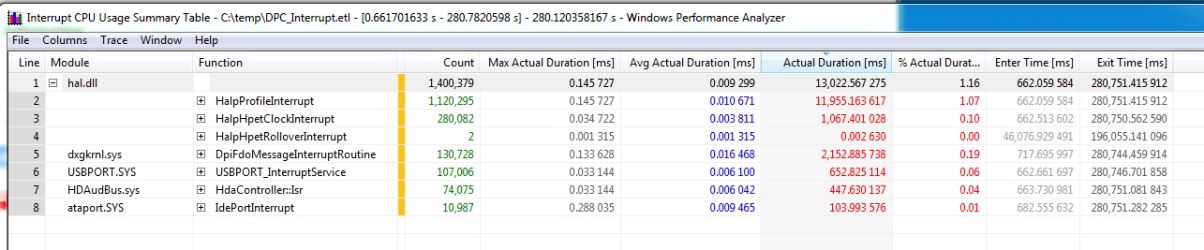
I recently noticed high CPU usage from NT system and kernel which was affecting my performance, noticeably when gaming. After doing a performance analysis, I found this in interrupts (attached screenshot)

After looking around, I'm still not sure of the cause as my PC is fairly new and was wondering if anyone could help me?

Thanks.
 

Attachments
  • interrupts.png
    interrupts.png
    22.2 KB · Views: 7

My Computer

Computer type
PC/Desktop
Computer Manufacturer/Model Number
Custom build
OS
windows 7 Home premium x64
Motherboard
MSI A78M-E35 M-ATX Motherboard
Graphics Card(s)
AMD Radeon HD 8570D
Browser
Chrome
Interrupts don't really mean a lot. An interrupt is generated every time you move your mouse or press a key on the keyboard. If you look at the average duration it's .009ms or 9/1000th of a millisecond. The total accumulated over the entire period in your data amounts to 13 seconds. I don't see the period covered but that's not a lot.

It would probably be better to analyze what else is running while you're trying to play a game. Services, background programs, auto update, etc. can eat up cycles. You might try a Clean Startup and see if that improves game response. OEM bloatware and crapware are heavy burdens on a laptop. Most don't do anything that can't be done through Windows.

Forgot to mention: You don't have many specs listed but running out of memory is another bottleneck on performance.
 

My Computer

Computer type
PC/Desktop
Computer Manufacturer/Model Number
Built 2/11/2011
OS
Windows 7 Pro-x64
CPU
i7-2600 3.4GHz - 3.8GHz Turbo
Motherboard
Intel DH67BL-B3
Memory
8Gb - 2x4GB, Muskin 991770 PC3-1333
Graphics Card(s)
Integrated Intel HD 2000
Sound Card
Integrated Intel 10.1 HD, RealTek ALC892
Monitor(s) Displays
Asus LCD VH222H, Haier HL24XSL2a
Screen Resolution
1920x1080, 1920x1080
Hard Drives
Crucial SSD C300-128Gb,
Western Digital WD5002AALX - 500Gb,
Western Digital WD7501AALS - 750Gb
PSU
Seasonic 650W 80+ Gold Modular
Case
Rosewill Defender
Cooling
Stock CPU, Four 120mm case fans, PCH fan added
Keyboard
Logitech EX100 Y-RBH94 Wireless
Mouse
Logitech EX100 M-RCE95 Wireless
Internet Speed
3.0/1.5 Mbs
Antivirus
Microsoft Security Essentials
Browser
Microsoft Internet Explorer 11
Other Info
Antec Veris Premier-Multimedia IR Station,
Cyber Accoustics-3602 Speakers,
AFT XM-5U Card Reader,
Hauppauge TV-HVR-2250,
Sony LX300 USB Turntable
Interrupts don't really mean a lot. An interrupt is generated every time you move your mouse or press a key on the keyboard. If you look at the average duration it's .009ms or 9/1000th of a millisecond. The total accumulated over the entire period in your data amounts to 13 seconds. I don't see the period covered but that's not a lot.

It would probably be better to analyze what else is running while you're trying to play a game. Services, background programs, auto update, etc. can eat up cycles. You might try a Clean Startup and see if that improves game response. OEM bloatware and crapware are heavy burdens on a laptop. Most don't do anything that can't be done through Windows.

Forgot to mention: You don't have many specs listed but running out of memory is another bottleneck on performance.

Ah I see. I've observed my processes whilst gaming etc but why is NT kernel and system taking up 15 cpu constantly on windows task manager, more than the game itself at points. I barely run any other things when gaming just the necessities, but this seems to take up a large amount of the CPU.
 

My Computer

Computer type
PC/Desktop
Computer Manufacturer/Model Number
Custom build
OS
windows 7 Home premium x64
Motherboard
MSI A78M-E35 M-ATX Motherboard
Graphics Card(s)
AMD Radeon HD 8570D
Browser
Chrome
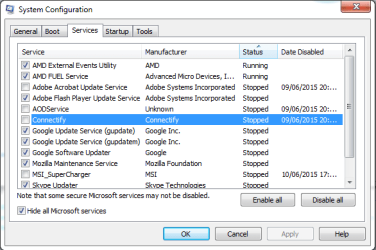
I can't see from here unless you run this Diagnostic Tool and upload the zip file. You could have lots of programs running unnecessarily. That's what OEMs do. :) But run the Clean Startup first. Or at least snip the screens and post them here. Especially from the Startup Tab.
 

My Computer

Computer type
PC/Desktop
Computer Manufacturer/Model Number
Built 2/11/2011
OS
Windows 7 Pro-x64
CPU
i7-2600 3.4GHz - 3.8GHz Turbo
Motherboard
Intel DH67BL-B3
Memory
8Gb - 2x4GB, Muskin 991770 PC3-1333
Graphics Card(s)
Integrated Intel HD 2000
Sound Card
Integrated Intel 10.1 HD, RealTek ALC892
Monitor(s) Displays
Asus LCD VH222H, Haier HL24XSL2a
Screen Resolution
1920x1080, 1920x1080
Hard Drives
Crucial SSD C300-128Gb,
Western Digital WD5002AALX - 500Gb,
Western Digital WD7501AALS - 750Gb
PSU
Seasonic 650W 80+ Gold Modular
Case
Rosewill Defender
Cooling
Stock CPU, Four 120mm case fans, PCH fan added
Keyboard
Logitech EX100 Y-RBH94 Wireless
Mouse
Logitech EX100 M-RCE95 Wireless
Internet Speed
3.0/1.5 Mbs
Antivirus
Microsoft Security Essentials
Browser
Microsoft Internet Explorer 11
Other Info
Antec Veris Premier-Multimedia IR Station,
Cyber Accoustics-3602 Speakers,
AFT XM-5U Card Reader,
Hauppauge TV-HVR-2250,
Sony LX300 USB Turntable
I can't see from here unless you run this Diagnostic Tool and upload the zip file. You could have lots of programs running unnecessarily. That's what OEMs do. :) But run the Clean Startup first. Or at least snip the screens and post them here. Especially from the Startup Tab.

Hey.

Specs : AMD A8 6600K Quad Core 3.9Ghz Processor with 4.2GHz Turbo Clocking Speeds
AMD Radeon HD8570D 8GB RAM (says 7.19 GB usable)


Startup :
vlKkaND.png

The only running services I have are the ones related to AMD so don't see them being a problem.


Also, from the diagnostic tool.
View attachment Shafski.zip

Thanks so much, really do appreciate it

Oh one other thing, I've updated my profile. Apologies for the misunderstanding, I don't use a laptop anymore :) This is a problem with a computer I use now for everything, that I bought about 4 months ago.
 

My Computer

Computer type
PC/Desktop
Computer Manufacturer/Model Number
Custom build
OS
windows 7 Home premium x64
Motherboard
MSI A78M-E35 M-ATX Motherboard
Graphics Card(s)
AMD Radeon HD 8570D
Browser
Chrome
Here's a quick list (didn't have too look hard) that is probably contributing to lag on a 2-core, 4-thread processor.
These were all running while LoL was running.

Google Toolbar
Open Broadcaster
Catalyst Control Center
Super-Charger - List of startups not available.
Rainmeter
AdobeBridge
Winamp - Added

And Chrome if the browser is open while gamming.
 
Last edited:

My Computer

Computer type
PC/Desktop
Computer Manufacturer/Model Number
Built 2/11/2011
OS
Windows 7 Pro-x64
CPU
i7-2600 3.4GHz - 3.8GHz Turbo
Motherboard
Intel DH67BL-B3
Memory
8Gb - 2x4GB, Muskin 991770 PC3-1333
Graphics Card(s)
Integrated Intel HD 2000
Sound Card
Integrated Intel 10.1 HD, RealTek ALC892
Monitor(s) Displays
Asus LCD VH222H, Haier HL24XSL2a
Screen Resolution
1920x1080, 1920x1080
Hard Drives
Crucial SSD C300-128Gb,
Western Digital WD5002AALX - 500Gb,
Western Digital WD7501AALS - 750Gb
PSU
Seasonic 650W 80+ Gold Modular
Case
Rosewill Defender
Cooling
Stock CPU, Four 120mm case fans, PCH fan added
Keyboard
Logitech EX100 Y-RBH94 Wireless
Mouse
Logitech EX100 M-RCE95 Wireless
Internet Speed
3.0/1.5 Mbs
Antivirus
Microsoft Security Essentials
Browser
Microsoft Internet Explorer 11
Other Info
Antec Veris Premier-Multimedia IR Station,
Cyber Accoustics-3602 Speakers,
AFT XM-5U Card Reader,
Hauppauge TV-HVR-2250,
Sony LX300 USB Turntable
Here's a quick list (didn't have too look hard) that is probably contributing to lag on a 2-core, 4-thread processor.
These were all running while LoL was running.

Google Toolbar
Open Broadcaster
Catalyst Control Center
Super-Charger - List of startups not available.
Rainmeter
AdobeBridge
Winamp - Added

And Chrome if the browser is open while gamming.

Ah thanks. Is google toolbar a service or something? And Adobe Bridge aswell, is that service? I can't seem to find any of them as processes when I was just running the game. I've made supercharger stop running. Winamp I sometimes use to listen to music whilst gaming. CCC controls my graphics settings so I don't think I can end that (?) I've removed supercharger too as I don't need it.
 

My Computer

Computer type
PC/Desktop
Computer Manufacturer/Model Number
Custom build
OS
windows 7 Home premium x64
Motherboard
MSI A78M-E35 M-ATX Motherboard
Graphics Card(s)
AMD Radeon HD 8570D
Browser
Chrome
Google Tool Bar is a PUP. It probably installed with Chrome or some other program you downloaded. It spends a lot of time at startup uploading all the websites you've visited. It's probably listed in Chrome as a helper/extension.

Adobe Bridge is a process that comes with Adobe Creative Suite. Check the Startup Tab of the System Configuration for other entries too. (Clean Startup) It's just bloatware for CS6 file management. If you don't know what it is, you're probably not using it and it doesn't need to run at startup.

CCC is not required. It often causes BSODs. You can adjust graphic settings through the driver/display properties.
 

My Computer

Computer type
PC/Desktop
Computer Manufacturer/Model Number
Built 2/11/2011
OS
Windows 7 Pro-x64
CPU
i7-2600 3.4GHz - 3.8GHz Turbo
Motherboard
Intel DH67BL-B3
Memory
8Gb - 2x4GB, Muskin 991770 PC3-1333
Graphics Card(s)
Integrated Intel HD 2000
Sound Card
Integrated Intel 10.1 HD, RealTek ALC892
Monitor(s) Displays
Asus LCD VH222H, Haier HL24XSL2a
Screen Resolution
1920x1080, 1920x1080
Hard Drives
Crucial SSD C300-128Gb,
Western Digital WD5002AALX - 500Gb,
Western Digital WD7501AALS - 750Gb
PSU
Seasonic 650W 80+ Gold Modular
Case
Rosewill Defender
Cooling
Stock CPU, Four 120mm case fans, PCH fan added
Keyboard
Logitech EX100 Y-RBH94 Wireless
Mouse
Logitech EX100 M-RCE95 Wireless
Internet Speed
3.0/1.5 Mbs
Antivirus
Microsoft Security Essentials
Browser
Microsoft Internet Explorer 11
Other Info
Antec Veris Premier-Multimedia IR Station,
Cyber Accoustics-3602 Speakers,
AFT XM-5U Card Reader,
Hauppauge TV-HVR-2250,
Sony LX300 USB Turntable
Google Tool Bar is a PUP. It probably installed with Chrome or some other program you downloaded. It spends a lot of time at startup uploading all the websites you've visited. It's probably listed in Chrome as a helper/extension.

Adobe Bridge is a process that comes with Adobe Creative Suite. Check the Startup Tab of the System Configuration for other entries too. (Clean Startup) It's just bloatware for CS6 file management. If you don't know what it is, you're probably not using it and it doesn't need to run at startup.

CCC is not required. It often causes BSODs. You can adjust graphic settings through the driver/display properties.

Thanks a lot for the advice. I'll stop the unecessary/unused services from startup.

I wanted to ask, is it normal for Nt Kernel & System to take up 10-15 of my CPU constantly when im gaming?
 

My Computer

Computer type
PC/Desktop
Computer Manufacturer/Model Number
Custom build
OS
windows 7 Home premium x64
Motherboard
MSI A78M-E35 M-ATX Motherboard
Graphics Card(s)
AMD Radeon HD 8570D
Browser
Chrome
That seems pretty high but it depends on what the game is doing. Right click on NT Kernel & System then click on Analyze Wait Chain. Is there anything shown in the window?

What is it without the game running?
 

My Computer

Computer type
PC/Desktop
Computer Manufacturer/Model Number
Built 2/11/2011
OS
Windows 7 Pro-x64
CPU
i7-2600 3.4GHz - 3.8GHz Turbo
Motherboard
Intel DH67BL-B3
Memory
8Gb - 2x4GB, Muskin 991770 PC3-1333
Graphics Card(s)
Integrated Intel HD 2000
Sound Card
Integrated Intel 10.1 HD, RealTek ALC892
Monitor(s) Displays
Asus LCD VH222H, Haier HL24XSL2a
Screen Resolution
1920x1080, 1920x1080
Hard Drives
Crucial SSD C300-128Gb,
Western Digital WD5002AALX - 500Gb,
Western Digital WD7501AALS - 750Gb
PSU
Seasonic 650W 80+ Gold Modular
Case
Rosewill Defender
Cooling
Stock CPU, Four 120mm case fans, PCH fan added
Keyboard
Logitech EX100 Y-RBH94 Wireless
Mouse
Logitech EX100 M-RCE95 Wireless
Internet Speed
3.0/1.5 Mbs
Antivirus
Microsoft Security Essentials
Browser
Microsoft Internet Explorer 11
Other Info
Antec Veris Premier-Multimedia IR Station,
Cyber Accoustics-3602 Speakers,
AFT XM-5U Card Reader,
Hauppauge TV-HVR-2250,
Sony LX300 USB Turntable
That seems pretty high but it depends on what the game is doing. Right click on NT Kernel & System then click on Analyze Wait Chain. Is there anything shown in the window?

What is it without the game running?

I don't have the analyze wait chain option (I use windows 7)

But, for now I tried it after ending all the services and I haven't seen it go over 5 whilst gaming. Is 5% normal?

It maxes at about 3 every few seconds without gaming.
 

My Computer

Computer type
PC/Desktop
Computer Manufacturer/Model Number
Custom build
OS
windows 7 Home premium x64
Motherboard
MSI A78M-E35 M-ATX Motherboard
Graphics Card(s)
AMD Radeon HD 8570D
Browser
Chrome
That is Windows 7. I thought you were getting your numbers from Resource Monitor (CPU Tab)? In the upper pane, there should be a listing for NT Kernel & System. Right click on it and you should get a menu.

Added:
With just IE, Live Mail and Resource Monitor running, I'm at 0.21 on NTK & S. :cool:
....BUT, I have an 8-thread machine.
 

My Computer

Computer type
PC/Desktop
Computer Manufacturer/Model Number
Built 2/11/2011
OS
Windows 7 Pro-x64
CPU
i7-2600 3.4GHz - 3.8GHz Turbo
Motherboard
Intel DH67BL-B3
Memory
8Gb - 2x4GB, Muskin 991770 PC3-1333
Graphics Card(s)
Integrated Intel HD 2000
Sound Card
Integrated Intel 10.1 HD, RealTek ALC892
Monitor(s) Displays
Asus LCD VH222H, Haier HL24XSL2a
Screen Resolution
1920x1080, 1920x1080
Hard Drives
Crucial SSD C300-128Gb,
Western Digital WD5002AALX - 500Gb,
Western Digital WD7501AALS - 750Gb
PSU
Seasonic 650W 80+ Gold Modular
Case
Rosewill Defender
Cooling
Stock CPU, Four 120mm case fans, PCH fan added
Keyboard
Logitech EX100 Y-RBH94 Wireless
Mouse
Logitech EX100 M-RCE95 Wireless
Internet Speed
3.0/1.5 Mbs
Antivirus
Microsoft Security Essentials
Browser
Microsoft Internet Explorer 11
Other Info
Antec Veris Premier-Multimedia IR Station,
Cyber Accoustics-3602 Speakers,
AFT XM-5U Card Reader,
Hauppauge TV-HVR-2250,
Sony LX300 USB Turntable
That is Windows 7. I thought you were getting your numbers from Resource Monitor (CPU Tab)? In the upper pane, there should be a listing for NT Kernel & System. Right click on it and you should get a menu.

Added:
With just IE, Live Mail and Resource Monitor running, I'm at 0.21 on NTK & S. :cool:
....BUT, I have an 8-thread machine.

Nice :P

It says system is running normally and nothing happens when I leave it on the analyze wait chain. On average my NT Kernel & System CPU Usage is 7, fluctuating constantly between like 4-15.

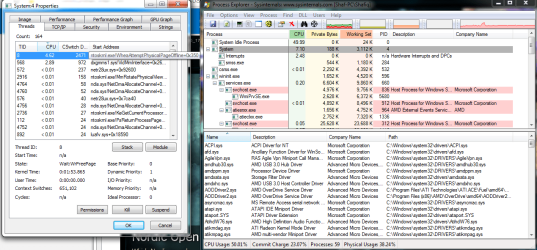
Also, I think I found the cause of the CPU from it but I have no idea what it is?

CPU.png
 

My Computer

Computer type
PC/Desktop
Computer Manufacturer/Model Number
Custom build
OS
windows 7 Home premium x64
Motherboard
MSI A78M-E35 M-ATX Motherboard
Graphics Card(s)
AMD Radeon HD 8570D
Browser
Chrome
Hmmmm. I was looking at the description in your left window example. It looks like ntoskrnl.exe is having trouble retrieving a page. That should have generated a BSOD if it failed. It's in the Windows Hardware Error Architecture (WHEA) process at that point.

For test purposes, reduce your pagefile size to .5GB (or 500MB). I'd like to see if less pagefile space on that big spinner (HDD) of yours will help reduce your system time as well as put more into free memory. We may want to run a Memtest if you don't see an improvement.

Forgot to mention:
I don't think the Analyze Wait Chain screen updates. It's just a snapshot at that point in time. The fact that it was empty is a good thing.
 
Last edited:

My Computer

Computer type
PC/Desktop
Computer Manufacturer/Model Number
Built 2/11/2011
OS
Windows 7 Pro-x64
CPU
i7-2600 3.4GHz - 3.8GHz Turbo
Motherboard
Intel DH67BL-B3
Memory
8Gb - 2x4GB, Muskin 991770 PC3-1333
Graphics Card(s)
Integrated Intel HD 2000
Sound Card
Integrated Intel 10.1 HD, RealTek ALC892
Monitor(s) Displays
Asus LCD VH222H, Haier HL24XSL2a
Screen Resolution
1920x1080, 1920x1080
Hard Drives
Crucial SSD C300-128Gb,
Western Digital WD5002AALX - 500Gb,
Western Digital WD7501AALS - 750Gb
PSU
Seasonic 650W 80+ Gold Modular
Case
Rosewill Defender
Cooling
Stock CPU, Four 120mm case fans, PCH fan added
Keyboard
Logitech EX100 Y-RBH94 Wireless
Mouse
Logitech EX100 M-RCE95 Wireless
Internet Speed
3.0/1.5 Mbs
Antivirus
Microsoft Security Essentials
Browser
Microsoft Internet Explorer 11
Other Info
Antec Veris Premier-Multimedia IR Station,
Cyber Accoustics-3602 Speakers,
AFT XM-5U Card Reader,
Hauppauge TV-HVR-2250,
Sony LX300 USB Turntable
Hmmmm. I was looking at the description in your left window example. It looks like ntoskrnl.exe is having trouble retrieving a page. That should have generated a BSOD if it failed. It's in the Windows Hardware Error Architecture (WHEA) process at that point.

For test purposes, reduce your pagefile size to .5GB (or 500MB). I'd like to see if less pagefile space on that big spinner (HDD) of yours will help reduce your system time as well as put more into free memory. We may want to run a Memtest if you don't see an improvement.

Forgot to mention:
I don't think the Analyze Wait Chain screen updates. It's just a snapshot at that point in time. The fact that it was empty is a good thing.

Ah haha. I left it open and was checking it every few seconds to see if something came up. I'll open it after a while a few times and see if theres any difference (with regards to the wait chain)

I reduced the pagefile size to 500MB. Sorry, I've never changed the pagefile size but I just put the minimum and maximum as 500MB right? Thanks again
 

My Computer

Computer type
PC/Desktop
Computer Manufacturer/Model Number
Custom build
OS
windows 7 Home premium x64
Motherboard
MSI A78M-E35 M-ATX Motherboard
Graphics Card(s)
AMD Radeon HD 8570D
Browser
Chrome
I reduced the pagefile size to 500MB. Sorry, I've never changed the pagefile
size but I just put the minimum and maximum as 500MB right?
Yes, that's correct. Did it seem to help reduce the system time used?
 

My Computer

Computer type
PC/Desktop
Computer Manufacturer/Model Number
Built 2/11/2011
OS
Windows 7 Pro-x64
CPU
i7-2600 3.4GHz - 3.8GHz Turbo
Motherboard
Intel DH67BL-B3
Memory
8Gb - 2x4GB, Muskin 991770 PC3-1333
Graphics Card(s)
Integrated Intel HD 2000
Sound Card
Integrated Intel 10.1 HD, RealTek ALC892
Monitor(s) Displays
Asus LCD VH222H, Haier HL24XSL2a
Screen Resolution
1920x1080, 1920x1080
Hard Drives
Crucial SSD C300-128Gb,
Western Digital WD5002AALX - 500Gb,
Western Digital WD7501AALS - 750Gb
PSU
Seasonic 650W 80+ Gold Modular
Case
Rosewill Defender
Cooling
Stock CPU, Four 120mm case fans, PCH fan added
Keyboard
Logitech EX100 Y-RBH94 Wireless
Mouse
Logitech EX100 M-RCE95 Wireless
Internet Speed
3.0/1.5 Mbs
Antivirus
Microsoft Security Essentials
Browser
Microsoft Internet Explorer 11
Other Info
Antec Veris Premier-Multimedia IR Station,
Cyber Accoustics-3602 Speakers,
AFT XM-5U Card Reader,
Hauppauge TV-HVR-2250,
Sony LX300 USB Turntable
I reduced the pagefile size to 500MB. Sorry, I've never changed the pagefile
size but I just put the minimum and maximum as 500MB right?
Yes, that's correct. Did it seem to help reduce the system time used?

Sorry, what do you mean by system time? CPU used up by NT Kernel & System right?

So far I've seen it at a maximum of 3% after the change, but I just checked today. I'll post again any further changes. It's constantly at 1% now, much better than before.
 

My Computer

Computer type
PC/Desktop
Computer Manufacturer/Model Number
Custom build
OS
windows 7 Home premium x64
Motherboard
MSI A78M-E35 M-ATX Motherboard
Graphics Card(s)
AMD Radeon HD 8570D
Browser
Chrome
"Time" was probably a bad word choice. Percent CPU, as you were watching. :o

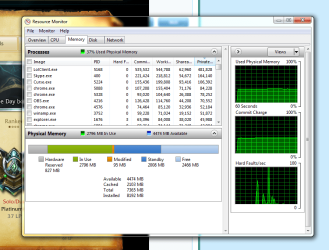
Right click the task bar and Start Task Manager. On the Performance Tab, click on Resource Monitor (at the bottom), then click on the Memory Tab. Post a screen shot of the Physical Memory bar graph area.
 

My Computer

Computer type
PC/Desktop
Computer Manufacturer/Model Number
Built 2/11/2011
OS
Windows 7 Pro-x64
CPU
i7-2600 3.4GHz - 3.8GHz Turbo
Motherboard
Intel DH67BL-B3
Memory
8Gb - 2x4GB, Muskin 991770 PC3-1333
Graphics Card(s)
Integrated Intel HD 2000
Sound Card
Integrated Intel 10.1 HD, RealTek ALC892
Monitor(s) Displays
Asus LCD VH222H, Haier HL24XSL2a
Screen Resolution
1920x1080, 1920x1080
Hard Drives
Crucial SSD C300-128Gb,
Western Digital WD5002AALX - 500Gb,
Western Digital WD7501AALS - 750Gb
PSU
Seasonic 650W 80+ Gold Modular
Case
Rosewill Defender
Cooling
Stock CPU, Four 120mm case fans, PCH fan added
Keyboard
Logitech EX100 Y-RBH94 Wireless
Mouse
Logitech EX100 M-RCE95 Wireless
Internet Speed
3.0/1.5 Mbs
Antivirus
Microsoft Security Essentials
Browser
Microsoft Internet Explorer 11
Other Info
Antec Veris Premier-Multimedia IR Station,
Cyber Accoustics-3602 Speakers,
AFT XM-5U Card Reader,
Hauppauge TV-HVR-2250,
Sony LX300 USB Turntable
"Time" was probably a bad word choice. Percent CPU, as you were watching. :o

Right click the task bar and Start Task Manager. On the Performance Tab, click on Resource Monitor (at the bottom), then click on the Memory Tab. Post a screen shot of the Physical Memory bar graph area.

memory.png

Is that alright sir

Btw when I game I end skype process, chrome, and just use League and sometimes OBS & Curse

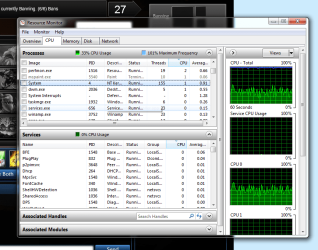
Right now even with all those running whilst im in matchmaking in League (so the actual game hasn't started yet) I'm getting the below average CPU on System.

memory2.png

Things are seeming a lot more hopeful, but I'm going to monitor it and report back if it changes. So is the cause memory related?
 

My Computer

Computer type
PC/Desktop
Computer Manufacturer/Model Number
Custom build
OS
windows 7 Home premium x64
Motherboard
MSI A78M-E35 M-ATX Motherboard
Graphics Card(s)
AMD Radeon HD 8570D
Browser
Chrome
That memory usage looks pretty good.

Actually, I think it's a combination of the large disk being used for system files and the possibility that you may be using IDE mode instead of AHCI mode. I didn't look up the specs on your HDD but large disks aren't known for speed. Typically, they're used for data storage. Windows will use much of whatever you assign to virtual memory even though it may not be necessary from a physical memory standpoint. And having a pagefile on a slow disk takes time and I/O from other tasks as the pagefile is filled and re-read.

That's where Solid State Drives (SSD) really shine. They can make an otherwise slow system blazing fast. Many use a smaller SSD for system and programs and leave the HDD to data storage. The difference is like night and day.

Keep an eye on your system load for a while and if it stays low, you can add back any startups you disabled during the Clean Start. It's better to add only ONE at a time so you can see the effect it has on the system and decide if it's worth the load it puts on the system when you're not actually using it.
 

My Computer

Computer type
PC/Desktop
Computer Manufacturer/Model Number
Built 2/11/2011
OS
Windows 7 Pro-x64
CPU
i7-2600 3.4GHz - 3.8GHz Turbo
Motherboard
Intel DH67BL-B3
Memory
8Gb - 2x4GB, Muskin 991770 PC3-1333
Graphics Card(s)
Integrated Intel HD 2000
Sound Card
Integrated Intel 10.1 HD, RealTek ALC892
Monitor(s) Displays
Asus LCD VH222H, Haier HL24XSL2a
Screen Resolution
1920x1080, 1920x1080
Hard Drives
Crucial SSD C300-128Gb,
Western Digital WD5002AALX - 500Gb,
Western Digital WD7501AALS - 750Gb
PSU
Seasonic 650W 80+ Gold Modular
Case
Rosewill Defender
Cooling
Stock CPU, Four 120mm case fans, PCH fan added
Keyboard
Logitech EX100 Y-RBH94 Wireless
Mouse
Logitech EX100 M-RCE95 Wireless
Internet Speed
3.0/1.5 Mbs
Antivirus
Microsoft Security Essentials
Browser
Microsoft Internet Explorer 11
Other Info
Antec Veris Premier-Multimedia IR Station,
Cyber Accoustics-3602 Speakers,
AFT XM-5U Card Reader,
Hauppauge TV-HVR-2250,
Sony LX300 USB Turntable
Back
Top