

- Local time
- 8:15 PM
- Messages
- 83
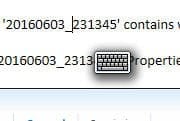
Can anyone tell me how to disable the handwriting tool (image attached) that pops up whenever I place a cursor in text?
For example, if I open Notepad, the tool appears just below the blinking cursor and doesn't go away until I start typing.
I understand that this tool allows the user to enter text using handwriting, which is something I do not want or need.
FYI this tool began popping up after I installed an Intuos tablet. Regardless of whether the tablet is turned on or off, the tool always follows my cursor around.
Is there an option to disable the tool so that it never pops up? If so, I can't find it.
For example, if I open Notepad, the tool appears just below the blinking cursor and doesn't go away until I start typing.
I understand that this tool allows the user to enter text using handwriting, which is something I do not want or need.
FYI this tool began popping up after I installed an Intuos tablet. Regardless of whether the tablet is turned on or off, the tool always follows my cursor around.
Is there an option to disable the tool so that it never pops up? If so, I can't find it.
Attachments
Last edited:
My Computer
- Computer type
- PC/Desktop
- Computer Manufacturer/Model Number
- Dell Studio MT
- OS
- Microsoft Windows 7 Professional 64-bit 7601 Multiprocessor Free Service Pack 1
- CPU
- Intel(R) Core(TM) i7-4790 CPU @ 3.60GHz
- Motherboard
- Dell Inc. 0KWVT8
- Memory
- 24.00 GB
- Graphics Card(s)
- AMD Radeon(TM) R9 270
- Sound Card
- (1) AMD High Definition Audio Device (2) Realtek High Defi
- Monitor(s) Displays
- Sun CRT
- Screen Resolution
- 1920 x 1200 x 32 bits (4294967296 colors) @ 60 Hz
- Hard Drives
- (1) Crucial_ CT256MX100SSD1 SCSI Disk Device (2) Intel Raid 1 Volume SCSI Disk Device (3) SK hynix SC210 mSAT SCSI Disk Device (4) CF/MD Card (5) MS/Pro/Duo Card (6) SD/mini-MMC/RS Card (7) SM/xD Card


