Solved Happili redirect

Zelanie

New member
Local time
3:41 PM
Messages
12
So my google searches sometimes (but not always) redirect to Happili pages instead. I followed the directions in this thread, but a few hours later, it happened again. So it must not be cleared all the way.

The first log is from ComboFix. You'll see that I didn't manage to disable AVG all the way. I disabled the resident shield as directed, then tried to run ComboFix, and got the error that AVG wasn't properly disabled. So I doublechecked the directions, and realized I hadn't turned off the email scanners. Then ComboFix said something like "you dumbass, you still didn't get all the components turned off, I'm going to run anyway so good luck." with no option to go back and turn anything else off before running.

ComboFix found one problem, ESET found none. I then cleaned out temp files, uninstalled ComboFix, and patched programs with Secunia. So I was hoping I was done, but no luck.

Other ideas?
 

Attachments

My Computer

OS
Windows 7 Home Premium 64 bit

My Computer

Computer Manufacturer/Model Number
Dell XPS 15 L502x
OS
Windows 7 Ultimate x64 SP1
CPU
Core i7-2670QM
Memory
8GB DDR3 PC3-10600
Graphics Card(s)
Intel HD Graphics 3000 + GeForce GT 540M
Screen Resolution
1920x1080
Hard Drives
1TB 5400RPM Seagate
Thanks, I'll post the next steps as I do them.

1. TDSS Killer ran, no problems found.
 

My Computer

OS
Windows 7 Home Premium 64 bit
2. Redownloaded and ran ComboFix with AVG properly disabled.
 

Attachments

My Computer

OS
Windows 7 Home Premium 64 bit
4. Ran security check.

Results of screen317's Security Check version 0.99.32
Windows 7 x64 (UAC is enabled)
Internet Explorer 9
``````````````````````````````
Antivirus/Firewall Check:

Windows Firewall Enabled!
ESET Online Scanner v3
WMI entry may not exist for antivirus; attempting automatic update.
```````````````````````````````
Anti-malware/Other Utilities Check:

Secunia PSI (2.0.0.4003)
Java(TM) 6 Update 31
Adobe Reader X (10.1.3)
Mozilla Firefox (11.0.)
````````````````````````````````
Process Check:
objlist.exe by Laurent

Malwarebytes' Anti-Malware mbam.exe
AVG avgwdsvc.exe
AVG avgtray.exe
``````````End of Log````````````
 

My Computer

OS
Windows 7 Home Premium 64 bit
5. Made sure Proxy server was unchecked
6. Flushed DNS cache, then stopped and started it.
7. Ran Hijackthis and am posting log. I don't know enough to know which, if any, lines are the problem, so I'm hoping somebody can help me out with the next step!
 

Attachments

My Computer

OS
Windows 7 Home Premium 64 bit
It is my understanding that a full check with the lowly Windows Defender shall remove all traces of Happili Virus from any Desktop/Laptop. So why go anywhere else.
 

My Computer

Computer Manufacturer/Model Number
Custom Built
OS
Windows 7 Pro with SP1 32bit
Motherboard
Intel D845GVS1 X86-based PC
Memory
2 gigs of RAM
Graphics Card(s)
Intel(R) 82845G/GL/GE/PE/GV Graphics Controller
Sound Card
Realtek AC'97 Audio
Monitor(s) Displays
Samsung SyncMaster 931BF Black 19" LCD Monitor
Screen Resolution
1280X960
Hard Drives
1. SAMSUNG SP0822N ATA Device ~ 80 GigaBytes

2. Seagate FreeAgent Go USB Device ~ 500 GigaBytes
Keyboard
COMPAQ Standard PS/2 Keyboard
Mouse
iBall Laser Precise Speedster
Internet Speed
4 mb/sec
Notifying Jacee of this thread. Such a tricky infection is best tackled with an expert's guidance, and the steps can vary from computer to computer/infection to infection. Zelanie, Jacee is one of our malware removal experts :-)
In the meantime, do not try to get rid of the virus on your own, and do not do any e-banking or other confidential activities on your infected computer.
 

My Computer

OS
-

My Computer

Computer Manufacturer/Model Number
SMN-Productions
OS
Windows 7 x86/x64, Server 2008r2, Web Server 2008
CPU
i7 v2 3930K Steping stone 2
Motherboard
ASUS Rampage IV Extreme
Memory
G.SKILL Ripjaws Z Series 32GB
Graphics Card(s)
AMD HD 5770
Monitor(s) Displays
Acer 21" and Samsung 20"
Hard Drives
Patriot Pyro 80GB
PSU
1000 Watt
Case
HAF-X
Cooling
4 Fans
Keyboard
Black Widow Ultimate
Please download aswMBR to your desktop.

  • Double click the aswMBR.exe icon to run it
  • it will ask to download extra definitions - ALLOW IT
  • Click the Scan button to start the scan
  • On completion of the scan, click the save log button, save it to your desktop and post it in your next reply.
 

My Computer

Computer type
PC/Desktop
Computer Manufacturer/Model Number
Bruce ... somewhere in his 40's
OS
Windows 7 Ultimate 32bit SP1
CPU
Intel(R) Core(TM)2 Quad CPU @ 2.40GHz, 2400 MHz
Motherboard
INTEL/D975XBX2
Memory
4 GB
Graphics Card(s)
ATI Radeon HD 2600 Pro
Monitor(s) Displays
Samsung SyncMaster 914v
Screen Resolution
1280 x 1024
Hard Drives
2/500GB each ... ST3500630AS ATA Device.
One is not connected
PSU
Rocketfish 700 W
Case
G.Skill Gigabyte Chassis
Keyboard
Standard PS/2 Keyboard
Mouse
Microsoft PS/2 Mouse
Internet Speed
DSL
Antivirus
Avira Internet Security
Browser
IE 11
Other Info
ATI HDMI Audio
Thank you so much for replying to my thread.

Log is posted here. I have to go in to work and won't be back until late, but can follow whatever the next step is when I get back.
 

Attachments

My Computer

OS
Windows 7 Home Premium 64 bit
Type services.msc in the start search box. Click on the icon then scroll down to Microsoft BingBar. Right click on the line and disable it.
Now go to Programs and Features and uninstall BingBar.
Navigate to c:\program files (x86)\Microsoft\BingBar <---delete the folder.


Please download TFC by Old Timer TFC - Temp File Cleaner by OldTimer - Geeks to Go Forums and save it to your desktop.
Save any unsaved work. TFC will close ALL open programs including your browser!
Double-click on TFC.exe to run it. If you are using Vista/Windows 7 right-click on the file and choose Run As Administrator.
Click the Start button to begin the cleaning process and let it run uninterrupted to completion.
Important! If TFC prompts you to reboot, please do so immediately. If not prompted, manually reboot the machine anyway to ensure a complete clean.


Next,

Copy and paste these lines in Note pad.

@Echo on
pushd\windows\system32\drivers\etc
attrib -h -s -r hosts
echo 127.0.0.1 localhost>HOSTS
attrib +r +h +s hosts
popd
ipconfig /release
ipconfig /renew
ipconfig /flushdns
netsh winsock reset all
netsh int ip reset all
shutdown -r -t 1
del %0


Save as flush.bat to your desktop.

Double click on the flush.bat file to run it.Vista and Windows 7... right click the .bat file and choose to run as Administrator. Your computer will reboot itself.

Let me know if you're still being re-directed.
 

My Computer

Computer type
PC/Desktop
Computer Manufacturer/Model Number
Bruce ... somewhere in his 40's
OS
Windows 7 Ultimate 32bit SP1
CPU
Intel(R) Core(TM)2 Quad CPU @ 2.40GHz, 2400 MHz
Motherboard
INTEL/D975XBX2
Memory
4 GB
Graphics Card(s)
ATI Radeon HD 2600 Pro
Monitor(s) Displays
Samsung SyncMaster 914v
Screen Resolution
1280 x 1024
Hard Drives
2/500GB each ... ST3500630AS ATA Device.
One is not connected
PSU
Rocketfish 700 W
Case
G.Skill Gigabyte Chassis
Keyboard
Standard PS/2 Keyboard
Mouse
Microsoft PS/2 Mouse
Internet Speed
DSL
Antivirus
Avira Internet Security
Browser
IE 11
Other Info
ATI HDMI Audio
I am not an expert virus remover and haven't tried all the exotic suggestions mentioned for removing the Happili Virus. They must be very good.

I had found the instructions as under at How Do I Stop Happili From Redirecting? | eHow.com for removing it, and it did the job for me nicely.

Instructions
1 Exit out of any open Web browsers.
2 Click the "Start" button located in the bottom left of the screen. The Start menu launches.
3 Type “Windows Defender” in the Search box located at the bottom of the Start menu. Press “Enter.”
4 Click “Scan” from the top menu and then select “Full Scan.” The Windows Defender tool scans your computer for the Happili virus. The files are quarantined and automatically removed. This could take several hours depending on how badly infected your computer system is.
5 Click the “X” located in the upper right corner of Windows Defender to close the program after the Happili virus has been removed.

That is why I had suggested that Windows Defender should be given a try before anything else.
 

My Computer

Computer Manufacturer/Model Number
Custom Built
OS
Windows 7 Pro with SP1 32bit
Motherboard
Intel D845GVS1 X86-based PC
Memory
2 gigs of RAM
Graphics Card(s)
Intel(R) 82845G/GL/GE/PE/GV Graphics Controller
Sound Card
Realtek AC'97 Audio
Monitor(s) Displays
Samsung SyncMaster 931BF Black 19" LCD Monitor
Screen Resolution
1280X960
Hard Drives
1. SAMSUNG SP0822N ATA Device ~ 80 GigaBytes

2. Seagate FreeAgent Go USB Device ~ 500 GigaBytes
Keyboard
COMPAQ Standard PS/2 Keyboard
Mouse
iBall Laser Precise Speedster
Internet Speed
4 mb/sec
Jacee, followed all instructions and am still being redirected. I use Firefox, fwiw.

wanchoo, I wasn't able to get Windows Defender re-enabled when I tried it after your post yesterday. I get the message that it's turned off (which apparently is common when using other AV software), but also get an error message when I tried to re-enable it.
 

My Computer

OS
Windows 7 Home Premium 64 bit
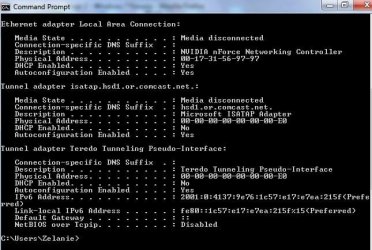
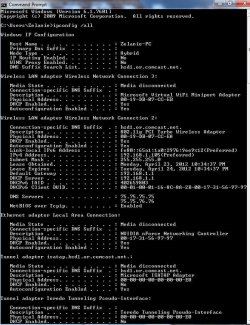
I'm sure Jacee will return as soon as she can. In the meantime can you open a command prompt, type ipconfig /all and press enter, and post us a screenshot of the result?

I'd like to see what DNS servers you're using...
 

My Computer

OS
Windows 7 Ultimate x64
Here you go.
 

Attachments

  • ipcfg.jpg
    ipcfg.jpg
    68.4 KB · Views: 19

My Computer

OS
Windows 7 Home Premium 64 bit
Thanks. Can you go back to that window, scroll up some, and post a shot of the beginning of that output?
 

My Computer

OS
Windows 7 Ultimate x64
Oh jeez- I can't believe I didn't catch that myself last night. Sorry about that.
 

Attachments

  • inconfig2.jpg
    inconfig2.jpg
    140.9 KB · Views: 25

My Computer

OS
Windows 7 Home Premium 64 bit
Un-install Firefox and if asked about user data or settings then I want that removed too.

Delete your copy of Combofix.

Re-install Firefox and tell me if you're still being re-directed.
 

My Computer

Computer type
PC/Desktop
Computer Manufacturer/Model Number
Bruce ... somewhere in his 40's
OS
Windows 7 Ultimate 32bit SP1
CPU
Intel(R) Core(TM)2 Quad CPU @ 2.40GHz, 2400 MHz
Motherboard
INTEL/D975XBX2
Memory
4 GB
Graphics Card(s)
ATI Radeon HD 2600 Pro
Monitor(s) Displays
Samsung SyncMaster 914v
Screen Resolution
1280 x 1024
Hard Drives
2/500GB each ... ST3500630AS ATA Device.
One is not connected
PSU
Rocketfish 700 W
Case
G.Skill Gigabyte Chassis
Keyboard
Standard PS/2 Keyboard
Mouse
Microsoft PS/2 Mouse
Internet Speed
DSL
Antivirus
Avira Internet Security
Browser
IE 11
Other Info
ATI HDMI Audio
Back
Top