Solved hard disk changed to dynamic type after using disk management

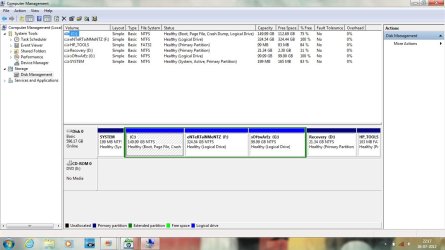
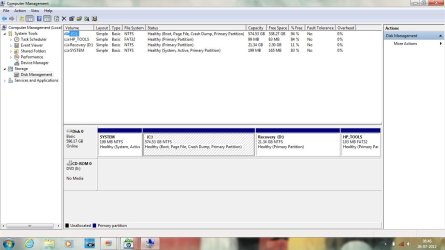
hai friends,here's the screenshot of my disk management after reinstalling windows:
Untitled_2.jpg

Please tell me
1.which one should I change to logical?
2.how to shrink C drive to my desired size?
3.should the newly created partitions be logical or primary?
I'd be using PW boot cd.

Please provide steps in detail.:)
 

My Computer

Computer Manufacturer/Model Number
hp pavilion dv6-7012tx
OS
windows 7 home premium 64-bit
CPU
2nd generation i5
Memory
6GB
Graphics Card(s)
Nvidia Geforce GT630M(2GB)
Monitor(s) Displays
LED
Screen Resolution
1366*768
Hard Drives
Hitachi 640GB Hard Disk
Hi! I'm new to this thread and I realize you already have a bunch of helpers here, so I'll not add any advice that differs from what you've already gotten.

I read through the thread a couple of hours ago and saw where Gregrocker had outlined steps you can take to complete what you're looking for, so until one of the helpers responds I'd just recommend reviewing that post to determine your next move.
 

My Computer

OS
Windows 7 Ultimate x64
hai friends,here's the screenshot of my disk management after reinstalling windows:

View attachment 223330

Please tell me
1.which one should I change to logical?
2.how to shrink C drive to my desired size?
3.should the newly created partitions be logical or primary?
I'd be using PW boot cd.

Please provide steps in detail.:)
In PW select the 574GB partition and resize it. Then create the logical partitions in the unallocated space. Of course apply the changes. Post screenshot afterwards.

How to Create Partition with partition manager? Partition Wizard Create Partition Video Help

Resize partition with Partition Wizard
How to Move/Resize Partition with partition manager? Partition Wizard Move/Resize Partition Video Help.

Create the unallocated space AFTER (not before) your 574GB partition!
 

My Computer

Computer type
Laptop
Computer Manufacturer/Model Number
ACER ASPIRE 5742G
OS
Microsoft Windows 7 Home Premium 64-bits 7601 Multiprocessor Free Service Pack 1
CPU
Intel(R) Core(TM) i3 CPU M 370 @ 2.40GHz
Motherboard
Acer Aspire 5742G
Memory
4,00 GB
Graphics Card(s)
ATI Mobility Radeon HD 5400 Series
Sound Card
(1) AMD High Definition Audio Device (2) Realtek High Defi
Screen Resolution
1366 x 768 x 32 bits (4294967296 colors) @ 60 Hz
Hard Drives
WDC WD5000BEVT-22ZAT0
Converting the HP_TOOLS to logical is not the way to go. Logical partitions should be adjacent to each other. Don't touch the HP_TOOLS and RECOVERY tools partition anyway.... because they are used for recovery. "system reserved" must be primary as well, because system boots from ACTIVE partition from disk. And only primary partitions can be active. So keep those 3 partitions as they are now!!

Convert 574GB partition to type logical! Video help on how to set partition as Primary or Logical.

Then do what I told you a few minutes ago
 

My Computer

Computer type
Laptop
Computer Manufacturer/Model Number
ACER ASPIRE 5742G
OS
Microsoft Windows 7 Home Premium 64-bits 7601 Multiprocessor Free Service Pack 1
CPU
Intel(R) Core(TM) i3 CPU M 370 @ 2.40GHz
Motherboard
Acer Aspire 5742G
Memory
4,00 GB
Graphics Card(s)
ATI Mobility Radeon HD 5400 Series
Sound Card
(1) AMD High Definition Audio Device (2) Realtek High Defi
Screen Resolution
1366 x 768 x 32 bits (4294967296 colors) @ 60 Hz
Hard Drives
WDC WD5000BEVT-22ZAT0

My Computer

Computer Manufacturer/Model Number
hp pavilion dv6-7012tx
OS
windows 7 home premium 64-bit
CPU
2nd generation i5
Memory
6GB
Graphics Card(s)
Nvidia Geforce GT630M(2GB)
Monitor(s) Displays
LED
Screen Resolution
1366*768
Hard Drives
Hitachi 640GB Hard Disk
create the unallocated space on the right side (not left side) of 574GB partirion
 

My Computer

Computer type
Laptop
Computer Manufacturer/Model Number
ACER ASPIRE 5742G
OS
Microsoft Windows 7 Home Premium 64-bits 7601 Multiprocessor Free Service Pack 1
CPU
Intel(R) Core(TM) i3 CPU M 370 @ 2.40GHz
Motherboard
Acer Aspire 5742G
Memory
4,00 GB
Graphics Card(s)
ATI Mobility Radeon HD 5400 Series
Sound Card
(1) AMD High Definition Audio Device (2) Realtek High Defi
Screen Resolution
1366 x 768 x 32 bits (4294967296 colors) @ 60 Hz
Hard Drives
WDC WD5000BEVT-22ZAT0
create the unallocated space on the right side (not left side) of 574GB partirion

Do u have any screenshot of unallocated space created on right side?Because I didn't understand the above reply either.:confused:

Will I get any option to create new partitions on right side?
 

My Computer

Computer Manufacturer/Model Number
hp pavilion dv6-7012tx
OS
windows 7 home premium 64-bit
CPU
2nd generation i5
Memory
6GB
Graphics Card(s)
Nvidia Geforce GT630M(2GB)
Monitor(s) Displays
LED
Screen Resolution
1366*768
Hard Drives
Hitachi 640GB Hard Disk

My Computer

Computer type
Laptop
Computer Manufacturer/Model Number
ACER ASPIRE 5742G
OS
Microsoft Windows 7 Home Premium 64-bits 7601 Multiprocessor Free Service Pack 1
CPU
Intel(R) Core(TM) i3 CPU M 370 @ 2.40GHz
Motherboard
Acer Aspire 5742G
Memory
4,00 GB
Graphics Card(s)
ATI Mobility Radeon HD 5400 Series
Sound Card
(1) AMD High Definition Audio Device (2) Realtek High Defi
Screen Resolution
1366 x 768 x 32 bits (4294967296 colors) @ 60 Hz
Hard Drives
WDC WD5000BEVT-22ZAT0

My Computer

Computer type
Laptop
Computer Manufacturer/Model Number
ACER ASPIRE 5742G
OS
Microsoft Windows 7 Home Premium 64-bits 7601 Multiprocessor Free Service Pack 1
CPU
Intel(R) Core(TM) i3 CPU M 370 @ 2.40GHz
Motherboard
Acer Aspire 5742G
Memory
4,00 GB
Graphics Card(s)
ATI Mobility Radeon HD 5400 Series
Sound Card
(1) AMD High Definition Audio Device (2) Realtek High Defi
Screen Resolution
1366 x 768 x 32 bits (4294967296 colors) @ 60 Hz
Hard Drives
WDC WD5000BEVT-22ZAT0
Converting the HP_TOOLS to logical is not the way to go. Logical partitions should be adjacent to each other. Don't touch the HP_TOOLS and RECOVERY tools partition anyway.... because they are used for recovery. "system reserved" must be primary as well, because system boots from ACTIVE partition from disk. And only primary partitions can be active. So keep those 3 partitions as they are now!!

Convert 574GB partition to type logical! Video help on how to set partition as Primary or Logical.

Then do what I told you a few minutes ago

But Arc earlier said that primary partitions should not exceed four.
So is it necessary to convert C drive to logical?
 

My Computer

Computer Manufacturer/Model Number
hp pavilion dv6-7012tx
OS
windows 7 home premium 64-bit
CPU
2nd generation i5
Memory
6GB
Graphics Card(s)
Nvidia Geforce GT630M(2GB)
Monitor(s) Displays
LED
Screen Resolution
1366*768
Hard Drives
Hitachi 640GB Hard Disk
Christin, follow what Greg is saying.

As and when you will try to partition the C drive, it will initially find 5 partitions there, and will be converted to dynamic again, coz a logical extended, including the volumes within it will be treated as another primary partition by the disk management.

If the number of primary partitions are less than four at the starting point, this problem will not occur.

System, recovery and HP tools must be primary for the proper running and maintenance of the system.

If you are afraid that after making C logical your system may not boot, it is not correct. The system boots from the system partition, where the MBR is stored.

So go for it, convert C to logical. Dont worry at all.
 

My Computer

Computer type
PC/Desktop
Computer Manufacturer/Model Number
Self Assembled
OS
Microsoft Windows 10 Pro Insider Preview 64-bit
CPU
Intel(R) Core(TM) i3-4130 CPU @ 3.40GHz
Motherboard
Gigabyte Technology Co., Ltd. B85M-D3H
Memory
Corsair Vengence 4GB x2 (8.00GB Dual-Channel DDR3 @ 798MHz)
Graphics Card(s)
2047MB GeForce GTS 450 (ZOTAC International)
Sound Card
Onboard (Realtek High Definition Audio)
Monitor(s) Displays
LG Flatron E2040T
Screen Resolution
1600x900
Hard Drives
Western Digital 1 TB
Seagate 500 GB
PSU
Corsair VS550
Case
Cooler Master K380
Cooling
Cooler Master Seidon 120V Plus
Keyboard
Logitech MK260r
Mouse
Logitech MK260r
Internet Speed
PMPL Broadband
Antivirus
Windows Defender + MBAM
Browser
Firefox
Other Info
Dell Studio 15" Laptop
thank u friends for assisting me.
I have successfully done the partition:D
 

My Computer

Computer Manufacturer/Model Number
hp pavilion dv6-7012tx
OS
windows 7 home premium 64-bit
CPU
2nd generation i5
Memory
6GB
Graphics Card(s)
Nvidia Geforce GT630M(2GB)
Monitor(s) Displays
LED
Screen Resolution
1366*768
Hard Drives
Hitachi 640GB Hard Disk
thank u friends for assisting me.
I have successfully done the partition:D
Untitled_3.jpg
 

My Computer

Computer Manufacturer/Model Number
hp pavilion dv6-7012tx
OS
windows 7 home premium 64-bit
CPU
2nd generation i5
Memory
6GB
Graphics Card(s)
Nvidia Geforce GT630M(2GB)
Monitor(s) Displays
LED
Screen Resolution
1366*768
Hard Drives
Hitachi 640GB Hard Disk
well done mate. bettet late than never.
 

My Computer

Computer type
PC/Desktop
Computer Manufacturer/Model Number
Self Assembled
OS
Microsoft Windows 10 Pro Insider Preview 64-bit
CPU
Intel(R) Core(TM) i3-4130 CPU @ 3.40GHz
Motherboard
Gigabyte Technology Co., Ltd. B85M-D3H
Memory
Corsair Vengence 4GB x2 (8.00GB Dual-Channel DDR3 @ 798MHz)
Graphics Card(s)
2047MB GeForce GTS 450 (ZOTAC International)
Sound Card
Onboard (Realtek High Definition Audio)
Monitor(s) Displays
LG Flatron E2040T
Screen Resolution
1600x900
Hard Drives
Western Digital 1 TB
Seagate 500 GB
PSU
Corsair VS550
Case
Cooler Master K380
Cooling
Cooler Master Seidon 120V Plus
Keyboard
Logitech MK260r
Mouse
Logitech MK260r
Internet Speed
PMPL Broadband
Antivirus
Windows Defender + MBAM
Browser
Firefox
Other Info
Dell Studio 15" Laptop
Nice work everyone...failure is not an option here. :D
 

My Computer

Computer type
PC/Desktop
Computer Manufacturer/Model Number
Self Built
OS
Win 10 Pro x64
CPU
Intel I5-2500K @3.3GHz
Motherboard
Asrock P67 Extreme4
Memory
16GB G.Skill Ripjaws X (4x4GB)
Graphics Card(s)
EVGA GeForce 750 Ti SC 2GB
Sound Card
ASUS Xonar DG 5.1 Channels 24-bit 96KHz PCI Interface Sound
Monitor(s) Displays
auria eq2367
Screen Resolution
1920 x 1080
Hard Drives
250GB Samsung 850 EVO SSD
1TB WD Blue
1TB Hitachi
PSU
SeaSonic X 650W 80 Plus Gold
Case
Corsair Obsidian 750D
Cooling
Corsair H60, Three 140mm case fans
Keyboard
Logitech Wireless Keyboard K520
Mouse
Logitech Wireless Mouse M310
Internet Speed
Wave Broadband ~ 100 dn 5 up
Antivirus
Windows Defender, Malwarebytes Premium
Browser
Edge, IE11, Chrome
Other Info
Laptop specs: HP g7-1365dx /
CPU: AMD A6-3420M APU with Radeon(tm) HD Graphics /
RAM: Crucial 8Gb (2x4Gb) /
SSD: Crucial M4-CT128M4SSD2 ATA Device/ FW 000F /
GFX: AMD Radeon HD 6520G /
OS: Windows 10 Pro x64

My Computer

Computer Manufacturer/Model Number
hp pavilion dv6-7012tx
OS
windows 7 home premium 64-bit
CPU
2nd generation i5
Memory
6GB
Graphics Card(s)
Nvidia Geforce GT630M(2GB)
Monitor(s) Displays
LED
Screen Resolution
1366*768
Hard Drives
Hitachi 640GB Hard Disk
well done mate. bettet late than never.

dude just one more doubt:
how much percentage of C drive should be always free for smooth functioning of laptop?(I've heard that minimum 40% should be free)

In future can I extend the size of C drive by shrinking any other drive if need arises?:confused:
 

My Computer

Computer Manufacturer/Model Number
hp pavilion dv6-7012tx
OS
windows 7 home premium 64-bit
CPU
2nd generation i5
Memory
6GB
Graphics Card(s)
Nvidia Geforce GT630M(2GB)
Monitor(s) Displays
LED
Screen Resolution
1366*768
Hard Drives
Hitachi 640GB Hard Disk
Back
Top