Hard drive appears wiped after installing Windows 7 to another drive

Danny247

New member
Local time
7:39 PM
Messages
5
Hey all, somehow my 1TB hard drive was wiped out and I've lost 930GB worth of files from the past 8 years. I don't have any backups (stupid me). My hard drive contains lots of family vacation photos and videos, old school projects I'll need in the future, and loads of other really important stuff. Here's what happened.

-This hard drive (lets call it Drive A) was Truecrypt encrypted. It contains all of my files.

- I had to send back my SSD (that contained my operating system) for warranty. No big deal, I simply wiped that out and mailed it back.

- I had a spare 500GB hard drive (lets call it Drive B) that I decided to install my operating system on. I launched the Windows 7 installer, clicked on the few partitions this drive had, and hit "delete" to wipe them out. I clicked on the unallocated space, and installed the operating system on it.

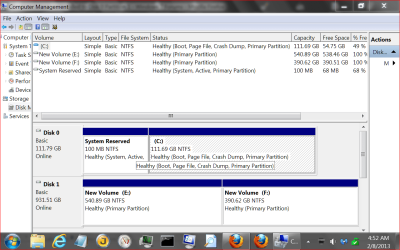
- When I went to boot my computer, it worked fine. I went to mount Drive A, when it gave me an error; "Cannot mount volume. The host file/device is already in use." I checked in Disk Management, and saw that the drive appeared to be completely empty (apart from about 100MB). I used a 3rd party file explorer to see that the drive contained a bunch of weird files like "$upcase", "$badclus", "$boot", and dozens of other files all being named something with "bootmgr" in the name. This made me become extremely concerned.

- I immediately shut off my computer and removed Drive A. After taking out Drive A, the computer gave me an error to the extent of it not finding an operating system or not being able to boot or something. The only change I had made was removing that other drive, so I figure that somehow the bootloader was installed on Drive A (when the rest of the operating system is on Drive B). I reinstalled Windows 7 on Drive B (this time without Drive A being hooked up), and it worked completely fine and booted normally.

Is it possible that the Windows 7 installed somehow wiped out Drive A and installed the bootloader on it? I really have no idea what I'm doing here, but I really need to get my data back. I've tried various utilities like "Recuva", "EASIS", and a few others. The only files they detect are the "bootmgr" ones.

Do you have any suggestions for getting my files back? Any and all help would be greatly appreciated. Thanks so much.
 

My Computer My Computer

At a glance

Windows 7 Ultimate x64
OS
Windows 7 Ultimate x64
Danny I don't know if I can help but lets see if we can get a little more information.
It is possible that you did wipe the hard drive with your saved things if you had that hard drive hooked up when you installed Windows 7.

It's also possible the information is still there but you are no longer able to decrypt it or get access to the encrypted drive.

Post one of these so other members can see what is what.
Please use this method to do so.

BY Golden:
http://www.sevenforums.com/tutorials/274797-disk-management-post-screen-capture-image.html

Disk Management.PNG
 

My Computer My Computer

At a glance

Windows 10 Pro. 64/ version 1709 Windows 7 Pr...Intel i7-6800K @ 4.3Corsair Platinum 16 gig @2400EVGA GTX 1070 OC
Computer type
PC/Desktop
Computer Manufacturer/Model Number
Home made Desktop
OS
Windows 10 Pro. 64/ version 1709 Windows 7 Pro/64
CPU
Intel i7-6800K @ 4.3
Motherboard
ASUS X-99 Deluxe II
Memory
Corsair Platinum 16 gig @2400
Graphics Card(s)
EVGA GTX 1070 OC
Monitor(s) Displays
Asus 27" LED LCD/VE278Q
Screen Resolution
1920-1080 or 1280-720 HDMI
Hard Drives
INTEL SSD 730-240 Gb Sata 3.0/
PSU
EVGA Platium 1200W
Case
Phanteks Luxe Tempered Glass 8 fans/ one radiator
Cooling
XSPC/ Water Cooled CPU
Keyboard
Das 4 Professional
Mouse
Logitech M705/MX Anywhere 2-S
Internet Speed
100 mbits
Antivirus
Microsoft Security Essentials/ Malwarebytes Premium 3.0/ SAS
Browser
I.E. 11 default/Firefox/ ISP Time Warner Cable/Spectrum
Other Info
LG BluRay Burner/
Sound system-KLipsch-THX/
Icy Dock ssd Hot Swap bays.
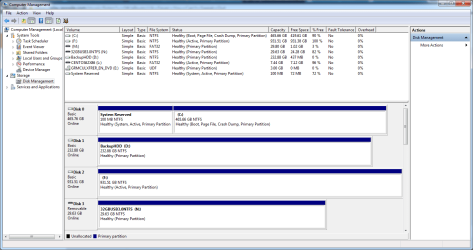
Thank you very much for your reply, regardless of whether or not you can actually solve my problem :) Here's my Disk Management page; The "F" drive (Disk 2) is the one that I need to recover the data on.
 

Attachments

  • disk_management_sevenforums.png
    disk_management_sevenforums.png
    39.8 KB · Views: 17

My Computer My Computer

At a glance

Windows 7 Ultimate x64
OS
Windows 7 Ultimate x64
You have 3 active drives. When everything is install correctly you only need Reserve active.
I wouldn't change anything at this time.
Your backup drive (D) is full.
Are you saying you can't access drive (D)?

If drive (D) is not the drive you are trying to access whatever drive is the one you are trying to access try the process below.

Start Orb and select Computer and then select Drive (D) and see if you can open drive (D).
You posted that it is encrypted then you will have to use what ever code you have to access it.
If that doesn't work use Windows Explorer and in the left hand plain select drive (D) and see if you can open it.

If neither work I'm out of ideas except the encryption is stopping you from accessing the drive or the drive has failed.
 

My Computer My Computer

At a glance

Windows 10 Pro. 64/ version 1709 Windows 7 Pr...Intel i7-6800K @ 4.3Corsair Platinum 16 gig @2400EVGA GTX 1070 OC
Computer type
PC/Desktop
Computer Manufacturer/Model Number
Home made Desktop
OS
Windows 10 Pro. 64/ version 1709 Windows 7 Pro/64
CPU
Intel i7-6800K @ 4.3
Motherboard
ASUS X-99 Deluxe II
Memory
Corsair Platinum 16 gig @2400
Graphics Card(s)
EVGA GTX 1070 OC
Monitor(s) Displays
Asus 27" LED LCD/VE278Q
Screen Resolution
1920-1080 or 1280-720 HDMI
Hard Drives
INTEL SSD 730-240 Gb Sata 3.0/
PSU
EVGA Platium 1200W
Case
Phanteks Luxe Tempered Glass 8 fans/ one radiator
Cooling
XSPC/ Water Cooled CPU
Keyboard
Das 4 Professional
Mouse
Logitech M705/MX Anywhere 2-S
Internet Speed
100 mbits
Antivirus
Microsoft Security Essentials/ Malwarebytes Premium 3.0/ SAS
Browser
I.E. 11 default/Firefox/ ISP Time Warner Cable/Spectrum
Other Info
LG BluRay Burner/
Sound system-KLipsch-THX/
Icy Dock ssd Hot Swap bays.
As Layback Bear said, you should only have one fixed hard drive partition marked as Active. Windows will often ignore a second active partition.

I'm sure the 3rd Active partition shown is a thumbdrive with CENTOS OS on it. Remove that before testing (of course).

I would also disconnect all the other non-OS hard drives during diagnostic testing.

Then with just "Drive A" and "Drive B" connected, try removing the active flag from "Drive A" (the problem disk).
See here:
http://www.sevenforums.com/tutorials/197157-partition-mark-inactive.html

Afterward, install your decryption software on "Drive B" (your main OS drive) and then see if you can access your encrypted files on "Drive A" with it.
 

My Computer My Computer

At a glance

Windows 7 64 Bit Home Premium SP1i7-3820GSkill F3-14900CL9Q - 16GBEVGA GeForce GTX660 - Driver 352.86
Computer type
PC/Desktop
Computer Manufacturer/Model Number
Home Built - Jan 2013
OS
Windows 7 64 Bit Home Premium SP1
CPU
i7-3820
Motherboard
Asus P9X79-PRO - Bios 4608
Memory
GSkill F3-14900CL9Q - 16GB
Graphics Card(s)
EVGA GeForce GTX660 - Driver 352.86
Sound Card
On board Realtek ALC898
Monitor(s) Displays
Acer S271HL
Screen Resolution
1920 x 1080
Hard Drives
#1- Samsung 840 Pro Series
#2- Western Digital WD1002FAEX Sata3 Black
#3- Western Digital WD1002FAEX Sata3 Black
PSU
Corsair CMPSU-850TX-V2 - 850 watt (by Seasonic)
Case
Corsair Obsidian 550D
Cooling
Standard 3 120mm case fans, Cooler Master Hyper 212 EVO
Keyboard
MS KC-0405
Mouse
Intellimouse 5-button
Internet Speed
56 Mbits/Sec (on a good day)
Antivirus
Avast & Malwarebytes
Browser
Firefox
Other Info
Asus DVD - DRW-24B1ST 24X
After making the partition inactive, TrueCrypt still gives me the error of "Incorrect password or not a TrueCrypt volume." It's definitely the correct password, I have a batch file setup that I've always used to decrypt/access the drive :/

Just to avoid confusion, the drive that I need to access is Disk 2 (Drive F). Thanks so much for the continued help, is there anything else that I can try? :/
 

My Computer My Computer

At a glance

Windows 7 Ultimate x64
OS
Windows 7 Ultimate x64
The Encryption software is the stumbling block I believe. I do not play with encryption so I'm only guessing now, but it seems logical that Windows and Recuva can't recognize usable data because it is encrypted, and TrueCrypt can't recognize the data because it probably relies on the MBR of the drive to do so, and the MBR was deleted.

I'm not even sure if rebuilding the MBR would be of any use.

You might check to see if you can get help or info from Truecrypt support, or see if they have a forum. Maybe someone has had this problem before.

EDIT: Have you seen this:
ww.truecrypt.org/docs/rescue-disk
 

My Computer My Computer

At a glance

Windows 7 64 Bit Home Premium SP1i7-3820GSkill F3-14900CL9Q - 16GBEVGA GeForce GTX660 - Driver 352.86
Computer type
PC/Desktop
Computer Manufacturer/Model Number
Home Built - Jan 2013
OS
Windows 7 64 Bit Home Premium SP1
CPU
i7-3820
Motherboard
Asus P9X79-PRO - Bios 4608
Memory
GSkill F3-14900CL9Q - 16GB
Graphics Card(s)
EVGA GeForce GTX660 - Driver 352.86
Sound Card
On board Realtek ALC898
Monitor(s) Displays
Acer S271HL
Screen Resolution
1920 x 1080
Hard Drives
#1- Samsung 840 Pro Series
#2- Western Digital WD1002FAEX Sata3 Black
#3- Western Digital WD1002FAEX Sata3 Black
PSU
Corsair CMPSU-850TX-V2 - 850 watt (by Seasonic)
Case
Corsair Obsidian 550D
Cooling
Standard 3 120mm case fans, Cooler Master Hyper 212 EVO
Keyboard
MS KC-0405
Mouse
Intellimouse 5-button
Internet Speed
56 Mbits/Sec (on a good day)
Antivirus
Avast & Malwarebytes
Browser
Firefox
Other Info
Asus DVD - DRW-24B1ST 24X
According to the picture of Drive Management your (F) drive is empty. 100 % free space.
I really don't know if a encrypted drive would show empty just because of the encryption if their was data on it.

These might be helpful.

TrueCrypt - Rescue Disk

TrueCrypt - Tutorial 1/5
 

My Computer My Computer

At a glance

Windows 10 Pro. 64/ version 1709 Windows 7 Pr...Intel i7-6800K @ 4.3Corsair Platinum 16 gig @2400EVGA GTX 1070 OC
Computer type
PC/Desktop
Computer Manufacturer/Model Number
Home made Desktop
OS
Windows 10 Pro. 64/ version 1709 Windows 7 Pro/64
CPU
Intel i7-6800K @ 4.3
Motherboard
ASUS X-99 Deluxe II
Memory
Corsair Platinum 16 gig @2400
Graphics Card(s)
EVGA GTX 1070 OC
Monitor(s) Displays
Asus 27" LED LCD/VE278Q
Screen Resolution
1920-1080 or 1280-720 HDMI
Hard Drives
INTEL SSD 730-240 Gb Sata 3.0/
PSU
EVGA Platium 1200W
Case
Phanteks Luxe Tempered Glass 8 fans/ one radiator
Cooling
XSPC/ Water Cooled CPU
Keyboard
Das 4 Professional
Mouse
Logitech M705/MX Anywhere 2-S
Internet Speed
100 mbits
Antivirus
Microsoft Security Essentials/ Malwarebytes Premium 3.0/ SAS
Browser
I.E. 11 default/Firefox/ ISP Time Warner Cable/Spectrum
Other Info
LG BluRay Burner/
Sound system-KLipsch-THX/
Icy Dock ssd Hot Swap bays.
Alright, I'll try posting on the TrueCrypt forums. I fear that I actually didn't create a rescue disk or if I did, I no longer have it :/

Thanks again, and if you have any additional suggestions PLEASE let me know. I'll definitely be backing up all my future data.
 

My Computer My Computer

At a glance

Windows 7 Ultimate x64
OS
Windows 7 Ultimate x64
Wish you luck and yes please keep us informed. The information you gather could help others.
 

My Computer My Computer

At a glance

Windows 10 Pro. 64/ version 1709 Windows 7 Pr...Intel i7-6800K @ 4.3Corsair Platinum 16 gig @2400EVGA GTX 1070 OC
Computer type
PC/Desktop
Computer Manufacturer/Model Number
Home made Desktop
OS
Windows 10 Pro. 64/ version 1709 Windows 7 Pro/64
CPU
Intel i7-6800K @ 4.3
Motherboard
ASUS X-99 Deluxe II
Memory
Corsair Platinum 16 gig @2400
Graphics Card(s)
EVGA GTX 1070 OC
Monitor(s) Displays
Asus 27" LED LCD/VE278Q
Screen Resolution
1920-1080 or 1280-720 HDMI
Hard Drives
INTEL SSD 730-240 Gb Sata 3.0/
PSU
EVGA Platium 1200W
Case
Phanteks Luxe Tempered Glass 8 fans/ one radiator
Cooling
XSPC/ Water Cooled CPU
Keyboard
Das 4 Professional
Mouse
Logitech M705/MX Anywhere 2-S
Internet Speed
100 mbits
Antivirus
Microsoft Security Essentials/ Malwarebytes Premium 3.0/ SAS
Browser
I.E. 11 default/Firefox/ ISP Time Warner Cable/Spectrum
Other Info
LG BluRay Burner/
Sound system-KLipsch-THX/
Icy Dock ssd Hot Swap bays.
Back
Top