Solved Hard Drive Clicking?

gbu

New member
Member
VIP
Local time
11:14 PM
Messages
144
After successfully being helped by the kind members here i have yet another problem that i hope you can help with. :D

Over the last 36 hours i have noticed a 'clicking' noise that i believe is coming from one of my hard drives.
The hard part is trying to describe it, all i can say is it sounds like a light switch being turned on/off.
Ive searched and found different sites that have recordings of hard drive noises to try and compare but none sound like what i have.
Im still trying to find a way of recording it to possibly post if that helps.

Ive checked the fans to see if it was coming from one of those but dont think it is.

The problem doesn't happen all the time but more often then not if i'm writing to the disc or an update is happening etc

I have 3 hard drives
1. Maxtor 300GB 2 partitions with OS Windows 7 installed
2. Western digital 640GB 6 partitions (Storage)
3. Western Digital 640GB (Storage)


The Maxtor is the older of the three but all have passed Health tests from Hard Drive Inspector, SeaTools and HD Sentinel

I did have one BSOD yesterday but nothing since so not sure if its related?
 

My Computer

Computer type
PC/Desktop
OS
Windows 7 Ultimate x64 SP1
CPU
INTEL Core 2 Quad Q8400 2.66GHz 4Mb LGA775 FSB1333
Motherboard
Gigabyte GA-G41MT-S2PT
Memory
Crucial 8GB Kit (4GBx2), 240-pin DIMM, DDR3-1333 • 1.5V
Graphics Card(s)
ASUS EAH4350 Silent 1GB
Hard Drives
x2 640GB Western Digital WD6400AARS Caviar Green, SATA 3Gb/s, 5400rpm, 32MB Cache

SEAGATE ST500DM005 BARRACUDA SPINPOINT 500GB 3.5IN 7200RPM SATA HD502HJ IN OS Windows 7 Installed
PSU
Corsair CMPSU-600CX 600W
Case
Zalman Z9-Plus Mid Tower Case
Cooling
Arctic Cooling Freezer 7 Pro Rev2 Quiet CPU Cooler
Hello again gbu,

The sounds you are hearing are possibly symptomatic of a hard disk in poor health. There are a few things we can do to analyze it further, but first thing is first:

Backup up all your data from that disk immediately

Post back here once you have done that.

regards,
golden
 

My Computer

Computer type
PC/Desktop
Computer Manufacturer/Model Number
Golden Mk. I.4
OS
Windows 10 Pro x64 ; Xubuntu x64
CPU
Intel i7 860 @ 2.80 GHz O/C'ed to 4.0GHz
Motherboard
Gigabyte P55A-UD3R Rev.1. Award BIOS F13
Memory
16GB Corsair Vengance DDR3 @ 661 MHz Dual Channel (9-9-9-24)
Graphics Card(s)
EVGA NVidia GTX 560 1024MB
Sound Card
Realtek Integrated
Monitor(s) Displays
Dual Samsung SyncMaster 2494HS
Screen Resolution
1920*1080 and 1920*1080
Hard Drives
1*Samsung 840 EVO 120GB SSD;
1*OCZ Vertex 2 60GB SSD;
2*Samsung F3 SpinPoint 1TB in RAID0;
1*Samsung F1 SpinPoint 1TB;
2*Western Digital 1TB External USB 3.0
1*Western Digital 500GB External USB 3.0
1*Seagate 500GB External USB 2.0
PSU
Thermaltake ToughPower QFan 750W
Case
Thermaltake Element S VK60001W2Z
Cooling
Corsair H60 Water Cooling, 2*230mm and 2*80mm case fans
Keyboard
Logitech G110
Mouse
Logitech MX518
It could be a sign that the hard drive is about to fail.

I would, as a matter of urgency, consider backing up anything that is important to you on it.

We posted at exactly the same time Golden - snap!
 

My Computer

Computer Manufacturer/Model Number
HP Pavilion Elite 495UK
OS
Windows 7 Ultimate SP1 64-Bit
CPU
Intel Core i7 870 @ 2.93GHz
Motherboard
MSI 2A9C (CPU1)
Memory
8Gb Dual-Channel DDR3 @ 664MHz
Graphics Card(s)
nVidia GeForce GTX 460 1024MB dedicated RAM
Sound Card
Realtek HD Audio
Monitor(s) Displays
HP2310i
Screen Resolution
1920 x 1080
Hard Drives
1x1954GB Hitachi HDS22020ALA 330 (RAID), 1x1954GB Hitachi External for backup and storage
PSU
460W
Case
HP Elite
Cooling
Air cooled
Keyboard
Logitech K750 solar-powered keyboard
Mouse
Logitech Wireless M180 mouse
Internet Speed
2Mb
Other Info
Pure Avanti Flow Internet Radio with iPod Dock, 64Gb iPod, HP USB Speakers, Sony MDR-V500 Headphones, Sony Vaio F-Series Laptop
Hello again Golden!! :D

Ok i have backed up everything, didnt have much as it was backed up pretty much from the last time/thread i had :)
 

My Computer

Computer type
PC/Desktop
OS
Windows 7 Ultimate x64 SP1
CPU
INTEL Core 2 Quad Q8400 2.66GHz 4Mb LGA775 FSB1333
Motherboard
Gigabyte GA-G41MT-S2PT
Memory
Crucial 8GB Kit (4GBx2), 240-pin DIMM, DDR3-1333 • 1.5V
Graphics Card(s)
ASUS EAH4350 Silent 1GB
Hard Drives
x2 640GB Western Digital WD6400AARS Caviar Green, SATA 3Gb/s, 5400rpm, 32MB Cache

SEAGATE ST500DM005 BARRACUDA SPINPOINT 500GB 3.5IN 7200RPM SATA HD502HJ IN OS Windows 7 Installed
PSU
Corsair CMPSU-600CX 600W
Case
Zalman Z9-Plus Mid Tower Case
Cooling
Arctic Cooling Freezer 7 Pro Rev2 Quiet CPU Cooler

My Computer

Computer type
PC/Desktop
Computer Manufacturer/Model Number
Golden Mk. I.4
OS
Windows 10 Pro x64 ; Xubuntu x64
CPU
Intel i7 860 @ 2.80 GHz O/C'ed to 4.0GHz
Motherboard
Gigabyte P55A-UD3R Rev.1. Award BIOS F13
Memory
16GB Corsair Vengance DDR3 @ 661 MHz Dual Channel (9-9-9-24)
Graphics Card(s)
EVGA NVidia GTX 560 1024MB
Sound Card
Realtek Integrated
Monitor(s) Displays
Dual Samsung SyncMaster 2494HS
Screen Resolution
1920*1080 and 1920*1080
Hard Drives
1*Samsung 840 EVO 120GB SSD;
1*OCZ Vertex 2 60GB SSD;
2*Samsung F3 SpinPoint 1TB in RAID0;
1*Samsung F1 SpinPoint 1TB;
2*Western Digital 1TB External USB 3.0
1*Western Digital 500GB External USB 3.0
1*Seagate 500GB External USB 2.0
PSU
Thermaltake ToughPower QFan 750W
Case
Thermaltake Element S VK60001W2Z
Cooling
Corsair H60 Water Cooling, 2*230mm and 2*80mm case fans
Keyboard
Logitech G110
Mouse
Logitech MX518
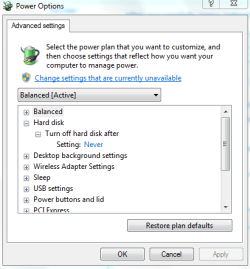
I had a brand new (probably faulty from factory) Sea Gate hard drive that cause the clicking sound that you are talking about. It failed working once, with help of the person I bought it from fixed it for me but the hard drive clicking sound did not go, I changed a setting (in the attached pic) from 20 mins to 0 (never) it stopped the sound (I guess) , and I thought it would never fail again. But it did, it died. and I got a replacement. You should take a back up of this hard disk because there's a chance its going to die.

HTH :)
 

Attachments

  • Capture3.PNG
    Capture3.PNG
    13.3 KB · Views: 18

My Computer

Computer type
PC/Desktop
Computer Manufacturer/Model Number
Self assembled
OS
Windows 10 Home 64Bit
CPU
Intel Core i5 10400 @ 2.90GHz
Motherboard
Intel Corporation DG41WV (PROCESSOR)
Memory
8.00GB Single-Channel Unknown @ 1329MHz (16-20-20-38)
Sound Card
Realtek High Definition Audio
Monitor(s) Displays
DELL E170S
Screen Resolution
1280x1024 pixels
Hard Drives
931GB TOSHIBA DT01ACA100 (SATA)
238GB TEAM TM8PS7256G (SATA SSD)
Case
Nothing Fancy
Cooling
Fans
Keyboard
A4 Tech Co LTD
Mouse
A4 Tech Co Ltd/Logitech
Internet Speed
25 Mbps
  • Like
Reactions: gbu
@koolkat i have that setting switched to Never already thanks :)

@ Golden i will run those dumps now.

Outa interest i have recorded the noise to mp3 and uploaded in zip file.
May have to turn volume up a bit to her it but you can definitely hear the click.
 

Attachments

My Computer

Computer type
PC/Desktop
OS
Windows 7 Ultimate x64 SP1
CPU
INTEL Core 2 Quad Q8400 2.66GHz 4Mb LGA775 FSB1333
Motherboard
Gigabyte GA-G41MT-S2PT
Memory
Crucial 8GB Kit (4GBx2), 240-pin DIMM, DDR3-1333 • 1.5V
Graphics Card(s)
ASUS EAH4350 Silent 1GB
Hard Drives
x2 640GB Western Digital WD6400AARS Caviar Green, SATA 3Gb/s, 5400rpm, 32MB Cache

SEAGATE ST500DM005 BARRACUDA SPINPOINT 500GB 3.5IN 7200RPM SATA HD502HJ IN OS Windows 7 Installed
PSU
Corsair CMPSU-600CX 600W
Case
Zalman Z9-Plus Mid Tower Case
Cooling
Arctic Cooling Freezer 7 Pro Rev2 Quiet CPU Cooler
Hmmm i posted in the BSOD forum but cant find the thread could it of been deleted if it didnt fill it in properly?
 

My Computer

Computer type
PC/Desktop
OS
Windows 7 Ultimate x64 SP1
CPU
INTEL Core 2 Quad Q8400 2.66GHz 4Mb LGA775 FSB1333
Motherboard
Gigabyte GA-G41MT-S2PT
Memory
Crucial 8GB Kit (4GBx2), 240-pin DIMM, DDR3-1333 • 1.5V
Graphics Card(s)
ASUS EAH4350 Silent 1GB
Hard Drives
x2 640GB Western Digital WD6400AARS Caviar Green, SATA 3Gb/s, 5400rpm, 32MB Cache

SEAGATE ST500DM005 BARRACUDA SPINPOINT 500GB 3.5IN 7200RPM SATA HD502HJ IN OS Windows 7 Installed
PSU
Corsair CMPSU-600CX 600W
Case
Zalman Z9-Plus Mid Tower Case
Cooling
Arctic Cooling Freezer 7 Pro Rev2 Quiet CPU Cooler
You can post your crash reports in this thread. Golden asked me to take a look, so I am now subscribed to this thread.
 

My Computer

Computer Manufacturer/Model Number
HP Pavilion e9110t
OS
Windows 7 Home Premium 64 Bit
CPU
Intel(R) Core(TM)2 Quad CPU Q9550 @ 2.83GHz
Motherboard
Pegatron IPIEL-LA3
Memory
6.00 GB Hundai HMT125U6BFR8C-H9
Graphics Card(s)
ATI Radeon HD 4850
Sound Card
Realtek High Definition Audio/ATI High Definition Audio
Monitor(s) Displays
Acer AL2216W
Screen Resolution
1680x1050
Hard Drives
Hitachi HDP725050GLA360 ATA Device 500 GB
PSU
Unknown/installed by HP
Case
HP generic case
Cooling
Intel Stock Cooling
Keyboard
HP Keyboard
Mouse
HP Mouse
Internet Speed
Download: 19.15 Mbps Upload: 1.67 Mbps
Other Info
Network Adapter Realtek RTL8168D/8111D Family PCI-E Gigabit Ethernet NIC (NDIS 6.20)
Network Adapter 802.11n Wireless PCI Express Card LAN Adapter
Oh thats great thanks again Golden and writhziden for taking the time to help me :)

Here is the log
 

Attachments

My Computer

Computer type
PC/Desktop
OS
Windows 7 Ultimate x64 SP1
CPU
INTEL Core 2 Quad Q8400 2.66GHz 4Mb LGA775 FSB1333
Motherboard
Gigabyte GA-G41MT-S2PT
Memory
Crucial 8GB Kit (4GBx2), 240-pin DIMM, DDR3-1333 • 1.5V
Graphics Card(s)
ASUS EAH4350 Silent 1GB
Hard Drives
x2 640GB Western Digital WD6400AARS Caviar Green, SATA 3Gb/s, 5400rpm, 32MB Cache

SEAGATE ST500DM005 BARRACUDA SPINPOINT 500GB 3.5IN 7200RPM SATA HD502HJ IN OS Windows 7 Installed
PSU
Corsair CMPSU-600CX 600W
Case
Zalman Z9-Plus Mid Tower Case
Cooling
Arctic Cooling Freezer 7 Pro Rev2 Quiet CPU Cooler
You're welcome. Hopefully we can resolve the issue. :)

Proceeding with the analysis...

Out of date driver:
Code:
FSPFltd	fffff880`0117d000	fffff880`0118e000	Thu Jun 05 11:37:17 2008 (4848244d)	00017b5c		FSPFltd.sys
FSPFltd.sys is a Hide Folders 2009 file encryption driver. This driver concerns me because it is used for file encryption and it is out of date. It may cause some hard disk corruption problems or conflicts with the hard disk controller and file system drivers. If your hard disk errors are mechanical, then this is not the cause, but I would remove this program to be sure it is not causing hard disk data errors.

Code:
[list=1][*]


Microsoft (R) Windows Debugger Version 6.12.0002.633 AMD64
Copyright (c) Microsoft Corporation. All rights reserved.


Loading Dump File [D:\Kingston\BSODDmpFiles\gbu\Windows_NT6_BSOD_jcgriff2\031212-40887-01.dmp]
Mini Kernel Dump File: Only registers and stack trace are available

Symbol search path is: SRV*c:\symbols*http://msdl.microsoft.com/download/symbols
Executable search path is: 
Windows 7 Kernel Version 7601 (Service Pack 1) MP (4 procs) Free x64
Product: WinNt, suite: TerminalServer SingleUserTS
Built by: 7601.17640.amd64fre.win7sp1_gdr.110622-1506
Machine Name:
Kernel base = 0xfffff800`0300b000 PsLoadedModuleList = 0xfffff800`03250670
Debug session time: Mon Mar 12 03:42:53.498 2012 (UTC - 6:00)
System Uptime: 0 days 0:05:16.825
Loading Kernel Symbols
...............................................................
................................................................
...............................
Loading User Symbols
Loading unloaded module list
....
*******************************************************************************
*                                                                             *
*                        Bugcheck Analysis                                    *
*                                                                             *
*******************************************************************************

Use !analyze -v to get detailed debugging information.

BugCheck 50, {fffffa80278c51b4, 1, fffff88001122700, 2}


Could not read faulting driver name
Probably caused by : fltmgr.sys ( fltmgr!FltpReleaseStreamListCtrl+0 )

Followup: MachineOwner
---------

2: kd> !analyze -v
*******************************************************************************
*                                                                             *
*                        Bugcheck Analysis                                    *
*                                                                             *
*******************************************************************************

PAGE_FAULT_IN_NONPAGED_AREA (50)
Invalid system memory was referenced.  This cannot be protected by try-except,
it must be protected by a Probe.  Typically the address is just plain bad or it
is pointing at freed memory.
Arguments:
Arg1: fffffa80278c51b4, memory referenced.
Arg2: 0000000000000001, value 0 = read operation, 1 = write operation.
Arg3: fffff88001122700, If non-zero, the instruction address which referenced the bad memory
	address.
Arg4: 0000000000000002, (reserved)

Debugging Details:
------------------


Could not read faulting driver name

WRITE_ADDRESS: GetPointerFromAddress: unable to read from fffff800032ba100
 fffffa80278c51b4 

FAULTING_IP: 
fltmgr!FltpReleaseStreamListCtrl+0
fffff880`01122700 f0834144ff      lock add dword ptr [rcx+44h],0FFFFFFFFh

MM_INTERNAL_CODE:  2

CUSTOMER_CRASH_COUNT:  1

DEFAULT_BUCKET_ID:  VISTA_DRIVER_FAULT

BUGCHECK_STR:  0x50

PROCESS_NAME:  System

CURRENT_IRQL:  0

TRAP_FRAME:  fffff8800317e6d0 -- (.trap 0xfffff8800317e6d0)
NOTE: The trap frame does not contain all registers.
Some register values may be zeroed or incorrect.
rax=fffffa80278c5170 rbx=0000000000000000 rcx=fffffa80278c5170
rdx=000000000000384e rsi=0000000000000000 rdi=0000000000000000
rip=fffff88001122700 rsp=fffff8800317e868 rbp=fffff8800111d000
 r8=fffffa8007b134a8  r9=00000000000000c0 r10=fffff8000300b000
r11=0000000000000398 r12=0000000000000000 r13=0000000000000000
r14=0000000000000000 r15=0000000000000000
iopl=0         nv up ei ng nz na pe nc
fltmgr!FltpReleaseStreamListCtrl:
fffff880`01122700 f0834144ff      lock add dword ptr [rcx+44h],0FFFFFFFFh ds:0ec0:fffffa80`278c51b4=????????
Resetting default scope

LAST_CONTROL_TRANSFER:  from fffff800030323f0 to fffff80003087c40

STACK_TEXT:  
fffff880`0317e568 fffff800`030323f0 : 00000000`00000050 fffffa80`278c51b4 00000000`00000001 fffff880`0317e6d0 : nt!KeBugCheckEx
fffff880`0317e570 fffff800`03085d6e : 00000000`00000001 fffffa80`278c51b4 00000000`00000000 fffff8a0`0e6f2788 : nt! ?? ::FNODOBFM::`string'+0x447c6
fffff880`0317e6d0 fffff880`01122700 : fffff880`01147177 fffff8a0`0e5c0ed8 fffff880`0111d000 00000000`00000000 : nt!KiPageFault+0x16e
fffff880`0317e868 fffff880`01147177 : fffff8a0`0e5c0ed8 fffff880`0111d000 00000000`00000000 00000000`00000090 : fltmgr!FltpReleaseStreamListCtrl
fffff880`0317e870 fffff880`01142311 : fffffa80`06d29800 00000000`00000130 fffff8a0`0e720c70 00000000`00000000 : fltmgr! ?? ::NNGAKEGL::`string'+0x1100
fffff880`0317e8a0 fffff880`011423fb : fffffa80`06d29800 fffff8a0`0e720ed8 fffffa80`06d29800 fffff800`0307009d : fltmgr!CleanupStreamListCtrl+0x21
fffff880`0317e8e0 fffff800`0334090e : 00000000`00000001 fffff880`012b71b3 fffff8a0`0e720da0 fffff880`01233f49 : fltmgr!DeleteStreamListCtrlCallback+0x6b
fffff880`0317e910 fffff880`012b6bac : fffff8a0`0e720c70 fffffa80`06d77040 fffff880`0317e9e8 00000000`00000706 : nt!FsRtlTeardownPerStreamContexts+0xe2
fffff880`0317e960 fffff880`012bbcc1 : 00000000`00000000 00000000`00000000 fffff800`03228200 00000000`00000001 : Ntfs!NtfsDeleteScb+0x108
fffff880`0317e9a0 fffff880`0123485c : fffff8a0`0e720b70 fffff8a0`0e720c70 fffff800`03228200 fffff880`0317eb12 : Ntfs!NtfsRemoveScb+0x61
fffff880`0317e9e0 fffff880`012b964c : fffff8a0`0e720b40 fffff800`03228260 fffff880`0317eb12 fffffa80`0724be40 : Ntfs!NtfsPrepareFcbForRemoval+0x50
fffff880`0317ea10 fffff880`0123b0e2 : fffffa80`0724be40 fffffa80`0724be40 fffff8a0`0e720b40 00000000`00000000 : Ntfs!NtfsTeardownStructures+0xdc
fffff880`0317ea90 fffff880`012c9193 : fffffa80`0724be40 fffff800`03228260 fffff8a0`0e720b40 00000000`00000009 : Ntfs!NtfsDecrementCloseCounts+0xa2
fffff880`0317ead0 fffff880`012b8357 : fffffa80`0724be40 fffff8a0`0e720c70 fffff8a0`0e720b40 fffffa80`081cf180 : Ntfs!NtfsCommonClose+0x353
fffff880`0317eba0 fffff800`03092001 : 00000000`00000000 fffff800`03228200 fffffa80`06d77001 00000000`00000002 : Ntfs!NtfsFspClose+0x15f
fffff880`0317ec70 fffff800`03322fee : 00000000`00000000 fffffa80`06d77040 00000000`00000080 fffffa80`06d089e0 : nt!ExpWorkerThread+0x111
fffff880`0317ed00 fffff800`030795e6 : fffff880`02f64180 fffffa80`06d77040 fffff880`02f6efc0 00000000`00000000 : nt!PspSystemThreadStartup+0x5a
fffff880`0317ed40 00000000`00000000 : 00000000`00000000 00000000`00000000 00000000`00000000 00000000`00000000 : nt!KxStartSystemThread+0x16


STACK_COMMAND:  kb

FOLLOWUP_IP: 
fltmgr!FltpReleaseStreamListCtrl+0
fffff880`01122700 f0834144ff      lock add dword ptr [rcx+44h],0FFFFFFFFh

SYMBOL_STACK_INDEX:  3

SYMBOL_NAME:  fltmgr!FltpReleaseStreamListCtrl+0

FOLLOWUP_NAME:  MachineOwner

MODULE_NAME: fltmgr

IMAGE_NAME:  fltmgr.sys

DEBUG_FLR_IMAGE_TIMESTAMP:  4ce7929c

FAILURE_BUCKET_ID:  X64_0x50_fltmgr!FltpReleaseStreamListCtrl+0

BUCKET_ID:  X64_0x50_fltmgr!FltpReleaseStreamListCtrl+0

Followup: MachineOwner
---------
[*]
Loading Dump File [D:\Kingston\BSODDmpFiles\gbu\Windows_NT6_BSOD_jcgriff2\031112-26925-01.dmp]
Mini Kernel Dump File: Only registers and stack trace are available

Symbol search path is: SRV*c:\symbols*http://msdl.microsoft.com/download/symbols
Executable search path is: 
Windows 7 Kernel Version 7601 (Service Pack 1) MP (4 procs) Free x64
Product: WinNt, suite: TerminalServer SingleUserTS
Built by: 7601.17640.amd64fre.win7sp1_gdr.110622-1506
Machine Name:
Kernel base = 0xfffff800`03063000 PsLoadedModuleList = 0xfffff800`032a8670
Debug session time: Sun Mar 11 09:54:31.863 2012 (UTC - 6:00)
System Uptime: 1 days 0:13:28.966
Loading Kernel Symbols
...............................................................
................................................................
...............................
Loading User Symbols
Loading unloaded module list
.....
*******************************************************************************
*                                                                             *
*                        Bugcheck Analysis                                    *
*                                                                             *
*******************************************************************************

Use !analyze -v to get detailed debugging information.

BugCheck 1A, {41790, fffffa8003bc06a0, ffff, 0}

Probably caused by : ntkrnlmp.exe ( nt! ?? ::FNODOBFM::`string'+36024 )

Followup: MachineOwner
---------

3: kd> !analyze -v
*******************************************************************************
*                                                                             *
*                        Bugcheck Analysis                                    *
*                                                                             *
*******************************************************************************

MEMORY_MANAGEMENT (1a)
    # Any other values for parameter 1 must be individually examined.
Arguments:
Arg1: 0000000000041790, The subtype of the bugcheck.
Arg2: fffffa8003bc06a0
Arg3: 000000000000ffff
Arg4: 0000000000000000

Debugging Details:
------------------


BUGCHECK_STR:  0x1a_41790

CUSTOMER_CRASH_COUNT:  1

DEFAULT_BUCKET_ID:  VISTA_DRIVER_FAULT

PROCESS_NAME:  svchost.exe

CURRENT_IRQL:  0

LAST_CONTROL_TRANSFER:  from fffff8000314f150 to fffff800030dfc40

STACK_TEXT:  
fffff880`07412918 fffff800`0314f150 : 00000000`0000001a 00000000`00041790 fffffa80`03bc06a0 00000000`0000ffff : nt!KeBugCheckEx
fffff880`07412920 fffff800`030cd0ff : fffffa80`00000000 00000000`39ecffff 00000000`00000000 00000000`00000000 : nt! ?? ::FNODOBFM::`string'+0x36024
fffff880`07412ae0 fffff800`030deed3 : ffffffff`ffffffff 00000000`0195f858 00000000`0195f850 00000000`00008000 : nt!NtFreeVirtualMemory+0x61f
fffff880`07412be0 00000000`779f14fa : 00000000`00000000 00000000`00000000 00000000`00000000 00000000`00000000 : nt!KiSystemServiceCopyEnd+0x13
00000000`0195f818 00000000`00000000 : 00000000`00000000 00000000`00000000 00000000`00000000 00000000`00000000 : 0x779f14fa


STACK_COMMAND:  kb

FOLLOWUP_IP: 
nt! ?? ::FNODOBFM::`string'+36024
fffff800`0314f150 cc              int     3

SYMBOL_STACK_INDEX:  1

SYMBOL_NAME:  nt! ?? ::FNODOBFM::`string'+36024

FOLLOWUP_NAME:  MachineOwner

MODULE_NAME: nt

IMAGE_NAME:  ntkrnlmp.exe

DEBUG_FLR_IMAGE_TIMESTAMP:  4e02aaa3

FAILURE_BUCKET_ID:  X64_0x1a_41790_nt!_??_::FNODOBFM::_string_+36024

BUCKET_ID:  X64_0x1a_41790_nt!_??_::FNODOBFM::_string_+36024

Followup: MachineOwner
---------

[/list]

  1. Likely caused by hard disk file system corruption. Other possible causes are Memory problems... Graphics card memory problems... BIOS... Corrupted System Files... Missing Windows Updates... Drivers...
  2. Possible causes are Memory problems... Drivers...
Thanks to Dave76 for help understanding possible causes.


We will start with the common problems first (see bold possible causes). Do the following steps and test by doing your normal routine after each step to see if stability increases (the memory tests you can run concurrently as they will not increase stability unless you are forced to move modules around). Post back your results after each step, and if you get a blue screen crash, upload the files again and await further instructions after we are able to analyze the crash.

If you can do your normal routine for a few weeks without a crash, and your crashes are usually more frequent than that, then the problem is likely solved.

  • If you are overclocking any hardware, please stop.

  • Run Disk Check with both boxes checked for all HDDs and with Automatically fix file system errors checked for all SSDs. Post back your logs for the checks after finding them using http://www.sevenforums.com/tutorials/96938-check-disk-chkdsk-read-event-viewer-log.html

  • Remove Hide Folders 2009

  • Run the boot version of Memtest86+ paying close attention to Parts 2 and 3 of the tutorial. Also, in case Memtest86+ misses anything and comes up with no errors, run the extended version of the Windows Memory Diagnostics Tool for at least five passes. These you may want to run overnight since they take a long time to complete (run them an hour before bed each of the next two nights and check before going to sleep that they are still running).

    If you swap any memory components, follow these steps for ESD safety:
    1. Shut down and turn off your computer.
    2. Unplug all power supplies to the computer (AC Power then battery for laptops, AC power for desktops)
    3. Hold down the power button for 30 seconds to close the circuit and ensure all power drains from components.
    4. Make sure you are grounded by using proper grounding techniques, i.e. work on an anti-static workbench, anti-static desk, or an anti-static pad. Hold something metallic while touching it to the anti-static surface, or use an anti-static wristband to attach to the anti-static material while working.
    Once these steps have been followed, it is safe to remove and replace components within your computer.
 

My Computer

Computer Manufacturer/Model Number
HP Pavilion e9110t
OS
Windows 7 Home Premium 64 Bit
CPU
Intel(R) Core(TM)2 Quad CPU Q9550 @ 2.83GHz
Motherboard
Pegatron IPIEL-LA3
Memory
6.00 GB Hundai HMT125U6BFR8C-H9
Graphics Card(s)
ATI Radeon HD 4850
Sound Card
Realtek High Definition Audio/ATI High Definition Audio
Monitor(s) Displays
Acer AL2216W
Screen Resolution
1680x1050
Hard Drives
Hitachi HDP725050GLA360 ATA Device 500 GB
PSU
Unknown/installed by HP
Case
HP generic case
Cooling
Intel Stock Cooling
Keyboard
HP Keyboard
Mouse
HP Mouse
Internet Speed
Download: 19.15 Mbps Upload: 1.67 Mbps
Other Info
Network Adapter Realtek RTL8168D/8111D Family PCI-E Gigabit Ethernet NIC (NDIS 6.20)
Network Adapter 802.11n Wireless PCI Express Card LAN Adapter

My Computer

Computer type
PC/Desktop
Computer Manufacturer/Model Number
Golden Mk. I.4
OS
Windows 10 Pro x64 ; Xubuntu x64
CPU
Intel i7 860 @ 2.80 GHz O/C'ed to 4.0GHz
Motherboard
Gigabyte P55A-UD3R Rev.1. Award BIOS F13
Memory
16GB Corsair Vengance DDR3 @ 661 MHz Dual Channel (9-9-9-24)
Graphics Card(s)
EVGA NVidia GTX 560 1024MB
Sound Card
Realtek Integrated
Monitor(s) Displays
Dual Samsung SyncMaster 2494HS
Screen Resolution
1920*1080 and 1920*1080
Hard Drives
1*Samsung 840 EVO 120GB SSD;
1*OCZ Vertex 2 60GB SSD;
2*Samsung F3 SpinPoint 1TB in RAID0;
1*Samsung F1 SpinPoint 1TB;
2*Western Digital 1TB External USB 3.0
1*Western Digital 500GB External USB 3.0
1*Seagate 500GB External USB 2.0
PSU
Thermaltake ToughPower QFan 750W
Case
Thermaltake Element S VK60001W2Z
Cooling
Corsair H60 Water Cooling, 2*230mm and 2*80mm case fans
Keyboard
Logitech G110
Mouse
Logitech MX518
Thanks for the heads up, Golden. Luckily, I do not see anything in that thread that would change my analysis. :)
 

My Computer

Computer Manufacturer/Model Number
HP Pavilion e9110t
OS
Windows 7 Home Premium 64 Bit
CPU
Intel(R) Core(TM)2 Quad CPU Q9550 @ 2.83GHz
Motherboard
Pegatron IPIEL-LA3
Memory
6.00 GB Hundai HMT125U6BFR8C-H9
Graphics Card(s)
ATI Radeon HD 4850
Sound Card
Realtek High Definition Audio/ATI High Definition Audio
Monitor(s) Displays
Acer AL2216W
Screen Resolution
1680x1050
Hard Drives
Hitachi HDP725050GLA360 ATA Device 500 GB
PSU
Unknown/installed by HP
Case
HP generic case
Cooling
Intel Stock Cooling
Keyboard
HP Keyboard
Mouse
HP Mouse
Internet Speed
Download: 19.15 Mbps Upload: 1.67 Mbps
Other Info
Network Adapter Realtek RTL8168D/8111D Family PCI-E Gigabit Ethernet NIC (NDIS 6.20)
Network Adapter 802.11n Wireless PCI Express Card LAN Adapter
First off thank you very much for the help :)

Before i go through these steps you have posted could any of these problems be resolved by a complete format and re-install of Windows 7?
The reason i ask is a few weeks ago i posted about getting a new motherboard which meant buying new DDR3 RAM as well but all other components were existing, i have since bought and installed this items here is the thread:-
http://www.sevenforums.com/installation-setup/216522-do-i-need-re-install-windows.html
This thread also contains another link for a thread i made regarding the RAM i purchased as i had conflicting advice as to whether it was suitable found in post#12

Now i was going to do a complete format and install but because everything seemed to be working fine it was recommended that i didn't need to but i have however got everything backed up and can do so if need be.

If you think this wont solve my problem then i will continue with the steps you have posted.
Also i don't know what Hide Folders 2009 is but it is possible it was an old program that i had installed ages ago but its no longer installed in my programs if it was.

In the mean time i will be running Disk Check.
 

My Computer

Computer type
PC/Desktop
OS
Windows 7 Ultimate x64 SP1
CPU
INTEL Core 2 Quad Q8400 2.66GHz 4Mb LGA775 FSB1333
Motherboard
Gigabyte GA-G41MT-S2PT
Memory
Crucial 8GB Kit (4GBx2), 240-pin DIMM, DDR3-1333 • 1.5V
Graphics Card(s)
ASUS EAH4350 Silent 1GB
Hard Drives
x2 640GB Western Digital WD6400AARS Caviar Green, SATA 3Gb/s, 5400rpm, 32MB Cache

SEAGATE ST500DM005 BARRACUDA SPINPOINT 500GB 3.5IN 7200RPM SATA HD502HJ IN OS Windows 7 Installed
PSU
Corsair CMPSU-600CX 600W
Case
Zalman Z9-Plus Mid Tower Case
Cooling
Arctic Cooling Freezer 7 Pro Rev2 Quiet CPU Cooler
If I can dive in (having contributed nothing to some excellent advice you've had) I'd be inclined to go for a clean install after a new motherboard is installed.

It takes up some more valuable time, but it does reduce the risk of something going wrong as a result of the hardware upgrade.

However, it's just my personal opinion, and others may have more compelling reasons why a re-install is not necessary. :)
 

My Computer

Computer Manufacturer/Model Number
HP Pavilion Elite 495UK
OS
Windows 7 Ultimate SP1 64-Bit
CPU
Intel Core i7 870 @ 2.93GHz
Motherboard
MSI 2A9C (CPU1)
Memory
8Gb Dual-Channel DDR3 @ 664MHz
Graphics Card(s)
nVidia GeForce GTX 460 1024MB dedicated RAM
Sound Card
Realtek HD Audio
Monitor(s) Displays
HP2310i
Screen Resolution
1920 x 1080
Hard Drives
1x1954GB Hitachi HDS22020ALA 330 (RAID), 1x1954GB Hitachi External for backup and storage
PSU
460W
Case
HP Elite
Cooling
Air cooled
Keyboard
Logitech K750 solar-powered keyboard
Mouse
Logitech Wireless M180 mouse
Internet Speed
2Mb
Other Info
Pure Avanti Flow Internet Radio with iPod Dock, 64Gb iPod, HP USB Speakers, Sony MDR-V500 Headphones, Sony Vaio F-Series Laptop
  • Like
Reactions: gbu
I see no reason not to do a clean install, and it may very well help with the problems you are facing. I agree with seavixen32.
 

My Computer

Computer Manufacturer/Model Number
HP Pavilion e9110t
OS
Windows 7 Home Premium 64 Bit
CPU
Intel(R) Core(TM)2 Quad CPU Q9550 @ 2.83GHz
Motherboard
Pegatron IPIEL-LA3
Memory
6.00 GB Hundai HMT125U6BFR8C-H9
Graphics Card(s)
ATI Radeon HD 4850
Sound Card
Realtek High Definition Audio/ATI High Definition Audio
Monitor(s) Displays
Acer AL2216W
Screen Resolution
1680x1050
Hard Drives
Hitachi HDP725050GLA360 ATA Device 500 GB
PSU
Unknown/installed by HP
Case
HP generic case
Cooling
Intel Stock Cooling
Keyboard
HP Keyboard
Mouse
HP Mouse
Internet Speed
Download: 19.15 Mbps Upload: 1.67 Mbps
Other Info
Network Adapter Realtek RTL8168D/8111D Family PCI-E Gigabit Ethernet NIC (NDIS 6.20)
Network Adapter 802.11n Wireless PCI Express Card LAN Adapter
Ok I can do a clean install that's no problem, would this sort out the clicking noise though?

Would you say it's more of a hardware physical noise rather then something a format would fix?
 

My Computer

Computer type
PC/Desktop
OS
Windows 7 Ultimate x64 SP1
CPU
INTEL Core 2 Quad Q8400 2.66GHz 4Mb LGA775 FSB1333
Motherboard
Gigabyte GA-G41MT-S2PT
Memory
Crucial 8GB Kit (4GBx2), 240-pin DIMM, DDR3-1333 • 1.5V
Graphics Card(s)
ASUS EAH4350 Silent 1GB
Hard Drives
x2 640GB Western Digital WD6400AARS Caviar Green, SATA 3Gb/s, 5400rpm, 32MB Cache

SEAGATE ST500DM005 BARRACUDA SPINPOINT 500GB 3.5IN 7200RPM SATA HD502HJ IN OS Windows 7 Installed
PSU
Corsair CMPSU-600CX 600W
Case
Zalman Z9-Plus Mid Tower Case
Cooling
Arctic Cooling Freezer 7 Pro Rev2 Quiet CPU Cooler
It is most likely that the drive is failing, but if the clean install fixes it, that could possibly rule out a hardware problem.
 
Last edited:

My Computer

Computer Manufacturer/Model Number
HP Pavilion e9110t
OS
Windows 7 Home Premium 64 Bit
CPU
Intel(R) Core(TM)2 Quad CPU Q9550 @ 2.83GHz
Motherboard
Pegatron IPIEL-LA3
Memory
6.00 GB Hundai HMT125U6BFR8C-H9
Graphics Card(s)
ATI Radeon HD 4850
Sound Card
Realtek High Definition Audio/ATI High Definition Audio
Monitor(s) Displays
Acer AL2216W
Screen Resolution
1680x1050
Hard Drives
Hitachi HDP725050GLA360 ATA Device 500 GB
PSU
Unknown/installed by HP
Case
HP generic case
Cooling
Intel Stock Cooling
Keyboard
HP Keyboard
Mouse
HP Mouse
Internet Speed
Download: 19.15 Mbps Upload: 1.67 Mbps
Other Info
Network Adapter Realtek RTL8168D/8111D Family PCI-E Gigabit Ethernet NIC (NDIS 6.20)
Network Adapter 802.11n Wireless PCI Express Card LAN Adapter
Ok when i next have some free time in the next day or two i'll do a fresh install :)

I was going to post the logs for the disc check but when i try to open the 'Applications' folder in event viewer i get this message and it wont go unless i end the task in task manger?
 

Attachments

  • Capture.JPG
    Capture.JPG
    19.2 KB · Views: 10

My Computer

Computer type
PC/Desktop
OS
Windows 7 Ultimate x64 SP1
CPU
INTEL Core 2 Quad Q8400 2.66GHz 4Mb LGA775 FSB1333
Motherboard
Gigabyte GA-G41MT-S2PT
Memory
Crucial 8GB Kit (4GBx2), 240-pin DIMM, DDR3-1333 • 1.5V
Graphics Card(s)
ASUS EAH4350 Silent 1GB
Hard Drives
x2 640GB Western Digital WD6400AARS Caviar Green, SATA 3Gb/s, 5400rpm, 32MB Cache

SEAGATE ST500DM005 BARRACUDA SPINPOINT 500GB 3.5IN 7200RPM SATA HD502HJ IN OS Windows 7 Installed
PSU
Corsair CMPSU-600CX 600W
Case
Zalman Z9-Plus Mid Tower Case
Cooling
Arctic Cooling Freezer 7 Pro Rev2 Quiet CPU Cooler
Looks like you have a bad installation of Microsoft .NET Framework. Re-install your version of Microsoft .NET Framework. You can find the version through Start Menu -> Control Panel -> Uninstall a Program and scrolling down.

Let us know if you need any help with that or with the clean install.
 

My Computer

Computer Manufacturer/Model Number
HP Pavilion e9110t
OS
Windows 7 Home Premium 64 Bit
CPU
Intel(R) Core(TM)2 Quad CPU Q9550 @ 2.83GHz
Motherboard
Pegatron IPIEL-LA3
Memory
6.00 GB Hundai HMT125U6BFR8C-H9
Graphics Card(s)
ATI Radeon HD 4850
Sound Card
Realtek High Definition Audio/ATI High Definition Audio
Monitor(s) Displays
Acer AL2216W
Screen Resolution
1680x1050
Hard Drives
Hitachi HDP725050GLA360 ATA Device 500 GB
PSU
Unknown/installed by HP
Case
HP generic case
Cooling
Intel Stock Cooling
Keyboard
HP Keyboard
Mouse
HP Mouse
Internet Speed
Download: 19.15 Mbps Upload: 1.67 Mbps
Other Info
Network Adapter Realtek RTL8168D/8111D Family PCI-E Gigabit Ethernet NIC (NDIS 6.20)
Network Adapter 802.11n Wireless PCI Express Card LAN Adapter
Back
Top