
Solved Hard Drive Filled Up

JohnHD

New member
Local time
3:11 PM
Messages
8
I have 4 Dell computers all running Windows 7 Home Premium 64 bit. On all my computers, the primary (C:\ Drive) contains only the operating system, program files, and stuff needed to run the machines. All data files on all the machines are stored in a logical partition on an extended drive. Although the 4 machines are somewhat different with respect to installed applications, the hard drive on one of the computers is getting eaten up by something (see the attached image - red text column). I am at wits-ends to determine what. Nothing seems out of line with respect to the size of each folder on the C:\ Drive as reported by Windows Explorer. From this, I can only account for about 47 GB of hard drive usage, but Windows Explorer reports that 309 GB of the drive is used. With respect to the problem machine (red text) it is a computer I bought from a refurbisher, all others were bought new from Dell. Is it possible the refurbisher hid some large files on the drive? Someone, please help me.
 

Attachments
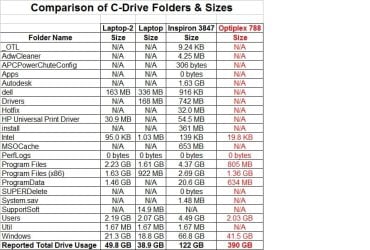
  • Comparison Table.jpg
    Comparison Table.jpg
    82.6 KB · Views: 2

My Computer My Computer

At a glance

Windows 7 Home Premium 64bit
Computer type
PC/Desktop
Computer Manufacturer/Model Number
Dell
OS
Windows 7 Home Premium 64bit
Browser
Firefox
Restore points are a number one cause of "lost" HD space, stored in the "system volume information" folder (which you don't account for). By default also you don't have read access into it. See if you delete restore points if space comes back.

BTW, summing space used by each file isn't a good way to get the total space used. That's affected by your access permissions, links and other issues that Windows Explorer is totally unaware of.
 

My Computer My Computer

At a glance

Windows 7 Ultimate x64Intel Core i7-740QM8 GB DDR3NVIDIA GeForce 330GT
Computer type
Laptop
Computer Manufacturer/Model Number
Toshiba Sattelite A665-S6092
OS
Windows 7 Ultimate x64
CPU
Intel Core i7-740QM
Memory
8 GB DDR3
Graphics Card(s)
NVIDIA GeForce 330GT
Screen Resolution
1366x768
Hard Drives
Samsung 840 SSD 500GB
1TB USB3 external HD
Cooling
Coolermaster Notepal U3 notebook cooling pad
Internet Speed
3mbps ASDL
Antivirus
ClamWin 0.98.7
Browser
Opera 12.17 x86 (main), Firefox 38 (sec), IE11 (last resort)

My Computer My Computer

At a glance

Win 10 x64, Linux Lite, Win 7 x64, BlackArch,...
Computer type
PC/Desktop
Computer Manufacturer/Model Number
HP Desktop & Compaq Laptop
OS
Win 10 x64, Linux Lite, Win 7 x64, BlackArch, & Kali
Hard Drives
Samsung 850 Pro 256Gb,
Hitachi HDD 1Tb,
Crucial MX SSD 250Gb
Segate 3Tb USB 3.0 Ext. Backup HDD
Internet Speed
150Mbps dn, 20Mbps up
Antivirus
Avast Free, Malwarebytes Anti-Exploit & Anti-Ransomware
Browser
Firefox, Chrome, Opera, & VPN
Reply to Alejandro85

Thanks for your suggestions, but the restore points don't seem to be the problem. Just to make sure, I went into Control Panel, System, System Protection, Configure, and turned off the system protection, then clicked the button to delete all restore points. I rebooted the system and checked the properties of my C:\ drive. The same thing - a lot of space used up, but no reason why. My max usage for restore points was only set to 4% of the disk, or about 16 GB. I had run Disk Cleanup and Disk Defragmenter several times before, but neither of these did any good. So, I'm still looking for the cause. I've also run CHKDSK and Disk Management and found no problems and that the disk is healthy.
 

My Computer My Computer

At a glance

Windows 7 Home Premium 64bit
Computer type
PC/Desktop
Computer Manufacturer/Model Number
Dell
OS
Windows 7 Home Premium 64bit
Browser
Firefox
Fist set Windows Explorer to show system folders and files and uncheck hide protected operating system files (Control Panel\All Control Panel Items\Folder Options)

See how big is C:\Windows\SoftwareDistribution\Download.
Is where windows store downloaded updates. Delete all them but the recent ones.

See if there isn't Win 10 installation files on a c:\
 
Last edited:

My Computers My Computers

  • At a glance

    Windows 7 HP 64i5 6600K - 800MHz to 4200MHz4+4G GSkill DDR4 3000IG - Intel 530
    Computer type
    PC/Desktop
    Computer Manufacturer/Model Number
    custom build
    OS
    Windows 7 HP 64
    CPU
    i5 6600K - 800MHz to 4200MHz
    Motherboard
    GA-Z170-HD3P
    Memory
    4+4G GSkill DDR4 3000
    Graphics Card(s)
    IG - Intel 530
    Monitor(s) Displays
    Samsung 226BW
    Screen Resolution
    1680x1050
    Hard Drives
    (1) -1 SM951 – 128GB M.2 AHCI PCIe SSD drive for Windows 7 and Lubuntu
    (2) -1 WD SATA 3 - 1T for Data
    (3) -1 WD SATA 3 - 1T for backup
    PSU
    Thermaltake 450W TR2 gold
    Keyboard
    Old and good Chicony mechanical keyboard
    Mouse
    Logitech mX performance - 9 buttons (had to disable some)
    Internet Speed
    500Mb/s
    Browser
    Firefox 64
    Other Info
    TinyWall firewall
  • At a glance

    Windows 7 Proi7-4500U 800MHz to 3.0GHz(4+4)G DDR3 1600IG intel 4400 + NVIDIA GeForce GT 745M
    Computer type
    Laptop
    System Manufacturer/Model Number
    Asus Q550LF
    OS
    Windows 7 Pro
    CPU
    i7-4500U 800MHz to 3.0GHz
    Motherboard
    Asus Q550LF
    Memory
    (4+4)G DDR3 1600
    Graphics Card(s)
    IG intel 4400 + NVIDIA GeForce GT 745M
    Sound Card
    Realtek
    Monitor(s) Displays
    LG Display LP156WF4-SPH1
    Screen Resolution
    1920 x 1080
    Hard Drives
    BX500 120G SSD for Windows and programs +
    1T HDD for data
    Internet Speed
    500 Mb/s
    Browser
    Firefox
    Other Info
    TinyWall firewall
Try disabling Hibernation. You don't actually have to have hibernation; but the image files it creates can take up a lot of space.
 

My Computer My Computer

At a glance

Linux Mint 18.2 xfce 64-bit (VMWare host) / W...Haswell4 GB
Computer type
PC/Desktop
Computer Manufacturer/Model Number
Dell
OS
Linux Mint 18.2 xfce 64-bit (VMWare host) / Windows 8.1 Pro 32-bit (VMWare guest)
CPU
Haswell
Memory
4 GB
Monitor(s) Displays
Acer 23"
Screen Resolution
1920 x 1080
Hard Drives
Two hard drives, 1TB each: One for Linux, one for my data.
Keyboard
IBM Model M
Antivirus
Sophos (Linux), Trend Micro (Windows)
Browser
Firefox, Opera
Other Info
I use Samba to share my data drive with the other computers at my house and with my guest session in VMWare Workstation Player.

My Computer My Computer

At a glance

Win 10 x64, Linux Lite, Win 7 x64, BlackArch,...
Computer type
PC/Desktop
Computer Manufacturer/Model Number
HP Desktop & Compaq Laptop
OS
Win 10 x64, Linux Lite, Win 7 x64, BlackArch, & Kali
Hard Drives
Samsung 850 Pro 256Gb,
Hitachi HDD 1Tb,
Crucial MX SSD 250Gb
Segate 3Tb USB 3.0 Ext. Backup HDD
Internet Speed
150Mbps dn, 20Mbps up
Antivirus
Avast Free, Malwarebytes Anti-Exploit & Anti-Ransomware
Browser
Firefox, Chrome, Opera, & VPN
Reply to Megahertz07 and mrjimphelps

Thank you both for your suggestions. There is no Windows 10 installation on the machine in question, and I do not use hibernation - it is a desktop so really no need. I did check the C:\Windows\SoftwareDistribution\Download file and found some old stuff (which I deleted), but the files I deleted were really not all that big and it did not may appreciable difference in the amount of hard drive space being used. So, still looking for the culprit as to what is causing a drive that should have roughly 50 GB of contents being filled up to 390 GB.


As I noted in my original post, the machine in question was purchased from a refurbisher, so I wonder if the refurbishment process left some stuff on the C:\ drive that is hidden from Windows? I've run CHKDSK (booted to the command prompt mode) and there are no bad sectors. I guess my next step is to try the Disk Cleanup-Extended to see if that surfaces anything. But for now, I'm still at a loss as to what could be chewing up all the hard drive space.
 

My Computer My Computer

At a glance

Windows 7 Home Premium 64bit
Computer type
PC/Desktop
Computer Manufacturer/Model Number
Dell
OS
Windows 7 Home Premium 64bit
Browser
Firefox

My Computer My Computer

At a glance

Win 10 x64, Linux Lite, Win 7 x64, BlackArch,...
Computer type
PC/Desktop
Computer Manufacturer/Model Number
HP Desktop & Compaq Laptop
OS
Win 10 x64, Linux Lite, Win 7 x64, BlackArch, & Kali
Hard Drives
Samsung 850 Pro 256Gb,
Hitachi HDD 1Tb,
Crucial MX SSD 250Gb
Segate 3Tb USB 3.0 Ext. Backup HDD
Internet Speed
150Mbps dn, 20Mbps up
Antivirus
Avast Free, Malwarebytes Anti-Exploit & Anti-Ransomware
Browser
Firefox, Chrome, Opera, & VPN
Making Small Progress

Since the file left by the hibernation function in Windows 7 was mentioned as a possible problem, I did a little more delving into this subject, even though my selected power setting DOES NOT have the hibernation option enabled. I found the following blog which I found most useful:


Delete hiberfil.sys by disabling Windows Hibernate function - TechRepublic


If I correctly understand the article with respect to Windows 7, if any of the available power setting options have the hibernation option enabled, a hyberfil.sys file is created even if the user does not use a power setting option that has hibernation enabled.


I tried the suggested fix, deleted the hiberfil.sys I found on my hard drive (only 6+ GB), rebooted my computer and verified that the file was gone and did not reappear. This worked. Now on to the task to find the remaining, useless files that are chewing up some 390 GB of disk space.
 

My Computer My Computer

At a glance

Windows 7 Home Premium 64bit
Computer type
PC/Desktop
Computer Manufacturer/Model Number
Dell
OS
Windows 7 Home Premium 64bit
Browser
Firefox

My Computer My Computer

At a glance

Win 10 x64, Linux Lite, Win 7 x64, BlackArch,...
Computer type
PC/Desktop
Computer Manufacturer/Model Number
HP Desktop & Compaq Laptop
OS
Win 10 x64, Linux Lite, Win 7 x64, BlackArch, & Kali
Hard Drives
Samsung 850 Pro 256Gb,
Hitachi HDD 1Tb,
Crucial MX SSD 250Gb
Segate 3Tb USB 3.0 Ext. Backup HDD
Internet Speed
150Mbps dn, 20Mbps up
Antivirus
Avast Free, Malwarebytes Anti-Exploit & Anti-Ransomware
Browser
Firefox, Chrome, Opera, & VPN
Reply to Snick

Yes, I ran Disk Cleanup with the extended options and selected everything. No appreciable change. I don't have CCleaner or WinDirStat, but I suspect that will be my next option to get those and see what they reveal.
 

My Computer My Computer

At a glance

Windows 7 Home Premium 64bit
Computer type
PC/Desktop
Computer Manufacturer/Model Number
Dell
OS
Windows 7 Home Premium 64bit
Browser
Firefox
Well, that's off the troubleshooting check-list! Quite often troubleshooting is a trial and error process, utilizing the most-likely towards the top of the list! :-)


The last link I posted has WinDirStat listed toward the bottom of the list. The list doesn't appear to be in any particular order of precedence.
 

My Computer My Computer

At a glance

Win 10 x64, Linux Lite, Win 7 x64, BlackArch,...
Computer type
PC/Desktop
Computer Manufacturer/Model Number
HP Desktop & Compaq Laptop
OS
Win 10 x64, Linux Lite, Win 7 x64, BlackArch, & Kali
Hard Drives
Samsung 850 Pro 256Gb,
Hitachi HDD 1Tb,
Crucial MX SSD 250Gb
Segate 3Tb USB 3.0 Ext. Backup HDD
Internet Speed
150Mbps dn, 20Mbps up
Antivirus
Avast Free, Malwarebytes Anti-Exploit & Anti-Ransomware
Browser
Firefox, Chrome, Opera, & VPN
Found the Culprit

After comparing the size of the directories in the root level on two of my computers, I found that the C:\Windows directory was grossly larger on the problem machine. In further delving, I looked at the size of all the subdirectories under the Windows directory (using the dir *.* /a /s command from the command prompt run as administrator) and found Temp subdirectory to be the culprit (some 381 GB). It contained a bunch of CAB files and other stuff. I'm surprised that this subdirectory still had stuff in it after running Disk Cleanup and Disk Cleanup Extended. So, does Disk Cleanup not work on this subdirectory?


I assume that Temp means exactly that, and that none of these file are used in running the machine. Is this a correct assumption? Can I manually delete the entire contents of the C:\Windows\Temp subdirectory and NOT encounter any problems? Does anyone know as to what operations deposit stuff in the Temp subdirectory? Do I need to check this subdirectory periodically after certain Windows operations and manuall delete its contents to keep my disk from getting used up? I have yet to download CCleaner, but would it have cleaned up this subdirectory?


I greatly appreciate all the suggestions and feedback all of you have provided in helping me ferret out this problem. Thanks.
 

My Computer My Computer

At a glance

Windows 7 Home Premium 64bit
Computer type
PC/Desktop
Computer Manufacturer/Model Number
Dell
OS
Windows 7 Home Premium 64bit
Browser
Firefox
Disk cleanup normally clean the Temp folder. CCleaner I'm sure it does.
When you open Disk cleanup (%windir%\system32\cleanmgr.exe) it will give you the options what you want to clean. I select ALL options.
There are two Temp folders. One is under Windows and other under %USERPROFILE%\AppData\Local\Temp
You can relocate those folders by editing System Properties - Advanced tab.
On the top you have the user temp folder. Down the list you have the system Temp / TMP folder location.

Temporary files folder is where the files are extracted for installation, draft files etc
Yes, you can delete all files and sub folders. Some files can't be deleted as they are in use. Just skip them.
 

My Computers My Computers

  • At a glance

    Windows 7 HP 64i5 6600K - 800MHz to 4200MHz4+4G GSkill DDR4 3000IG - Intel 530
    Computer type
    PC/Desktop
    Computer Manufacturer/Model Number
    custom build
    OS
    Windows 7 HP 64
    CPU
    i5 6600K - 800MHz to 4200MHz
    Motherboard
    GA-Z170-HD3P
    Memory
    4+4G GSkill DDR4 3000
    Graphics Card(s)
    IG - Intel 530
    Monitor(s) Displays
    Samsung 226BW
    Screen Resolution
    1680x1050
    Hard Drives
    (1) -1 SM951 – 128GB M.2 AHCI PCIe SSD drive for Windows 7 and Lubuntu
    (2) -1 WD SATA 3 - 1T for Data
    (3) -1 WD SATA 3 - 1T for backup
    PSU
    Thermaltake 450W TR2 gold
    Keyboard
    Old and good Chicony mechanical keyboard
    Mouse
    Logitech mX performance - 9 buttons (had to disable some)
    Internet Speed
    500Mb/s
    Browser
    Firefox 64
    Other Info
    TinyWall firewall
  • At a glance

    Windows 7 Proi7-4500U 800MHz to 3.0GHz(4+4)G DDR3 1600IG intel 4400 + NVIDIA GeForce GT 745M
    Computer type
    Laptop
    System Manufacturer/Model Number
    Asus Q550LF
    OS
    Windows 7 Pro
    CPU
    i7-4500U 800MHz to 3.0GHz
    Motherboard
    Asus Q550LF
    Memory
    (4+4)G DDR3 1600
    Graphics Card(s)
    IG intel 4400 + NVIDIA GeForce GT 745M
    Sound Card
    Realtek
    Monitor(s) Displays
    LG Display LP156WF4-SPH1
    Screen Resolution
    1920 x 1080
    Hard Drives
    BX500 120G SSD for Windows and programs +
    1T HDD for data
    Internet Speed
    500 Mb/s
    Browser
    Firefox
    Other Info
    TinyWall firewall
Hi Everyone!

Can't add reps as already did to most of you! I like the suggestions you are giving JohnHD. I will look in my huge C: drive for some of these same problems and see if I have anything like Hibernation (never used, but will follow pathway to see what is there).

I do restore points for "anything" Do you mean that can take up a lot of space? Hmmmm

ON my "next" HD/Computer system I'll try to remember NOT to write any file with term "TEMP" at the start! I write that all the time, so I can't use any cleaners that look for those, as I'd have to exception 10,000 ++ files by hand so I shrug and say Lesson learned. But I do want to keep the data from my old HDD when I convert to my new one--I'll mention this in my own thread....not trying to hijack John's thread here!

Again thanks to everyone too numerous to list, who responded here, and wish I could double rep members who are very helpful! I should list a lot individually like Snick and his 8 free tools to find what files and folders are taking up disk space.

Good luck JohnHD in fixing your problem!

P.S. Snick's site for checking WHAT size are the items on my HDD: Says its a "safe site" and quotes and shows results from :

WOT Reputation on Welcome to JAM Software

Can't those ratings be "faked" like my phone is spoofed every day by fake numbers including my own number calling itself!, by phone scam artists?

I did one anyway as I trusk Snick's items having used them already successfully. But wanted to know for JohnHD and others who might be viewing this. (my Norton checked out site as "Safe" so that is why I took it anyway). Will post results in my own problem thread if significant!
 
Last edited:

My Computer My Computer

At a glance

Windows7 Professional 64bitIntel(R) Core (TM) i5 CPU M 430 @2.27 Ghz8.0 GB
Computer type
Laptop
Computer Manufacturer/Model Number
SONY VAIO VPCS111FM
OS
Windows7 Professional 64bit
CPU
Intel(R) Core (TM) i5 CPU M 430 @2.27 Ghz
Memory
8.0 GB
Hard Drives
Seagate 500GB Momentus
Cooling
Internal fan
Mouse
Logitech bluetooth trackball
Browser
Pale Moon Browser for x64
Reply to Megahertz07

Thanks for the confirmation that I can blow away all the stuff in the Windows\Temp directory. This confirms several things I had already found on the subject. One noted it is best to boot the computer to the Command prompt level so Windows isn't using any of the files. Thanks also for noting the TEMP directory stored under the use profiles. I hadn't thought to check there, but I don't think that is the problem place based on the size of the stuff in the Windows\Temp directory.
 

My Computer My Computer

At a glance

Windows 7 Home Premium 64bit
Computer type
PC/Desktop
Computer Manufacturer/Model Number
Dell
OS
Windows 7 Home Premium 64bit
Browser
Firefox
BINGO !!! - HD Space Recoverd

Going in and just deleting the contents of the Windows\Temp file by brute force got rid of some 14K of items taking up 355 GB of space. Things worked perfectly after the operation, and my C:\ drive consumption is now down to around 35 GB. Thanks to all that helped. I can put this issue to bed, now.
 

My Computer My Computer

At a glance

Windows 7 Home Premium 64bit
Computer type
PC/Desktop
Computer Manufacturer/Model Number
Dell
OS
Windows 7 Home Premium 64bit
Browser
Firefox

My Computers My Computers

  • At a glance

    Windows 7 HP 64i5 6600K - 800MHz to 4200MHz4+4G GSkill DDR4 3000IG - Intel 530
    Computer type
    PC/Desktop
    Computer Manufacturer/Model Number
    custom build
    OS
    Windows 7 HP 64
    CPU
    i5 6600K - 800MHz to 4200MHz
    Motherboard
    GA-Z170-HD3P
    Memory
    4+4G GSkill DDR4 3000
    Graphics Card(s)
    IG - Intel 530
    Monitor(s) Displays
    Samsung 226BW
    Screen Resolution
    1680x1050
    Hard Drives
    (1) -1 SM951 – 128GB M.2 AHCI PCIe SSD drive for Windows 7 and Lubuntu
    (2) -1 WD SATA 3 - 1T for Data
    (3) -1 WD SATA 3 - 1T for backup
    PSU
    Thermaltake 450W TR2 gold
    Keyboard
    Old and good Chicony mechanical keyboard
    Mouse
    Logitech mX performance - 9 buttons (had to disable some)
    Internet Speed
    500Mb/s
    Browser
    Firefox 64
    Other Info
    TinyWall firewall
  • At a glance

    Windows 7 Proi7-4500U 800MHz to 3.0GHz(4+4)G DDR3 1600IG intel 4400 + NVIDIA GeForce GT 745M
    Computer type
    Laptop
    System Manufacturer/Model Number
    Asus Q550LF
    OS
    Windows 7 Pro
    CPU
    i7-4500U 800MHz to 3.0GHz
    Motherboard
    Asus Q550LF
    Memory
    (4+4)G DDR3 1600
    Graphics Card(s)
    IG intel 4400 + NVIDIA GeForce GT 745M
    Sound Card
    Realtek
    Monitor(s) Displays
    LG Display LP156WF4-SPH1
    Screen Resolution
    1920 x 1080
    Hard Drives
    BX500 120G SSD for Windows and programs +
    1T HDD for data
    Internet Speed
    500 Mb/s
    Browser
    Firefox
    Other Info
    TinyWall firewall
Great work JohnHD! I'll have to try that too (is that ok with everyone? or are such answers JohnHD only specific? I hope I can just delete some of the computer's Temp files and not ones I made with same name)....I need space tooooooo!

Thanks Megahertz07 for the information!
Yes, I followed the link and learned I will not post anything here if I have problems. I don't seem to. I think I used SURT before and have it somewhere..

I can ask here....does everyone have Windows Update issues? Mine work ok. Wonder why????

Megahertz07 said:
I now keep WU to never check and and recommended updates off. Under services I have it set to manual.
For Office I run WU manually and select those I want to install.
For Win 7 I'm now installing security ONLY updates.

Why do you have it set to "off" except for security issues???
 

My Computer My Computer

At a glance

Windows7 Professional 64bitIntel(R) Core (TM) i5 CPU M 430 @2.27 Ghz8.0 GB
Computer type
Laptop
Computer Manufacturer/Model Number
SONY VAIO VPCS111FM
OS
Windows7 Professional 64bit
CPU
Intel(R) Core (TM) i5 CPU M 430 @2.27 Ghz
Memory
8.0 GB
Hard Drives
Seagate 500GB Momentus
Cooling
Internal fan
Mouse
Logitech bluetooth trackball
Browser
Pale Moon Browser for x64
Back
Top