Hi folks!
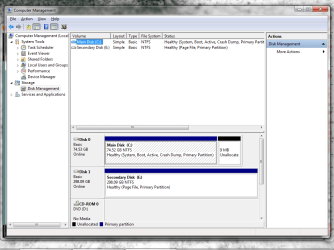
Not sure if this is the proper place to post this, but I've had a burning question that's stumped me for awhile now...I have two hard drives installed on my computer - one SATA and one IDE, 320gb (E:/) and 80gb (C:/) respectively. Windows 7 Ultimate 64-bit is installed to the 80gb IDE drive and the 320gb is essentially my storage drive, although I do keep some stuff on C:/.
My computer has 6gb of RAM (just installed another 4gbs a few days ago). The Page file is disabled on the 80gb C:/ drive, and is enabled on the 320gb E:/ drive to be system-managed. I did this because the 320gb drive is bigger and is SATA, meaning faster access.
My question is this: the amount of hard drive space on my C:/ drive fluctuates from time to time for no reason. I would expect such on E:/ because the page file is there, but I am not uninstalling or installing anything at all on C:/....where is my space going? As an example, I deleted some files from C:/ yesterday and Windows was showing that it had 31.4gbs free. I come back this morning and Windows is now saying 28.8gbs free, yet I installed nothing, deleted nothing, touched nothing at all...is this normal? I understand that it can change somewhat in normal operation due to temp files, etc. But where did those 2.6gbs go...? (I should say it's fluctuated even more than this in the past - by 4gbs or so).
There are no programs running that I have installed that could account for this that I am aware of and I run regular defrags, malware scans, etc. to keep everything squeaky clean. (Aside from standard system processes, this is ALL the other stuff I normally have running, that's it: Avast anti-virus, Hamachi2, my Logitech MX510 mouse SetPoint software, Pidgin IM client and Google Talk) I can't think that any of those would cause the fluctuations except maybe Avast, but then why don't I see them on the E:/ drive as well?
Long story short - am I crazy or is there a good reason for the fluctuation? Thanks for any insights!
EDIT: Forgot to mention...I even checked C:/ with WinDirStat and I don't see any giant odd files anywhere that are out of the ordinary aside from my own large files such as movie files, etc.
Not sure if this is the proper place to post this, but I've had a burning question that's stumped me for awhile now...I have two hard drives installed on my computer - one SATA and one IDE, 320gb (E:/) and 80gb (C:/) respectively. Windows 7 Ultimate 64-bit is installed to the 80gb IDE drive and the 320gb is essentially my storage drive, although I do keep some stuff on C:/.
My computer has 6gb of RAM (just installed another 4gbs a few days ago). The Page file is disabled on the 80gb C:/ drive, and is enabled on the 320gb E:/ drive to be system-managed. I did this because the 320gb drive is bigger and is SATA, meaning faster access.
My question is this: the amount of hard drive space on my C:/ drive fluctuates from time to time for no reason. I would expect such on E:/ because the page file is there, but I am not uninstalling or installing anything at all on C:/....where is my space going? As an example, I deleted some files from C:/ yesterday and Windows was showing that it had 31.4gbs free. I come back this morning and Windows is now saying 28.8gbs free, yet I installed nothing, deleted nothing, touched nothing at all...is this normal? I understand that it can change somewhat in normal operation due to temp files, etc. But where did those 2.6gbs go...? (I should say it's fluctuated even more than this in the past - by 4gbs or so).
There are no programs running that I have installed that could account for this that I am aware of and I run regular defrags, malware scans, etc. to keep everything squeaky clean. (Aside from standard system processes, this is ALL the other stuff I normally have running, that's it: Avast anti-virus, Hamachi2, my Logitech MX510 mouse SetPoint software, Pidgin IM client and Google Talk) I can't think that any of those would cause the fluctuations except maybe Avast, but then why don't I see them on the E:/ drive as well?
Long story short - am I crazy or is there a good reason for the fluctuation? Thanks for any insights!
EDIT: Forgot to mention...I even checked C:/ with WinDirStat and I don't see any giant odd files anywhere that are out of the ordinary aside from my own large files such as movie files, etc.
Last edited:
My Computer
- Computer type
- PC/Desktop
- Computer Manufacturer/Model Number
- Custom
- OS
- Windows 7 Ultimate 64-bit
- CPU
- Intel Core 2 Duo 3.0ghz
- Motherboard
- Asus P5K SE/EPU
- Memory
- 6gb DDR2 RAM - 2gb OCZ, 4gb GSkill - both in dual channel
- Graphics Card(s)
- ASUS Radeon HD7850 2gb
- Sound Card
- On-board Realtek AC'97 Audio
- Monitor(s) Displays
- NEC AccuSync LCD71V LCD Monitor
- Screen Resolution
- 1280x1024
- Hard Drives
- Western Digital 160gb SATA (Master), Western Digital 320gb SATA (Secondary)
- PSU
- 500w Coolmax
- Case
- iCute 0302-SL-BAL-B
- Cooling
- top 80mm Exhaust, back 80mm Exhaust, side 80mm Intake
- Keyboard
- 22-year old Compaq RT101 w/ superbright modded blue LEDs
- Mouse
- Logitech MX510 (blue)
- Internet Speed
- Eastlink Cable @ 20 Mbps
- Antivirus
- Avast Antivirus Free
- Browser
- Mozilla Firefox
- Other Info
- I also have an MSI Wind U100 netbook running Linux Mint 17 MATE - 1.6ghz Intel Atom, 2gb RAM, 160gb Hard Drive, 128mb Intel Mobile On-board Video, Realtek AC'97 On-board Audio, 9-cell Battery, 1.0G BIOS