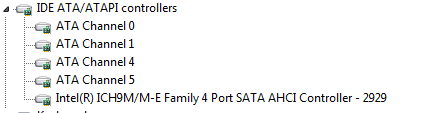
Hard drive has 5 parts to it in device manager

hollyoaks777

New member
Member
VIP
Local time
8:32 PM
Messages
340
Hard drive has 5 parts to it in device manager could someone have a look at this picture as i only had one device when i clicked on small triangle in device manager for my old hard drive. In this new one i have 5.
thank you in advance
 

Attachments

  • hard drive.PNG
    hard drive.PNG
    2.3 KB · Views: 4

My Computer My Computer

At a glance

windows 7
OS
windows 7
Unless I am wrong that is only showing that your mobo has 4 sata I guess sataII ports. If using only 1 drive that is chann 0.

You notice the numbers skip a few. That should mean other chips and or drivers run other ports on your mobo say for ide or sata 1.5 or sataIII ports? I would guess looking at it channels 2 and 3 are ran by another chip or controller and are a different speed or interface?

Normally different interfaces use different color sata connection ports on the mobo. They can be black blue gray and white maybe other colors but is so you can tell them apart and should be listed as so in your mobo manual.

The other ports may or not show until drivers are installed or a drive is plugged into the said other ports. Windows and or the mobo bios will default to the main sata ports which in number count should be more than other ports. If a sataII mobo you might have 4 or 6 or 8 normal drive ports and maybe 2 to 4 what ever other ports for say sataIII etc.

If you have the yellow triangle that means you need to install drivers- or w7 might install them for ya..
 

My Computer My Computer

At a glance

w7
OS
w7
Unless I am wrong that is only showing that your mobo has 4 sata I guess sataII ports. If using only 1 drive that is chann 0.

You notice the numbers skip a few. That should mean other chips and or drivers run other ports on your mobo say for ide or sata 1.5 or sataIII ports? I would guess looking at it channels 2 and 3 are ran by another chip or controller and are a different speed or interface?

Normally different interfaces use different color sata connection ports on the mobo. They can be black blue gray and white maybe other colors but is so you can tell them apart and should be listed as so in your mobo manual.

Thank you very much for explaining that to me it is a brand new drive 250GB Western Digital. That's the exact same as my old drive being western digital and 250GB but it only showed one device. i did not format it when installing os as i was scared i would mess it up as i wiped my old one by mistake :o could that be the why it shows more as it was not formatted mate.
 

My Computer My Computer

At a glance

windows 7
OS
windows 7
Now I am a lil confused. If you have 2 same drives and plugged into proper ports they should be chan 0 and chan 1.

If the os is installed and the system is working- w7 reformatted or partitioned during the install and I guess asked you so and you said yes. If the second drive is not showing up from say computer id say yes it needs to be partitioned and formatted- if it is a new drive a quick format should be fine and takes maybe 2 minutes.

You should run proper drives on the proper ports on your mobo- check your manual and see what ports run what and use the proper drives per port. But you can also jump say a sataII drive to run on a sata 1.5g or a sataIII to run on a sataII port- or older drives any way.

Also it is best that your mobo bios be set up in ahci support or your drives are running in ide mode. You may not need all the features of ahci but the drives will not run in full speeds unless using ahci and you do not need to run a raid to use ahci. You have to turn on ahci before you install the os. Or you can find here in the forums a reg tweak and can turn on ahci support and reboot- good to go..

Sorry I do not know where to find the reg tweak- I know it is here- I need to locate it for future references. Maybe you can use the search function to find it if need be? Search "reg tweak after os install for ahci support" or something like that.

You do not have to use ahci- well some newer drives will give ya fits and might not work at all with out ahci. But again the drives will not run at full speeds with out it. AHCI is for sata drives.

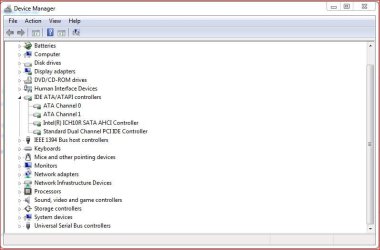
** can find the drives here look bottom partition drive etc.. I guess your os drive is c: your second drive shows no letter? not until it is formatted etc. I do not do this everyday so- I think you just need to right click on the drive needed attention and then click format it will ask you to partition and then just click fast format.>


* this second photo is just general after the last photo. My drives are already set up. C: is the os drive unless you on purpose change letters. You other drive might say unallocated space or something and needs to be formatted etc. Just right click your other drive and do so. When done it will give it a drive letter and be working- or you may have to reboot after- even if it does not prompt ya to do so- do it reboot any wa. All should be good to go after that..>

 
Last edited:

My Computer My Computer

At a glance

w7
OS
w7
Thank you very much mate off to see what it is running and change it to AHCI if it is not running that. SATA operation is running AHCI. I take it the device will have to be formatted but i will wait as it takes a while to reinstall everything on computer mate
 
Last edited:

My Computer My Computer

At a glance

windows 7
OS
windows 7
Now I am a lil confused. If you have 2 same drives and plugged into proper ports they should be chan 0 and chan 1.

Just for clarification, I think the OP is referring to a Dell Inspiron 1545 laptop that he swapped hard drives on. (I'm guessing this from a different thread the OP has.) If I'm mistaken I extend my sincerest apologies.
 

My Computer My Computer

At a glance

Win 7 Pro 64-bitIntel i5 2.4 Ghz8GB DDR3Intel HD 3000
Computer type
Laptop
Computer Manufacturer/Model Number
Sony Vaio VPCEB47GM Laptop
OS
Win 7 Pro 64-bit
CPU
Intel i5 2.4 Ghz
Memory
8GB DDR3
Graphics Card(s)
Intel HD 3000
Sound Card
IDT High Definition
Monitor(s) Displays
15.6 WGXA Anti-Glare LED
Screen Resolution
1280x800
Hard Drives
640Gb 7200rpm
Antivirus
MSE
Browser
Opera (primary) with IE9 backup
Now I am a lil confused. If you have 2 same drives and plugged into proper ports they should be chan 0 and chan 1.

Just for clarification, I think the OP is referring to a Dell Inspiron 1545 laptop that he swapped hard drives on. (I'm guessing this from a different thread the OP has.) If I'm mistaken I extend my sincerest apologies.

No you are correct mate
 

My Computer My Computer

At a glance

windows 7
OS
windows 7
You do not have to reinstall the os for ahci support- Some say it might be best- I would reinstall the os my self maybe if just building and not really a lot of programs installed etc..

The reg tweak is way more easy and fast. You just make a simple change to the reg- then boot to your bios and turn on ahci support and then reboot as normal- w7 might need to reboot again before it rights its self and its done..

Do not just go changing to ahci and try to boot to w7 it will mess up every thing. Either do as you say. A all new os install after first turning on ahci in bios or do the faster reg tweak.

You need to get your info and ducks in a row to know you have ahci support turned on proper in your bios- it is easy and maybe only 2 places to check or change settings. It's just mobos and bios are different- I can not tell ya how to enable it on your mobo- good manuals will tell ya- or post at the mobos help forums and someone can tell ya fast ..

Do not jump the gun and cause your self head akes- your system seems to be working- just not your second drive. Take an extra day if need be read post get some info then do it- Maybe just do the reg tweak and will be a lot faster.
 

My Computer My Computer

At a glance

w7
OS
w7
how do i do reg tweak or am i better to do reinstall? system is fine just now but with what we are talking about will it cause me problems down the line if i don't format the hard drive.
 

My Computer My Computer

At a glance

windows 7
OS
windows 7
Ya I am not expert. I am just going by what he posted in this thread. I did not know he has another thread or plug and play- I think all sata drives are plug and play.

And I did not know this is a lap top. I know nothing about lap tops..

I do think I am right as far as ports showing up or for the controllers that run them in his photo.

I build my own systems and for a few friends and learn or correct stuff as I go. I can talk a lot too- but trying hard to help is all. I do not do this every day- so I can my memory or info not all right..

Sorry If I get confusing.
 

My Computer My Computer

At a glance

w7
OS
w7
Wait I am looking for the reg tweak now.
 

My Computer My Computer

At a glance

w7
OS
w7
Here ya go. I think this is the right one..>

http://www.sevenforums.com/tutorials/61869-ahci-enable-windows-7-vista.html

It is more easy than you think and save ya lots of time. I am still confused tho. Is this system running now the os drive is showing but the other drive is not? A format on the second drive should fix that.

AHCI is not really needed but is best and is for sata drives and so they run at their fastest speeds. If this system is running and you already have your second drive running. If you do want ahci support just do the reg tweak.

I think I would turn off my system first and disconnect power and sata cable to my second drive. then reboot and do reg tweak or if going to reinstall your os- just use 1 drive- do not connect the other drive until w7 is good to go and is running and what ever changes you are trying to make to it..
 

My Computer My Computer

At a glance

w7
OS
w7
I do not know what to say or think now. Your first post said nothing about this being a lap top- I did not look at your system info either. I do not know this info is good for you or not.. Had I known it was a lap top I might not have tried to help- being I know nothing about them..

So I guess your second drive is an external drive [usb maybe]? If plugged in it should be same to format it as if it was an internal drive.

You can skip some info I posted. I did not know this is a lap top..

I hope you get it going like you need or want. Take care..
 

My Computer My Computer

At a glance

w7
OS
w7

My Computer My Computer

At a glance

W7x64 Pro, SuSe 12.1/** W7 x64 Pro, XP MCEPhenom II 1090T w/Noctua NH-D14 /**4400+ X2 w...2 x 2GB Patriot PGS34g1600LLKA/**4x1GB Corsai...EVGA GTX460 SC/**EVGA 8800GTS
Computer Manufacturer/Model Number
DIY
OS
W7x64 Pro, SuSe 12.1/** W7 x64 Pro, XP MCE
CPU
Phenom II 1090T w/Noctua NH-D14 /**4400+ X2 w/CM Hyper TX 3
Motherboard
ASRock 890FX Deluxe 4/**A8N-SLI
Memory
2 x 2GB Patriot PGS34g1600LLKA/**4x1GB Corsair VS
Graphics Card(s)
EVGA GTX460 SC/**EVGA 8800GTS
Sound Card
Asus Xonar D2X/**Xonar D1
Monitor(s) Displays
Acer X233H, Dell E152FPc /**LG M237-WD
Screen Resolution
1920x1080 & 1024x768/**1980x1080
Hard Drives
WDC 2TB, 1.5TB, 1TB, 500GB,Seagate 500GB , Maxtor 80GB /**500GB Seagate & WDC 1TB Black
PSU
CM RS600 w/ APC BX1000G/**Antec 500 TP w/ APC BX1000
Case
HAF922/**Antec 1040IIB
Cooling
3x200mm, 1x140 and 1x120mm/**5x80mm fans
Keyboard
Logitech Media USB/**Saitek Eclipse
Mouse
Cordless Trackman Wheel/**Ditto
Internet Speed
3.3Mbps
Other Info
SB 560 5.1 w/ Sennheiser RS140/**Creative T20 speakers, Dvico FusionHDTV7 Gold RT, Cisco E3000, HP 5510V AIO, Linksys E3000, Belkin F5U237 hub and **F5D8055 adapter
(** = 2nd rig)
I do not know what to say or think now. Your first post said nothing about this being a lap top- I did not look at your system info either. I do not know this info is good for you or not.. Had I known it was a lap top I might not have tried to help- being I know nothing about them..
it's much appreciated your answers mate basically i have only one hard drive intalled and windows 7 is running off it. What you could help me with is if i don't reinstall and format the hard drive will the hard drive cause problems if i don't format it please answer asap as it takes a while to get everything back on my laptop.
 

My Computer My Computer

At a glance

windows 7
OS
windows 7
The os install will prompt you to partition and format during install. If it is running it is already done- unless you made it partition more than 1x?

So if it is running and has 1 partition- or you know the proper partition with the os on it- I think the reg tweak will be faster and should give ya no problems.. But if you have lil stuff programs etc on the os drive you can do a fresh os install that is up to you but will take longer..

I am not sure how this reg tweak will work if you have multi partitions on one drive. I guess the info for the reg tweak explains such things- I did not read it all?

Note in my second photo- system reserve is not really thought of as a second partition- My drive is set up as 1 partition- windows shows it like that- not that I have or on purpose set it up for 2 partitions..

The prob I was talking about before was- if you already installed the os and is in ide mode- you can not just change the bios to ahci and it work- It will not boot and say it can not find the drive or say the boot something or another is messed up.. You have to do it right- either before os install or follow the instructions for the reg tweak.. But even if you do mess up- it will not hurt the drive- you just need to reinstall the os and format and the propoer mode you want- ide or ahci..
 

My Computer My Computer

At a glance

w7
OS
w7

My Computer My Computer

At a glance

Windows 10 ProIntel Core i7-4770K (3.5Ghz)32 gig Corsair Dominator Platinum (4x8Gig)Sapphire Tri-X R9 Fury
Computer type
PC/Desktop
Computer Manufacturer/Model Number
Custom built by me.
OS
Windows 10 Pro
CPU
Intel Core i7-4770K (3.5Ghz)
Motherboard
Gigabyte G1 Sniper 5 (F10 Bios)
Memory
32 gig Corsair Dominator Platinum (4x8Gig)
Graphics Card(s)
Sapphire Tri-X R9 Fury
Sound Card
Soundblaster ZXR
Monitor(s) Displays
NEC PA242W 24" LCD Monitor
Screen Resolution
1920 x 1200
Hard Drives
Primary - Samsung 850 Pro (512gig), Samsung 840 Pro (256gig), 2TB WD Caviar Black.
PSU
EVGA Supernova 1000 G2
Case
Cooler Master HAF X
Cooling
Corsair H100i with Corsair Air Series SP120 Quiet Fans
Keyboard
Logitech Wireless Wave
Mouse
Logitech Performance MX
Internet Speed
High Speed Cable
Antivirus
Norton Security
Browser
IE11
Other Info
Memory Timings - 1866MHz @ 9-9-9-27-1T @ 1.5 volts
Ya some of these other folks can better help ya. I said in my first post unless I am wrong- and can be.

Just trying to be helpful is all. You will get it figured out. I hope so any way..
 

My Computer My Computer

At a glance

w7
OS
w7
I have just done reinstall and formatted my hard drive and its the same lol be up all night reinstalling my progams lol
 

My Computer My Computer

At a glance

windows 7
OS
windows 7
I have just done reinstall and formatted my hard drive and its the same lol be up all night reinstalling my progams lol

If I may make a suggestion? In an effort to avoid similar problems in the future, once you have your 1545 configured the way you want with all programs, apps, etc installed, invest in a new external hard drive. Here in the Colonies they're selling 2TB drives for under $100 US.

Seagate ST320005EXA101 2TB Expansion External Drive - 2TB, USB 2.0 at TigerDirect.com

Make a system image of your computer and store it on the external HD. Leave the original system image intact and make a new image every week or so. If you ever have to reinstall everything again, restore from the system image of your choice and be back online in about 30 minutes. The original image can be your "master clean install" to avoid the dreaded up-all-night headache. :) You can use the built-in 7 backup utility or the free Macrium Reflect or Paragon. There are others (paid and free) but these are the ones I've used.

http://www.sevenforums.com/tutorials/663-backup-complete-computer-create-image-backup.html

http://www.sevenforums.com/tutorials/73828-imaging-free-macrium.html

Free Backup Software: Paragon Backup & Recovery (Advanced) Free Edition - Overview
 

My Computer My Computer

At a glance

Win 7 Pro 64-bitIntel i5 2.4 Ghz8GB DDR3Intel HD 3000
Computer type
Laptop
Computer Manufacturer/Model Number
Sony Vaio VPCEB47GM Laptop
OS
Win 7 Pro 64-bit
CPU
Intel i5 2.4 Ghz
Memory
8GB DDR3
Graphics Card(s)
Intel HD 3000
Sound Card
IDT High Definition
Monitor(s) Displays
15.6 WGXA Anti-Glare LED
Screen Resolution
1280x800
Hard Drives
640Gb 7200rpm
Antivirus
MSE
Browser
Opera (primary) with IE9 backup
Back
Top