Hard drive initialization question

Cybrow

New member
Local time
4:11 PM
Messages
7
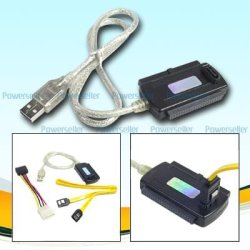
My laptop running Vista Home Premium 32bit died (system board) and I want to copy my data off the hard drive to my desktop running Windows 7 RC. I'm using an IDE to USB adapter and it wants to initialize the hard drive before it can be read. Won't that destroy the data? If so, any suggestions as to how I can save my files?
 

My Computer

OS
Windows 7 RC
Hello Cybrow Welcome to the Se7en Forums!

To see the drive initialized you will need to go into "Control Panel>Administrative Tools>Computer Management>Storage>Disk Management" in order to perform the following action.

Initialize New Disks


To initialize new disks
  1. In Disk Management, right-click the disk you want to initialize, and then click Initialize Disk.
  2. In the Initialize Disk dialog box, select the disk(s) to initialize. You can select whether to use the master boot record (MBR) or GUID partition table (GPT) partition style.
Note The disk is initialized as a basic disk.


Additional considerations

  • New disks appear as Not Initialized. Before you can use a disk, you must first initialize it. If you start Disk Management after adding a disk, the Initialize Disk Wizard appears so you can initialize the disk.
This is right in the menu bar>help option when arriving in the Disk Management tool itself.
 

My Computers

System One System Two

  • Computer type
    PC/Desktop
    Computer Manufacturer/Model Number
    Custom builds = 2
    OS
    W7 Ultimate x64/W10 Pro x64/W11 Pro Triple Boot - Main PC W7 Remote PC Micro ATX W7 Pro x64/W11 Pro
    CPU
    AMD Phenom II X4 975 Deneb 3.6ghz - 965 2nd remote pc
    Motherboard
    Gigabyte GA-790XTA-UD4-Gigabyte GA-880GM-D2H remote pc
    Memory
    Kingston Hyper X DDR3 1600 1.5v 16gb - Hyper X Fury 8gb 2nd
    Graphics Card(s)
    MSI HD Radeon 5750 1gb - MSI HD Radeon 6450 on mini tower
    Sound Card
    Creative Labs X-Fi Xtreme Audio P - Realtek onooard 2nd case
    Monitor(s) Displays
    ASUS VW199T-P 19" HP 2082a Main-HP 2082a 20" remote pc
    Screen Resolution
    Asus 1440x900 - HP 1600x900
    Hard Drives
    WD Black 1TB HD per OS W7, W10, and pending W11 presently on 500gb OS Drive - Pending Triple 1TB HDs for Spanned Storage/backup volume
    Single 2TB external USB enclosure, single 1TB System 7 Host/Boot drive, Pending 8TB external HD for system image b
    PSU
    Corsair 750TX - primary / Corsair CX600 - second
    Case
    Antec 900-2 - SSD compatible / NZXT Vulcan mini tower
    Cooling
    Zalman CNPS9900A
    Keyboard
    AZIO L70 Backlit Letters Gaming - ONN Cordless/USB
    Mouse
    MSI DS200 Programmable, Logitech Cordless
    Internet Speed
    30mbps upgrade - primary hard wired - mini tower usb WiFi
    Antivirus
    GFI VIPRE Internet Security 2014 on W7 2016 beta on W10,
    Browser
    Cyberfox, WaterFox 64bit FF variants, FireFox x64, Pale Moon
    Other Info
    Accomdata fan cooled usb 2.0 PIDE/Sata II, III external enclosure.
    Sambient usb/eSata PATA/Sata II, III external enclosure.
  • Computer type
    PC/Desktop
    System Manufacturer/Model Number
    CUSTOM ASSEMBLY
    OS
    W7 Pro x64/W11 Pro
    CPU
    AMD Deneb 3.6ghz - 965
    Motherboard
    Gigabyte GA-880GM-D2H remote pc
    Memory
    Kingston Hyper X Fury 8gb
    Graphics Card(s)
    MSI HD Radeon 6450 DVI Output
    Sound Card
    Realtek onooard Creative or Other separate PENDING
    Monitor(s) Displays
    VIZIO 32" LCD TV Separate LCD Pending
    Screen Resolution
    1600x1080
    Hard Drives
    WD 500GB OS Host/Boot WD Green 1TB Storage/Backup
    PSU
    Corsair 600W - THERMALTAKE 600W spare case
    Case
    NZXT Vulcan mini tower
    Cooling
    Twin 120mm Top Fans - 240mm Side Cover
    Keyboard
    ONN Cordless/USB Logitech Cordless
    Mouse
    ONN USB/Cordless - Logitech Cordless
    Internet Speed
    DSL 5G
    Browser
    MS Edge, FireFox, WaterFox x64, FireFox Nightly
    Other Info
    OS Testing-Remote Access to Main TeamViewer
Hello and thanks for the welcome.

Yes I can see how to initialize the hard drive but will doing so wipe out the
existing data? Thanks.
 

My Computer

OS
Windows 7 RC
Hello and thanks for the welcome.

Yes I can see how to initialize the hard drive but will doing so wipe out the
existing data? Thanks.

Cybrow


Yep it will. You moved the HD to another machine? how are you trying to view the drive in IE?
 

My Computer

Computer Manufacturer/Model Number
HP Pavillion dv-7 1005 Tx
OS
Win 8 Release candidate 8400
CPU
[email protected]
Memory
4 gigs
Graphics Card(s)
Nvidia 9600M
Sound Card
HD built-in
Monitor(s) Displays
17" Wxga
Screen Resolution
1440x900
Cooling
none
Internet Speed
45Mb down 5Mb up
zigzag,

I have it plugged onto one of those IDE to USB adapters and plugged into a USB port on my desktop to use as an external drive. The drive shows up in disk management and says I must initialize it before I can access it. The drive does not show up in Windows Explorer only under the disk manager. As you confirm a my fear that initializing the disk will scrub the data I am trying to find some way to copy the files to another computer to save them. I tried booting my desktop into Knopix but the drive does not show up there either. I also tried a couple of freeware recovery programs and the drive shows up in the list but I can't access it. I installed the drive into another laptop and it wants to do a do a recovery on the drive probably because the hardware is different or maybe some damage to boot files occurred when the first laptop died. I thought maybe if I could get the drive to boot into windows on the second laptop I could save the files to another external drive or burn them to a DVD.
 

My Computer

OS
Windows 7 RC
Cybrow

Did you have an OS on that disk? was it a basic volume, or a virtual?
 

My Computer

Computer Manufacturer/Model Number
HP Pavillion dv-7 1005 Tx
OS
Win 8 Release candidate 8400
CPU
[email protected]
Memory
4 gigs
Graphics Card(s)
Nvidia 9600M
Sound Card
HD built-in
Monitor(s) Displays
17" Wxga
Screen Resolution
1440x900
Cooling
none
Internet Speed
45Mb down 5Mb up
If there's already an NTFS volume on the drive you shouldn't have any problem once the drive is initialized as far as losing anything on it. Once initialized you will be able to assign a logical drive letter to it if it still isn't seen in Computer or any Windows Explorer or other browser window.

For someone else who is just finishing up a 7 retail installation after some hardwares failed lately a second sata drive wasn't seen at first until he went into the DM and even then had problems. Suddenly the prompting that 7 had detected the drive appeared.

And you wouldn't use Internet Explorer to look for a hard drive.
 

My Computers

System One System Two

  • Computer type
    PC/Desktop
    Computer Manufacturer/Model Number
    Custom builds = 2
    OS
    W7 Ultimate x64/W10 Pro x64/W11 Pro Triple Boot - Main PC W7 Remote PC Micro ATX W7 Pro x64/W11 Pro
    CPU
    AMD Phenom II X4 975 Deneb 3.6ghz - 965 2nd remote pc
    Motherboard
    Gigabyte GA-790XTA-UD4-Gigabyte GA-880GM-D2H remote pc
    Memory
    Kingston Hyper X DDR3 1600 1.5v 16gb - Hyper X Fury 8gb 2nd
    Graphics Card(s)
    MSI HD Radeon 5750 1gb - MSI HD Radeon 6450 on mini tower
    Sound Card
    Creative Labs X-Fi Xtreme Audio P - Realtek onooard 2nd case
    Monitor(s) Displays
    ASUS VW199T-P 19" HP 2082a Main-HP 2082a 20" remote pc
    Screen Resolution
    Asus 1440x900 - HP 1600x900
    Hard Drives
    WD Black 1TB HD per OS W7, W10, and pending W11 presently on 500gb OS Drive - Pending Triple 1TB HDs for Spanned Storage/backup volume
    Single 2TB external USB enclosure, single 1TB System 7 Host/Boot drive, Pending 8TB external HD for system image b
    PSU
    Corsair 750TX - primary / Corsair CX600 - second
    Case
    Antec 900-2 - SSD compatible / NZXT Vulcan mini tower
    Cooling
    Zalman CNPS9900A
    Keyboard
    AZIO L70 Backlit Letters Gaming - ONN Cordless/USB
    Mouse
    MSI DS200 Programmable, Logitech Cordless
    Internet Speed
    30mbps upgrade - primary hard wired - mini tower usb WiFi
    Antivirus
    GFI VIPRE Internet Security 2014 on W7 2016 beta on W10,
    Browser
    Cyberfox, WaterFox 64bit FF variants, FireFox x64, Pale Moon
    Other Info
    Accomdata fan cooled usb 2.0 PIDE/Sata II, III external enclosure.
    Sambient usb/eSata PATA/Sata II, III external enclosure.
  • Computer type
    PC/Desktop
    System Manufacturer/Model Number
    CUSTOM ASSEMBLY
    OS
    W7 Pro x64/W11 Pro
    CPU
    AMD Deneb 3.6ghz - 965
    Motherboard
    Gigabyte GA-880GM-D2H remote pc
    Memory
    Kingston Hyper X Fury 8gb
    Graphics Card(s)
    MSI HD Radeon 6450 DVI Output
    Sound Card
    Realtek onooard Creative or Other separate PENDING
    Monitor(s) Displays
    VIZIO 32" LCD TV Separate LCD Pending
    Screen Resolution
    1600x1080
    Hard Drives
    WD 500GB OS Host/Boot WD Green 1TB Storage/Backup
    PSU
    Corsair 600W - THERMALTAKE 600W spare case
    Case
    NZXT Vulcan mini tower
    Cooling
    Twin 120mm Top Fans - 240mm Side Cover
    Keyboard
    ONN Cordless/USB Logitech Cordless
    Mouse
    ONN USB/Cordless - Logitech Cordless
    Internet Speed
    DSL 5G
    Browser
    MS Edge, FireFox, WaterFox x64, FireFox Nightly
    Other Info
    OS Testing-Remote Access to Main TeamViewer
ZigZag,

Yes, Windows Vista Home Premium. This a friend's laptop so I don't know any more about it except that it came with the OS installed when he bought it.

Night Hawk,

I'm pretty sure it's NTFS. That's good news then and sounds like the way to go. I have read differing opinions on whether initialization will wipe out data so I think I will give it a try. The guy is going to buy another laptop so if I can save his docs etc. it will be a great, if not I guess he has learned a lesson in backing up his files. Yes, I think he meant windows explorer.

Hey thanks to everyone for pitching in. I'll post my results.
 

My Computer

OS
Windows 7 RC
At the prompt in disk management to initialize the hard drive Virtual Disk Manager pops up saying "The device is not ready" and once it fails the option is greyed out. Maybe the disk got corrupted when his laptop died?
 

My Computer

OS
Windows 7 RC
Okay, I finally got it. I put the drive into a different external enclosure and it popped right up. Guess that IDE to USB adapter I was using wasn't doing the job in some way. The enclosure that worked was just a cheapo 2.5 enclosure I had forgotten I had. Again thanks again everyone. -Cy
 

My Computer

OS
Windows 7 RC
Probably not enough power from the USB port for the adapter.

I have used many of these & usually use an extra power source for the HD :)
 

Attachments

  • Tri_Head_tb24611.jpg
    Tri_Head_tb24611.jpg
    19.7 KB · Views: 141

My Computer

Computer type
PC/Desktop
Computer Manufacturer/Model Number
Built them myself, Science Experiments !
OS
Win7 Enterprise, Win7 x86 (Ult 7600), Win7 x64 Ult 7600, TechNet RTM on AMD x64 (2.8Ghz)
CPU
AMD fx8350 4ghz, AMD-32 2400mhz, AMD-64 3200mhz, AMDx64 2.8G
Motherboard
SIS 755, ECS-K8M890M-M (Ult 7600), GigaByte & others
Memory
2gb, 4gb on the Ult 7600, 4gb on Technet RTM, 32gb on FX8350
Graphics Card(s)
Draw my own Graphics, several nVidia cards
Sound Card
on motherboard
Monitor(s) Displays
19" flat scr, 28" I-Inc widescr,22" Emprex Widescr, 23" Acer
Screen Resolution
1280 x 1024, 1440 x 900, 1920 x 1080
Hard Drives
6 pata Ide HD's & 2 Sata HD's
added 80gb external on Ult 7600 computer,
numerous extra 1tb, 2TB, 3Tb SATA HD's
A collection of ext HD Docks w/ HDs
PSU
430w, 550w, 600w, 700, 800, etc
Case
All Generic Full Towers
Cooling
Open Air & a few fans, some w/ colored LEDs
Keyboard
Compaq & Dell recycled from GoodWill
Mouse
Made in China Optical Wired Mouse
Internet Speed
Fast Cable InterNet
Antivirus
AVG Free on 24 different Desktops, NO Problems!
Browser
IE 8 is preferred, but use FireFox sometimes
Other Info
Linksys Routers, switches, & Hubs
Too Many USB Flash Drives to count, Biggest is 64GB !
Eight computers in my home network.
Sixteen computers at my business network.
Linked via TeamViewer !
Lots of old used spare computer parts everywhere!
Cybrow, if you are still unsure if the suggestion you have already gotten (good ones) aren't going to work, then here is a good way to retrieve those files. Using a Linux Distro (Ubuntu is a good choice) create a start up disk then using the USB device you have created run Linux to download the information off of the drive. Good luck either way, helping someone else can be a trying matter, especially a friend. :)
 

My Computer

Computer Manufacturer/Model Number
HP Pavilion a4302f
OS
Win 7 Pro x64, VM Win XP, Win7 Pro Sandbox, Kubuntu 11
CPU
AMD Athlon(tm) II X4 640 @ 3.0 Gbz
Memory
12GB 1066MHz DDR3 SDRAM - 2x4GB, 2x2GB
Graphics Card(s)
ATI Radeon HD 4350 HD Graphics/Audio with 512MB
Sound Card
Realtek High Definition Audio
Monitor(s) Displays
1. Dell 23" SP2307, 2. Mitsublishi 40" HDTV, Hannspree 25"
Screen Resolution
1. 2048x1152, 2. 1920-1080, 3. 1920x1200
Hard Drives
Int: 1 120 Gig SSD i
1 - 2.5" 500 USB External HDD
1 -1 Tb USB External HDD
Case
Mid Tower
Cooling
Standard Fans - 5 fans (very quiet)
Keyboard
Microsoft Wireless 2000
Mouse
Microsoft Wireless Mouse 5000
Internet Speed
10 Mbit (realistically 500 Kbit - 1.2 Mbit)
Other Info
Speakers - Bose Desktop (Excellent Sound)
1 external CD|DVD\Blue-ray Recorders/Players (Sony)
DocBrown you have something there! I've seen usb hubs with external power not provided enough for some flash drives while others work like a champ. With a rather insufficient port a good hub might be a thought being that it's not drawing off of the board any.

I think you are referring to a Linux live recovery tool there. Lee. A live cd or dvd or usb key made up or even a direct install to a flash drive and booting live can get at files as long as the drive is accessible. If the usb power is suffering a bit oops! Then you need another port or a good hub for the little extra seen with some.

Drive initialization itself never causes any data loss simply since then Windows can mount the volume as a logical drive. If Windows later prompts for formatting it ut oh! Then you would need some other way like a live recovery to save files from the effected drive. You'll temd tp see that a bit more with factory Fat and exFat volumes before NTFS however while 7 is now seeing support for those not seen in Vista.
 

My Computers

System One System Two

  • Computer type
    PC/Desktop
    Computer Manufacturer/Model Number
    Custom builds = 2
    OS
    W7 Ultimate x64/W10 Pro x64/W11 Pro Triple Boot - Main PC W7 Remote PC Micro ATX W7 Pro x64/W11 Pro
    CPU
    AMD Phenom II X4 975 Deneb 3.6ghz - 965 2nd remote pc
    Motherboard
    Gigabyte GA-790XTA-UD4-Gigabyte GA-880GM-D2H remote pc
    Memory
    Kingston Hyper X DDR3 1600 1.5v 16gb - Hyper X Fury 8gb 2nd
    Graphics Card(s)
    MSI HD Radeon 5750 1gb - MSI HD Radeon 6450 on mini tower
    Sound Card
    Creative Labs X-Fi Xtreme Audio P - Realtek onooard 2nd case
    Monitor(s) Displays
    ASUS VW199T-P 19" HP 2082a Main-HP 2082a 20" remote pc
    Screen Resolution
    Asus 1440x900 - HP 1600x900
    Hard Drives
    WD Black 1TB HD per OS W7, W10, and pending W11 presently on 500gb OS Drive - Pending Triple 1TB HDs for Spanned Storage/backup volume
    Single 2TB external USB enclosure, single 1TB System 7 Host/Boot drive, Pending 8TB external HD for system image b
    PSU
    Corsair 750TX - primary / Corsair CX600 - second
    Case
    Antec 900-2 - SSD compatible / NZXT Vulcan mini tower
    Cooling
    Zalman CNPS9900A
    Keyboard
    AZIO L70 Backlit Letters Gaming - ONN Cordless/USB
    Mouse
    MSI DS200 Programmable, Logitech Cordless
    Internet Speed
    30mbps upgrade - primary hard wired - mini tower usb WiFi
    Antivirus
    GFI VIPRE Internet Security 2014 on W7 2016 beta on W10,
    Browser
    Cyberfox, WaterFox 64bit FF variants, FireFox x64, Pale Moon
    Other Info
    Accomdata fan cooled usb 2.0 PIDE/Sata II, III external enclosure.
    Sambient usb/eSata PATA/Sata II, III external enclosure.
  • Computer type
    PC/Desktop
    System Manufacturer/Model Number
    CUSTOM ASSEMBLY
    OS
    W7 Pro x64/W11 Pro
    CPU
    AMD Deneb 3.6ghz - 965
    Motherboard
    Gigabyte GA-880GM-D2H remote pc
    Memory
    Kingston Hyper X Fury 8gb
    Graphics Card(s)
    MSI HD Radeon 6450 DVI Output
    Sound Card
    Realtek onooard Creative or Other separate PENDING
    Monitor(s) Displays
    VIZIO 32" LCD TV Separate LCD Pending
    Screen Resolution
    1600x1080
    Hard Drives
    WD 500GB OS Host/Boot WD Green 1TB Storage/Backup
    PSU
    Corsair 600W - THERMALTAKE 600W spare case
    Case
    NZXT Vulcan mini tower
    Cooling
    Twin 120mm Top Fans - 240mm Side Cover
    Keyboard
    ONN Cordless/USB Logitech Cordless
    Mouse
    ONN USB/Cordless - Logitech Cordless
    Internet Speed
    DSL 5G
    Browser
    MS Edge, FireFox, WaterFox x64, FireFox Nightly
    Other Info
    OS Testing-Remote Access to Main TeamViewer
DocBrown,

Yeah, that's the kind of unit I was using but mine didn't come with a power adapter for 2.5 drives with the brick. I'm sure you're right about the extra power. When I found the external enclosure I noticed the dual USB plug for extra power. Sure nice to have that done.

Lee,

I think that would be good way to approach the problem and in fact I booted up with my Knoppix disk and tried. That was before I found the external enclosure with the dual USB power cable so it couldn't access the drive. In fact I used that approach to clean up my dual boot -Windows 7 / Win XP so that I could get rid of the system status on the Wind XP drive and get everything on the Windows 7 disk alone. Great tools.

Night Hawk,

Right on all accounts. I virus scanned the drive successfully and watched a video file off the drive so all is copacetic in Repairland.

Again thanks to everyone. Great forum.
 

My Computer

OS
Windows 7 RC
Okay everyone, I know this post is almost a year old, but I'm having similar issues. I'll try to be brief yet concise. I have a somewhat older MyBook 500GB external HD that was working fine when I first upgraded to Win7. One day it gave me an error along the lines of "device not configured properly" or something, so it wasn't installing properly when windows booted. I uninstalled it and reinstalled it and now windows installs it 'properly' and recognizes it in disk manager, but it's not showing up in Windows Explorer as a hard drive. So I believe this puts me at a simliar situation as was originally posted in this thread. I downloaded the most recent version of "recover my files" and it recognizes the drive but says "No Readable Media", so the tech support told me to initialize. I'm kinda scared, because I was a moron and trusted my external HD as my 'backup' and hadn't had an opportunity to back that up. It seriously has my entire library of photos from me and my wifes entire relationship, including our engagement and wedding photos. I'm hoping to NOT have to go through a data retrieval service, so I'm asking all the smart people on the internet. Thanks for any help you can provide. I was/am interested in the Linux 'downloading' of the files, but am unfamiliar with linux for the most part.

Cheers,
Carl
 

My Computer

OS
Windows 7
USB to HD cable working

I had a similar issue trying to access Windows XP data on an IDE drive on Windows 7 via a USB to IDE/SATA cable I have. I was getting the "You must initialize" message. I unplugged the drive for fear of losing data, as others have mentioned, and checked the jumper settings. It was set to Cable Select, so for hahas I figured I would try Slave. Once I switched it and plugged it in, no more initialization message and I can view the files.

Just thought I would post this in case it helps someone else in the future!
 

My Computer

OS
Windows XP Professional SP 3 32bit
sbarstow nailed it right on the head! Switched my external hd jumper that I plugged into my Win 7 box with the cheap adapter to Cable Select and it no longer asked to Initialize the disc and showed right up under COMPUTER as a drive letter. Could see all my files.
bravo!
 

My Computer

OS
Windows 7 Pro
I had a similar issue trying to access Windows XP data on an IDE drive on Windows 7 via a USB to IDE/SATA cable I have. I was getting the "You must initialize" message. I unplugged the drive for fear of losing data, as others have mentioned, and checked the jumper settings. It was set to Cable Select, so for hahas I figured I would try Slave. Once I switched it and plugged it in, no more initialization message and I can view the files.

Just thought I would post this in case it helps someone else in the future!

Had this problem with a usb drive that would work some times, but would on occasions not show up.

Put a jumper on and bam working just fine since.

Try this before you wipe all your data...:D
 

My Computer

Computer Manufacturer/Model Number
Johns build
OS
Vic 20 / Dos 4 / 3.1 / 95 / 98 / 98SE / xp sp3 / windows 7 Pro
CPU
Athlon II X4 2.8 @ 3.4
Motherboard
GA-MA785G-UD3H
Memory
Kingston HyperX 4GB DDR2 x 1066
Graphics Card(s)
Radeon HD 4550 / 4200
Sound Card
Realtec
Monitor(s) Displays
Samsung / Viewsonic
Hard Drives
Sata x2
IDE x 1
PSU
Antec 330
Case
Antec
Cooling
CPU stock, idle 31c / 4 case fans
Keyboard
USB/PS2
Mouse
Logitech USB, wireless
Internet Speed
10mbs sec
Data error cyclic redundancy check

Seagate 1 TB, was working, remove data, formated it windows 7, using eSATA/USB COMBO EXTERNAL ENCLOSURE MECCER - HD316SSC, REFUSES TO BE initialize it give the data error cyclic redundamcy check. If I plug it in on SATA port it ask for a password, I donot have it. Please can anyone help.
 

My Computer

OS
windows 64
Without going into why, how and what, I would suggest that you try this. ( Since you do not have any data on your HDD it becomes all the more easy to try out anything :))

Download and install HDD LLF Low Level Format Tool from http://hddguru.com/software/HDD-LLF-Low-Level-Format-Tool/

Put your HDD inside the external case, power it up and plug it into your Windows 7 computer using the USB connection

Select your external drive run the tool to low-level format it.

It may take quite sometime zero-filling each and every sector of your external drive. Be patient and do not interrupt it halfway through.

This will reinitialise your external HDD to factory condition after which you can format it the way you like using Windows 7 Disk Management or any other formatting utility.

I hope this works.:)
 

My Computer

OS
Windows 7 Home Premium 32 bit
Back
Top