Hard drive installed, shows in Drive Mngmnt, in Bios, but not in Comp.

Dumhed

New member
Local time
6:07 AM
Messages
11
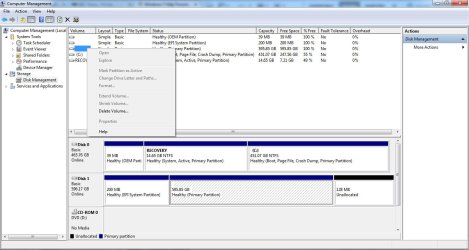
I have a backup drive that we had used for for a while (WD 6000aak), previously in an external drive enclosure. I connected it today via USB to find that the computer has the driver installed, the drive appears in the Devices list, but it does not show in My Computer. In "Disk Management" the drive appears but is not assigned a drive letter. Also, all the options for the volumes are greyed out and cannot be selected - thus I cannot assign a drive letter.

I have tried this on multiple computers. I have also removed it from the enclosure and connected the drive via SATA... the result is identical. I checked the bios and the drive appears there.

The drive does spin when powering up. It is hot (even though it cannot really be accessed).

Any suggestions? Is this drive done?
 

My Computer My Computer

At a glance

Microsoft Windows 7 Home Premium 64-bit 7601 ...Intel(R) Core(TM) i7 CPU Q 740 @ 1.73GHz8.00 GBATI Mobility Radeon HD 5400 Series
Computer type
PC/Desktop
OS
Microsoft Windows 7 Home Premium 64-bit 7601 Multiprocessor Free Service Pack 1
CPU
Intel(R) Core(TM) i7 CPU Q 740 @ 1.73GHz
Motherboard
Dell Inc. 0133D9
Memory
8.00 GB
Graphics Card(s)
ATI Mobility Radeon HD 5400 Series
Sound Card
(1) AMD High Definition Audio Device (2) Realtek High Defi
Screen Resolution
1366 x 768 x 32 bits (4294967296 colors) @ 60 Hz
Hard Drives
(1) ST9500420AS ATA Device (2) WD 6400AAK External USB Device
Go to Disk Management, in the bottom part of the screen, right click the drive, select 'change drive letter or path', next window select add, next window select a drive letter from the drop down box. For an external drive it's best to use a letter lower in the alphabet. If disk management wants to initialize and format it, don't do it if there is data on it you don't want to lose. If no data or if you don't care, go ahead. It will show in computer when a drive letter is assigned.
 

My Computers My Computers

  • At a glance

    Windows 11 ProRyzen 9 5900X32GB G Skill DDR4-3600EVGA RTX 3080 FTW 3 Ultra
    Computer type
    PC/Desktop
    Computer Manufacturer/Model Number
    ALWAYS UNDER CONSTRUCTION
    OS
    Windows 11 Pro
    CPU
    Ryzen 9 5900X
    Motherboard
    Asus X570 Crosshair Viii Hero
    Memory
    32GB G Skill DDR4-3600
    Graphics Card(s)
    EVGA RTX 3080 FTW 3 Ultra
    Sound Card
    On Board/Sennheiser PC37X Headset
    Monitor(s) Displays
    3 X Asus 27"
    Screen Resolution
    2560x1440
    Hard Drives
    2 X 1 TB NVME drives
    PSU
    EVGA 850
    Case
    Phanteks Eclipse P400A
    Cooling
    EVGA 280 AIO
    Keyboard
    Logitech G510s/ Logitech G13
    Mouse
    Logitech G502
    Internet Speed
    24/1
    Antivirus
    ESET/MBAM Pro/SAS Pro
    Browser
    Chrome/ Firefox/ Edge
  • At a glance

    Windows 11 ProIntel Ultra 9 288V32 GB LPDDR5X 8533
    Computer type
    Laptop
    System Manufacturer/Model Number
    Dell 16 Plus
    OS
    Windows 11 Pro
    CPU
    Intel Ultra 9 288V
    Memory
    32 GB LPDDR5X 8533
    Monitor(s) Displays
    16" Mini-LED HDR600 Touch 90 Hz
    Screen Resolution
    2560X1600
    Hard Drives
    1 TB NVME

My Computer My Computer

At a glance

Windows 7 Ultimate X64 SP1Intel i5-2550K, Differing ~4.4-4.8GHz No buil...16GB G.Skill Sniper 1866MHz @ 2133MHz 2x8GBASUS GTX650TIB-DC2OC-2GD5, (650TI Boost)
Computer type
PC/Desktop
Computer Manufacturer/Model Number
Home Built Desktop By DataTech
OS
Windows 7 Ultimate X64 SP1
CPU
Intel i5-2550K, Differing ~4.4-4.8GHz No built in GPU
Motherboard
ASUS P8Z68-V PRO/GEN3
Memory
16GB G.Skill Sniper 1866MHz @ 2133MHz 2x8GB
Graphics Card(s)
ASUS GTX650TIB-DC2OC-2GD5, (650TI Boost)
Sound Card
Onboard Realtek 5-1
Monitor(s) Displays
Samsung P2570HD
Screen Resolution
1920x1080
Hard Drives
Samsung 840 Pro 256GB SSD for OS, 500GB Seagate Constellation (Enterprise drive) for Data
PSU
Corsair HX650W
Case
Inwin Dragon Rider
Cooling
Hyper 212 EVO w/two Noctua fans, push-pull, @1300 RPM
Keyboard
E-Z Eyes, bright yellow keys with large characters
Mouse
steelseries SENSEI Laser Pro Gaming
Internet Speed
48-51Mbs Mbs down, 11 Mbs up Xfinity Cable
Antivirus
Norton Internet Security 2013
Browser
IE 10, Opera, Pale Moon if needed
Other Info
4 case fans, LG BluRay-RE, ASUS DVD-RW, Mr. Fusion power supply, 1.21 gigawatts.
Please post a screenshot of Windows Disk Management.

http://www.sevenforums.com/tutorials/274797-disk-management-post-screen-capture-image.html

Please make sure that you hide the Console tree and Action pane by clicking on the relevant icons in the tool bar so that we get a full screen view without hiding the Disk list, Disk map info.

Also tell us whether it is now connected internally or it is back as an external drive.

Remove all other external drives/pen drives/ Card Readers to avoid confusion in identifying the faulty drive.
 

My Computer My Computer

At a glance

Windows 7 Home Premium 32 bit
OS
Windows 7 Home Premium 32 bit
Sorry if I was not clear. The option to assign a drive letter grayed out - cannot be selected. Attached are screenshots.

Currently, the drive is back in the external enclosure connected via USB. The issue is identical when attached "internally" to my desktop. Also, there are no other drives, virtual or physical attached. I have also tested other USB drives, hard drives, and they have no problem.
 

Attachments

  • Disk-Recovery-1.jpg
    Disk-Recovery-1.jpg
    91 KB · Views: 9
  • Disk-Recovery-1a.jpg
    Disk-Recovery-1a.jpg
    98.8 KB · Views: 9
  • Disk-Recovery-2.jpg
    Disk-Recovery-2.jpg
    88.8 KB · Views: 5

My Computer My Computer

At a glance

Microsoft Windows 7 Home Premium 64-bit 7601 ...Intel(R) Core(TM) i7 CPU Q 740 @ 1.73GHz8.00 GBATI Mobility Radeon HD 5400 Series
Computer type
PC/Desktop
OS
Microsoft Windows 7 Home Premium 64-bit 7601 Multiprocessor Free Service Pack 1
CPU
Intel(R) Core(TM) i7 CPU Q 740 @ 1.73GHz
Motherboard
Dell Inc. 0133D9
Memory
8.00 GB
Graphics Card(s)
ATI Mobility Radeon HD 5400 Series
Sound Card
(1) AMD High Definition Audio Device (2) Realtek High Defi
Screen Resolution
1366 x 768 x 32 bits (4294967296 colors) @ 60 Hz
Hard Drives
(1) ST9500420AS ATA Device (2) WD 6400AAK External USB Device
I should add, I have also cleared the mounted drives via registry and reset... but still no dice.
 

My Computer My Computer

At a glance

Microsoft Windows 7 Home Premium 64-bit 7601 ...Intel(R) Core(TM) i7 CPU Q 740 @ 1.73GHz8.00 GBATI Mobility Radeon HD 5400 Series
Computer type
PC/Desktop
OS
Microsoft Windows 7 Home Premium 64-bit 7601 Multiprocessor Free Service Pack 1
CPU
Intel(R) Core(TM) i7 CPU Q 740 @ 1.73GHz
Motherboard
Dell Inc. 0133D9
Memory
8.00 GB
Graphics Card(s)
ATI Mobility Radeon HD 5400 Series
Sound Card
(1) AMD High Definition Audio Device (2) Realtek High Defi
Screen Resolution
1366 x 768 x 32 bits (4294967296 colors) @ 60 Hz
Hard Drives
(1) ST9500420AS ATA Device (2) WD 6400AAK External USB Device
The disk appears to be in GPT partition style but Windows doesn't seems to detect the file system. I suspect the disk was partitioned and used under "Mac OS". If that is the case, file system will be HFS+ which is not support by Windows. If there is no important data on it, simply delete both 595 GB and 200 MB partitions and then create a single NTFS volume.
 

My Computer My Computer

At a glance

Windows 7 Ultimate x64
Computer type
PC/Desktop
OS
Windows 7 Ultimate x64
Anshad , Should there be any doubt that it is a Mac formatted drive???

To the OP: Can you tell us the previous history of the drive? Just for our information.

And yes, you should tell us whether you need the data in it.
 

My Computer My Computer

At a glance

Windows 7 Home Premium 32 bit
OS
Windows 7 Home Premium 32 bit

My Computer My Computer

At a glance

Windows 7 Ultimate X64 SP1Intel i5-2550K, Differing ~4.4-4.8GHz No buil...16GB G.Skill Sniper 1866MHz @ 2133MHz 2x8GBASUS GTX650TIB-DC2OC-2GD5, (650TI Boost)
Computer type
PC/Desktop
Computer Manufacturer/Model Number
Home Built Desktop By DataTech
OS
Windows 7 Ultimate X64 SP1
CPU
Intel i5-2550K, Differing ~4.4-4.8GHz No built in GPU
Motherboard
ASUS P8Z68-V PRO/GEN3
Memory
16GB G.Skill Sniper 1866MHz @ 2133MHz 2x8GB
Graphics Card(s)
ASUS GTX650TIB-DC2OC-2GD5, (650TI Boost)
Sound Card
Onboard Realtek 5-1
Monitor(s) Displays
Samsung P2570HD
Screen Resolution
1920x1080
Hard Drives
Samsung 840 Pro 256GB SSD for OS, 500GB Seagate Constellation (Enterprise drive) for Data
PSU
Corsair HX650W
Case
Inwin Dragon Rider
Cooling
Hyper 212 EVO w/two Noctua fans, push-pull, @1300 RPM
Keyboard
E-Z Eyes, bright yellow keys with large characters
Mouse
steelseries SENSEI Laser Pro Gaming
Internet Speed
48-51Mbs Mbs down, 11 Mbs up Xfinity Cable
Antivirus
Norton Internet Security 2013
Browser
IE 10, Opera, Pale Moon if needed
Other Info
4 case fans, LG BluRay-RE, ASUS DVD-RW, Mr. Fusion power supply, 1.21 gigawatts.
Dumhed, try the above suggestions, if none of them work open an elevated command prompt (click start, in the search box type cmd right click the cmd that appears and select run as administrator) in the cmd window type diskpart press enter, when the window replies diskpart, type list disk, press enter, it will list each disk and assign them a number. (pick the number of the disk in question, it should be disk #2.) type select disk 2 and press enter, next type detail disk and press enter. Please post a screenshot of the command window.
 

My Computers My Computers

  • At a glance

    Windows 11 ProRyzen 9 5900X32GB G Skill DDR4-3600EVGA RTX 3080 FTW 3 Ultra
    Computer type
    PC/Desktop
    Computer Manufacturer/Model Number
    ALWAYS UNDER CONSTRUCTION
    OS
    Windows 11 Pro
    CPU
    Ryzen 9 5900X
    Motherboard
    Asus X570 Crosshair Viii Hero
    Memory
    32GB G Skill DDR4-3600
    Graphics Card(s)
    EVGA RTX 3080 FTW 3 Ultra
    Sound Card
    On Board/Sennheiser PC37X Headset
    Monitor(s) Displays
    3 X Asus 27"
    Screen Resolution
    2560x1440
    Hard Drives
    2 X 1 TB NVME drives
    PSU
    EVGA 850
    Case
    Phanteks Eclipse P400A
    Cooling
    EVGA 280 AIO
    Keyboard
    Logitech G510s/ Logitech G13
    Mouse
    Logitech G502
    Internet Speed
    24/1
    Antivirus
    ESET/MBAM Pro/SAS Pro
    Browser
    Chrome/ Firefox/ Edge
  • At a glance

    Windows 11 ProIntel Ultra 9 288V32 GB LPDDR5X 8533
    Computer type
    Laptop
    System Manufacturer/Model Number
    Dell 16 Plus
    OS
    Windows 11 Pro
    CPU
    Intel Ultra 9 288V
    Memory
    32 GB LPDDR5X 8533
    Monitor(s) Displays
    16" Mini-LED HDR600 Touch 90 Hz
    Screen Resolution
    2560X1600
    Hard Drives
    1 TB NVME
Yeah right. The partitions on Drive1 do not have a single drive letter. So they are 'hidden' and cannot be seen in Computer. Do what Gary and Steve suggest and you'll be OK.
 

My Computer My Computer

At a glance

Vista, Windows7, Mint Mate, Zorin, Windows 8from 1.6GHz Duo to i7
Computer Manufacturer/Model Number
HP, Dell, Gateway, Toshiba - 4 laptops and 2 desktops
OS
Vista, Windows7, Mint Mate, Zorin, Windows 8
CPU
from 1.6GHz Duo to i7
Monitor(s) Displays
2x HP w2207
Hard Drives
5x HDD, 7x SSD, 12x Externals
Keyboard
with trackball - no mices
Mouse
Trackball mice
Internet Speed
DSL 6000
follow essenbe's request for Diskpart information - but select each disk in list disk and show the details.
lis dis
sel dis 0
det dis

sel dis 1
det dis

etc.

This is a strange disk setup. Please provide more information on the machine (Make and model).
The first disk has an special OEM part and the recovery partition is active which is probably ok
the second disk has the special efi part

It looks to me as a incomplete or failed UEFI install. - not sure though.

Dumhed, please give us some history on the machine and disks.
What exactly do you mean by I have also cleared the mounted drives via registry and reset

Also, please add your SF Systems Specs by following this tutorial: http://www.sevenforums.com/tutorials/180324-system-info-see-your-system-specs.html
  • In the System Manufacturer/Model Number field, manually type Desktop or Laptop adding it to the information already in the field.
  • Specify Custom Build as the manufacturer if it is not an OEM machine.
  • The tool does not fill in this information but it is very important if someone has to research drivers or hardware for your machine.
Log on to Sevenforums (SF) and let the tool fill in you System specs on your SF profile.

Full instructions are in the tutorial. It's a simple process and it makes that information readily available on your posts. You don't have to retype the information in any thread.

Click here to view your system specs on SevenForums.

Click on My System Specs in the lower left of any post by any member to see what is presented about their machine.

Thanks

Also,
 

My Computer My Computer

At a glance

x64 (6.3.9600) Win8.1 Pro & soon dual boot x6...AMD A6-3420M APU with Radeon(tm) HD Graphics6.00 GBAMD Radeon(TM) HD 6520G
Computer type
Laptop
Computer Manufacturer/Model Number
HP Pavilion dv6-6c10us
OS
x64 (6.3.9600) Win8.1 Pro & soon dual boot x64 (6.1.7601) Win7_SP1 HomePrem
CPU
AMD A6-3420M APU with Radeon(tm) HD Graphics
Motherboard
Hewlett-Packard 1805
Memory
6.00 GB
Graphics Card(s)
AMD Radeon(TM) HD 6520G
Sound Card
(1) AMD High Definition Audio Device (2) IDT High Definiti
Monitor(s) Displays
HP W2072a 20" LCD (1600 x 900) @ 60 Hz
Screen Resolution
1366 x 768 x 32 bits (4294967296 colors) @ 60 Hz
Hard Drives
ST640LM0 00 HM641JI SATA Disk Device
Keyboard
Logitech k520 wireless KB
Mouse
Logitech m320 wireless mouse (bundled with KB)
Internet Speed
15/5 | 54 MB Wireless 'n'
Antivirus
Realtime: Defender or Avast | On-demand: Malwarebytes, ESET
Browser
IE 11 on Win8, IE 10 on win 7
Other Info
Media: [Gimp, Audacity, VLC] || Comm: [WEmail 2012, Skype] || Productivity: [OpenOffice,| Textpad] || Utils: [Sysinternals, cCleaner, Speccy, Defraggler]
A disk partitioned as GPT under Windows probably will have "Microsoft Reserved" partition (MSR ). The absence of that partition suggest the drive is partitioned using "Disk Utility" under Mac. This is only my assumption - OP need to confirm.
 

My Computer My Computer

At a glance

Windows 7 Ultimate x64
Computer type
PC/Desktop
OS
Windows 7 Ultimate x64
Yes, OP's drive is an exact replica of the OP's drive here http://www.sevenforums.com/hardware-devices/336422-wd-my-passport-external-hdd-not-showing-my-computer.html where you and me almost instantaneously posted that it appears to be a Mac formatted drive. And the OP conceded.

Windows will neither assign a drive letter to it nor read/write to it natively if it is so..

Nonetheless it would be interesting to see how Windows diskpart shows the drive and what it says when one tries to assign a drive letter.

And here the OP only says he had used it before but where? That is why a previous history is called for and also whether he needs the data on it.

If he intends to use the drive henceforth only on Windows 7, and does not need the data on it he may delete those partitions shown in diskpart and then format it to NTFS.

If he wants to shift it back and forth between a Mac and Windows PC he has to format it to exFAT.
 

My Computer My Computer

At a glance

Windows 7 Home Premium 32 bit
OS
Windows 7 Home Premium 32 bit
Gary asked me to look in. Some observations as we await important answers:

Disk Mgmt does not always show MSR partition. Missing MSR partition after clean install.

It is clearly an EFI install of an OS so if as stated it was a backup it may be a clone which failed due to lack of EFI support. So its also important to know why an EFI install to GPT disk is being called a backup.

Everything I can see that can be done has been proposed, up to the soundest choice which is to wipe the drive with Diskpart Clean Command then repartition in Disk Mgmt as an MBR disk.
 
......Disk Mgmt does not always show MSR partition. Missing MSR partition after clean install.

It is clearly an EFI install of an OS so if as stated it was a backup it may be a clone which failed due to lack of EFI support. So its also important to know why an EFI install to GPT disk is being called a backup.

Everything I can see that can be done has been proposed, up to the soundest choice which is to wipe the drive with Diskpart Clean Command then repartition in Disk Mgmt as an MBR disk.

GPT specification does not specify a 128 MB reserved partition. It is an addendum that MS has put in for a specific purpose. When it exists in an Windows GPT formatted drive, it can be seen by other partitioning software.

The other point is it need not necessarily be a failed OS install on a GPT drive or a clone that failed. To my mind it was used as a backup drive for a Mac. The partition structure of the drive when compared to the one in the other post I referenced is ditto of a Mac formatted drive.Hence the question whether he needs the backedup data on it.

We shall know for certain when the OP gives all details asked for.
 

My Computer My Computer

At a glance

Windows 7 Home Premium 32 bit
OS
Windows 7 Home Premium 32 bit
Thanks Greg.

If the drive is formatted for Mac, HSF or some other file system I believe it would show up as unallocated or unknown files system?
 

My Computer My Computer

At a glance

Windows 7 Ultimate X64 SP1Intel i5-2550K, Differing ~4.4-4.8GHz No buil...16GB G.Skill Sniper 1866MHz @ 2133MHz 2x8GBASUS GTX650TIB-DC2OC-2GD5, (650TI Boost)
Computer type
PC/Desktop
Computer Manufacturer/Model Number
Home Built Desktop By DataTech
OS
Windows 7 Ultimate X64 SP1
CPU
Intel i5-2550K, Differing ~4.4-4.8GHz No built in GPU
Motherboard
ASUS P8Z68-V PRO/GEN3
Memory
16GB G.Skill Sniper 1866MHz @ 2133MHz 2x8GB
Graphics Card(s)
ASUS GTX650TIB-DC2OC-2GD5, (650TI Boost)
Sound Card
Onboard Realtek 5-1
Monitor(s) Displays
Samsung P2570HD
Screen Resolution
1920x1080
Hard Drives
Samsung 840 Pro 256GB SSD for OS, 500GB Seagate Constellation (Enterprise drive) for Data
PSU
Corsair HX650W
Case
Inwin Dragon Rider
Cooling
Hyper 212 EVO w/two Noctua fans, push-pull, @1300 RPM
Keyboard
E-Z Eyes, bright yellow keys with large characters
Mouse
steelseries SENSEI Laser Pro Gaming
Internet Speed
48-51Mbs Mbs down, 11 Mbs up Xfinity Cable
Antivirus
Norton Internet Security 2013
Browser
IE 10, Opera, Pale Moon if needed
Other Info
4 case fans, LG BluRay-RE, ASUS DVD-RW, Mr. Fusion power supply, 1.21 gigawatts.
If the drive is formatted for Mac, HSF or some other file system I believe it would show up as unallocated or unknown files system?

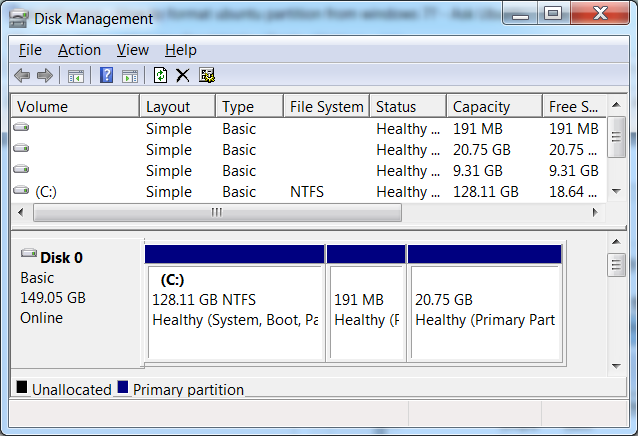
That is what the current situation. "Disk management" doesn't seems to detect the file system at all - it just says "Healthy Primary Partition".Those who dual boot Windows and Linux will easily recognize this. As Windows don't read "ext4" , Linux drive won't be assigned with a letter in Windows. It's partition won't be marked as "unknown" either - instead you will see "Healthy Primary Partition".

http://askubuntu.com/questions/1382...-partition-from-windows-7-and-reuse-the-space


gbAOB.png


In the above example, 191 MB is Linux Swap and 20 GB is Linux Root ( either Ext3 or Ext4).

Try assigning a drive letter to the Linux partition and you will understand. Windows is smart enough to detect it's own file system.
 

My Computer My Computer

At a glance

Windows 7 Ultimate x64
Computer type
PC/Desktop
OS
Windows 7 Ultimate x64
Thanks Greg.

If the drive is formatted for Mac, HSF or some other file system I believe it would show up as unallocated or unknown files system?

Just have a look at this thread http://www.sevenforums.com/hardware...ort-external-hdd-not-showing-my-computer.html.

The screenshot of the drive posted by the OP there is that of a Mac formatted drive given by his friend.

All the partitions of that drive are shown as healthy but no file system. It is a replica of OP's drive here.

Following Anshad's suggestion to install Macdrive to copy files from his Windows system, he copied the files onto the Macdrive and gave it back to his friend.
 

My Computer My Computer

At a glance

Windows 7 Home Premium 32 bit
OS
Windows 7 Home Premium 32 bit
Try option 3 here: http://www.sevenforums.com/tutorials/82994-drive-letter-add-change-remove-windows.html

If that won't work, try Option2. As essenbe said with a drive letter it will show in Computer. You should be able to copy data from it or format it.
Did you read this tutorial at all?

Yes, and what the tutorial suggests did not work or is not possible since, as I stated, I cannot select any options to re-assign drive letters.

Dumhed, try the above suggestions, if none of them work open an elevated command prompt (click start, in the search box type cmd right click the cmd that appears and select run as administrator) in the cmd window type diskpart press enter, when the window replies diskpart, type list disk, press enter, it will list each disk and assign them a number. (pick the number of the disk in question, it should be disk #2.) type select disk 2 and press enter, next type detail disk and press enter. Please post a screenshot of the command window.

I've attached the screenshot below. As you can see, the "healthy" primary partition did not appear.

As for drive history, I had always used this drive as a media storage drive and a backup for important documents... that is it. I have never formatted it with a Mac (don't have one, haven't had one since Apple IIe). I've never used it to boot an OS, linux or otherwise.

(I'll get around to the System specs later today, however, the same thing happens on multiple machines when connecting to this drive via USB, or installed internally via Sata cable, not just on the one I am currently typing on)
 

Attachments

  • diskpart.jpg
    diskpart.jpg
    34.1 KB · Views: 20

My Computer My Computer

At a glance

Microsoft Windows 7 Home Premium 64-bit 7601 ...Intel(R) Core(TM) i7 CPU Q 740 @ 1.73GHz8.00 GBATI Mobility Radeon HD 5400 Series
Computer type
PC/Desktop
OS
Microsoft Windows 7 Home Premium 64-bit 7601 Multiprocessor Free Service Pack 1
CPU
Intel(R) Core(TM) i7 CPU Q 740 @ 1.73GHz
Motherboard
Dell Inc. 0133D9
Memory
8.00 GB
Graphics Card(s)
ATI Mobility Radeon HD 5400 Series
Sound Card
(1) AMD High Definition Audio Device (2) Realtek High Defi
Screen Resolution
1366 x 768 x 32 bits (4294967296 colors) @ 60 Hz
Hard Drives
(1) ST9500420AS ATA Device (2) WD 6400AAK External USB Device
Back
Top