Hard drive installed, shows in Drive Mngmnt, in Bios, but not in Comp.

(Thanks for the help, by the way. I appreciate it. I would like to keep the data on this disk as I believe my wife put some family photos on there that are not backed up elsewhere)
 

My Computer My Computer

At a glance

Microsoft Windows 7 Home Premium 64-bit 7601 ...Intel(R) Core(TM) i7 CPU Q 740 @ 1.73GHz8.00 GBATI Mobility Radeon HD 5400 Series
Computer type
PC/Desktop
OS
Microsoft Windows 7 Home Premium 64-bit 7601 Multiprocessor Free Service Pack 1
CPU
Intel(R) Core(TM) i7 CPU Q 740 @ 1.73GHz
Motherboard
Dell Inc. 0133D9
Memory
8.00 GB
Graphics Card(s)
ATI Mobility Radeon HD 5400 Series
Sound Card
(1) AMD High Definition Audio Device (2) Realtek High Defi
Screen Resolution
1366 x 768 x 32 bits (4294967296 colors) @ 60 Hz
Hard Drives
(1) ST9500420AS ATA Device (2) WD 6400AAK External USB Device
If it is partitioned under "Windows" as NTFS, i wonder why Windows is not recognizing the file system. Let's find what file system is currently on the disk.

1. Download "Partition Wizard" home edition from Best Free Partition Manager Freeware and free partition magic for Windows 7, Windows 8, Windows Vista and Windows XP 32 bit & 64 bit. MiniTool Free Partition Manager Software Home Edition.

2. Run the tool while the disk is connected and use "Windows Snipping Tool" to capture a screenshot. Please post the screenshot with next reply.
 

My Computer My Computer

At a glance

Windows 7 Ultimate x64
Computer type
PC/Desktop
OS
Windows 7 Ultimate x64
I have a backup drive that we had used for for a while (WD 6000aak), previously in an external drive enclosure

Which enclosure and what happened to it ?.
 

My Computer My Computer

At a glance

Windows 7 Ultimate x64
Computer type
PC/Desktop
OS
Windows 7 Ultimate x64

Attachments

  • diskpart2.jpg
    diskpart2.jpg
    60.4 KB · Views: 2

My Computer My Computer

At a glance

Microsoft Windows 7 Home Premium 64-bit 7601 ...Intel(R) Core(TM) i7 CPU Q 740 @ 1.73GHz8.00 GBATI Mobility Radeon HD 5400 Series
Computer type
PC/Desktop
OS
Microsoft Windows 7 Home Premium 64-bit 7601 Multiprocessor Free Service Pack 1
CPU
Intel(R) Core(TM) i7 CPU Q 740 @ 1.73GHz
Motherboard
Dell Inc. 0133D9
Memory
8.00 GB
Graphics Card(s)
ATI Mobility Radeon HD 5400 Series
Sound Card
(1) AMD High Definition Audio Device (2) Realtek High Defi
Screen Resolution
1366 x 768 x 32 bits (4294967296 colors) @ 60 Hz
Hard Drives
(1) ST9500420AS ATA Device (2) WD 6400AAK External USB Device
I don't know how the drive would have an EFI System partition if it never had an OS installed on it. That is the partition that boots Windows on a GPT-initialized disk.

If you can access the drive with Partition Wizard then rightclick on both partitions to Explore to see if you can see your files, post back screenshot of each's content. If you see them then they can likely be saved from a boot disk.

If PW cannot see them in Windows then try its boot disk which is normally definitive.
 
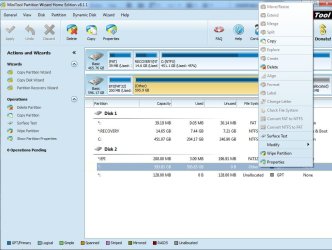
Attached is the screenshot from the partition tool wizard.

Which enclosure and what happened to it ?.

I had mentioned earlier that the external drive came in an enclosure. I had removed it once to put it into my desktop to see if there was a problem with the USB. But the result was the same. So, I removed it from the desktop, put it back in its enclosure and have it once again connected via USB to my laptop.

Anyway, I gotta run for a bit. I'll check back later today.
 

Attachments

  • partitiontool.PNG
    partitiontool.PNG
    15.1 KB · Views: 1

My Computer My Computer

At a glance

Microsoft Windows 7 Home Premium 64-bit 7601 ...Intel(R) Core(TM) i7 CPU Q 740 @ 1.73GHz8.00 GBATI Mobility Radeon HD 5400 Series
Computer type
PC/Desktop
OS
Microsoft Windows 7 Home Premium 64-bit 7601 Multiprocessor Free Service Pack 1
CPU
Intel(R) Core(TM) i7 CPU Q 740 @ 1.73GHz
Motherboard
Dell Inc. 0133D9
Memory
8.00 GB
Graphics Card(s)
ATI Mobility Radeon HD 5400 Series
Sound Card
(1) AMD High Definition Audio Device (2) Realtek High Defi
Screen Resolution
1366 x 768 x 32 bits (4294967296 colors) @ 60 Hz
Hard Drives
(1) ST9500420AS ATA Device (2) WD 6400AAK External USB Device
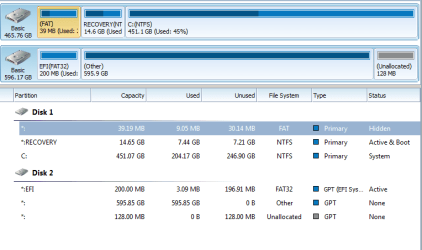
There is a GPT attribute to make a partition "Super Hidden" - this is to protect the partition from modifying. Usually partition Wizard will be able to remove the hidden attribute and make the partition visible.

Video help on how to Hide/Unhide Partition with Partition Wizard partition manager.


Edit:

Saw the screenshot you posted - it doesn't seems to be hidden. Try the recovery wizard and check whether it can detect a valid NTFS file system.
 

My Computer My Computer

At a glance

Windows 7 Ultimate x64
Computer type
PC/Desktop
OS
Windows 7 Ultimate x64
If it is partitioned under "Windows" as NTFS, i wonder why Windows is not recognizing the file system. Let's find what file system is currently on the disk.

1. Download "Partition Wizard" home edition from Best Free Partition Manager Freeware and free partition magic for Windows 7, Windows 8, Windows Vista and Windows XP 32 bit & 64 bit. MiniTool Free Partition Manager Software Home Edition.

2. Run the tool while the disk is connected and use "Windows Snipping Tool" to capture a screenshot. Please post the screenshot with next reply.

Nowhere has the OP said he formatted the drive with Windows.

Most probably he purchased a Western Digital Drive formatted for a Mac, and used it to back up from his Media device ( Even now he has failed to tell what media device it is. make/model/manufacturer) Most probably that media device recommends a mac formatted drive for additional storage/backup)

(I searched for WD6000aak but drew a blank. So even the description of the external drive seems inadequate or misleading))
 

My Computer My Computer

At a glance

Windows 7 Home Premium 32 bit
OS
Windows 7 Home Premium 32 bit
I also searched for that model without success.

@Dumhed

What is the exact model number of this disk ? ( WD My book, Passport etc ). Do you remember the old partitioning setup ?.

Are you sure nobody messed with the disk while you are not using it ?.

I would recommend this excellent partition recovery guide written by "Jumanji" as a reference - http://www.sevenforums.com/software...ive-turned-raw-partition-wizard-testdisk.html
 

My Computer My Computer

At a glance

Windows 7 Ultimate x64
Computer type
PC/Desktop
OS
Windows 7 Ultimate x64
Where is the question of recovery? I think he is going back to use it with his Media Device and keep the data already in it.
 

My Computer My Computer

At a glance

Windows 7 Home Premium 32 bit
OS
Windows 7 Home Premium 32 bit
At best, he may install MacDrive on his Windows and try to read the drive in it. That will also tell us whether it is really a mac formatted drive.

Iam retiring for the day and done with this thread.
 

My Computer My Computer

At a glance

Windows 7 Home Premium 32 bit
OS
Windows 7 Home Premium 32 bit
If the file system is HFS+, "Partition Wizard" will identify it without issues. That is what confusing me.

As for drive history, I had always used this drive as a media storage drive and a backup for important documents...

I am not clear what is meant by "media storage". Connected to TV for storing/streaming media files ?.
 

My Computer My Computer

At a glance

Windows 7 Ultimate x64
Computer type
PC/Desktop
OS
Windows 7 Ultimate x64
Since it sees the drive, What does PW show when you right click each partition to Explore? Waiting for answer or requested screenshots.
 
jumanji / Anshad

Would macdrive settle the issue?

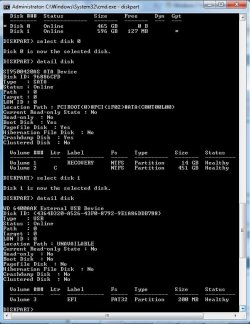
Diskpart and PartWiz confirm GPT, but that still leaves the Mac question.

I agree with jumanji that recovery is premature at this point.

I think we need to take a breath and let Dumhed catch up answering questions. There are five SF members asking one SF member a whole bunch of technical questions.

The most important question in my mind concerns Mac

.....I would like to keep the data on this disk as I believe my wife put some family photos on there that are not backed up elsewhere)

Since there is data on the drive and his wife put some photos on the drive... where was the drive connected when data was placed on it?

Does your wife have a Mac?
Was the drive connected to a media box (such as an Xbox)
Was the drive connected to this Windows machine.

jumanji raises a good point re: how the drive was formatted when purchased - please answer that question as well.

Has this drive ever been connected to a Windows machine before or is this the first time? I know you said we've used it for a while, but that isn't what I'm asking.


following Anshad''s lead, I found this page on WD
Product List

there is a WD BHDK 5000ABK (USB 3.0 and USB 2.0) 500 GB (Windows/Mac) which is fairly close to model WD 6000aak

Only Dumhed can fill in the missing information, we can keep guessing

So I'll sit out for a while and let Dumhed read the thread again and answer all questions not already answered.

Bill
 

My Computer My Computer

At a glance

x64 (6.3.9600) Win8.1 Pro & soon dual boot x6...AMD A6-3420M APU with Radeon(tm) HD Graphics6.00 GBAMD Radeon(TM) HD 6520G
Computer type
Laptop
Computer Manufacturer/Model Number
HP Pavilion dv6-6c10us
OS
x64 (6.3.9600) Win8.1 Pro & soon dual boot x64 (6.1.7601) Win7_SP1 HomePrem
CPU
AMD A6-3420M APU with Radeon(tm) HD Graphics
Motherboard
Hewlett-Packard 1805
Memory
6.00 GB
Graphics Card(s)
AMD Radeon(TM) HD 6520G
Sound Card
(1) AMD High Definition Audio Device (2) IDT High Definiti
Monitor(s) Displays
HP W2072a 20" LCD (1600 x 900) @ 60 Hz
Screen Resolution
1366 x 768 x 32 bits (4294967296 colors) @ 60 Hz
Hard Drives
ST640LM0 00 HM641JI SATA Disk Device
Keyboard
Logitech k520 wireless KB
Mouse
Logitech m320 wireless mouse (bundled with KB)
Internet Speed
15/5 | 54 MB Wireless 'n'
Antivirus
Realtime: Defender or Avast | On-demand: Malwarebytes, ESET
Browser
IE 11 on Win8, IE 10 on win 7
Other Info
Media: [Gimp, Audacity, VLC] || Comm: [WEmail 2012, Skype] || Productivity: [OpenOffice,| Textpad] || Utils: [Sysinternals, cCleaner, Speccy, Defraggler]
Thanks for sticking with me.

Here are some responses:
  • We do not own any Macs or iOS devices. All of our computers are Windows 7. We have two Android tablets. But these cannot connect to the hard drive directly.
  • The files stored here are family videos, photos, and music. Files were transfered to this hard drive were always transfered through Windows file methods such as drag and drop or clicking "move" or "copy". I do not use Window Media Player, iTunes, or any other program to move files.
  • On the hard disk itself, it is written: WD 64000AAKS, WD Caviar Blue. I do not buy things formatted for Mac since... we don't have one and haven't had any Apple products since the Apple IIe. At any rate, I had been using this drive on and off for a few years now, always on Windows computers... the same computers I am trying to use now.
  • Attached is what I see when I try to do anything with the partition using Partition Wizard. As you can see, almost everything is grayed out. So I cannot "Explore" it.
  • Is there the possibility that someone messed with it?.... Hmm... it was in my office desk. Unlikely, but theoretically possible. We did leave the country for vacation and had a house sitter. But the drive was where I left it, in a box in my desk.

I may be missing some answers. I'll check back in sec after I get a little work done.
 

Attachments

  • pw1.jpg
    pw1.jpg
    88.1 KB · Views: 3

My Computer My Computer

At a glance

Microsoft Windows 7 Home Premium 64-bit 7601 ...Intel(R) Core(TM) i7 CPU Q 740 @ 1.73GHz8.00 GBATI Mobility Radeon HD 5400 Series
Computer type
PC/Desktop
OS
Microsoft Windows 7 Home Premium 64-bit 7601 Multiprocessor Free Service Pack 1
CPU
Intel(R) Core(TM) i7 CPU Q 740 @ 1.73GHz
Motherboard
Dell Inc. 0133D9
Memory
8.00 GB
Graphics Card(s)
ATI Mobility Radeon HD 5400 Series
Sound Card
(1) AMD High Definition Audio Device (2) Realtek High Defi
Screen Resolution
1366 x 768 x 32 bits (4294967296 colors) @ 60 Hz
Hard Drives
(1) ST9500420AS ATA Device (2) WD 6400AAK External USB Device
WD 64000AAKS, WD Caviar Blue

Thanks DH,

I found the WD page after you posted the information above:
WD Support / Downloads / SATA & SAS / WD Blue / SE / SE16 (SATA II)

Do you have WD Data Lifeguard for Windows install on this machine?
If you do, please run a quick test on the ext drive

If you don not have it installed, many members have had better results using the DOS version, booting from a USB
You can download the DOS version here and there are instructions on how to make a bootable USB flash drive
WD Support / Downloads / Data Lifeguard Diagnostic for DOS

Either way, start with a quick test.

Make sure you select the ext HD - the utility will see all drives.

This won't fix anything, but it might provide some information.
 

My Computer My Computer

At a glance

x64 (6.3.9600) Win8.1 Pro & soon dual boot x6...AMD A6-3420M APU with Radeon(tm) HD Graphics6.00 GBAMD Radeon(TM) HD 6520G
Computer type
Laptop
Computer Manufacturer/Model Number
HP Pavilion dv6-6c10us
OS
x64 (6.3.9600) Win8.1 Pro & soon dual boot x64 (6.1.7601) Win7_SP1 HomePrem
CPU
AMD A6-3420M APU with Radeon(tm) HD Graphics
Motherboard
Hewlett-Packard 1805
Memory
6.00 GB
Graphics Card(s)
AMD Radeon(TM) HD 6520G
Sound Card
(1) AMD High Definition Audio Device (2) IDT High Definiti
Monitor(s) Displays
HP W2072a 20" LCD (1600 x 900) @ 60 Hz
Screen Resolution
1366 x 768 x 32 bits (4294967296 colors) @ 60 Hz
Hard Drives
ST640LM0 00 HM641JI SATA Disk Device
Keyboard
Logitech k520 wireless KB
Mouse
Logitech m320 wireless mouse (bundled with KB)
Internet Speed
15/5 | 54 MB Wireless 'n'
Antivirus
Realtime: Defender or Avast | On-demand: Malwarebytes, ESET
Browser
IE 11 on Win8, IE 10 on win 7
Other Info
Media: [Gimp, Audacity, VLC] || Comm: [WEmail 2012, Skype] || Productivity: [OpenOffice,| Textpad] || Utils: [Sysinternals, cCleaner, Speccy, Defraggler]
@DH: Have you tried the drive on another computer? You mentioned that you had several Windows Machines.


@jumanji and Anshad
If DH installed Macdrive, as a test, would it cause any additional issues.
I know that it doesn't seem to be Mac related, but the symptoms and layout of the drives in this thread and the other are nearly identical. I'm leaning towards testing Macdrive in this case - if the data can be accessed, great. If not, we can look at other tools.​
 

My Computer My Computer

At a glance

x64 (6.3.9600) Win8.1 Pro & soon dual boot x6...AMD A6-3420M APU with Radeon(tm) HD Graphics6.00 GBAMD Radeon(TM) HD 6520G
Computer type
Laptop
Computer Manufacturer/Model Number
HP Pavilion dv6-6c10us
OS
x64 (6.3.9600) Win8.1 Pro & soon dual boot x64 (6.1.7601) Win7_SP1 HomePrem
CPU
AMD A6-3420M APU with Radeon(tm) HD Graphics
Motherboard
Hewlett-Packard 1805
Memory
6.00 GB
Graphics Card(s)
AMD Radeon(TM) HD 6520G
Sound Card
(1) AMD High Definition Audio Device (2) IDT High Definiti
Monitor(s) Displays
HP W2072a 20" LCD (1600 x 900) @ 60 Hz
Screen Resolution
1366 x 768 x 32 bits (4294967296 colors) @ 60 Hz
Hard Drives
ST640LM0 00 HM641JI SATA Disk Device
Keyboard
Logitech k520 wireless KB
Mouse
Logitech m320 wireless mouse (bundled with KB)
Internet Speed
15/5 | 54 MB Wireless 'n'
Antivirus
Realtime: Defender or Avast | On-demand: Malwarebytes, ESET
Browser
IE 11 on Win8, IE 10 on win 7
Other Info
Media: [Gimp, Audacity, VLC] || Comm: [WEmail 2012, Skype] || Productivity: [OpenOffice,| Textpad] || Utils: [Sysinternals, cCleaner, Speccy, Defraggler]
Regardless of how an external drive got an EFI OS installation on it, we need to focus on fixing that partition so you can get your data out.

You have two real experts on this and we can call in others, too. So don't give up to be in a rush to use that drive until every possibility is exhausted.

Anything you can remember or find out about what was done with that drive could help. There is a big unknown when a UEFI OS installation lands on an external HD. Once you can recover your files, we should be able to determine what OS it is, or if the OS was deleted off the large partition to use for storage and you somehow didn't know it.
 
The EFI partition says it's FAT32, is that proper? :confused:
 

My Computer My Computer

At a glance

Windows 7 Ultimate X64 SP1Intel i5-2550K, Differing ~4.4-4.8GHz No buil...16GB G.Skill Sniper 1866MHz @ 2133MHz 2x8GBASUS GTX650TIB-DC2OC-2GD5, (650TI Boost)
Computer type
PC/Desktop
Computer Manufacturer/Model Number
Home Built Desktop By DataTech
OS
Windows 7 Ultimate X64 SP1
CPU
Intel i5-2550K, Differing ~4.4-4.8GHz No built in GPU
Motherboard
ASUS P8Z68-V PRO/GEN3
Memory
16GB G.Skill Sniper 1866MHz @ 2133MHz 2x8GB
Graphics Card(s)
ASUS GTX650TIB-DC2OC-2GD5, (650TI Boost)
Sound Card
Onboard Realtek 5-1
Monitor(s) Displays
Samsung P2570HD
Screen Resolution
1920x1080
Hard Drives
Samsung 840 Pro 256GB SSD for OS, 500GB Seagate Constellation (Enterprise drive) for Data
PSU
Corsair HX650W
Case
Inwin Dragon Rider
Cooling
Hyper 212 EVO w/two Noctua fans, push-pull, @1300 RPM
Keyboard
E-Z Eyes, bright yellow keys with large characters
Mouse
steelseries SENSEI Laser Pro Gaming
Internet Speed
48-51Mbs Mbs down, 11 Mbs up Xfinity Cable
Antivirus
Norton Internet Security 2013
Browser
IE 10, Opera, Pale Moon if needed
Other Info
4 case fans, LG BluRay-RE, ASUS DVD-RW, Mr. Fusion power supply, 1.21 gigawatts.
Regarding WD Data Life Guard
I tried to run WD Data Lifeguard (from a bootable DOS Usb drive). But when i ran to the program, it would not run because of an error stating that no WD drive was detected.

I rebooted into Windows and ran the Windows version. I ran a Quick test which gave a "Pass" result I will later do an extended test.

As for trying the drive, I had mentioned before, but this thing is getting long. I have tried this drive on multiple computers via USB. I have also tried the same drive, unscrewed from the external case, and installing it internally to my desktop. All yield the same result.

On Drive History
I have had this drive for several years (to the point that I'm not exactly sure when I got it). As far as I remember, I have only used it as a drive for storing large files, like photos/music/videos. I do build my own desktops, so I have swapped drives before. However, this drive was purchased as an external drive. (the model number on the outside of the external drive enclosure is WD6400EB035-01).

Also, I never used any external hard drives for the purpose of booting different OS. I have used USB flash drives to boot dos or android... or to install linux on a different laptop. So, unless there is part of my memory blocked or just plain forgotten, this drive has not been used for booting into any other OS.

I apologize if there are thing I keep not thinking to include. Thanks for the patience in asking further questions.

On File Recovery
As far as drives are concerned, I have others. So, if it comes to it, if I can recover the files, I'm happy.
 

My Computer My Computer

At a glance

Microsoft Windows 7 Home Premium 64-bit 7601 ...Intel(R) Core(TM) i7 CPU Q 740 @ 1.73GHz8.00 GBATI Mobility Radeon HD 5400 Series
Computer type
PC/Desktop
OS
Microsoft Windows 7 Home Premium 64-bit 7601 Multiprocessor Free Service Pack 1
CPU
Intel(R) Core(TM) i7 CPU Q 740 @ 1.73GHz
Motherboard
Dell Inc. 0133D9
Memory
8.00 GB
Graphics Card(s)
ATI Mobility Radeon HD 5400 Series
Sound Card
(1) AMD High Definition Audio Device (2) Realtek High Defi
Screen Resolution
1366 x 768 x 32 bits (4294967296 colors) @ 60 Hz
Hard Drives
(1) ST9500420AS ATA Device (2) WD 6400AAK External USB Device
Back
Top