Hard drive issue - Slow speeds?

Phrosen

New member
Member
Local time
11:38 AM
Messages
92
Location
Sweden
Hello.

My hard drive (not SSD) is pretty old (maybe 3 years), and I'm thinking something may be wrong with it.
I downloaded a tool (Parkdale speed test) and tested it's speed, here's the result:

test.jpg


As you can see the results in general aren't very good, but they seem to be working. But then you look at the Random QD32 results and see that something looks very wrong. (I checked a youtube video of a guy testing his non-SSD hard drive, and his QD32 results were much better.)

Is my Hard drive broken?
Is there anything I can do to try and fix it?

Thanks in advance. =)
 

My Computer

Computer type
PC/Desktop
Computer Manufacturer/Model Number
Myself
OS
Windows 7 Professional x64
CPU
AMD FX 8320
Motherboard
ASUS M5A97
Memory
8GB
Graphics Card(s)
Nvidia Geforce GTX 770
Monitor(s) Displays
Acer P223w
Screen Resolution
1680x1050
Hard Drives
Samsung SpinPoint 1TB @ 7200rpm
PSU
Corsair 620HX - 620W
Case
Lian-Li Scandinavian Edition
Keyboard
Razer Lycosa
Mouse
Razer DeathAdder
Hey Phrosen!

I looked around and compared other Random QD32 results from that program, and yours are extremely low. I also checked the drive and it is a SATA II, meaning transfer speeds from about 300 MB/s, which means the read/write speeds are also very low.

Now, you may try by updating the firmware, if it's possible. But if there's a problem with the drive, better test its health and not its speed. Check for bad sectors as well, clean from viruses and malware, defrag. There are multiple programs that can do that, probably the manufacturer also has such. But before testing back up you most important data.

Post back with results!

CK_WD
 

My Computer

Computer type
PC/Desktop
OS
Windows 7 Home Premium x64
Thank you for checking out and confirming the slow speeds. =)
I spent about 3 and a half hours yesterday running a check disk - and it didn't seem to find any errors (at least it didn't tell me anything was wrong, but then again I had it set to "repair automatically".)

I run anti-virus scans regularly, and I am pretty certain that the problem isn't caused by malware or viruses.

Windows says defrag is scheduled - so I'm guessing that happens automatically?
I analyzed my disk and it said 16% defragged - I'm guessing it's not too bad, but I will try to run it manually later.

I've been noticing a slow down of my computer over the past year, but it was very noticable when I recently changed mobo, cpu and ram.
What happens is: I start up the computer, everything takes a really long time to load. I start the usual software - like Google Chrome - it takes a long time to load. Once it's done loading for the first time it runs fairly smoothly after that. (I'm guessing it's cached in the ram or something.)

I was planning on getting an SSD eventually anyway, but I wanna make sure that it's the HDD that's the problem. I would also like to fix it, if possible, since I have to put up with it in the meantime.
 

My Computer

Computer type
PC/Desktop
Computer Manufacturer/Model Number
Myself
OS
Windows 7 Professional x64
CPU
AMD FX 8320
Motherboard
ASUS M5A97
Memory
8GB
Graphics Card(s)
Nvidia Geforce GTX 770
Monitor(s) Displays
Acer P223w
Screen Resolution
1680x1050
Hard Drives
Samsung SpinPoint 1TB @ 7200rpm
PSU
Corsair 620HX - 620W
Case
Lian-Li Scandinavian Edition
Keyboard
Razer Lycosa
Mouse
Razer DeathAdder
Hey, you're welcome! :)

These speeds are even just obviously slow. :/

When a drive is above 10% of fragmentation, you should defrag it. Also, chkdsk can't always pick up on everything, some errors like physical or mechanical ones won't be detected. It's not the only one or even best tool to check your disk with. I do suggest checking it fully, including for bad sectors and S.M.A.R.T. with another software.

Also, if the CPU is not really good, it could also be causing slow performance.

CK_WD
 
Last edited:

My Computer

Computer type
PC/Desktop
OS
Windows 7 Home Premium x64
I defragged my HDD. It's now at 0%. (I have noticed a slight improvement, but the issues still remain.)

I have AMD FX 8320 (8-core, 3-5Ghz) cpu. I don't think my CPU is the bottleneck.
(I ran the Windows Experience Index and it gives me: CPU: 7.7 Ram: 7.7 GPU: 7.9 HDD: 5.9)

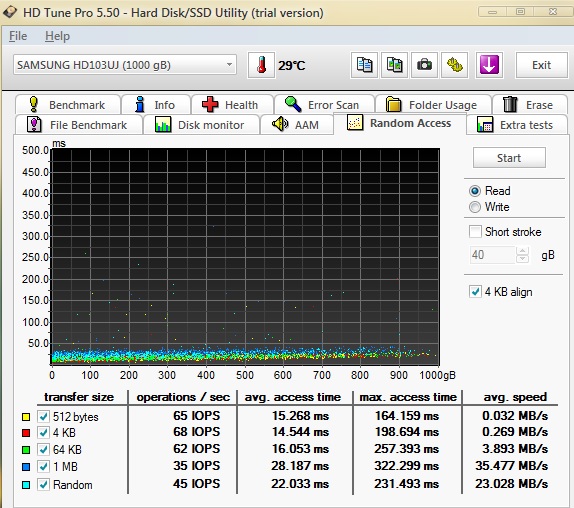
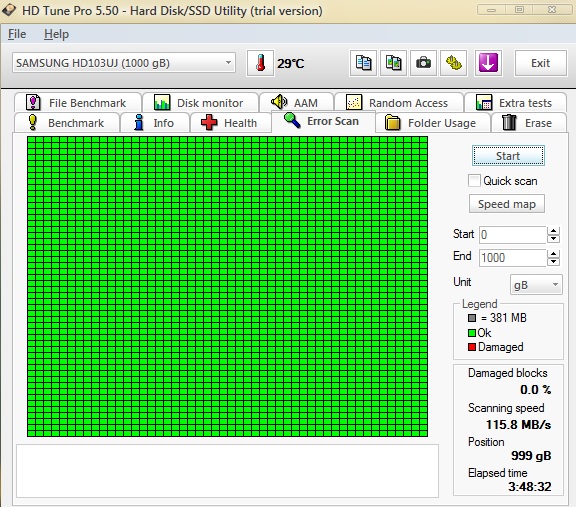
I downloaded a tool called HD Tune Pro (trial) and ran a few tests, as shown below:

uAfu7F1.jpg


QKPebD3.jpg


As you can see: the speeds are still horrible, but the HDD appears to be "healthy".
 

My Computer

Computer type
PC/Desktop
Computer Manufacturer/Model Number
Myself
OS
Windows 7 Professional x64
CPU
AMD FX 8320
Motherboard
ASUS M5A97
Memory
8GB
Graphics Card(s)
Nvidia Geforce GTX 770
Monitor(s) Displays
Acer P223w
Screen Resolution
1680x1050
Hard Drives
Samsung SpinPoint 1TB @ 7200rpm
PSU
Corsair 620HX - 620W
Case
Lian-Li Scandinavian Edition
Keyboard
Razer Lycosa
Mouse
Razer DeathAdder
Interesting. I would suggest you running S.M.A.R.T. On the drive and posting a screenshot of the results to see exactly what each factor shows.

Another idea would be to first back up everything, just in case, and reconnect the drive to a different SATA port.

Do try these and post back! :)

CK_WD
 

My Computer

Computer type
PC/Desktop
OS
Windows 7 Home Premium x64
I don't really know what all these numbers mean, but here's the S.M.A.R.T results:

HD_Tune_Pro_Drive_Status.png


EDIT: This was taken during idle - I wasn't really doing anything with my computer.

I will try to change SATA ports later.
If it isn't the SATA port - could there be something wrong with the cable?
 

My Computer

Computer type
PC/Desktop
Computer Manufacturer/Model Number
Myself
OS
Windows 7 Professional x64
CPU
AMD FX 8320
Motherboard
ASUS M5A97
Memory
8GB
Graphics Card(s)
Nvidia Geforce GTX 770
Monitor(s) Displays
Acer P223w
Screen Resolution
1680x1050
Hard Drives
Samsung SpinPoint 1TB @ 7200rpm
PSU
Corsair 620HX - 620W
Case
Lian-Li Scandinavian Edition
Keyboard
Razer Lycosa
Mouse
Razer DeathAdder
Yes, there could. Checking ports and cables, swapping and replacing them is a standard procedure in such troubleshooting.

Your S.M.A.R.T. status actually is quite normal, no errors, no warnings nor failures. Temps seem fine, as well, may be a bit low though.

So, either there is nothing wrong with the drive at all, or you should do a test while having the drive perform an action.

Either way, do the port and cable check up.

CK_WD
 

My Computer

Computer type
PC/Desktop
OS
Windows 7 Home Premium x64
I have just finished replacing the old SATA-cable with a new (un-used) one.
I also switched the SATA-ports on the motherboard.

Here is the results for no load:
no_load.jpg


As you can see there's not a big difference, except for one part:
The Random QD32 read speed.

I still think the results are fairly poor, but the computer seems to be "more responsive" now than before. So changing the cable and port made some sort of a positive difference. =)
 

My Computer

Computer type
PC/Desktop
Computer Manufacturer/Model Number
Myself
OS
Windows 7 Professional x64
CPU
AMD FX 8320
Motherboard
ASUS M5A97
Memory
8GB
Graphics Card(s)
Nvidia Geforce GTX 770
Monitor(s) Displays
Acer P223w
Screen Resolution
1680x1050
Hard Drives
Samsung SpinPoint 1TB @ 7200rpm
PSU
Corsair 620HX - 620W
Case
Lian-Li Scandinavian Edition
Keyboard
Razer Lycosa
Mouse
Razer DeathAdder
Back
Top