

A while back i decided to dual boot my windows 7 computer with Linux mint. During the install of Linux it made a 97 gig partition of my hard drive for the OS.
After i found Linux was complete crap (it nearly destroyed windows 7). I uninstalled it and when back to win 7 as my only OS.
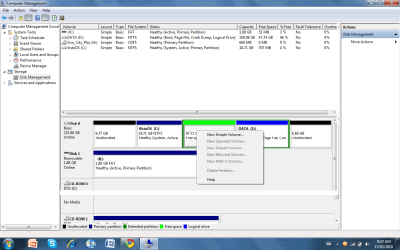
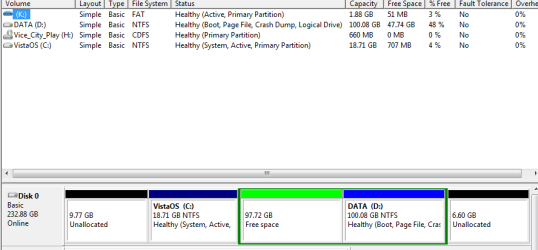
The partition for Linux was from my vista drive. So when i tried to put the partition back on the vista drive the disk management tool wouldn't let me. The 97 gig partition for some reason has now become an extended partition of my D drive (where win 7 is on). The 97 gig partition is labeled as free space but i also cant delete it as that option is grayed out on the computer management tool.
Is there any way i can get the 97 gig partition to merge back with the Vista Drive. Thanks
I also have some screen shots, the green shaded drive is the 97gig partition.
By the way im new to the forum hope i haven't posted this in the wrong place.
After i found Linux was complete crap
(it nearly destroyed windows 7). I uninstalled it and when back to win 7 as my only OS.The partition for Linux was from my vista drive. So when i tried to put the partition back on the vista drive the disk management tool wouldn't let me. The 97 gig partition for some reason has now become an extended partition of my D drive (where win 7 is on). The 97 gig partition is labeled as free space but i also cant delete it as that option is grayed out on the computer management tool.
Is there any way i can get the 97 gig partition to merge back with the Vista Drive. Thanks
I also have some screen shots, the green shaded drive is the 97gig partition.
By the way im new to the forum hope i haven't posted this in the wrong place.
Attachments

My Computer
- Computer Manufacturer/Model Number
- Self-built on 31/1/11
- OS
- Windows 7 Ultimate 64 bit
- CPU
- Intel i5 2400 @ 3.80 GHz
- Motherboard
- Ashrock P67 Extreme 4
- Memory
- Mushkin Silverline 996768 4GB
- Graphics Card(s)
- MSI GTX 460 760MB Cyclone Overclocked
- Sound Card
- Integrated
- Monitor(s) Displays
- Asus VH202T 20" Widescreen
- Screen Resolution
- 1600x900
- Hard Drives
- SSD: OCZ Vertex 2 60GB
HDD: Hitachi Deskstar 7K1000.C 500GB
- PSU
- Silverstone Strider 500W
- Case
- Zalman Z9 Plus
- Cooling
- Cooler Master Hyper 212 Plus
- Keyboard
- Logitech Wireless Keyboard MK520
- Mouse
- Logitech M310
- Internet Speed
- 3 Mbps
- Other Info
- UEFI: Ashrock P67/
Network Card :TP-Link WN350GD/
WEI: 7.4/
ODD: Lite-On IHAS324