
I recently purchased an hp dv6 laptop running windows 7 home premium.
This is what i did with it till date:
1. Since it came with a big Windows patition (C drive) i used macrium reflect free edition to change C drive from primary to logical parition.
2. I then created 3 different partions for my data and other files.
Everything worked out fine untill few days ago i saw different partition formed all on its own. To my utter dismay it refuses to be accessed and does not show up in the disk management either! Although the partition does not take up any space. I thought of it first as a virus issue. So i scanned my computer with norton internet security (came with the laptop) but no viruses or malware was found.
I was frustrated so i did a factory reset from the recovery partition and found that the paritition was gone now. I then painfully installed the programs which were removed due to factory reset. Not to mention the time taking windows updates!
I thought that was it, but now its just been two days and the partition is showing up again.
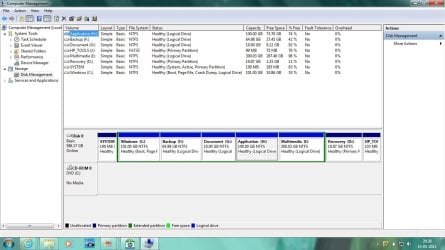
I have uploaded the related screenshots. The partition formed on its own is th Q partion (last one).
I am really annoyed and dont know what else should i do. So i decided to seek help from this forum. I searched for a similar thread but could not find any.
Any help here would be really appreciated!
This is what i did with it till date:
1. Since it came with a big Windows patition (C drive) i used macrium reflect free edition to change C drive from primary to logical parition.
2. I then created 3 different partions for my data and other files.
Everything worked out fine untill few days ago i saw different partition formed all on its own. To my utter dismay it refuses to be accessed and does not show up in the disk management either! Although the partition does not take up any space. I thought of it first as a virus issue. So i scanned my computer with norton internet security (came with the laptop) but no viruses or malware was found.
I was frustrated so i did a factory reset from the recovery partition and found that the paritition was gone now. I then painfully installed the programs which were removed due to factory reset. Not to mention the time taking windows updates!
I thought that was it, but now its just been two days and the partition is showing up again.
I have uploaded the related screenshots. The partition formed on its own is th Q partion (last one).
I am really annoyed and dont know what else should i do. So i decided to seek help from this forum. I searched for a similar thread but could not find any.
Any help here would be really appreciated!
Attachments

Last edited:
My Computer
- Computer Manufacturer/Model Number
- hp
- OS
- Windows Home Premium 64bit
- CPU
- intel core i5
- Memory
- 6 GB DDR3
- Graphics Card(s)
- nVIDIA GEFORCE 630 M

