
Hard Drive Replacement for PC

It does have 6 mate, 2 looking to you, 4 looking towards the side. The white ports in lower right.

1024.png
 

My Computer

Computer type
PC/Desktop
Computer Manufacturer/Model Number
Custom Build
OS
Windows 7 Ultimate x64 SP1
CPU
AMD Phenom 2 1090T
Motherboard
Gigabyte GA-890FXA-UD5
Memory
2x8GB Kingston HyperX Fury Black 1600Mhz Unganged
Graphics Card(s)
MSI GTX 970 Gaming 4G
Sound Card
Realtek On-Board HD 7.1 Audio / Logitech G35
Monitor(s) Displays
3xAcer GD245HQ
Screen Resolution
1920x1080
Hard Drives
Samsung 850 Pro 512GB SSD - OS /
WD Caviar Black SATA 3 - 1 TBx2 - Dynamic RAID 0 /
WD Caviar Green SATA 2 - 640GBx2 - Dynamic RAID 0 /
WD Caviar Green SATA 2 - 640GB - Internal Backup /
Seagate Barracude SATA 3 - 3TB - External Backup/ Sync
PSU
HighPower 1000W
Case
Cooler Master HAF 932
Cooling
Noctua NH-D14
Keyboard
Logitech G19
Mouse
Logitech G500
Internet Speed
100/4 Mbit Cable (100GB quota)
Antivirus
ZoneAlarm Extreme Security / MBAM Pro / MBAE Free / SAS Free
Browser
IE 11 - Firefox - Chrome
Other Info
Logitech F710/ G27/ G940/ Z5500 // TrackIR 5 // Nvidia 3D Surround Vision
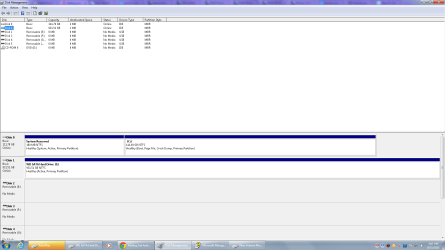
Got both drives connected & both show up in BIOS. Now I need to figure out how to set disk management to put all my files, pictures, other programs, etc. on the SATA hard drive. It is listed as DISK 1 BASIC Unallocated Any suggestions?
 

My Computer

Computer type
PC/Desktop
Computer Manufacturer/Model Number
Custom Build
OS
Windows 7 Home Premium 64bit
CPU
AMD A8-3850
Motherboard
MSI A75MA-G55 (MS-7696
Memory
Type: DDR3 Size: 8192 MBytes
Graphics Card(s)
ATI AMD Radeon HD 6550D & ATI AMD Radeon HD 6670
Hard Drives
932GB Seagate ST310005 24AS SATA Disk Device (SATA)
Antivirus
Microsoft Security Essentials
Browser
Chrome
You don't have anything on the HDD now, right? Everything you need is either on the SSD or backed up to an external?

The HDD showing as unallocated means you (most likely) deleted the partitions on it. The answer to your question may change according to your reply.
 

My Computer

Computer type
PC/Desktop
Computer Manufacturer/Model Number
Custom Build
OS
Windows 7 Ultimate x64 SP1
CPU
AMD Phenom 2 1090T
Motherboard
Gigabyte GA-890FXA-UD5
Memory
2x8GB Kingston HyperX Fury Black 1600Mhz Unganged
Graphics Card(s)
MSI GTX 970 Gaming 4G
Sound Card
Realtek On-Board HD 7.1 Audio / Logitech G35
Monitor(s) Displays
3xAcer GD245HQ
Screen Resolution
1920x1080
Hard Drives
Samsung 850 Pro 512GB SSD - OS /
WD Caviar Black SATA 3 - 1 TBx2 - Dynamic RAID 0 /
WD Caviar Green SATA 2 - 640GBx2 - Dynamic RAID 0 /
WD Caviar Green SATA 2 - 640GB - Internal Backup /
Seagate Barracude SATA 3 - 3TB - External Backup/ Sync
PSU
HighPower 1000W
Case
Cooler Master HAF 932
Cooling
Noctua NH-D14
Keyboard
Logitech G19
Mouse
Logitech G500
Internet Speed
100/4 Mbit Cable (100GB quota)
Antivirus
ZoneAlarm Extreme Security / MBAM Pro / MBAE Free / SAS Free
Browser
IE 11 - Firefox - Chrome
Other Info
Logitech F710/ G27/ G940/ Z5500 // TrackIR 5 // Nvidia 3D Surround Vision
You don't have anything on the HDD now, right? Everything you need is either on the SSD or backed up to an external?

The HDD showing as unallocated means you (most likely) deleted the partitions on it. The answer to your question may change according to your reply.

The HDD is new so there is nothing on it yet.
 

My Computer

Computer type
PC/Desktop
Computer Manufacturer/Model Number
Custom Build
OS
Windows 7 Home Premium 64bit
CPU
AMD A8-3850
Motherboard
MSI A75MA-G55 (MS-7696
Memory
Type: DDR3 Size: 8192 MBytes
Graphics Card(s)
ATI AMD Radeon HD 6550D & ATI AMD Radeon HD 6670
Hard Drives
932GB Seagate ST310005 24AS SATA Disk Device (SATA)
Antivirus
Microsoft Security Essentials
Browser
Chrome
Alright, you can just right click the unallocated space - New Simple Volume - set the size - assign a letter and then format with NTFS (default settings are good enough).

Then create your folders on the HDD as usual and copy the files (music, video, documents) into them. You can add these new folders to your libraries as well if you so wish.

For programs you should use your SSD unless you have a program that takes an unusually high disk space. For those, specify the HDD folder you created for programs while installing.
 

My Computer

Computer type
PC/Desktop
Computer Manufacturer/Model Number
Custom Build
OS
Windows 7 Ultimate x64 SP1
CPU
AMD Phenom 2 1090T
Motherboard
Gigabyte GA-890FXA-UD5
Memory
2x8GB Kingston HyperX Fury Black 1600Mhz Unganged
Graphics Card(s)
MSI GTX 970 Gaming 4G
Sound Card
Realtek On-Board HD 7.1 Audio / Logitech G35
Monitor(s) Displays
3xAcer GD245HQ
Screen Resolution
1920x1080
Hard Drives
Samsung 850 Pro 512GB SSD - OS /
WD Caviar Black SATA 3 - 1 TBx2 - Dynamic RAID 0 /
WD Caviar Green SATA 2 - 640GBx2 - Dynamic RAID 0 /
WD Caviar Green SATA 2 - 640GB - Internal Backup /
Seagate Barracude SATA 3 - 3TB - External Backup/ Sync
PSU
HighPower 1000W
Case
Cooler Master HAF 932
Cooling
Noctua NH-D14
Keyboard
Logitech G19
Mouse
Logitech G500
Internet Speed
100/4 Mbit Cable (100GB quota)
Antivirus
ZoneAlarm Extreme Security / MBAM Pro / MBAE Free / SAS Free
Browser
IE 11 - Firefox - Chrome
Other Info
Logitech F710/ G27/ G940/ Z5500 // TrackIR 5 // Nvidia 3D Surround Vision
Alright, you can just right click the unallocated space - New Simple Volume - set the size - assign a letter and then format with NTFS (default settings are good enough).

Then create your folders on the HDD as usual and copy the files (music, video, documents) into them. You can add these new folders to your libraries as well if you so wish.

For programs you should use your SSD unless you have a program that takes an unusually high disk space. For those, specify the HDD folder you created for programs while installing.


Do I put folders like My Pictures, My Media, etc. on the HDD?
 

My Computer

Computer type
PC/Desktop
Computer Manufacturer/Model Number
Custom Build
OS
Windows 7 Home Premium 64bit
CPU
AMD A8-3850
Motherboard
MSI A75MA-G55 (MS-7696
Memory
Type: DDR3 Size: 8192 MBytes
Graphics Card(s)
ATI AMD Radeon HD 6550D & ATI AMD Radeon HD 6670
Hard Drives
932GB Seagate ST310005 24AS SATA Disk Device (SATA)
Antivirus
Microsoft Security Essentials
Browser
Chrome
Does this look right?
 

Attachments

  • Screenshot 2.png
    Screenshot 2.png
    42.3 KB · Views: 4

My Computer

Computer type
PC/Desktop
Computer Manufacturer/Model Number
Custom Build
OS
Windows 7 Home Premium 64bit
CPU
AMD A8-3850
Motherboard
MSI A75MA-G55 (MS-7696
Memory
Type: DDR3 Size: 8192 MBytes
Graphics Card(s)
ATI AMD Radeon HD 6550D & ATI AMD Radeon HD 6670
Hard Drives
932GB Seagate ST310005 24AS SATA Disk Device (SATA)
Antivirus
Microsoft Security Essentials
Browser
Chrome
Do I put folders like My Pictures, My Media, etc. on the HDD?
In File Explorer navigate to C:\Users\YOURNAME, right-click the Folder you want to move and click Properties. On the Location tab specify the new HDD. At least it works for me. I consider the Libraries to just be shortcuts to the actual files of the logged on User.
 

My Computer

Computer type
PC/Desktop
Computer Manufacturer/Model Number
Customs, Dell, Gateway, HP, Toshiba, Acer, ASUS
OS
Windows 7 Ultimate 64-bit, Windows 8.1 64-bit, Mac OS X 10.10, Linux Mint 17, Windows 10 Pro TP
Keyboard
Microsoft
Mouse
Microsoft

My Computer

Computer type
PC/Desktop
Computer Manufacturer/Model Number
Custom Build
OS
Windows 7 Ultimate x64 SP1
CPU
AMD Phenom 2 1090T
Motherboard
Gigabyte GA-890FXA-UD5
Memory
2x8GB Kingston HyperX Fury Black 1600Mhz Unganged
Graphics Card(s)
MSI GTX 970 Gaming 4G
Sound Card
Realtek On-Board HD 7.1 Audio / Logitech G35
Monitor(s) Displays
3xAcer GD245HQ
Screen Resolution
1920x1080
Hard Drives
Samsung 850 Pro 512GB SSD - OS /
WD Caviar Black SATA 3 - 1 TBx2 - Dynamic RAID 0 /
WD Caviar Green SATA 2 - 640GBx2 - Dynamic RAID 0 /
WD Caviar Green SATA 2 - 640GB - Internal Backup /
Seagate Barracude SATA 3 - 3TB - External Backup/ Sync
PSU
HighPower 1000W
Case
Cooler Master HAF 932
Cooling
Noctua NH-D14
Keyboard
Logitech G19
Mouse
Logitech G500
Internet Speed
100/4 Mbit Cable (100GB quota)
Antivirus
ZoneAlarm Extreme Security / MBAM Pro / MBAE Free / SAS Free
Browser
IE 11 - Firefox - Chrome
Other Info
Logitech F710/ G27/ G940/ Z5500 // TrackIR 5 // Nvidia 3D Surround Vision
Back
Top