Hard drive warning

GEMICA

New member
Local time
2:54 AM
Messages
7
Windows detected a hard drive problem.
Back up your files immediately to prevent information loss,and then contact
computer manufacturer to determine if you need to repair or replace the disk.

This is the warning message. Can anyone help?
I do not have any warranty on computer.
It may software problem.
I did not have any restore points prior to this or backup disk.
 

My Computer

Computer type
Laptop
Computer Manufacturer/Model Number
lenova T61
OS
windows 7 32 bit
First thing you should do is back up your personal data like the message says.

Unless you don't care about the data.

After you do that, you can download the hard drive manufacturer's diagnostic tools to examine the disk. Or maybe use other tools to recover the partition or data.

But first--back your data up or tell us that you don't care about the data.
 

My Computer

Computer type
PC/Desktop
Computer Manufacturer/Model Number
Ignatz Special; 4 speed manual gearbox; factory air conditioning; one of one
OS
Windows 7 Home Premium SP1, 64-bit
CPU
Intel Skylake i5-6600K, not overclocked
Motherboard
AsRock Z170M Extreme 4, micro ATX
Memory
8 GB HyperX DDR4-2666 (2 x 4 GB)
Graphics Card(s)
none; graphics are integrated on CPU
Sound Card
onboard: Realtek ALC1150; external: USB Behringer UF0-202
Monitor(s) Displays
Dell S2340M 23 inch IPS
Screen Resolution
1600 x 900
Hard Drives
System: Crucial MX100 series SSD, 128 GB;
Data: Samsung Spinpoint 103SJ, 1 TB;
Backup: WD Caviar Green WD30EZRX-00D8PB0, 3 TB
PSU
Rosewill SilentNight 500 watt fanless, semi-modular
Case
Antec Solo II
Cooling
Noctua NH-U12S; Noctua F12 intake, Noctua S12A exhaust
Keyboard
Microsoft 200 6JH-00001 USB
Mouse
Dell or Microsoft optical wired; USB
Antivirus
Microsoft Security Essentials and Malwarebytes Premium
Browser
Pale Moon
Other Info
All fans PWM; speeds at idle: CPU circa 500 rpm; intake circa 600 rpm; exhaust circa 600 rpm; CPU temps 27 idle and 47 C load in a warm room (27 C/81 F) when running Intel Extreme Tuning Utility stress test.
I would immediately make an image of all partitions on the disk and run a chkdsl /r
 

My Computer

Computer Manufacturer/Model Number
HP, Dell, Gateway, Toshiba - 4 laptops and 2 desktops
OS
Vista, Windows7, Mint Mate, Zorin, Windows 8
CPU
from 1.6GHz Duo to i7
Monitor(s) Displays
2x HP w2207
Hard Drives
5x HDD, 7x SSD, 12x Externals
Keyboard
with trackball - no mices
Mouse
Trackball mice
Internet Speed
DSL 6000
Thanks, I am backing up disk.
Regards
Gerry
 

My Computer

Computer type
Laptop
Computer Manufacturer/Model Number
lenova T61
OS
windows 7 32 bit
Hi Ignatzatsonic,
Thanks for reply, I am a computer novice.
I have made backup of hard drive.I also ran error check on disk.
It found and repaired bad clusters on disk. Error message is still popping up.
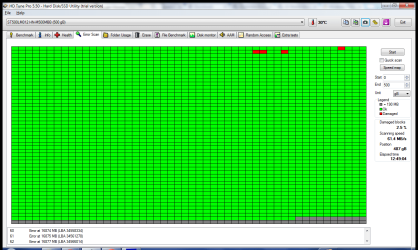
I ran HD Tune scan, see attachment.
I have just ran a lenovo diagnostic check. It detected one or more failures.
Error code WHD01V003-QJKA2N.
Any idea what is the cause?
Regards
Gerry
 

Attachments

  • 10-July-2014_23-01.png
    10-July-2014_23-01.png
    28.7 KB · Views: 3

My Computer

Computer type
Laptop
Computer Manufacturer/Model Number
lenova T61
OS
windows 7 32 bit
Looks like some bad sectors.

I'd download Speccy from here:

Speccy - Download

Run Speccy. It will identify the brand and model of your hard drive.

Looks like a Seagate from that HD Tune pic?

Once identified, go to the drive manufacturer's web site and download their diagnostic tool for the drive. If it's a Western Digital brand, you'd download Western Digital Data Lifeguard, but other drive companies have similar tools.

After you download the disk tool, run the basic testing program to show the "SMART" results. It will presumably show you what errors it finds.

HD Tune may show SMART results under one of those other tabs. I haven't look at that application in quite a while.

I assume this disk is not under warranty based on your first post.

If you have your data backed up, you could continue to try to use the disk as long as you keep backing up new data.

Many would tell you to get another disk immediately, assuming the SMART info reveals problems. I'd probably agree if budget allowed. Disks with bad sectors can easily develop more over time, so you have to watch the SMART info regularly if you decide not to replace it immediately.
 

My Computer

Computer type
PC/Desktop
Computer Manufacturer/Model Number
Ignatz Special; 4 speed manual gearbox; factory air conditioning; one of one
OS
Windows 7 Home Premium SP1, 64-bit
CPU
Intel Skylake i5-6600K, not overclocked
Motherboard
AsRock Z170M Extreme 4, micro ATX
Memory
8 GB HyperX DDR4-2666 (2 x 4 GB)
Graphics Card(s)
none; graphics are integrated on CPU
Sound Card
onboard: Realtek ALC1150; external: USB Behringer UF0-202
Monitor(s) Displays
Dell S2340M 23 inch IPS
Screen Resolution
1600 x 900
Hard Drives
System: Crucial MX100 series SSD, 128 GB;
Data: Samsung Spinpoint 103SJ, 1 TB;
Backup: WD Caviar Green WD30EZRX-00D8PB0, 3 TB
PSU
Rosewill SilentNight 500 watt fanless, semi-modular
Case
Antec Solo II
Cooling
Noctua NH-U12S; Noctua F12 intake, Noctua S12A exhaust
Keyboard
Microsoft 200 6JH-00001 USB
Mouse
Dell or Microsoft optical wired; USB
Antivirus
Microsoft Security Essentials and Malwarebytes Premium
Browser
Pale Moon
Other Info
All fans PWM; speeds at idle: CPU circa 500 rpm; intake circa 600 rpm; exhaust circa 600 rpm; CPU temps 27 idle and 47 C load in a warm room (27 C/81 F) when running Intel Extreme Tuning Utility stress test.
Thanks for info.
I will run this check.
Regards Gerry.
 

My Computer

Computer type
Laptop
Computer Manufacturer/Model Number
lenova T61
OS
windows 7 32 bit
Ran Speccy check.
HD seagate. S.M.A.R.T result status, Bad.
 

My Computer

Computer type
Laptop
Computer Manufacturer/Model Number
lenova T61
OS
windows 7 32 bit
OK.

It's your call. Try to work around it, keep your data backed up, and see if you can continue using the drive.

Or replace it as soon as possible.

If your budget can stand it, an SSD would make a significant boost in all-round performance.

Personally, I'd give up on it and find a replacement.
 

My Computer

Computer type
PC/Desktop
Computer Manufacturer/Model Number
Ignatz Special; 4 speed manual gearbox; factory air conditioning; one of one
OS
Windows 7 Home Premium SP1, 64-bit
CPU
Intel Skylake i5-6600K, not overclocked
Motherboard
AsRock Z170M Extreme 4, micro ATX
Memory
8 GB HyperX DDR4-2666 (2 x 4 GB)
Graphics Card(s)
none; graphics are integrated on CPU
Sound Card
onboard: Realtek ALC1150; external: USB Behringer UF0-202
Monitor(s) Displays
Dell S2340M 23 inch IPS
Screen Resolution
1600 x 900
Hard Drives
System: Crucial MX100 series SSD, 128 GB;
Data: Samsung Spinpoint 103SJ, 1 TB;
Backup: WD Caviar Green WD30EZRX-00D8PB0, 3 TB
PSU
Rosewill SilentNight 500 watt fanless, semi-modular
Case
Antec Solo II
Cooling
Noctua NH-U12S; Noctua F12 intake, Noctua S12A exhaust
Keyboard
Microsoft 200 6JH-00001 USB
Mouse
Dell or Microsoft optical wired; USB
Antivirus
Microsoft Security Essentials and Malwarebytes Premium
Browser
Pale Moon
Other Info
All fans PWM; speeds at idle: CPU circa 500 rpm; intake circa 600 rpm; exhaust circa 600 rpm; CPU temps 27 idle and 47 C load in a warm room (27 C/81 F) when running Intel Extreme Tuning Utility stress test.
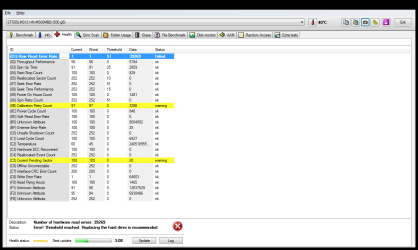
Post a pic of the health tab in HD Tune Pro. This will tell you the number of bad sectors.

Bad sectors are usually a sign of a hard drive failing. If the number is low AND ISN'T INCREASING the hard drive may be OK (although I wouldn't trust it and would keep everything important backed up). If the number is high and/or increasing it's probably dying.
 

My Computer

Computer type
PC/Desktop
OS
Windows 7 Ultimate x64
CPU
i7 920 @ 3.8GHz
Motherboard
ASUS P6T Deluxe V2
Memory
12GB DDR3
Graphics Card(s)
R9 290
Hard Drives
Crucial M4 128GB
OCZ Vertex 64GB
Hitachi Deskstar 2TB
2 x Hitachi Deskstar NAS 4TB
WD Caviar Black 1TB
Post a pic of the health tab in HD Tune Pro. This will tell you the number of bad sectors.

Bad sectors are usually a sign of a hard drive failing. If the number is low AND ISN'T INCREASING the hard drive may be OK (although I wouldn't trust it and would keep everything important backed up). If the number is high and/or increasing it's probably dying.

I don't trust any drive, period! all drives, even new ones, are capable of dying with little or no warning. The only defense for that is to make and maintain frequent multiple backups.
 

My Computer

Computer type
PC/Desktop
Computer Manufacturer/Model Number
Custom Build
OS
Win 7 Ultimate 64 bit
CPU
Intel i7-3930K
Motherboard
ASUS P9X79 WS
Memory
Kingston HyperX Genesis 32GB Kit (8x4GB Modules) 1600MHz DDR
Graphics Card(s)
MSI R7850 Twin Frozr 2GD5/OC Radeon HD 7850 2GB 256-bit GDDR
Sound Card
Asus Xonar Essence STX
Monitor(s) Displays
3x Asus VG248QE 24", Vizio 32" TV
Screen Resolution
1920 x 1080, ?
Hard Drives
Samsung 128GB 840 Pro SSD (1),
Samsung 4TB 850 EVO SSDs (4)
Samsung 4TB 850 EVO SSDs (16) external backup drives used in 2.5" hot swap bays in the computer.
PSU
Corsair HX750w
Case
Antec Two Hundred v2 (modified)
Cooling
Cooler Master GeminII S524 120mm (fan replaced with a 140mm)
Keyboard
Logitech G510s
Mouse
Logitech M525 (two in use)
Internet Speed
=< 32Mbps down, 8Mbps up
Antivirus
AVAST!, MBAM, SAS, Spybot S&D (all but MBAM free) Glary Util
Browser
IE11
Other Info
LSI 9211-8i HBA card (8 SATA III ports), 2.5" & 3.5" Hot Swap Bays, HooToo HT-CR001 PCI-E to USB 3.0 Internal Hub + 6 Slot Card Reader, and LG Model CH12LS28 BD-ROM Optical Drive. Also, ScanSnap S1500 ADF duplexing scanner, Canon 9000F flat bed scanner, Corsair SP2500 2.1 speakers, Samsung CLP 415nw laser color printer, Cyberpower PP2200SW UPS
That does not look too dramatic. Why don't you run the chkdsk /r as I had suggested earlier. That might fix it.
 

My Computer

Computer Manufacturer/Model Number
HP, Dell, Gateway, Toshiba - 4 laptops and 2 desktops
OS
Vista, Windows7, Mint Mate, Zorin, Windows 8
CPU
from 1.6GHz Duo to i7
Monitor(s) Displays
2x HP w2207
Hard Drives
5x HDD, 7x SSD, 12x Externals
Keyboard
with trackball - no mices
Mouse
Trackball mice
Internet Speed
DSL 6000
Hi I have uploaded attachment. It has got worse.
I have taken snapshots of health scan on the 27th June and today.
HD also failed seagate smart test.
Gerry
 

My Computer

Computer type
Laptop
Computer Manufacturer/Model Number
lenova T61
OS
windows 7 32 bit
I forgot attachment
 

Attachments

  • 11-July-2014_20-20.png
    11-July-2014_20-20.png
    39.7 KB · Views: 1
  • 27-June-2014_12-15.png
    27-June-2014_12-15.png
    31.1 KB · Views: 1

My Computer

Computer type
Laptop
Computer Manufacturer/Model Number
lenova T61
OS
windows 7 32 bit
Back
Top