
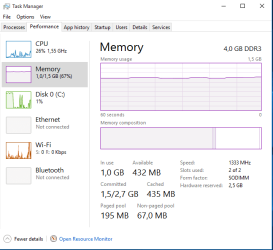
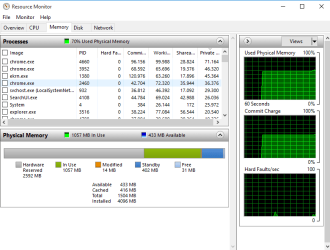
hi i have a bit of a problem with my laptop.My laptop used to have 2 gb ram and still have 1.47 used and i taught ok its close but today i upgred it to 4 gb ram and still have 1.43 used what seem to be the problem ? as u can see resource monitor is showing 2.5 gb hardware resource p.s i have tried msconfig ad it is not working
here is all u need to know about my laptop
System Information
------------------
Time of this report: 11/16/2015, 16:16:08
Machine name: DESKTOP-6KLG0GR
Operating System: Windows 10 Pro 64-bit (10.0, Build 10240) (10240.th1.150709-1700)
Language: Bosnian (Latin) (Regional Setting: Bosnian (Latin))
System Manufacturer: Hewlett-Packard
System Model: HP ProBook 6465b
BIOS: Default System BIOS
Processor: AMD A6-3430MX APU with Radeon(tm) HD Graphics (4 CPUs), ~1.7GHz
Memory: 4096MB RAM
Available OS Memory: 1504MB RAM
Page File: 1859MB used, 860MB available
Windows Dir: C:\Windows
DirectX Version: 11.1
DX Setup Parameters: Not found
User DPI Setting: Using System DPI
System DPI Setting: 96 DPI (100 percent)
DWM DPI Scaling: Disabled
Miracast: Not Available
Microsoft Graphics Hybrid: Not Supported
DxDiag Version: 10.00.10240.16384 64bit Unicode
------------
DxDiag Notes
------------
Display Tab 1: No problems found.
Sound Tab 1: No problems found.
Input Tab: No problems found.
--------------------
DirectX Debug Levels
--------------------
Direct3D: 0/4 (retail)
DirectDraw: 0/4 (retail)
DirectInput: 0/5 (retail)
DirectMusic: 0/5 (retail)
DirectPlay: 0/9 (retail)
DirectSound: 0/5 (retail)
DirectShow: 0/6 (retail)
---------------
Display Devices
---------------
Card name: AMD Radeon HD 6520G
Manufacturer: Advanced Micro Devices, Inc.
Chip type: AMD Radeon Graphics Processor (0x9647)
DAC type: Internal DAC(400MHz)
Device Type: Full Device
Device Key: Enum\PCI\VEN_1002&DEV_9647&SUBSYS_1633103C&REV_00
Display Memory: 1013 MB
Dedicated Memory: 501 MB
Shared Memory: 512 MB
Current Mode: 1366 x 768 (32 bit) (60Hz)
Monitor Name: Generic PnP Monitor
Monitor Model: unknown
Monitor Id: SEC345A
Native Mode: 1366 x 768(p) (59.987Hz)
Output Type: Internal
Driver Name: aticfx64.dll,aticfx64.dll,aticfx64.dll,aticfx32,aticfx32,aticfx32,atiumd64.dll,atidxx64.dll,atidxx64.dll,atiumdag,atidxx32,atidxx32,atiumdva,atiumd6a.cap,atitmm64.dll
Driver File Version: 8.17.0010.1404 (English)
Driver Version: 15.201.1151.0
DDI Version: 11.1
Feature Levels: 11.0,10.1,10.0,9.3,9.2,9.1
Driver Model: WDDM 1.2
Graphics Preemption: DMA
Compute Preemption: DMA
Miracast: Not Supported by Graphics driver
Hybrid Graphics GPU: Not Applicable
Power P-states: Not Applicable
Driver Attributes: Final Retail
Driver Date/Size: 11/16/2015 04:10:07, 1479808 bytes
WHQL Logo'd: Yes
WHQL Date Stamp:
Device Identifier: {D7B71EE2-D507-11CF-F076-3936BEC2C535}
Vendor ID: 0x1002
Device ID: 0x9647
SubSys ID: 0x1633103C
Revision ID: 0x0000
Driver Strong Name: oem10.inf:cb0ae414e94bfb4f:ati2mtag_Sumo_Mobile:15.201.1151.0 ci\ven_1002&dev_9647
Rank Of Driver: 00DA2001
Video Accel: ModeMPEG2_A ModeMPEG2_C
DXVA2 Modes: DXVA2_ModeMPEG2_VLD DXVA2_ModeMPEG2_IDCT DXVA2_ModeH264_VLD_NoFGT DXVA2_ModeVC1_VLD DXVA2_ModeMPEG4pt2_VLD_AdvSimple_NoGMC
Deinterlace Caps: {6E8329FF-B642-418B-BCF0-BCB6591E255F}: Format(In/Out)=(YUY2,YUY2) Frames(Prev/Fwd/Back)=(0,0,1) Caps=VideoProcess_YUV2RGB VideoProcess_StretchX VideoProcess_StretchY DeinterlaceTech_PixelAdaptive
{335AA36E-7884-43A4-9C91-7F87FAF3E37E}: Format(In/Out)=(YUY2,YUY2) Frames(Prev/Fwd/Back)=(0,0,0) Caps=VideoProcess_YUV2RGB VideoProcess_StretchX VideoProcess_StretchY DeinterlaceTech_BOBVerticalStretch
{5A54A0C9-C7EC-4BD9-8EDE-F3C75DC4393B}: Format(In/Out)=(YUY2,YUY2) Frames(Prev/Fwd/Back)=(0,0,0) Caps=VideoProcess_YUV2RGB VideoProcess_StretchX VideoProcess_StretchY
{6E8329FF-B642-418B-BCF0-BCB6591E255F}: Format(In/Out)=(UYVY,UYVY) Frames(Prev/Fwd/Back)=(0,0,1) Caps=VideoProcess_YUV2RGB VideoProcess_StretchX VideoProcess_StretchY DeinterlaceTech_PixelAdaptive
{335AA36E-7884-43A4-9C91-7F87FAF3E37E}: Format(In/Out)=(UYVY,UYVY) Frames(Prev/Fwd/Back)=(0,0,0) Caps=VideoProcess_YUV2RGB VideoProcess_StretchX VideoProcess_StretchY DeinterlaceTech_BOBVerticalStretch
{5A54A0C9-C7EC-4BD9-8EDE-F3C75DC4393B}: Format(In/Out)=(UYVY,UYVY) Frames(Prev/Fwd/Back)=(0,0,0) Caps=VideoProcess_YUV2RGB VideoProcess_StretchX VideoProcess_StretchY
{5A54A0C9-C7EC-4BD9-8EDE-F3C75DC4393B}: Format(In/Out)=(YV12,0x32315659) Frames(Prev/Fwd/Back)=(0,0,0) Caps=
{3C5323C1-6FB7-44F5-9081-056BF2EE449D}: Format(In/Out)=(NV12,0x3231564e) Frames(Prev/Fwd/Back)=(0,0,2) Caps=VideoProcess_YUV2RGB VideoProcess_StretchX VideoProcess_StretchY DeinterlaceTech_PixelAdaptive
{552C0DAD-CCBC-420B-83C8-74943CF9F1A6}: Format(In/Out)=(NV12,0x3231564e) Frames(Prev/Fwd/Back)=(0,0,2) Caps=VideoProcess_YUV2RGB VideoProcess_StretchX VideoProcess_StretchY DeinterlaceTech_PixelAdaptive
{6E8329FF-B642-418B-BCF0-BCB6591E255F}: Format(In/Out)=(NV12,0x3231564e) Frames(Prev/Fwd/Back)=(0,0,1) Caps=VideoProcess_YUV2RGB VideoProcess_StretchX VideoProcess_StretchY DeinterlaceTech_PixelAdaptive
{335AA36E-7884-43A4-9C91-7F87FAF3E37E}: Format(In/Out)=(NV12,0x3231564e) Frames(Prev/Fwd/Back)=(0,0,0) Caps=VideoProcess_YUV2RGB VideoProcess_StretchX VideoProcess_StretchY DeinterlaceTech_BOBVerticalStretch
{5A54A0C9-C7EC-4BD9-8EDE-F3C75DC4393B}: Format(In/Out)=(NV12,0x3231564e) Frames(Prev/Fwd/Back)=(0,0,0) Caps=VideoProcess_YUV2RGB VideoProcess_StretchX VideoProcess_StretchY
{5A54A0C9-C7EC-4BD9-8EDE-F3C75DC4393B}: Format(In/Out)=(IMC1,UNKNOWN) Frames(Prev/Fwd/Back)=(0,0,0) Caps=
{5A54A0C9-C7EC-4BD9-8EDE-F3C75DC4393B}: Format(In/Out)=(IMC2,UNKNOWN) Frames(Prev/Fwd/Back)=(0,0,0) Caps=
{5A54A0C9-C7EC-4BD9-8EDE-F3C75DC4393B}: Format(In/Out)=(IMC3,UNKNOWN) Frames(Prev/Fwd/Back)=(0,0,0) Caps=
{5A54A0C9-C7EC-4BD9-8EDE-F3C75DC4393B}: Format(In/Out)=(IMC4,UNKNOWN) Frames(Prev/Fwd/Back)=(0,0,0) Caps=
{5A54A0C9-C7EC-4BD9-8EDE-F3C75DC4393B}: Format(In/Out)=(S340,UNKNOWN) Frames(Prev/Fwd/Back)=(0,0,0) Caps=
{5A54A0C9-C7EC-4BD9-8EDE-F3C75DC4393B}: Format(In/Out)=(S342,UNKNOWN) Frames(Prev/Fwd/Back)=(0,0,0) Caps=
D3D9 Overlay: Not Supported
DXVA-HD: Not Supported
DDraw Status: Enabled
D3D Status: Enabled
AGP Status: Enabled
-------------
Sound Devices
-------------
Description: Speakers (High Definition Audio Device)
Default Sound Playback: Yes
Default Voice Playback: Yes
Hardware ID: HDAUDIO\FUNC_01&VEN_111D&DEV_7605&SUBSYS_103C3668&REV_1001
Manufacturer ID: 1
Product ID: 65535
Type: WDM
Driver Name: HdAudio.sys
Driver Version: 10.00.10240.16384 (English)
Driver Attributes: Final Retail
WHQL Logo'd: Yes
Date and Size: 7/10/2015 11:59:36, 379392 bytes
Other Files:
Driver Provider: Microsoft
HW Accel Level: Basic
Cap Flags: 0xF1F
Min/Max Sample Rate: 100, 200000
Static/Strm HW Mix Bufs: 1, 0
Static/Strm HW 3D Bufs: 0, 0
HW Memory: 0
Voice Management: No
EAX(tm) 2.0 Listen/Src: No, No
I3DL2(tm) Listen/Src: No, No
Sensaura(tm) ZoomFX(tm): No
---------------------
Sound Capture Devices
---------------------
Description: Microphone (High Definition Audio Device)
Default Sound Capture: Yes
Default Voice Capture: Yes
Driver Name: HdAudio.sys
Driver Version: 10.00.10240.16384 (English)
Driver Attributes: Final Retail
Date and Size: 7/10/2015 11:59:36, 379392 bytes
Cap Flags: 0x1
Format Flags: 0xFFFFF
---------------------
Video Capture Devices
Number of Devices: 1
---------------------
FriendlyName: HP HD Webcam [Fixed]
Location: n/a
SymbolicLink: \\?\usb#vid_04f2&pid_b230&mi_00#6&369e123a&0&0000#{e5323777-f976-4f5b-9b55-b94699c46e44}\global
Manufacturer: Sonix
HardwareID: USB\VID_04F2&PID_B230&REV_9999&MI_00,USB\VID_04F2&PID_B230&MI_00
DriverDesc: HP HD Webcam [Fixed]
DriverProvider: Sonix
DriverVersion: 6.0.1114.4
DriverDateEnglish: 7/10/2015 00:00:00
DriverDateLocalized: 10.07.2015. 00:00:00
Service: SNP2UVC
Class: Image
DevNodeStatus: 180200A[DN_DRIVER_LOADED|DN_STARTED|DN_DISABLEABLE|DN_NT_ENUMERATOR|DN_NT_DRIVER]
ContainerId: {00000000-0000-0000-FFFF-FFFFFFFFFFFF}
ProblemCode: No Problem
BusReportedDeviceDesc: HP HD Webcam [Fixed]
Parent: USB\VID_04F2&PID_B230\SN0001
DriverProblemDesc: n/a
UpperFilters: n/a
LowerFilters: n/a
Stack: \Driver\ksthunk,\Driver\SNP2UVC,\Driver\usbccgp
ContainerCategory: Imaging
-------------------
DirectInput Devices
-------------------
Device Name: Mouse
Attached: 1
Controller ID: n/a
Vendor/Product ID: n/a
FF Driver: n/a
Device Name: Keyboard
Attached: 1
Controller ID: n/a
Vendor/Product ID: n/a
FF Driver: n/a
Poll w/ Interrupt: No
-----------
USB Devices
-----------
+ USB Root Hub
| Vendor/Product ID: 0x1022, 0x7807
| Matching Device ID: USB\ROOT_HUB
| Service: usbhub
| Driver: usbhub.sys, 7/10/2015 11:59:39, 499040 bytes
| Driver: usbd.sys, 7/10/2015 11:59:39, 29536 bytes
|
+-+ USB Input Device
| | Vendor/Product ID: 0x093A, 0x2510
| | Location: Port_#0004.Hub_#0001
| | Matching Device ID: USB\Class_03&SubClass_01
| | Service: HidUsb
| | Driver: hidusb.sys, 7/10/2015 11:59:38, 38400 bytes
| | Driver: hidclass.sys, 7/10/2015 11:59:38, 153088 bytes
| | Driver: hidparse.sys, 7/10/2015 11:59:38, 39936 bytes
| |
| +-+ HID-compliant mouse
| | | Vendor/Product ID: 0x093A, 0x2510
| | | Matching Device ID: HID_DEVICE_SYSTEM_MOUSE
| | | Service: mouhid
| | | Driver: mouhid.sys, 7/10/2015 11:59:39, 32256 bytes
| | | Driver: mouclass.sys, 7/10/2015 11:59:39, 59232 bytes
here is all u need to know about my laptop
System Information
------------------
Time of this report: 11/16/2015, 16:16:08
Machine name: DESKTOP-6KLG0GR
Operating System: Windows 10 Pro 64-bit (10.0, Build 10240) (10240.th1.150709-1700)
Language: Bosnian (Latin) (Regional Setting: Bosnian (Latin))
System Manufacturer: Hewlett-Packard
System Model: HP ProBook 6465b
BIOS: Default System BIOS
Processor: AMD A6-3430MX APU with Radeon(tm) HD Graphics (4 CPUs), ~1.7GHz
Memory: 4096MB RAM
Available OS Memory: 1504MB RAM
Page File: 1859MB used, 860MB available
Windows Dir: C:\Windows
DirectX Version: 11.1
DX Setup Parameters: Not found
User DPI Setting: Using System DPI
System DPI Setting: 96 DPI (100 percent)
DWM DPI Scaling: Disabled
Miracast: Not Available
Microsoft Graphics Hybrid: Not Supported
DxDiag Version: 10.00.10240.16384 64bit Unicode
------------
DxDiag Notes
------------
Display Tab 1: No problems found.
Sound Tab 1: No problems found.
Input Tab: No problems found.
--------------------
DirectX Debug Levels
--------------------
Direct3D: 0/4 (retail)
DirectDraw: 0/4 (retail)
DirectInput: 0/5 (retail)
DirectMusic: 0/5 (retail)
DirectPlay: 0/9 (retail)
DirectSound: 0/5 (retail)
DirectShow: 0/6 (retail)
---------------
Display Devices
---------------
Card name: AMD Radeon HD 6520G
Manufacturer: Advanced Micro Devices, Inc.
Chip type: AMD Radeon Graphics Processor (0x9647)
DAC type: Internal DAC(400MHz)
Device Type: Full Device
Device Key: Enum\PCI\VEN_1002&DEV_9647&SUBSYS_1633103C&REV_00
Display Memory: 1013 MB
Dedicated Memory: 501 MB
Shared Memory: 512 MB
Current Mode: 1366 x 768 (32 bit) (60Hz)
Monitor Name: Generic PnP Monitor
Monitor Model: unknown
Monitor Id: SEC345A
Native Mode: 1366 x 768(p) (59.987Hz)
Output Type: Internal
Driver Name: aticfx64.dll,aticfx64.dll,aticfx64.dll,aticfx32,aticfx32,aticfx32,atiumd64.dll,atidxx64.dll,atidxx64.dll,atiumdag,atidxx32,atidxx32,atiumdva,atiumd6a.cap,atitmm64.dll
Driver File Version: 8.17.0010.1404 (English)
Driver Version: 15.201.1151.0
DDI Version: 11.1
Feature Levels: 11.0,10.1,10.0,9.3,9.2,9.1
Driver Model: WDDM 1.2
Graphics Preemption: DMA
Compute Preemption: DMA
Miracast: Not Supported by Graphics driver
Hybrid Graphics GPU: Not Applicable
Power P-states: Not Applicable
Driver Attributes: Final Retail
Driver Date/Size: 11/16/2015 04:10:07, 1479808 bytes
WHQL Logo'd: Yes
WHQL Date Stamp:
Device Identifier: {D7B71EE2-D507-11CF-F076-3936BEC2C535}
Vendor ID: 0x1002
Device ID: 0x9647
SubSys ID: 0x1633103C
Revision ID: 0x0000
Driver Strong Name: oem10.inf:cb0ae414e94bfb4f:ati2mtag_Sumo_Mobile:15.201.1151.0
ci\ven_1002&dev_9647Rank Of Driver: 00DA2001
Video Accel: ModeMPEG2_A ModeMPEG2_C
DXVA2 Modes: DXVA2_ModeMPEG2_VLD DXVA2_ModeMPEG2_IDCT DXVA2_ModeH264_VLD_NoFGT DXVA2_ModeVC1_VLD DXVA2_ModeMPEG4pt2_VLD_AdvSimple_NoGMC
Deinterlace Caps: {6E8329FF-B642-418B-BCF0-BCB6591E255F}: Format(In/Out)=(YUY2,YUY2) Frames(Prev/Fwd/Back)=(0,0,1) Caps=VideoProcess_YUV2RGB VideoProcess_StretchX VideoProcess_StretchY DeinterlaceTech_PixelAdaptive
{335AA36E-7884-43A4-9C91-7F87FAF3E37E}: Format(In/Out)=(YUY2,YUY2) Frames(Prev/Fwd/Back)=(0,0,0) Caps=VideoProcess_YUV2RGB VideoProcess_StretchX VideoProcess_StretchY DeinterlaceTech_BOBVerticalStretch
{5A54A0C9-C7EC-4BD9-8EDE-F3C75DC4393B}: Format(In/Out)=(YUY2,YUY2) Frames(Prev/Fwd/Back)=(0,0,0) Caps=VideoProcess_YUV2RGB VideoProcess_StretchX VideoProcess_StretchY
{6E8329FF-B642-418B-BCF0-BCB6591E255F}: Format(In/Out)=(UYVY,UYVY) Frames(Prev/Fwd/Back)=(0,0,1) Caps=VideoProcess_YUV2RGB VideoProcess_StretchX VideoProcess_StretchY DeinterlaceTech_PixelAdaptive
{335AA36E-7884-43A4-9C91-7F87FAF3E37E}: Format(In/Out)=(UYVY,UYVY) Frames(Prev/Fwd/Back)=(0,0,0) Caps=VideoProcess_YUV2RGB VideoProcess_StretchX VideoProcess_StretchY DeinterlaceTech_BOBVerticalStretch
{5A54A0C9-C7EC-4BD9-8EDE-F3C75DC4393B}: Format(In/Out)=(UYVY,UYVY) Frames(Prev/Fwd/Back)=(0,0,0) Caps=VideoProcess_YUV2RGB VideoProcess_StretchX VideoProcess_StretchY
{5A54A0C9-C7EC-4BD9-8EDE-F3C75DC4393B}: Format(In/Out)=(YV12,0x32315659) Frames(Prev/Fwd/Back)=(0,0,0) Caps=
{3C5323C1-6FB7-44F5-9081-056BF2EE449D}: Format(In/Out)=(NV12,0x3231564e) Frames(Prev/Fwd/Back)=(0,0,2) Caps=VideoProcess_YUV2RGB VideoProcess_StretchX VideoProcess_StretchY DeinterlaceTech_PixelAdaptive
{552C0DAD-CCBC-420B-83C8-74943CF9F1A6}: Format(In/Out)=(NV12,0x3231564e) Frames(Prev/Fwd/Back)=(0,0,2) Caps=VideoProcess_YUV2RGB VideoProcess_StretchX VideoProcess_StretchY DeinterlaceTech_PixelAdaptive
{6E8329FF-B642-418B-BCF0-BCB6591E255F}: Format(In/Out)=(NV12,0x3231564e) Frames(Prev/Fwd/Back)=(0,0,1) Caps=VideoProcess_YUV2RGB VideoProcess_StretchX VideoProcess_StretchY DeinterlaceTech_PixelAdaptive
{335AA36E-7884-43A4-9C91-7F87FAF3E37E}: Format(In/Out)=(NV12,0x3231564e) Frames(Prev/Fwd/Back)=(0,0,0) Caps=VideoProcess_YUV2RGB VideoProcess_StretchX VideoProcess_StretchY DeinterlaceTech_BOBVerticalStretch
{5A54A0C9-C7EC-4BD9-8EDE-F3C75DC4393B}: Format(In/Out)=(NV12,0x3231564e) Frames(Prev/Fwd/Back)=(0,0,0) Caps=VideoProcess_YUV2RGB VideoProcess_StretchX VideoProcess_StretchY
{5A54A0C9-C7EC-4BD9-8EDE-F3C75DC4393B}: Format(In/Out)=(IMC1,UNKNOWN) Frames(Prev/Fwd/Back)=(0,0,0) Caps=
{5A54A0C9-C7EC-4BD9-8EDE-F3C75DC4393B}: Format(In/Out)=(IMC2,UNKNOWN) Frames(Prev/Fwd/Back)=(0,0,0) Caps=
{5A54A0C9-C7EC-4BD9-8EDE-F3C75DC4393B}: Format(In/Out)=(IMC3,UNKNOWN) Frames(Prev/Fwd/Back)=(0,0,0) Caps=
{5A54A0C9-C7EC-4BD9-8EDE-F3C75DC4393B}: Format(In/Out)=(IMC4,UNKNOWN) Frames(Prev/Fwd/Back)=(0,0,0) Caps=
{5A54A0C9-C7EC-4BD9-8EDE-F3C75DC4393B}: Format(In/Out)=(S340,UNKNOWN) Frames(Prev/Fwd/Back)=(0,0,0) Caps=
{5A54A0C9-C7EC-4BD9-8EDE-F3C75DC4393B}: Format(In/Out)=(S342,UNKNOWN) Frames(Prev/Fwd/Back)=(0,0,0) Caps=
D3D9 Overlay: Not Supported
DXVA-HD: Not Supported
DDraw Status: Enabled
D3D Status: Enabled
AGP Status: Enabled
-------------
Sound Devices
-------------
Description: Speakers (High Definition Audio Device)
Default Sound Playback: Yes
Default Voice Playback: Yes
Hardware ID: HDAUDIO\FUNC_01&VEN_111D&DEV_7605&SUBSYS_103C3668&REV_1001
Manufacturer ID: 1
Product ID: 65535
Type: WDM
Driver Name: HdAudio.sys
Driver Version: 10.00.10240.16384 (English)
Driver Attributes: Final Retail
WHQL Logo'd: Yes
Date and Size: 7/10/2015 11:59:36, 379392 bytes
Other Files:
Driver Provider: Microsoft
HW Accel Level: Basic
Cap Flags: 0xF1F
Min/Max Sample Rate: 100, 200000
Static/Strm HW Mix Bufs: 1, 0
Static/Strm HW 3D Bufs: 0, 0
HW Memory: 0
Voice Management: No
EAX(tm) 2.0 Listen/Src: No, No
I3DL2(tm) Listen/Src: No, No
Sensaura(tm) ZoomFX(tm): No
---------------------
Sound Capture Devices
---------------------
Description: Microphone (High Definition Audio Device)
Default Sound Capture: Yes
Default Voice Capture: Yes
Driver Name: HdAudio.sys
Driver Version: 10.00.10240.16384 (English)
Driver Attributes: Final Retail
Date and Size: 7/10/2015 11:59:36, 379392 bytes
Cap Flags: 0x1
Format Flags: 0xFFFFF
---------------------
Video Capture Devices
Number of Devices: 1
---------------------
FriendlyName: HP HD Webcam [Fixed]
Location: n/a
SymbolicLink: \\?\usb#vid_04f2&pid_b230&mi_00#6&369e123a&0&0000#{e5323777-f976-4f5b-9b55-b94699c46e44}\global
Manufacturer: Sonix
HardwareID: USB\VID_04F2&PID_B230&REV_9999&MI_00,USB\VID_04F2&PID_B230&MI_00
DriverDesc: HP HD Webcam [Fixed]
DriverProvider: Sonix
DriverVersion: 6.0.1114.4
DriverDateEnglish: 7/10/2015 00:00:00
DriverDateLocalized: 10.07.2015. 00:00:00
Service: SNP2UVC
Class: Image
DevNodeStatus: 180200A[DN_DRIVER_LOADED|DN_STARTED|DN_DISABLEABLE|DN_NT_ENUMERATOR|DN_NT_DRIVER]
ContainerId: {00000000-0000-0000-FFFF-FFFFFFFFFFFF}
ProblemCode: No Problem
BusReportedDeviceDesc: HP HD Webcam [Fixed]
Parent: USB\VID_04F2&PID_B230\SN0001
DriverProblemDesc: n/a
UpperFilters: n/a
LowerFilters: n/a
Stack: \Driver\ksthunk,\Driver\SNP2UVC,\Driver\usbccgp
ContainerCategory: Imaging
-------------------
DirectInput Devices
-------------------
Device Name: Mouse
Attached: 1
Controller ID: n/a
Vendor/Product ID: n/a
FF Driver: n/a
Device Name: Keyboard
Attached: 1
Controller ID: n/a
Vendor/Product ID: n/a
FF Driver: n/a
Poll w/ Interrupt: No
-----------
USB Devices
-----------
+ USB Root Hub
| Vendor/Product ID: 0x1022, 0x7807
| Matching Device ID: USB\ROOT_HUB
| Service: usbhub
| Driver: usbhub.sys, 7/10/2015 11:59:39, 499040 bytes
| Driver: usbd.sys, 7/10/2015 11:59:39, 29536 bytes
|
+-+ USB Input Device
| | Vendor/Product ID: 0x093A, 0x2510
| | Location: Port_#0004.Hub_#0001
| | Matching Device ID: USB\Class_03&SubClass_01
| | Service: HidUsb
| | Driver: hidusb.sys, 7/10/2015 11:59:38, 38400 bytes
| | Driver: hidclass.sys, 7/10/2015 11:59:38, 153088 bytes
| | Driver: hidparse.sys, 7/10/2015 11:59:38, 39936 bytes
| |
| +-+ HID-compliant mouse
| | | Vendor/Product ID: 0x093A, 0x2510
| | | Matching Device ID: HID_DEVICE_SYSTEM_MOUSE
| | | Service: mouhid
| | | Driver: mouhid.sys, 7/10/2015 11:59:39, 32256 bytes
| | | Driver: mouclass.sys, 7/10/2015 11:59:39, 59232 bytes
Attachments

My Computer
At a glance
Windows 7 Ultimate x32
- OS
- Windows 7 Ultimate x32


