
Hardware - Stress Test With Prime95

How to Stress Test your Hardware for Stability and Heat Problems with Prime95


   Tip
Be sure to keep an eye on your temperatures when running these tests, especially the Large FFTs. I recommend the free utility Speedfan.


1. Download the appropriate 32-bit or 64-bit Windows version of Prime95 from this link: Free Software - GIMPS

You can skip down to step 2 on that page; it is not necessary to register, if all you want to do is torture test.

2. Run the Prime95.exe file. If the UAC warning appears, click "Yes" to allow it.

3. Select "Just Stress Testing" in the first window that appears.
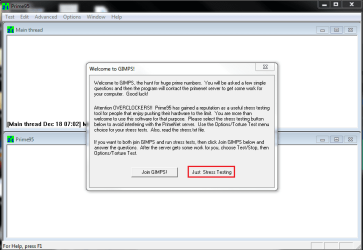
Capture.PNG
4. Select "Small FFTs", or whatever tests someone asks you to run. Prime95 will automatically select the maximum number of threads reported by Windows in the "Number of threads to run" box.
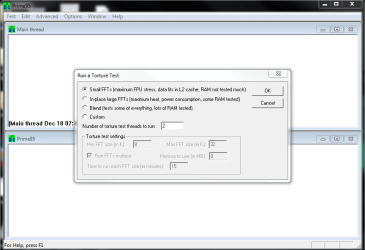
Capture1.PNG
5. Keep an eye on your temperatures, and stop the test if the machine starts to overheat.

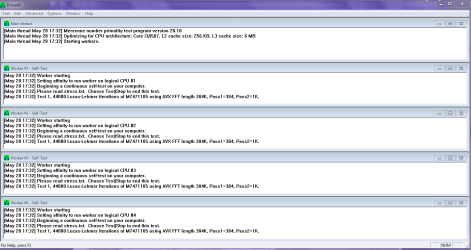
6. Leave the test running for up to 2 hours, unless errors occur sooner. Errors will show up by one or more of the workers stopping.

   Note
As with all hardware tests, Prime95 is not fail-safe. If the test passes for 2 hours with no errors, it is most likely to be stable. Unfortunately, it sometimes makes mistakes and gives a clean bill of health to faulty hardware.


Last edited by a moderator:
Check you BIOS temps, the CPU will cool down quickly so it is just an indication of the temps.

Also use Core Temp and Speed Fan to check against Real Temp.
It's not unusual to have different readings but, they should be fairly close.

I wouldn't recommend going past 78°C on any test, you should find out why the temps are so high.
If they are due to OC or CPU cooler problems.

I'll take a look at your thread.
 

My Computer My Computer

Computer type
PC/Desktop
Computer Manufacturer/Model Number
76~2.0
OS
Windows 7 Ult x64 - SP1/ Windows 8 Pro x64
CPU
Intel Core i5-3570K 4.6GHz
Motherboard
Gigabyte GA-Z77X UD3H, f18
Memory
8GB (2X4GB) DDR3 1600 Corsair Vengeance CL8 1.5v
Graphics Card(s)
Sapphire HD 7770 Vapor-X OC 1GB DDR5
Sound Card
Onboard VIA VT2021
Monitor(s) Displays
22" LCD Dell
Screen Resolution
1680x1050
Hard Drives
Samsung 840Pro 128GB SSD,
Seagate Barracuda 500GB SATA2 7200rpm 32MB cache, Seagate Barracuda 1TB SATA2 7200rpm 32MB cache,
PSU
Corsair HX650W
Case
Cooler Master Storm Scout
Cooling
Corsair H80 2x12cm Noctua NF P12 , 2x14cm case fans
Keyboard
Logitech Wave
Mouse
CM Sentinel
Internet Speed
Dismal
Antivirus
Avast
Browser
Opera Next
Other Info
Haswell laptop: HP Envy 17t-j, i7-4700MQ, GeForce 740M 2GB DDR3, 17.3" Full HD 1920x1080, 16GB RAM, Samsung 840 Pro 128GB, 1TB Hitachi 7200 HDD,
Desktop: eSATA ports,
External eSATA Seagate 500GB SATA2 7200rpm,
External WD USB 500GB
^^^ hey can i setup one of these temp monitor programs to run in the background while the CPU stress test runs so that if it overheats it shuts down the computer / saves the hardware from any damage? really dont want to sit next to my PC for 6 hours if at all possible :~)
 

My Computer My Computer

OS
Windows 7 Home Premium 64bit
CPU
MD Phenom II X4 965 Black Edition 3.4GHz
Motherboard
Asus M4A89GTD PRO
Memory
8GB - 2x 4GB (2x2GB) DDR3 1333MHz XMS3 Memory Kit CL9
Hard Drives
OCZ Agility3 SSD - 2x120GB
1TB SATA HD
PSU
Coolermaster Sileo Quiet Case With 500W Extreme Power Plus
Hello Kaizer,

I don't know of any programs that will do that off the top of my head, but in reality, you only need to watch the program for the first 5 or 10 minutes. After that time, your system will be just about as hot as it's going to get, so you can walk away for the rest of the time.
 

My Computer My Computer

Computer Manufacturer/Model Number
Custom
OS
Windows 7 Professional x64
CPU
Intel i7 2600K OC'd @ 4620 MHz
Motherboard
Asus P8Z68-V Pro
Memory
16GB GSkill Sniper 2133 Mhz (4x4GB)
Graphics Card(s)
EVGA GeForce GTX 480 SuperClocked+
Sound Card
Realtek High Definition Audio
Monitor(s) Displays
2x Acer S273HLbmii 27"
Screen Resolution
2 x 1920x1080
Hard Drives
64GB Crucial M4 SSD

Storage: Hitachi 1TB 5400RPM, Samsung 1.5TB 5400RPM
PSU
Corsair HW Series 750w (modular)
Case
Cooler Master HAF 932 Advanced Blue Edition
Cooling
CM Hyper 212+ CPU cooler, 3x 230mm + 1x 140mm case fans
Keyboard
Logitech MK320 (wireless)
Mouse
Logitech MK320 (wireless)
Internet Speed
30 Mb/s : 2 Mb/s
Very interesting software I have to say. Thank you for this tutorial Jonathan!

Best Regards,
FredeGail
 

My Computer My Computer

Computer Manufacturer/Model Number
Brewed
OS
Microsoft Windows 7 Ultimate: x64 (SP1)
CPU
Intel® Core™ i5-2500K Processor
Motherboard
ASUS P8Z68-V PRO
Memory
Kingston DDR3 HyperX 1600MHz 8GB
Graphics Card(s)
ASUS GTX 560 TI DirectCU II 900MHz
Sound Card
Realtek® ALC892 8-Channel High Definition Audio CODEC
Monitor(s) Displays
ACER LCD P246HBD 1920x1080 (24") - Dell 1280x800
Screen Resolution
ACER LCD P246HBD ~ [1920X1080] - DELL ~ [1280x800]
Hard Drives
500 GB WD Caviar SE116 7200rpm SATA2
PSU
Corsair 750W Power Supply
Case
Coolermaster CM Scout
Cooling
Zalman FS-C77 Fatal1ty CPU Cooler
Keyboard
Logitech G15
Mouse
Coolermaster Sentinel Advanced
Internet Speed
[↓ 10 MB/s DL] [↑ 1 MB/s UL]
Other Info
- ROCCAT™ Kave – Solid 5.1 Surround Sound Gaming Headset
- Not overclocking
Single Core Test

Don't forget to tick the 'Round off checking' option under Advanced:
View attachment 87940

Otherwise you won't know if one of your cores has failed etc

(And I personally prefer Realtemp over Speedfan, but that's just my opinion)
Hello if I am testing a single core processor can I leave 'Round off checking' alone?
 

My Computer My Computer

OS
Windows 7 64-bit Home Premium

My Computer My Computer

Computer Manufacturer/Model Number
Custom
OS
Windows 7 Professional x64
CPU
Intel i7 2600K OC'd @ 4620 MHz
Motherboard
Asus P8Z68-V Pro
Memory
16GB GSkill Sniper 2133 Mhz (4x4GB)
Graphics Card(s)
EVGA GeForce GTX 480 SuperClocked+
Sound Card
Realtek High Definition Audio
Monitor(s) Displays
2x Acer S273HLbmii 27"
Screen Resolution
2 x 1920x1080
Hard Drives
64GB Crucial M4 SSD

Storage: Hitachi 1TB 5400RPM, Samsung 1.5TB 5400RPM
PSU
Corsair HW Series 750w (modular)
Case
Cooler Master HAF 932 Advanced Blue Edition
Cooling
CM Hyper 212+ CPU cooler, 3x 230mm + 1x 140mm case fans
Keyboard
Logitech MK320 (wireless)
Mouse
Logitech MK320 (wireless)
Internet Speed
30 Mb/s : 2 Mb/s
single core processor

Thanks bud!
 

My Computer My Computer

OS
Windows 7 64-bit Home Premium
I ran Prime95, 2 minutes later, some of them had a fire Icon on :S on Speedfan
 

My Computer My Computer

Computer type
PC/Desktop
Computer Manufacturer/Model Number
Novatech iRush Pro
OS
Windows 7 Ultimate SP1 - 64 Bit
CPU
Intel Core i5 2500k
Motherboard
Foxconn H67M-S/H67M-V/H67
Memory
2x4GB DDR3 1333Hz
Graphics Card(s)
Ati Radeon 6770
Sound Card
None
Monitor(s) Displays
Samsung S22B150
Screen Resolution
1920x1080
Hard Drives
2x500GB
PSU
500W
Cooling
Fan
Keyboard
HP KU0316
Mouse
Wireless Logitech M185
Internet Speed
20MB/s
Antivirus
Avast Free
Browser
Google Chrome
Other Info
Logitech M185 Mouse
KU-M316 Keyboard
It's the temps that are more important than the icons.

I'm assuming you're on stock cooling?
 

My Computer My Computer

Computer type
PC/Desktop
Computer Manufacturer/Model Number
Systems by SmartEyeball
OS
8 Pro x64
CPU
i7 3770K 4.6GHz
Motherboard
ASUS P8Z77 WS
Memory
16GB G.Skill Trident X 2666mhz
Graphics Card(s)
x2 EVGA 780 Ti Superclocked SLI
Sound Card
SB X-FI Surround 5.1 PRO USB / ATH-AD900 Headphones
Monitor(s) Displays
x3 Dell U2410 / 58" Samsung
Screen Resolution
5760*1200/ 1920*1200
Hard Drives
2x Intel 520 240GB (RAID 0) * 2x WD Caviar Blacks 2TB (RAID 0) * 2TB WD Caviar Black * Sony Optirac DVD
PSU
Silverstone Strider Evolution 1200W
Case
Thermaltake Level 10 GT Snow Edition
Cooling
Noctua NH-D14
Keyboard
Topre Realforce // Ducky Shine MX Black // Filco Ninja TKL
Mouse
Thermaltake Theron (Highly Recommended) + Razer Imperator
Antivirus
MSE
Browser
IE, FF, WaterFox
Other Info
GT Extreme V2 Sim Racing Cockpit + 40" LCD and K/B Mouse stand ▼
Fanatec CSR Elite Wheel + Clubsport V1 Pedals + CSR shifter/7G-H ▼Saitek X52 Pro ▼ TrackIR 5 Pro
Buttkicker v2 Seat Rumbler with Dedicated 5.1 and Sub Woofer attached to frame ▼
=
Bloody Big Grin
Yes, No Overclocks, etc, I did change the fan speeds and core speeds in SpeedFan, but then immediately reset them.

And I haven't opened the case at all so no upgrades.
 

My Computer My Computer

Computer type
PC/Desktop
Computer Manufacturer/Model Number
Novatech iRush Pro
OS
Windows 7 Ultimate SP1 - 64 Bit
CPU
Intel Core i5 2500k
Motherboard
Foxconn H67M-S/H67M-V/H67
Memory
2x4GB DDR3 1333Hz
Graphics Card(s)
Ati Radeon 6770
Sound Card
None
Monitor(s) Displays
Samsung S22B150
Screen Resolution
1920x1080
Hard Drives
2x500GB
PSU
500W
Cooling
Fan
Keyboard
HP KU0316
Mouse
Wireless Logitech M185
Internet Speed
20MB/s
Antivirus
Avast Free
Browser
Google Chrome
Other Info
Logitech M185 Mouse
KU-M316 Keyboard
Hi group. Am running Prime95. Group 2 seems to be much slower than the rest. It's on pass 3 whilst others are on 9 or 10 after less than 10 mins.
OK now after about15 mins all seem to be running similarly. Temps in low to mid 70s.
 
Last edited:

My Computer My Computer

OS
windows 7 home premium 64
CPU
Intel core i5 2500 4x3.3GHz LGA 1155 6MB cache
Motherboard
Gigabyte GA-Z68X-UD3H-B3
Memory
2 Kingston 4GB 1333MHz DDR3 NON ECC
Graphics Card(s)
none
Sound Card
none
Monitor(s) Displays
LG Flatron W2252TQ
Hard Drives
"C" OCZ VERTEX 3 120GB SATA III 2.5"
WD 1TB SATA III 3.5"64MB Caviar Green Intellipower
PSU
Coolermaster 500W
Case
Coolermaster Elite 431P
Cooling
-
Hi Bob,

That seems pretty normal...keep running it for about an hour or so, and if there have been no errors after then, stop the test and start on one of the other two.
 

My Computer My Computer

Computer Manufacturer/Model Number
Custom
OS
Windows 7 Professional x64
CPU
Intel i7 2600K OC'd @ 4620 MHz
Motherboard
Asus P8Z68-V Pro
Memory
16GB GSkill Sniper 2133 Mhz (4x4GB)
Graphics Card(s)
EVGA GeForce GTX 480 SuperClocked+
Sound Card
Realtek High Definition Audio
Monitor(s) Displays
2x Acer S273HLbmii 27"
Screen Resolution
2 x 1920x1080
Hard Drives
64GB Crucial M4 SSD

Storage: Hitachi 1TB 5400RPM, Samsung 1.5TB 5400RPM
PSU
Corsair HW Series 750w (modular)
Case
Cooler Master HAF 932 Advanced Blue Edition
Cooling
CM Hyper 212+ CPU cooler, 3x 230mm + 1x 140mm case fans
Keyboard
Logitech MK320 (wireless)
Mouse
Logitech MK320 (wireless)
Internet Speed
30 Mb/s : 2 Mb/s
Jonathan could you please let me know is this just for over clockers or can I just run it for testing different thermal compounds and coolers in everyday machines.

At the moment I can only see idle and perhaps running some music , graphical stuff on my bog standard Sandy bridge and tester.

I ask because I have one machine that comes up 34C core temp no matter what cooler or thermal I am using in it.

I do also hope to get into trying the over clocking soon and is this the most reliable app to use?
 

My Computer My Computer

Computer type
PC/Desktop
Computer Manufacturer/Model Number
Own build (new) Desk1 / Asus ROG Win 7 / Desk2 1st build
OS
Desk1 7 Home Prem / Desk2 10 Pro / Main lap Asus ROG 10 Pro 2 laptop Toshiba 7 Pro Asus P2520 7 & 10
CPU
Desk1 i5 3750K / Laptop i7 GTX 860M / Desk2 i5 2500
Motherboard
Desk1 Asus P877-V / Desk2 Gigabyte H67 UD3H / Laptop ?
Memory
Desk1 8GB (1866) / Desk2 16GB (1333) / Laptop 8Gb DDR3
Graphics Card(s)
Desk 1& 2NVidia GTX 650 & Laptops on board Intel
Sound Card
Desk 1 & 2 -XONAR DG Realtek High Def audio Laptop
Monitor(s) Displays
Desk 1 Benq HD 2450 / Desk2 Philips 24" / Laptop 17.5"
Screen Resolution
1920x1080 D1 & D2 & Laptop 1
Hard Drives
Desk1 Samsung 120GB 830 SSD
Asus ROG 256GB 850 Pro SSD
Desk2 Samsung 840 256 SSD
Toshiba 120GB EVO
PSU
Desk 1 Corsair HX 1050/ Laptop ? / Desk 2 Corsair HX 650
Case
Desk 1 Cooler HAF XM ? Toshiba laptop / Desk2 Coolermaster
Cooling
Fans on all Desk1 -2 Desk2 - all Coolermasters 5 Laptop ?
Keyboard
Desk 1 MS Sidewinder X6 Desk 2 MS Sidewinder X 4
Mouse
Desk 1&2 - Gigabyte MS 900 gamer - laptop - Logitec wireless
Internet Speed
ADSL2+
Other Info
One other Desktop (tester) and spare Toshba laptop both with SSD's
Running Kaspersky 2016 ISS on all machines config'd identically
Logitec audio stereo systems on each machine (x3)
Canon MG5250MFC
Router/modem TP-Link running WPA2SK
Hello John,

Prime95 is good for pretty much everything - diagnostics, overclocking, thermal testing, and even finding prime numbers. :p

I use it for (almost ;)) all of the above. Opinions vary as to whether Prime95 is the most reliable program to use, but from what I've seen it's recommended as much as it's dissed. In my opinion, all those programs work essentially the same, so pick your favorite and get familiar with it.
 

My Computer My Computer

Computer Manufacturer/Model Number
Custom
OS
Windows 7 Professional x64
CPU
Intel i7 2600K OC'd @ 4620 MHz
Motherboard
Asus P8Z68-V Pro
Memory
16GB GSkill Sniper 2133 Mhz (4x4GB)
Graphics Card(s)
EVGA GeForce GTX 480 SuperClocked+
Sound Card
Realtek High Definition Audio
Monitor(s) Displays
2x Acer S273HLbmii 27"
Screen Resolution
2 x 1920x1080
Hard Drives
64GB Crucial M4 SSD

Storage: Hitachi 1TB 5400RPM, Samsung 1.5TB 5400RPM
PSU
Corsair HW Series 750w (modular)
Case
Cooler Master HAF 932 Advanced Blue Edition
Cooling
CM Hyper 212+ CPU cooler, 3x 230mm + 1x 140mm case fans
Keyboard
Logitech MK320 (wireless)
Mouse
Logitech MK320 (wireless)
Internet Speed
30 Mb/s : 2 Mb/s
Hello John,

Prime95 is good for pretty much everything - diagnostics, overclocking, thermal testing, and even finding prime numbers. :p

I use it for (almost ;)) all of the above. Opinions vary as to whether Prime95 is the most reliable program to use, but from what I've seen it's recommended as much as it's dissed. In my opinion, all those programs work essentially the same, so pick your favorite and get familiar with it.
Sorry to pester you but one last query Jonathan I am just a little wary right now re running this testing as I am not over clocking at the moment and do not know just what settings I should use for my i5 2500 on a H67 board as I am purely interested in thermal tests for my processor and also testing the processor on my test machine with a Q9650 quad core and DDR2 RAM.

I just don't want to frying anything as I have just done a lot of work / input into getting these machines just right.
 

My Computer My Computer

Computer type
PC/Desktop
Computer Manufacturer/Model Number
Own build (new) Desk1 / Asus ROG Win 7 / Desk2 1st build
OS
Desk1 7 Home Prem / Desk2 10 Pro / Main lap Asus ROG 10 Pro 2 laptop Toshiba 7 Pro Asus P2520 7 & 10
CPU
Desk1 i5 3750K / Laptop i7 GTX 860M / Desk2 i5 2500
Motherboard
Desk1 Asus P877-V / Desk2 Gigabyte H67 UD3H / Laptop ?
Memory
Desk1 8GB (1866) / Desk2 16GB (1333) / Laptop 8Gb DDR3
Graphics Card(s)
Desk 1& 2NVidia GTX 650 & Laptops on board Intel
Sound Card
Desk 1 & 2 -XONAR DG Realtek High Def audio Laptop
Monitor(s) Displays
Desk 1 Benq HD 2450 / Desk2 Philips 24" / Laptop 17.5"
Screen Resolution
1920x1080 D1 & D2 & Laptop 1
Hard Drives
Desk1 Samsung 120GB 830 SSD
Asus ROG 256GB 850 Pro SSD
Desk2 Samsung 840 256 SSD
Toshiba 120GB EVO
PSU
Desk 1 Corsair HX 1050/ Laptop ? / Desk 2 Corsair HX 650
Case
Desk 1 Cooler HAF XM ? Toshiba laptop / Desk2 Coolermaster
Cooling
Fans on all Desk1 -2 Desk2 - all Coolermasters 5 Laptop ?
Keyboard
Desk 1 MS Sidewinder X6 Desk 2 MS Sidewinder X 4
Mouse
Desk 1&2 - Gigabyte MS 900 gamer - laptop - Logitec wireless
Internet Speed
ADSL2+
Other Info
One other Desktop (tester) and spare Toshba laptop both with SSD's
Running Kaspersky 2016 ISS on all machines config'd identically
Logitec audio stereo systems on each machine (x3)
Canon MG5250MFC
Router/modem TP-Link running WPA2SK
The Large FFTs test will generate the most heat of the three, and thus, it will be best for your tests. Don't worry about frying stuff, really. Temps in the upper 90s or low 100s (for Intel CPUs) are immediately dangerous, and temps below that will just decrease the life of the chip depending on how long it spends running like that. For example, hitting 93c during a torture test won't fry the CPU, but if your system was running at that all the time, you can expect a much shorter life.

In general, if your stress-temps are pushing 80 or 85, it may be time to consider better cooling. The lower, the better.
 

My Computer My Computer

Computer Manufacturer/Model Number
Custom
OS
Windows 7 Professional x64
CPU
Intel i7 2600K OC'd @ 4620 MHz
Motherboard
Asus P8Z68-V Pro
Memory
16GB GSkill Sniper 2133 Mhz (4x4GB)
Graphics Card(s)
EVGA GeForce GTX 480 SuperClocked+
Sound Card
Realtek High Definition Audio
Monitor(s) Displays
2x Acer S273HLbmii 27"
Screen Resolution
2 x 1920x1080
Hard Drives
64GB Crucial M4 SSD

Storage: Hitachi 1TB 5400RPM, Samsung 1.5TB 5400RPM
PSU
Corsair HW Series 750w (modular)
Case
Cooler Master HAF 932 Advanced Blue Edition
Cooling
CM Hyper 212+ CPU cooler, 3x 230mm + 1x 140mm case fans
Keyboard
Logitech MK320 (wireless)
Mouse
Logitech MK320 (wireless)
Internet Speed
30 Mb/s : 2 Mb/s
Thanks Jonathan
I'll give it a try I just wanted to make sure of what I should use and expect - really appreciate your advice.:D
 

My Computer My Computer

Computer type
PC/Desktop
Computer Manufacturer/Model Number
Own build (new) Desk1 / Asus ROG Win 7 / Desk2 1st build
OS
Desk1 7 Home Prem / Desk2 10 Pro / Main lap Asus ROG 10 Pro 2 laptop Toshiba 7 Pro Asus P2520 7 & 10
CPU
Desk1 i5 3750K / Laptop i7 GTX 860M / Desk2 i5 2500
Motherboard
Desk1 Asus P877-V / Desk2 Gigabyte H67 UD3H / Laptop ?
Memory
Desk1 8GB (1866) / Desk2 16GB (1333) / Laptop 8Gb DDR3
Graphics Card(s)
Desk 1& 2NVidia GTX 650 & Laptops on board Intel
Sound Card
Desk 1 & 2 -XONAR DG Realtek High Def audio Laptop
Monitor(s) Displays
Desk 1 Benq HD 2450 / Desk2 Philips 24" / Laptop 17.5"
Screen Resolution
1920x1080 D1 & D2 & Laptop 1
Hard Drives
Desk1 Samsung 120GB 830 SSD
Asus ROG 256GB 850 Pro SSD
Desk2 Samsung 840 256 SSD
Toshiba 120GB EVO
PSU
Desk 1 Corsair HX 1050/ Laptop ? / Desk 2 Corsair HX 650
Case
Desk 1 Cooler HAF XM ? Toshiba laptop / Desk2 Coolermaster
Cooling
Fans on all Desk1 -2 Desk2 - all Coolermasters 5 Laptop ?
Keyboard
Desk 1 MS Sidewinder X6 Desk 2 MS Sidewinder X 4
Mouse
Desk 1&2 - Gigabyte MS 900 gamer - laptop - Logitec wireless
Internet Speed
ADSL2+
Other Info
One other Desktop (tester) and spare Toshba laptop both with SSD's
Running Kaspersky 2016 ISS on all machines config'd identically
Logitec audio stereo systems on each machine (x3)
Canon MG5250MFC
Router/modem TP-Link running WPA2SK
The Large FFTs test will generate the most heat of the three, and thus, it will be best for your tests. Don't worry about frying stuff, really. Temps in the upper 90s or low 100s (for Intel CPUs) are immediately dangerous, and temps below that will just decrease the life of the chip depending on how long it spends running like that. For example, hitting 93c during a torture test won't fry the CPU, but if your system was running at that all the time, you can expect a much shorter life.

In general, if your stress-temps are pushing 80 or 85, it may be time to consider better cooling. The lower, the better.

I don't have the money to not worry about frying stuff ):
 

My Computer My Computer

OS
Windows 7 Ultimate 64bit
CPU
Intel i5 3570k
Motherboard
ASrock z77 Extreme4
Memory
Crucial Ballistix 8GB (2 x 4GB) DDR3-1600
Graphics Card(s)
GeForce GTX 560 Ti
Hard Drives
Seagate Barracuda 500GB 3.5" 7500RPM
PSU
Cooler Master 550W ATX12V
Waka waka

The flaming icons on speed fan are scary LOL!
temp1:46C "green tick"
Temp2: 60c "flaming"
Temp 3: 67c "flaming"
hd0: 42c "green tick"
core: 55c "flaming"

madness.
 

My Computer My Computer

Computer type
PC/Desktop
Computer Manufacturer/Model Number
Custom
OS
Windows 7 64bits
CPU
AMD FX - 8150 Eight-core 3.60Ghz
Motherboard
Gigabyte - 970 - d3
Memory
4x4gb "corsair"
Graphics Card(s)
Radeon 7 200 series
Sound Card
Onboard
Monitor(s) Displays
Samsung 21" Wide
Screen Resolution
1600x900 even though 1920x1080 recommended
Hard Drives
Seagate 2tb
PSU
Coolermaster 700 WHAT
Case
Also coolermaster blackbox clear side
Cooling
1 box fan on rear, cpu fan, gpu fan, psu fan...........
Keyboard
Logitech k120 stock/ Game boards cant take the pressure.
Mouse
Logitech portable wireless... too small
Internet Speed
Im in australia so slow :)
Antivirus
has been security essentials, running a norton trial atm
Browser
IE
Other Info
I like peanuts
Ok I know I am little dense but I downloaded the test went though all that stuff and am stuck with a screen as in pic - is there anything happing because I can see nothing running at all. I did try it again and it semed to be over a heartbeat:confused:
 

Attachments

  • PRIME95.PNG
    PRIME95.PNG
    29 KB · Views: 73

My Computer My Computer

Computer type
PC/Desktop
Computer Manufacturer/Model Number
Own build (new) Desk1 / Asus ROG Win 7 / Desk2 1st build
OS
Desk1 7 Home Prem / Desk2 10 Pro / Main lap Asus ROG 10 Pro 2 laptop Toshiba 7 Pro Asus P2520 7 & 10
CPU
Desk1 i5 3750K / Laptop i7 GTX 860M / Desk2 i5 2500
Motherboard
Desk1 Asus P877-V / Desk2 Gigabyte H67 UD3H / Laptop ?
Memory
Desk1 8GB (1866) / Desk2 16GB (1333) / Laptop 8Gb DDR3
Graphics Card(s)
Desk 1& 2NVidia GTX 650 & Laptops on board Intel
Sound Card
Desk 1 & 2 -XONAR DG Realtek High Def audio Laptop
Monitor(s) Displays
Desk 1 Benq HD 2450 / Desk2 Philips 24" / Laptop 17.5"
Screen Resolution
1920x1080 D1 & D2 & Laptop 1
Hard Drives
Desk1 Samsung 120GB 830 SSD
Asus ROG 256GB 850 Pro SSD
Desk2 Samsung 840 256 SSD
Toshiba 120GB EVO
PSU
Desk 1 Corsair HX 1050/ Laptop ? / Desk 2 Corsair HX 650
Case
Desk 1 Cooler HAF XM ? Toshiba laptop / Desk2 Coolermaster
Cooling
Fans on all Desk1 -2 Desk2 - all Coolermasters 5 Laptop ?
Keyboard
Desk 1 MS Sidewinder X6 Desk 2 MS Sidewinder X 4
Mouse
Desk 1&2 - Gigabyte MS 900 gamer - laptop - Logitec wireless
Internet Speed
ADSL2+
Other Info
One other Desktop (tester) and spare Toshba laptop both with SSD's
Running Kaspersky 2016 ISS on all machines config'd identically
Logitec audio stereo systems on each machine (x3)
Canon MG5250MFC
Router/modem TP-Link running WPA2SK
Back
Top