JavaScript is disabled. For a better experience, please enable JavaScript in your browser before proceeding.
You are using an out of date browser. It may not display this or other websites correctly.
You should upgrade or use an
alternative browser .
Hardware - Stress Test With Prime95
How to Stress Test your Hardware for Stability and Heat Problems with Prime95
Be sure to keep an eye on your temperatures when running these tests, especially the Large FFTs. I recommend the free utility
Speedfan .
1. Download the appropriate
32-bit or 64-bit Windows version of Prime95 from this link:
Free Software - GIMPS
You can skip down to step 2 on that page; it is not necessary to register, if all you want to do is torture test.
2. Run the
Prime95.exe file. If the UAC warning appears, click "Yes" to allow it.
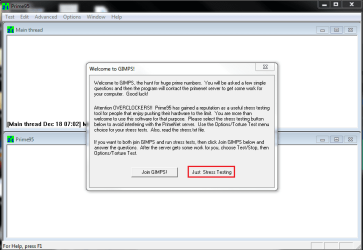
3. Select "Just Stress Testing" in the first window that appears.
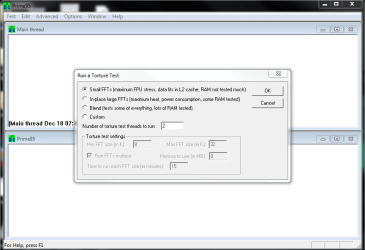
4. Select "Small FFTs", or whatever tests someone asks you to run. Prime95 will automatically select the maximum number of threads reported by Windows in the "Number of threads to run" box.
5. Keep an eye on your temperatures, and stop the test if the machine starts to overheat.
6. Leave the test running for up to 2 hours, unless errors occur sooner. Errors will show up by one or more of the workers stopping.
As with all hardware tests, Prime95 is not fail-safe. If the test passes for 2 hours with no errors, it is most likely to be stable. Unfortunately, it sometimes makes mistakes and gives a clean bill of health to faulty hardware.
Last edited by a moderator: Feb 19, 2014
A strange breed of redneck...
Guru Gold Member SF Team
Messages
13,322
Reaction score
946
Points
0
.. .. .. ..
Pro User
Gold Member
VIP
Use task manage and check if all threads are under 100% load when the Prime95 test is running. If it's under 100% load then it is running.
Computer type PC/Desktop Computer Manufacturer/Model Number ASUS X550ZE OS Windows 7 Home Premium 64-BIT CPU AMD A8 7200P Motherboard N/A Memory 8GB 1600mhz Graphics Card(s) Radeon R5 (APU) + Radeon R5 M230 2GB Dual Graphics Sound Card Realtek ALC269 with SonicMaster Monitor(s) Displays Laptop Display Screen Resolution 1920 x 1080 @60hz Hard Drives WDC WD50 00LPVX-80V0TT0 (500GB) PSU Laptop Charger Mouse ARMAGGEDON TEXTRON SCORPION 7 Internet Speed 100 mbps DOWN / 50 mbps UP Antivirus Windows Defender Browser Mozzila FireFox, Valve Steam in-game internet browser
3 Brain Cells
Guru
Gold Member
VIP
Check out Advanced and or Options at the top of the page. Make a selection.
Computer type PC/Desktop Computer Manufacturer/Model Number Home made Desktop OS Windows 10 Pro. 64/ version 1709 Windows 7 Pro/64 CPU Intel i7-6800K @ 4.3 Motherboard ASUS X-99 Deluxe II Memory Corsair Platinum 16 gig @2400 Graphics Card(s) EVGA GTX 1070 OC Monitor(s) Displays Asus 27" LED LCD/VE278Q Screen Resolution 1920-1080 or 1280-720 HDMI Hard Drives INTEL SSD 730-240 Gb Sata 3.0/ PSU EVGA Platium 1200W Case Phanteks Luxe Tempered Glass 8 fans/ one radiator Cooling XSPC/ Water Cooled CPU Keyboard Das 4 Professional Mouse Logitech M705/MX Anywhere 2-S Internet Speed 100 mbits Antivirus Microsoft Security Essentials/ Malwarebytes Premium 3.0/ SAS Browser I.E. 11 default/Firefox/ ISP Time Warner Cable/Spectrum Other Info LG BluRay Burner/
Confusion Therapist
Guru
Gold Member
VIP
Ok I was looking for a screen that showed it actually running so what is that screen for?
Computer type PC/Desktop Computer Manufacturer/Model Number Own build (new) Desk1 / Asus ROG Win 7 / Desk2 1st build OS Desk1 7 Home Prem / Desk2 10 Pro / Main lap Asus ROG 10 Pro 2 laptop Toshiba 7 Pro Asus P2520 7 & 10 CPU Desk1 i5 3750K / Laptop i7 GTX 860M / Desk2 i5 2500 Motherboard Desk1 Asus P877-V / Desk2 Gigabyte H67 UD3H / Laptop ? Memory Desk1 8GB (1866) / Desk2 16GB (1333) / Laptop 8Gb DDR3 Graphics Card(s) Desk 1& 2NVidia GTX 650 & Laptops on board Intel Sound Card Desk 1 & 2 -XONAR DG Realtek High Def audio Laptop Monitor(s) Displays Desk 1 Benq HD 2450 / Desk2 Philips 24" / Laptop 17.5" Screen Resolution 1920x1080 D1 & D2 & Laptop 1 Hard Drives Desk1 Samsung 120GB 830 SSD PSU Desk 1 Corsair HX 1050/ Laptop ? / Desk 2 Corsair HX 650 Case Desk 1 Cooler HAF XM ? Toshiba laptop / Desk2 Coolermaster Cooling Fans on all Desk1 -2 Desk2 - all Coolermasters 5 Laptop ? Keyboard Desk 1 MS Sidewinder X6 Desk 2 MS Sidewinder X 4 Mouse Desk 1&2 - Gigabyte MS 900 gamer - laptop - Logitec wireless Internet Speed ADSL2+ Other Info One other Desktop (tester) and spare Toshba laptop both with SSD's
Confusion Therapist
Guru
Gold Member
VIP
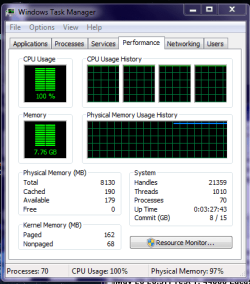
Use task manage and check if all threads are under 100% load when the Prime95 test is running. If it's under 100% load then it is running.
Ok and is that correct for that much RAM to be used too??
STRESS.PNG
16.3 KB
· Views: 438
Computer type PC/Desktop Computer Manufacturer/Model Number Own build (new) Desk1 / Asus ROG Win 7 / Desk2 1st build OS Desk1 7 Home Prem / Desk2 10 Pro / Main lap Asus ROG 10 Pro 2 laptop Toshiba 7 Pro Asus P2520 7 & 10 CPU Desk1 i5 3750K / Laptop i7 GTX 860M / Desk2 i5 2500 Motherboard Desk1 Asus P877-V / Desk2 Gigabyte H67 UD3H / Laptop ? Memory Desk1 8GB (1866) / Desk2 16GB (1333) / Laptop 8Gb DDR3 Graphics Card(s) Desk 1& 2NVidia GTX 650 & Laptops on board Intel Sound Card Desk 1 & 2 -XONAR DG Realtek High Def audio Laptop Monitor(s) Displays Desk 1 Benq HD 2450 / Desk2 Philips 24" / Laptop 17.5" Screen Resolution 1920x1080 D1 & D2 & Laptop 1 Hard Drives Desk1 Samsung 120GB 830 SSD PSU Desk 1 Corsair HX 1050/ Laptop ? / Desk 2 Corsair HX 650 Case Desk 1 Cooler HAF XM ? Toshiba laptop / Desk2 Coolermaster Cooling Fans on all Desk1 -2 Desk2 - all Coolermasters 5 Laptop ? Keyboard Desk 1 MS Sidewinder X6 Desk 2 MS Sidewinder X 4 Mouse Desk 1&2 - Gigabyte MS 900 gamer - laptop - Logitec wireless Internet Speed ADSL2+ Other Info One other Desktop (tester) and spare Toshba laptop both with SSD's
Confusion Therapist
Guru
Gold Member
VIP
Check out Advanced and or Options at the top of the page. Make a selection.
Ok Jack I chose torture test and this is after about four to five minutes.
STRESS 2.PNG
22.3 KB
· Views: 438
Computer type PC/Desktop Computer Manufacturer/Model Number Own build (new) Desk1 / Asus ROG Win 7 / Desk2 1st build OS Desk1 7 Home Prem / Desk2 10 Pro / Main lap Asus ROG 10 Pro 2 laptop Toshiba 7 Pro Asus P2520 7 & 10 CPU Desk1 i5 3750K / Laptop i7 GTX 860M / Desk2 i5 2500 Motherboard Desk1 Asus P877-V / Desk2 Gigabyte H67 UD3H / Laptop ? Memory Desk1 8GB (1866) / Desk2 16GB (1333) / Laptop 8Gb DDR3 Graphics Card(s) Desk 1& 2NVidia GTX 650 & Laptops on board Intel Sound Card Desk 1 & 2 -XONAR DG Realtek High Def audio Laptop Monitor(s) Displays Desk 1 Benq HD 2450 / Desk2 Philips 24" / Laptop 17.5" Screen Resolution 1920x1080 D1 & D2 & Laptop 1 Hard Drives Desk1 Samsung 120GB 830 SSD PSU Desk 1 Corsair HX 1050/ Laptop ? / Desk 2 Corsair HX 650 Case Desk 1 Cooler HAF XM ? Toshiba laptop / Desk2 Coolermaster Cooling Fans on all Desk1 -2 Desk2 - all Coolermasters 5 Laptop ? Keyboard Desk 1 MS Sidewinder X6 Desk 2 MS Sidewinder X 4 Mouse Desk 1&2 - Gigabyte MS 900 gamer - laptop - Logitec wireless Internet Speed ADSL2+ Other Info One other Desktop (tester) and spare Toshba laptop both with SSD's
3 Brain Cells
Guru
Gold Member
VIP
It all depends what test you select.
Computer type PC/Desktop Computer Manufacturer/Model Number Home made Desktop OS Windows 10 Pro. 64/ version 1709 Windows 7 Pro/64 CPU Intel i7-6800K @ 4.3 Motherboard ASUS X-99 Deluxe II Memory Corsair Platinum 16 gig @2400 Graphics Card(s) EVGA GTX 1070 OC Monitor(s) Displays Asus 27" LED LCD/VE278Q Screen Resolution 1920-1080 or 1280-720 HDMI Hard Drives INTEL SSD 730-240 Gb Sata 3.0/ PSU EVGA Platium 1200W Case Phanteks Luxe Tempered Glass 8 fans/ one radiator Cooling XSPC/ Water Cooled CPU Keyboard Das 4 Professional Mouse Logitech M705/MX Anywhere 2-S Internet Speed 100 mbits Antivirus Microsoft Security Essentials/ Malwarebytes Premium 3.0/ SAS Browser I.E. 11 default/Firefox/ ISP Time Warner Cable/Spectrum Other Info LG BluRay Burner/
.. .. .. ..
Pro User
Gold Member
VIP
The CPU test seems to be alright. I'll have to check on my system if I get the same RAM usage too.
Computer type PC/Desktop Computer Manufacturer/Model Number ASUS X550ZE OS Windows 7 Home Premium 64-BIT CPU AMD A8 7200P Motherboard N/A Memory 8GB 1600mhz Graphics Card(s) Radeon R5 (APU) + Radeon R5 M230 2GB Dual Graphics Sound Card Realtek ALC269 with SonicMaster Monitor(s) Displays Laptop Display Screen Resolution 1920 x 1080 @60hz Hard Drives WDC WD50 00LPVX-80V0TT0 (500GB) PSU Laptop Charger Mouse ARMAGGEDON TEXTRON SCORPION 7 Internet Speed 100 mbps DOWN / 50 mbps UP Antivirus Windows Defender Browser Mozzila FireFox, Valve Steam in-game internet browser
Confusion Therapist
Guru
Gold Member
VIP
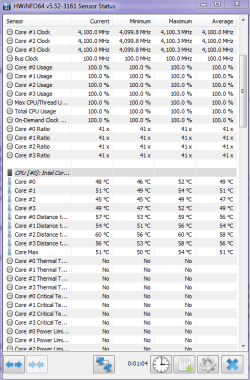
NO my CPU maxed at 100% and he RAM a constant 98.6% and I ran the torture test temps never got above 60C and although Tjunc is 72.5C or something at least the cooling is working fine.
But am now stumped as to what my main problem is I cannot think of anything else to test
Computer type PC/Desktop Computer Manufacturer/Model Number Own build (new) Desk1 / Asus ROG Win 7 / Desk2 1st build OS Desk1 7 Home Prem / Desk2 10 Pro / Main lap Asus ROG 10 Pro 2 laptop Toshiba 7 Pro Asus P2520 7 & 10 CPU Desk1 i5 3750K / Laptop i7 GTX 860M / Desk2 i5 2500 Motherboard Desk1 Asus P877-V / Desk2 Gigabyte H67 UD3H / Laptop ? Memory Desk1 8GB (1866) / Desk2 16GB (1333) / Laptop 8Gb DDR3 Graphics Card(s) Desk 1& 2NVidia GTX 650 & Laptops on board Intel Sound Card Desk 1 & 2 -XONAR DG Realtek High Def audio Laptop Monitor(s) Displays Desk 1 Benq HD 2450 / Desk2 Philips 24" / Laptop 17.5" Screen Resolution 1920x1080 D1 & D2 & Laptop 1 Hard Drives Desk1 Samsung 120GB 830 SSD PSU Desk 1 Corsair HX 1050/ Laptop ? / Desk 2 Corsair HX 650 Case Desk 1 Cooler HAF XM ? Toshiba laptop / Desk2 Coolermaster Cooling Fans on all Desk1 -2 Desk2 - all Coolermasters 5 Laptop ? Keyboard Desk 1 MS Sidewinder X6 Desk 2 MS Sidewinder X 4 Mouse Desk 1&2 - Gigabyte MS 900 gamer - laptop - Logitec wireless Internet Speed ADSL2+ Other Info One other Desktop (tester) and spare Toshba laptop both with SSD's
.. .. .. ..
Pro User
Gold Member
VIP
ok it looks like you chose the Blend test which stresses the CPU and the RAM. The temps look OK too.
Computer type PC/Desktop Computer Manufacturer/Model Number ASUS X550ZE OS Windows 7 Home Premium 64-BIT CPU AMD A8 7200P Motherboard N/A Memory 8GB 1600mhz Graphics Card(s) Radeon R5 (APU) + Radeon R5 M230 2GB Dual Graphics Sound Card Realtek ALC269 with SonicMaster Monitor(s) Displays Laptop Display Screen Resolution 1920 x 1080 @60hz Hard Drives WDC WD50 00LPVX-80V0TT0 (500GB) PSU Laptop Charger Mouse ARMAGGEDON TEXTRON SCORPION 7 Internet Speed 100 mbps DOWN / 50 mbps UP Antivirus Windows Defender Browser Mozzila FireFox, Valve Steam in-game internet browser
Confusion Therapist
Guru
Gold Member
VIP
Yep Roaster mate this is the third in approx 2 months with each OS anyway I have put otu feelers here
New motherboard and CPU - Windows 10 Forums for ideas on a new mobo and CPU as I have simply had it now with this one.
Computer type PC/Desktop Computer Manufacturer/Model Number Own build (new) Desk1 / Asus ROG Win 7 / Desk2 1st build OS Desk1 7 Home Prem / Desk2 10 Pro / Main lap Asus ROG 10 Pro 2 laptop Toshiba 7 Pro Asus P2520 7 & 10 CPU Desk1 i5 3750K / Laptop i7 GTX 860M / Desk2 i5 2500 Motherboard Desk1 Asus P877-V / Desk2 Gigabyte H67 UD3H / Laptop ? Memory Desk1 8GB (1866) / Desk2 16GB (1333) / Laptop 8Gb DDR3 Graphics Card(s) Desk 1& 2NVidia GTX 650 & Laptops on board Intel Sound Card Desk 1 & 2 -XONAR DG Realtek High Def audio Laptop Monitor(s) Displays Desk 1 Benq HD 2450 / Desk2 Philips 24" / Laptop 17.5" Screen Resolution 1920x1080 D1 & D2 & Laptop 1 Hard Drives Desk1 Samsung 120GB 830 SSD PSU Desk 1 Corsair HX 1050/ Laptop ? / Desk 2 Corsair HX 650 Case Desk 1 Cooler HAF XM ? Toshiba laptop / Desk2 Coolermaster Cooling Fans on all Desk1 -2 Desk2 - all Coolermasters 5 Laptop ? Keyboard Desk 1 MS Sidewinder X6 Desk 2 MS Sidewinder X 4 Mouse Desk 1&2 - Gigabyte MS 900 gamer - laptop - Logitec wireless Internet Speed ADSL2+ Other Info One other Desktop (tester) and spare Toshba laptop both with SSD's