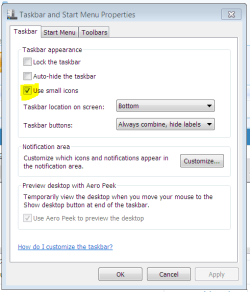
Recent install of Win7 x64 from an image onto my SSD drive.
(all updates and SSD firmware up to date etc)
I have a working firewall and I ran MS Security Essentials and nothing was found, so no virus' etc.
I changed the DPI of screen text as one of my Applications (Lightwave 3D) had very small menu text and I bumped the screen DPI up to 125% to see if it was better.
It wasn't (looked a bit Fisher Price!) so I put it back to 100%.
I started getting odd errors and a bluescreen and ran SFC /Scannow to see if there was any problem after the last batch of Windows updates.
SFC found errors. but said it was unable to fix them?
I rebooted and ran it again and it didn't find any corrupt files.
I rebooted again, only to find that the icons in my notification area were TINY and I could hardly see them on my 27" monitor set to hi res.
All seems to be working now, apart from teh above.
Any fix for this, be good to get them back to normal size!
thanks.
(all updates and SSD firmware up to date etc)
I have a working firewall and I ran MS Security Essentials and nothing was found, so no virus' etc.
I changed the DPI of screen text as one of my Applications (Lightwave 3D) had very small menu text and I bumped the screen DPI up to 125% to see if it was better.
It wasn't (looked a bit Fisher Price!) so I put it back to 100%.
I started getting odd errors and a bluescreen and ran SFC /Scannow to see if there was any problem after the last batch of Windows updates.
SFC found errors. but said it was unable to fix them?
I rebooted and ran it again and it didn't find any corrupt files.
I rebooted again, only to find that the icons in my notification area were TINY and I could hardly see them on my 27" monitor set to hi res.
All seems to be working now, apart from teh above.
Any fix for this, be good to get them back to normal size!
thanks.
My Computer
- OS
- Win7 x64
- CPU
- q6600 Go @ 3.4GHz
- Motherboard
- Gigabyte P35
- Memory
- 6GB
- Graphics Card(s)
- Nvidia Quadro FX 3700
- Sound Card
- onboard
- Monitor(s) Displays
- Benq G2420HDBL
- Hard Drives
- Samsung Spinpoint F3 1TB
Samsung Spinpoint F3 500GB
WD Mybook external USB 1TB