has the windows 7 explorer folder refresh bug been solved?

win7user2010

New member
Member
Local time
10:36 PM
Messages
84
Hi, for a long time I've been having a problem where windows 7 does not refresh the folder or desktop views when I do things like copy/paste files, rename files, create a new file/folder, etc. I have to press F5 in order to get the correct view.

After maybe 5-10 minutes of dealing with this problem, it seems to sometimes go away. Other times I reboot to end the problem. Also it seems that this problem arises when working with my computer after it has been asleep.

I have seen other people on the internet have been having similar issues for I think a year with windows 7, with no conclusive solution being reached to fix it.

Anyone know if a solution been reached to this issue?
 

My Computer

OS
windows 7
I've never had that problem, but if I have time tomorrow I will look if there is a solution to this.
 

My Computer

Computer type
PC/Desktop
Computer Manufacturer/Model Number
Custom built Desktop(Myself) Specs below - Also Asus G53SW-A1 laptop
OS
Windows 10 Pro / OpenSUSE
CPU
Intel Core i7 4790K
Motherboard
Asus Z97-A
Memory
32GB DDR3
Graphics Card(s)
EVGA GTX 1070
Sound Card
OnBoard
Monitor(s) Displays
3 X 1080P 24" displays
Screen Resolution
1280x1050 & 1920x1080
Hard Drives
SSD: Crucial M500 128GB
HD 1: WD Caviar Black 1TB
HD 2: WD Caviar Black 2TB
HD 3: WD Caviar Blue 500GB
PSU
Corsair CX650M
Case
Corsair Obisidian 450D
Cooling
Noctua NH-D14
Keyboard
Corsair K70 Vengeance (blue switches)
Mouse
Logitech M500
Internet Speed
65/10
Antivirus
Kaskersky Internet Securty
Browser
Opera
Have you tried sfc /scannow from an elevated command prompt?

~Lordbob
 

My Computer

Computer Manufacturer/Model Number
Hera
OS
Windows 7 Ultimate x64, Mint 9
CPU
Intel i5-2500k
Motherboard
ASUS P8P67 Pro
Memory
2x 4Gb Corsair VENGEANCE DDR3-1600
Graphics Card(s)
NVidia GeForce N260GTX Twin Frozr
Sound Card
Realtek HD OnBoard Audio
Monitor(s) Displays
ASUS 24" Monitor
Screen Resolution
1920x1080
Hard Drives
G.SKILL Phoenix Series 60GB SATA II MLC Internal Solid State Drive (SSD)
SAMSUNG Spinpoint F3R 1TB 7200 RPM 32MB Cache SATA II
PSU
Cooler Master Real Power Pro 750W
Case
Cooler Master Haf 932
Cooling
Fans
Keyboard
Razer Tarantula
Mouse
Razer Lachesis
Internet Speed
not fast enough
I've had this issue...the cause was SuperAntiSpyware for some reason... if you have that program try uninstalling it.. Just my suggestion, trying to help. :)

Edit: Why i have these problems with SAS i have no idea..never did before. It would also crash my explorer. :S
 

My Computer

Computer type
PC/Desktop
OS
Win7 Home Premium x64 SP1, Archlinux x86_64. Elementary Luna
Hit start, and type cmd
Right click on it and select run as admin (say yes to prompt)
type sfc /scannow

~Lordbob
 

My Computer

Computer Manufacturer/Model Number
Hera
OS
Windows 7 Ultimate x64, Mint 9
CPU
Intel i5-2500k
Motherboard
ASUS P8P67 Pro
Memory
2x 4Gb Corsair VENGEANCE DDR3-1600
Graphics Card(s)
NVidia GeForce N260GTX Twin Frozr
Sound Card
Realtek HD OnBoard Audio
Monitor(s) Displays
ASUS 24" Monitor
Screen Resolution
1920x1080
Hard Drives
G.SKILL Phoenix Series 60GB SATA II MLC Internal Solid State Drive (SSD)
SAMSUNG Spinpoint F3R 1TB 7200 RPM 32MB Cache SATA II
PSU
Cooler Master Real Power Pro 750W
Case
Cooler Master Haf 932
Cooling
Fans
Keyboard
Razer Tarantula
Mouse
Razer Lachesis
Internet Speed
not fast enough
thank you for the directions, its running now.

One of the difficulties with this issue I'm having is that it is very hard to pinpoint it. Right now, things appear to be working fine, and I'm not able to reproduce the problem. But maybe sometime later in the day it comes back, and when it does, it can be somewhat frustrating.
 

My Computer

OS
windows 7
Okay, the scan has been completed, and it gave me the following message:

Windows Resource Protection found corrupt files and successfully repaired them. Details are included in the CBS.log windir\Logs\CBS\CBS.log. FOr example C:\Windows\Logs\CBS\CBS.log

The system file repair changes will take effect after the next reboot.
 

My Computer

OS
windows 7
Restart and see if the problem persists.

~Lordbob
 

My Computer

Computer Manufacturer/Model Number
Hera
OS
Windows 7 Ultimate x64, Mint 9
CPU
Intel i5-2500k
Motherboard
ASUS P8P67 Pro
Memory
2x 4Gb Corsair VENGEANCE DDR3-1600
Graphics Card(s)
NVidia GeForce N260GTX Twin Frozr
Sound Card
Realtek HD OnBoard Audio
Monitor(s) Displays
ASUS 24" Monitor
Screen Resolution
1920x1080
Hard Drives
G.SKILL Phoenix Series 60GB SATA II MLC Internal Solid State Drive (SSD)
SAMSUNG Spinpoint F3R 1TB 7200 RPM 32MB Cache SATA II
PSU
Cooler Master Real Power Pro 750W
Case
Cooler Master Haf 932
Cooling
Fans
Keyboard
Razer Tarantula
Mouse
Razer Lachesis
Internet Speed
not fast enough
Thank you for your assistance. So far the problem hasn't returned. If it comes back while I work today, I'll put an update.

I do feel better that windows was able to fix whatever corruptions were found in the scannow process.

Thank you, I really appreciate the kindness and helpfulness of the contributors to this forum.
 

My Computer

OS
windows 7
Hi,
I've noticed that the problem has returned, but it is only a minor annoyance. It appears the scannow doesn't solve the problem, but I appreciated the help I received.
 

My Computer

OS
windows 7
i thought i had a fix, but it didn't work, and was in fact nonsense.
 
Last edited:

My Computer

Computer Manufacturer/Model Number
mickey megabyte 1234
OS
ultimate 64 sp1
CPU
i5 2500K [email protected]
Motherboard
MSI P67A-GD53
Memory
8 gigs GSkill Ripjaws 1600
Graphics Card(s)
amd hd6950
Sound Card
creative x-fi gamer
Monitor(s) Displays
samsung 24"
Screen Resolution
1920x1080
Hard Drives
ocz vertex 2e 60 gig, samsung f3 1tb, buffalo 2tb ext
PSU
antec 550
Case
antec three hundred
Cooling
i'm a cooling fan
Keyboard
saitek eclipse ii
Mouse
logitech g3
Internet Speed
about 4 Mbps
Other Info
i love win7
Thank you for your response,
I'm nervous about applying that suggestion, I found online that the fix helped some people and didn't help some people. And I'm not sure how the registry value is related to the issue. I found the following:

UpdateMode value
This registry entry determines how the client will search for the
Ntconfig.pol file that contains the policies.
Path: HKEY_LOCAL_MACHINE\System\CurrentControlSet\Control\Update
Value name: UpdateMode
Data type: REG_DWORD
Values:

Value Description
------------------
0 System Policies are disabled.
1 Automatic mode searches for a policy file that is named Ntconfig.pol
in the authenticating server's Netlogon share. This is the
default value.
2 Manual mode searches for the specified policy file in the location
that is specified by the NetworkPath value. If UpdateMode is set
to a value of 2, you must specify an additional value that is
named NetworkPath that specifies a local or network system policy
path and file name.
 

My Computer

OS
windows 7
Also I cannot find the path in my 32 bit Windows 7:

HKEY_LOCAL_MACHINE\System\CurrentControlSet\Control\Update

I see up to the subfolder "Control", but there is no subfolder under that called "Update" in my registry.
 

My Computer

OS
windows 7
i've just found where the tip came from:

microsoft answers

there are also other threads here, here and here, here and here too

lots of speculations in the threads, lots of suggested fixes that only work for a day or two - nothing conclusive. a common suggestion is that the problem only occurs in libraries, or where user documents are in a non-default location...

although your research suggests that this registry key has nothing to do with file refresh. in that case, i apologise for hastily spreading incorrect information before fully testing.

the problem has also just started again for me. so my 'fix' is useless, and i'm going to ask the admins to remove.

sorry about this, and lets hope that microsoft start acknowldeging the problem and bring out a fix, as it is trul annoying not being able to see newly copied files!

after reading the threads again, there are lots of theories, and a few suggested fixes...which work for a few days. then problem returns.
 
Last edited:

My Computer

Computer Manufacturer/Model Number
mickey megabyte 1234
OS
ultimate 64 sp1
CPU
i5 2500K [email protected]
Motherboard
MSI P67A-GD53
Memory
8 gigs GSkill Ripjaws 1600
Graphics Card(s)
amd hd6950
Sound Card
creative x-fi gamer
Monitor(s) Displays
samsung 24"
Screen Resolution
1920x1080
Hard Drives
ocz vertex 2e 60 gig, samsung f3 1tb, buffalo 2tb ext
PSU
antec 550
Case
antec three hundred
Cooling
i'm a cooling fan
Keyboard
saitek eclipse ii
Mouse
logitech g3
Internet Speed
about 4 Mbps
Other Info
i love win7
Yeah, its an odd problem, it comes and goes for me too.

Thank you though for trying to help me.
 

My Computer

OS
windows 7
Yeah, its an odd problem, it comes and goes for me too.

Thank you though for trying to help me.

Yeah comes and goes is right ! Its exactly like that on my machine.
 

My Computer

Computer Manufacturer/Model Number
Store Assembled
OS
Win 7
CPU
AMD Phenom™ II X6 1090T
Motherboard
ASUS M4A89GTD PRO/USB3 with AMD® 890GX/SB850 chipset
Memory
8 GB Corsair (2X4Gb)
Graphics Card(s)
Included in AMD® 890GX/SB850 chipset on MB
Sound Card
Included in AMD® 890GX/SB850 chipset on MB
Monitor(s) Displays
Dell ST 2210 21.5inch LCD
Hard Drives
Seagate Barracuda 7200.12 1TB SATA
PSU
500 W
Case
Zebronic ATX
Cooling
No extra cooling
it's only an idea, but you have to start somewhere...i would really like (along with lots of other frustrated users) to try to investigate this truly annoying problem further.

do either of you use mapped network drives?
does problem only occur in libraries and desktop?
have you moved the default user files locations?
what anti-virus software do you use? kaspersky here

i think my problem may have started when i mapped my laptop drive in explorer OR when i allowed windows update to give me a new driver for my network controller.

since i removed the mapped drive, and reverted to my old nic driver, i haven't experienced the refresh problem.....yet! :rolleyes:

or maybe this problem doesn't have the one single cause? it's baffling, and microsoft won't admit there is a problem at all, let alone try to fix it. :mad:
 

My Computer

Computer Manufacturer/Model Number
mickey megabyte 1234
OS
ultimate 64 sp1
CPU
i5 2500K [email protected]
Motherboard
MSI P67A-GD53
Memory
8 gigs GSkill Ripjaws 1600
Graphics Card(s)
amd hd6950
Sound Card
creative x-fi gamer
Monitor(s) Displays
samsung 24"
Screen Resolution
1920x1080
Hard Drives
ocz vertex 2e 60 gig, samsung f3 1tb, buffalo 2tb ext
PSU
antec 550
Case
antec three hundred
Cooling
i'm a cooling fan
Keyboard
saitek eclipse ii
Mouse
logitech g3
Internet Speed
about 4 Mbps
Other Info
i love win7
do either of you use mapped network drives?
Yes, I have some network drives now. But I think I had this problem before I had the them. I can't remember at the moment.

does problem only occur in libraries and desktop?
No. I don't use libraries. This problem happens on the desktop as well as in folders.

have you moved the default user files locations?
I don't know. Not sure.

what anti-virus software do you use?
I currently use Avast, but I had this problem while using AVG as well.


or maybe this problem doesn't have the one single cause? it's baffling, and microsoft won't admit there is a problem at all, let alone try to fix it.
Strangely, I've read online that previous versions of Windows has this same reported problem (going back at least to Windows XP).


Additional note:
I've noticed that the problem is more likely to occur for me if my computer has been asleep for a long time, and then I wake it up. Or if my computer has been left on for a long time (hours) without any activity being done on it. And it is less likely to occur after a reboot/restart.
 

My Computer

OS
windows 7
so we can discount the libraries and antivirus. i didn't notice any worsening after waking up from sleep.

about the user files locations - i moved my standard documents, pictures etc folders onto my d: drive - it looks as if this was not the problem either.

something else i noticed whilst suffering from the refresh bug was a noticeable pause when uploading files to forums.

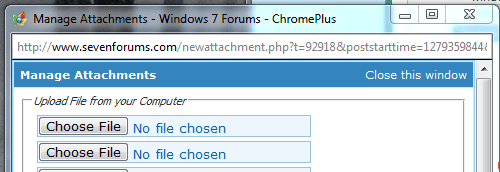
try attaching a small file to a post, and see if you get a long pause before 'No file chosen' changes to your attached file name. it used to take a second or two when i was suffering, but is now virtually instant.

so far mine has still been okay since removing the mapped network drives, and restoring my old nic driver...and i'm keeping my fingers crossed. :)
 

Attachments

  • upload.PNG
    upload.PNG
    10.5 KB · Views: 38

My Computer

Computer Manufacturer/Model Number
mickey megabyte 1234
OS
ultimate 64 sp1
CPU
i5 2500K [email protected]
Motherboard
MSI P67A-GD53
Memory
8 gigs GSkill Ripjaws 1600
Graphics Card(s)
amd hd6950
Sound Card
creative x-fi gamer
Monitor(s) Displays
samsung 24"
Screen Resolution
1920x1080
Hard Drives
ocz vertex 2e 60 gig, samsung f3 1tb, buffalo 2tb ext
PSU
antec 550
Case
antec three hundred
Cooling
i'm a cooling fan
Keyboard
saitek eclipse ii
Mouse
logitech g3
Internet Speed
about 4 Mbps
Other Info
i love win7
Back
Top