Have both XP and Windows 7 installed on computer BUT..

In addition to the above - as this is a HP system - HP wil normally supply a set of recovery disks for their machines for a nominal shipping charge.

This may be a last option
 

My Computers My Computers

  • At a glance

    Windows 11 Pro x64 [Latest Release and Releas...Ryzen 9 5950X, 3.8 - 5.2 MHz64GB [2 x 32GB] DDR4 3200MHz4GB NVIDIA GEFORCE GTX 1650 Ti
    Computer type
    PC/Desktop
    Computer Manufacturer/Model Number
    ChillBlast - Custom to my design
    OS
    Windows 11 Pro x64 [Latest Release and Release Preview]
    CPU
    Ryzen 9 5950X, 3.8 - 5.2 MHz
    Motherboard
    Asus Prime X570-Pro
    Memory
    64GB [2 x 32GB] DDR4 3200MHz
    Graphics Card(s)
    4GB NVIDIA GEFORCE GTX 1650 Ti
    Sound Card
    On-board SPDIF to 5.1 System + HDMI [5.1 system]
    Monitor(s) Displays
    32" UHD 32 Bit HDR Monitor + 43" UHD 4K 32Bit HDR TV
    Screen Resolution
    2 x 3840 x 2160 @60Hz
    Hard Drives
    1TB M2 SSD OS, 500GB Fast Access SSD, 2 x 8TB Data + Various Externals from 1TB to 4TB, 10TB NAS
    PSU
    NZXT C750 80 PLUS Gold 750W Modular PSU
    Case
    Workstation Case [Matt Black]
    Cooling
    NZXT Kraken X63 280mm CPU Cooler +2x Quiet Case fans
    Keyboard
    Logitech Wireless MX Keys & K400 + others
    Mouse
    Logitech Wireless MX Master 3S
    Internet Speed
    920 MB Down 50 MB Up
    Antivirus
    BitDefender Total Security Pro
    Browser
    Chrome (always run latest Non-Beta)
    Other Info
    Also run ...
    Laptop - Quad 8GB - Windows 10 Pro x64
    Nexus 7 Android tablet x2
    Samsung 10.2" tablet
    Blackview TAB 8 4G Android Tablet c/w Keyboard
    Wacom Intuos Pro Medium Pen Pad
    Wacom Intuos Pro Small Pen Pad
    Wacom Expresskeys Remote
    Loopdeck+ Graphics Controller
    Shuttle Pro v2 Control
  • At a glance

    Windows 11 Pro x64 Latest RPIntel I7 10750H 5.0GHz32GB [2x16GB] DDR4 2933 MHznVidia GTX1650Ti 4 GB GDDR6
    Computer type
    Laptop
    System Manufacturer/Model Number
    Dell XPS 17 10750H
    OS
    Windows 11 Pro x64 Latest RP
    CPU
    Intel I7 10750H 5.0GHz
    Motherboard
    Dell XPS
    Memory
    32GB [2x16GB] DDR4 2933 MHz
    Graphics Card(s)
    nVidia GTX1650Ti 4 GB GDDR6
    Sound Card
    Stock [Realtek] 4 Speaker
    Monitor(s) Displays
    17" IPS UHD+ Infinity Edge Touchscreen
    Screen Resolution
    3840 x 2400
    Hard Drives
    2TB M2 NVMe, 4TB External + various 500GB & 1TB External NVMe (also have access to spinner HDD from
    PSU
    Stock
    Case
    Stock XPS Aluminium & Carbon Fibre
    Cooling
    Stock - Active Fan Control
    Keyboard
    Backlit + Various Logitech
    Mouse
    Stock Track Pad + Logitech MX Trackball
    Internet Speed
    72 MB Down 18MB Up
    Browser
    Chrome
    Other Info
    Also run ...
    Laptop - Quad 8GB - Windows 10 Pro x64
    Nexus 7 Android tablet x2
    10.2" tablet
    Sony Z3 Android Smartphone
    Wacom Intuos Pro Medium Pen Pad
    Wacom Intuos Pro Small Pen Pad
    Wacom Expresskeys Remote
    Loopdeck+ Graphics Controller
    Shuttle Pro v2 Control Pad
    10TB NAS
Try F11 instead of F10 or F8.
 

My Computer My Computer

At a glance

Vista, Windows7, Mint Mate, Zorin, Windows 8from 1.6GHz Duo to i7
Computer Manufacturer/Model Number
HP, Dell, Gateway, Toshiba - 4 laptops and 2 desktops
OS
Vista, Windows7, Mint Mate, Zorin, Windows 8
CPU
from 1.6GHz Duo to i7
Monitor(s) Displays
2x HP w2207
Hard Drives
5x HDD, 7x SSD, 12x Externals
Keyboard
with trackball - no mices
Mouse
Trackball mice
Internet Speed
DSL 6000
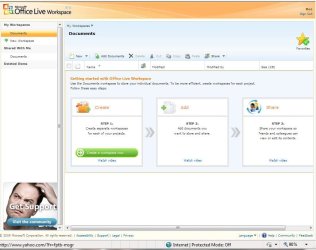
MS Live Add-on Workspace in Win7
 

Attachments

  • MS_Live_Add_on_Workspace.JPG
    MS_Live_Add_on_Workspace.JPG
    65 KB · Views: 14

My Computer My Computer

At a glance

Win7 Enterprise, Win7 x86 (Ult 7600), Win7 x6...AMD fx8350 4ghz, AMD-32 2400mhz, AMD-64 3200m...2gb, 4gb on the Ult 7600, 4gb on Technet RTM,...Draw my own Graphics, several nVidia cards
Computer type
PC/Desktop
Computer Manufacturer/Model Number
Built them myself, Science Experiments !
OS
Win7 Enterprise, Win7 x86 (Ult 7600), Win7 x64 Ult 7600, TechNet RTM on AMD x64 (2.8Ghz)
CPU
AMD fx8350 4ghz, AMD-32 2400mhz, AMD-64 3200mhz, AMDx64 2.8G
Motherboard
SIS 755, ECS-K8M890M-M (Ult 7600), GigaByte & others
Memory
2gb, 4gb on the Ult 7600, 4gb on Technet RTM, 32gb on FX8350
Graphics Card(s)
Draw my own Graphics, several nVidia cards
Sound Card
on motherboard
Monitor(s) Displays
19" flat scr, 28" I-Inc widescr,22" Emprex Widescr, 23" Acer
Screen Resolution
1280 x 1024, 1440 x 900, 1920 x 1080
Hard Drives
6 pata Ide HD's & 2 Sata HD's
added 80gb external on Ult 7600 computer,
numerous extra 1tb, 2TB, 3Tb SATA HD's
A collection of ext HD Docks w/ HDs
PSU
430w, 550w, 600w, 700, 800, etc
Case
All Generic Full Towers
Cooling
Open Air & a few fans, some w/ colored LEDs
Keyboard
Compaq & Dell recycled from GoodWill
Mouse
Made in China Optical Wired Mouse
Internet Speed
Fast Cable InterNet
Antivirus
AVG Free on 24 different Desktops, NO Problems!
Browser
IE 8 is preferred, but use FireFox sometimes
Other Info
Linksys Routers, switches, & Hubs
Too Many USB Flash Drives to count, Biggest is 64GB !
Eight computers in my home network.
Sixteen computers at my business network.
Linked via TeamViewer !
Lots of old used spare computer parts everywhere!
ADD-IN? Never heard of that. I would like to keep windows 7 because I really like it, but since I can't access the editor of MSOfficelive (small businesses) i thought I had no choice.

FURTHER UPDATE: I called HP, they have the recovery disk for purchase but its pricey. I am currently DL'ing the disks from a friend who had the similar problem and has the disks. Problem is he is in arizona and I am in NJ. He uploaded them as a torrent to share with me and others. They are in .iso format two dvd's and a cd. Anyways. Seems thats my only option since Windows 7 like others said above has completely different boot options. Although, I am going to try the option from BARMAN first. Urgh. This is obnoxious I tell ya. I can see the H drive and the F10 option, and its frusterating I cannot access it. I am hoping that the key for my XP since its genuine is still stored in the BIOS for when I do this. Although, the key i believe is printed on a sticker on my tower. I would like to hear more about this add-in for officelive. I was told by a tech support for Microsoft support that I cannot access my editor because it is a OS confliction. Although, strangely enough, it worked fine with windows 7 until they did an update to their site. Thanks for everyone's help. :) Microsoft better buy me that Gucchi purse for the heartache. lol. For everyone else, if they look this problem up and come across this..you need this disk set to fix the problem.
xp mce sp2 63naemmpa1 + supp 2 recovery kit.


My Computer My Computer

At a glance

XP/WINDOWS 7
Computer Manufacturer/Model Number
hp pavilion slimline s7520n PC
OS
XP/WINDOWS 7
whs: Ok well, I do see my recovery drive is still there and full. Now i have to figure out how to access it upon start up. The F10 option is no longer there.
Here is what I see. http://i110.photobucket.com/albums/n87/missdeadlocks/PC.jpg

Seems my HP recovery is still there...YIPPIE! So, any idea how I can access it from boot up to reformat?


The HP machine I had was F12; from a cold start, start tapping the F12 key to see if you get the "Recovery Option" sometimes it takes more than one try.


Have you tried this?
 

My Computer My Computer

At a glance

W 7 64-bit UltimateIntel Q9550 Yorkfield8GB Dominator 8500C5DATI : XFX 5870
Computer Manufacturer/Model Number
* BFK Customs *
OS
W 7 64-bit Ultimate
CPU
Intel Q9550 Yorkfield
Motherboard
ASUS P5Q Pro
Memory
8GB Dominator 8500C5D
Graphics Card(s)
ATI : XFX 5870
Sound Card
Realtek HD Audio 7-1
Monitor(s) Displays
1x 47" LCD HDMI & 3x 26" LCD HDMI
Screen Resolution
1920x1080P & 1920x1200
Hard Drives
1x 80GB Intel X25-M G2 SSD : 1x 500GB & 1x 640GB WD Caviar Black(s)
PSU
Corsair 620HX
Case
Cooler Master RC-690
Cooling
Tuniq Tower 120, 2x 140mm and 3x 120mm case fans
Keyboard
Microsoft 500
Mouse
Razer Diamondback 3G
Internet Speed
14 Mb/s
Other Info
1x Koutech 3Gb/s SATA HDD Hot Swap Rack
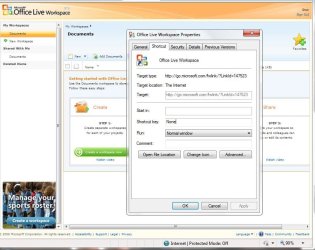
I must have got the ADD-On when I downloaded Windows LIVE Essentials from Microsoft.

After installing Office 2007 :confused:
 

Attachments

  • MS_Live_add_on_details.JPG
    MS_Live_add_on_details.JPG
    80.8 KB · Views: 8

My Computer My Computer

At a glance

Win7 Enterprise, Win7 x86 (Ult 7600), Win7 x6...AMD fx8350 4ghz, AMD-32 2400mhz, AMD-64 3200m...2gb, 4gb on the Ult 7600, 4gb on Technet RTM,...Draw my own Graphics, several nVidia cards
Computer type
PC/Desktop
Computer Manufacturer/Model Number
Built them myself, Science Experiments !
OS
Win7 Enterprise, Win7 x86 (Ult 7600), Win7 x64 Ult 7600, TechNet RTM on AMD x64 (2.8Ghz)
CPU
AMD fx8350 4ghz, AMD-32 2400mhz, AMD-64 3200mhz, AMDx64 2.8G
Motherboard
SIS 755, ECS-K8M890M-M (Ult 7600), GigaByte & others
Memory
2gb, 4gb on the Ult 7600, 4gb on Technet RTM, 32gb on FX8350
Graphics Card(s)
Draw my own Graphics, several nVidia cards
Sound Card
on motherboard
Monitor(s) Displays
19" flat scr, 28" I-Inc widescr,22" Emprex Widescr, 23" Acer
Screen Resolution
1280 x 1024, 1440 x 900, 1920 x 1080
Hard Drives
6 pata Ide HD's & 2 Sata HD's
added 80gb external on Ult 7600 computer,
numerous extra 1tb, 2TB, 3Tb SATA HD's
A collection of ext HD Docks w/ HDs
PSU
430w, 550w, 600w, 700, 800, etc
Case
All Generic Full Towers
Cooling
Open Air & a few fans, some w/ colored LEDs
Keyboard
Compaq & Dell recycled from GoodWill
Mouse
Made in China Optical Wired Mouse
Internet Speed
Fast Cable InterNet
Antivirus
AVG Free on 24 different Desktops, NO Problems!
Browser
IE 8 is preferred, but use FireFox sometimes
Other Info
Linksys Routers, switches, & Hubs
Too Many USB Flash Drives to count, Biggest is 64GB !
Eight computers in my home network.
Sixteen computers at my business network.
Linked via TeamViewer !
Lots of old used spare computer parts everywhere!
Miss Dead.. I'm pretty sure that HP's required you to create a bootable CD using the restore partition contents - before - anything bad happened.. I had to repair(reload) XP on a number of friend's HP's over the last couple years. The manuals and website said a Recovery CD was to be created after unpacking the machine, which they never did, so I used my own copy of XP to re-install the OS, but used their COA. Only difference was all the bloatware and HP-specific programs weren't there, which was fine as they were crap anyway.

If your hubby did a "clean install" of 7, without changing/deleting any partitions, then XP should still be in the Windows.old folder (it's sort of a quasi-upgrade installation). If you have another copy of XP, use that, but installing it into a DIFFERENTLY named Windows folder will -keep- your old files and let you save your data from your original XP install, and any Win7 data you'd want to keep as well..

I hope this helps...

TJ
 

My Computer My Computer

At a glance

Windows7 64bit Upgrade clean install.Intel Q6600 2.4Ghz Core2Quad Socket775 LGAHyundai Elec. DDR2 PC2-5300 333Mhz 4GB(2x2GB)NVidea GeForce 430 1GB DDR3 PCI-E
Computer Manufacturer/Model Number
Clone
OS
Windows7 64bit Upgrade clean install.
CPU
Intel Q6600 2.4Ghz Core2Quad Socket775 LGA
Motherboard
Asus P5G41-M LX2
Memory
Hyundai Elec. DDR2 PC2-5300 333Mhz 4GB(2x2GB)
Graphics Card(s)
NVidea GeForce 430 1GB DDR3 PCI-E
Sound Card
ECS Embedded HighDef Audio
Monitor(s) Displays
Envision L190
Hard Drives
Hitachi HDS721010 (Win7 64bit)
Hitachi HDS721075 (backup drive)
PSU
750w
Case
Mid Tower
Cooling
Intel OEM
Keyboard
Standard 102 KB
Mouse
Logitech USB TrackMan Wheel mouse
Internet Speed
VIA RhineII FastEthernet (embedded)
I've got this 'gut-feeling' that maybe some non-standard techniques might work,
without requiring a format and re-install of XP. Kinda ballsy, tho..

(At least I would do it on my computer if I had that situation,
but my BartPE XP tools would bring lotsa stuff back from the dead, in case I made a mistake.
She doesn't have these and will have to be extra careful.)

a.) Does she have a w7 'Install' DVD to boot from, if/when it 'hits the fan' ?
Does it boot OK, and 'Shift-F10' to Admin Cmd-prompt?
Can she run 'diskpart' from that DVD? i.e, these commands:
list disk
list volume
exit
should show us what's real (physical disks) and what's not (BD-ROM mounts)
and this info should also be posted.

1. Pic_1: We have to know what's in the root of the C: partition, with Sys/Hid files exposed, using Explorer, in 'List' view.
Specifically: ntldr and Ntdetect.com.
We already know for_sure? that Win7 'bootmgr' is there. Right?
Since w7 is fully available by booting HDD,
all prelim pics can be taken and posted using Win7.

2. Pic_2: We have to know what's in the \Windows.Old folder, using Explorer, in 'List' view.
Seems there should be a \Windows and \Windows\System32 in there, directly under \Windows.old...
(I've never worked with a \Windows.old.)

3. Pic_3: Seems that the H:::Recovery partition should be bootable, in 'List' view,
but getting to it might be tricky, what with a w7 mbr/bs.
(But we can change that from DVD, if nec.)

4. So far, nothing's been hurt, and maybe we can evaluate what's there.
We can always 'chicken-out' later.
 
Last edited:

My Computer My Computer

At a glance

XP_Pro, W7_7201, W7RC.vhd, SciLinux5.3, Fedor...AMD 64x21 gigDunno
Computer Manufacturer/Model Number
Gateway GT5056
OS
XP_Pro, W7_7201, W7RC.vhd, SciLinux5.3, Fedora12, Fedora9_2x, OpenSolaris_09-06
CPU
AMD 64x2
Motherboard
Yes
Memory
1 gig
Graphics Card(s)
Dunno
Sound Card
Realtek something
Monitor(s) Displays
Samsung SyncMaster 940MW w/TV
Screen Resolution
1280x1024
Hard Drives
250 GB WD, USB Seagate Freedesk 1.5 T
Internet Speed
Cable modem
Other Info
1 + 1 = 10b,
7 + 7 = 16o,
a + b = 15h.
Alright, hello again. Pity I had band practice, would have seen this sooner.
I think I see a solution.

First, a recap of what happened.

So you had Windows XP originally installed on the PC. Your husband decided Seven is cooler (good guy :)) and installed it over XP.
Now, this was not an upgrade, but a full install. However, this leaves behind the Windows.old folder. This has (basically) your C: drive with all your programs and info.
Now, this cannot be used to restore from (not the OS anyways, you can restore from the programs and settings, see my tut). Now, the HP recovery partition is there, therefore YOU CAN RESTORE FROM IT!
Here is how:

You will need the Windows XP disk. You need it. You cannot do it without it.

Second, REINSTALL XP OVER SEVEN. Just make sure you keep the recovery partition (and any info you want/need to save needs to be backed up) intact.

Third, you should be able to either have that Fbutton option restored, but I doubt it.
If it is not restored, then again, boot up into your XP cd. Go into "Repair my computer" and choose your XP install. Then select recover or whatnot, and select the recovery partition (or use another backup you made).
This should restore you to the factory defaults (assuming you want them).
If you want to just keep Windows XP and restore from the Seven folders and programs, then see this tutorial: http://www.sevenforums.com/tutorials/16282-windows-old-folder-restore-into-new-installation.html

   Warning
I do not know if that will work backwards, or if it will even create a Windows.old folder. I assume it will, but back it up anyways.


That should help you out and hopefully fix the problem.

~Lordbob
 

My Computer My Computer

At a glance

Windows 7 Ultimate x64, Mint 9Intel i5-2500k2x 4Gb Corsair VENGEANCE DDR3-1600NVidia GeForce N260GTX Twin Frozr
Computer Manufacturer/Model Number
Hera
OS
Windows 7 Ultimate x64, Mint 9
CPU
Intel i5-2500k
Motherboard
ASUS P8P67 Pro
Memory
2x 4Gb Corsair VENGEANCE DDR3-1600
Graphics Card(s)
NVidia GeForce N260GTX Twin Frozr
Sound Card
Realtek HD OnBoard Audio
Monitor(s) Displays
ASUS 24" Monitor
Screen Resolution
1920x1080
Hard Drives
G.SKILL Phoenix Series 60GB SATA II MLC Internal Solid State Drive (SSD)
SAMSUNG Spinpoint F3R 1TB 7200 RPM 32MB Cache SATA II
PSU
Cooler Master Real Power Pro 750W
Case
Cooler Master Haf 932
Cooling
Fans
Keyboard
Razer Tarantula
Mouse
Razer Lachesis
Internet Speed
not fast enough

My Computer My Computer

At a glance

windows 7Core2Quad [email protected]DDR3 1600 4GBAsus 8800GTS
Computer Manufacturer/Model Number
Microsift Windiws 7 32bit
OS
windows 7
CPU
Core2Quad [email protected]
Motherboard
Asus P2Q 3
Memory
DDR3 1600 4GB
Graphics Card(s)
Asus 8800GTS
Sound Card
M-Audio FW410
Monitor(s) Displays
HPL2445W
Hard Drives
3x500 GB
Case
Cooler Master Cavalier
Cooling
Cooler Master
Back
Top