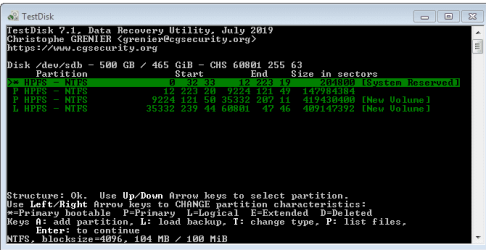
Hey everyone. I need some help. Kindly excuse the long post, i'm trying to include as many details as possible. Also a bit shaken, so memory is a bit foggy. Please forgive if i have not used the exact terms for dialogues.
TLDR: Need to recover missing data, chkdsk did "deleting orphan file record segment", HDD seems physically fine
Preface:
I put computer to hibernate, or I left computer, and it went to sleep (hybrid). I don't recall, probably the first one. I had a few windows open, notepad, explorer, chrome, and a video paused. When i came to restart, it started and went to a bank screen. This happens once in a while, when some stuff is open and it sleeps, and it loads in about 5 minutes. It's an old install, maybe 7 years. I did not force restart, since i had things open. It ran with blank screen for about an hour while i did something else. Ctrl+Alt+Del or Ctrl+Shift+Esc did nothing. So i listened for any disk activity and held down the power button.
Trouble:
On startup, it gave me the resume or start normal options, don't recall exact words. I selected resume and it tired and went to BSOD. Next start, it went to widows startup repair. It ran for a bit but i didn't see any progress. In the remaining menus, i could see that the drive letters were all mixed up. I had C (windows), D & E. But it was trying to boot from E and repair windows on E.
At this point, i think i tried the other options in there. Nothing worked. I don't remember exactly how, but chkdsk was run and it did "deleting orphan file record segment" a lot. I stopped it as soon i saw a lot of scrolling. Tried a few restarts, but it always went to startup repair. So i installed windows on an empty SSD and booted up.
Troubleshooting:
I installed Defraggler and checked SMART on the problem drive. It was showing healthy. Drive does not make any new noise.
199 UltraDMA CRC Error Count 49 200 200 0 0x000000000031 has been the same since. All the other danger ones are at 0. Crash happened 3 days ago.
My C D and E is now showing as F G and E, it's in the wrong order. C, now F moved to the middle. My new windows is on the current C, and D,E,F,G on problem drive. D is the System reserved.
Now, the data on my D and E (original names) seemed fine. I ran chkdsk and then chkdsk /f on each. D and E finished without any bad remarks. C, with chkdsk /f started the "deleting orphan file record segment" scrolling again. So i quit.
I got another hard drive and copied all i needed from D and E. But C has me stumped. This is where i need help.
I opened C (original name) and there were some folders missing. I had a folder called downloads that was setup to be opened on the network. The Users folder and downloads folder could not be opened. "you need permission" I clicked okay. It took some time but opened. Things were missing.
I tried to take ownership on some folders but i get errors like, cannot find "x file", or it gets stuck on a file and drive makes a buzzing noise. I cant quit that, i have to log off.
In Users/My name/ Desktop, files and folders are missing. Some folders say location not found, corrupted. In the meanwhile, after a few restarts, C shows more folders. Some more items showed up in the downloads folder. Same with the default downloads folder. Some more files showed up.
Recuva cannot see anything new. And the problem folders give the same corrupt dialogue in Recuva.
Even folders i can open, that have some of the files, Recuva sees nothing new.
Forgot to add that every restart chkdsk comes on, and i quit. I checked, and only C (original) is marked dirty. I disabled the chkdsk in startup for c. (chkntfs)
I have tried to not do any write operations to C, except trying to take permission and ownership.
In startup repair, under diagnostic and repair details, the root cause is "System volume on disk is corrupt."
Please help me recover my data. Or what steps i have to follow. My order of priority would be : Data on desktop and Library folders.
Then, if possible, boot windows to get application data as well, like bookmarks and settings from some other apps.
I was a bit disorganised the past few years, because i was procrastinating a backup and reset. So i thought i'd do it all together and this happened. I don't know for sure what i lost, but most of it is important. I don't have many photos or videos on C. It's mostly documents.
Any help would be greatly appreciated. Thanks in advance.
TLDR: Need to recover missing data, chkdsk did "deleting orphan file record segment", HDD seems physically fine
Preface:
I put computer to hibernate, or I left computer, and it went to sleep (hybrid). I don't recall, probably the first one. I had a few windows open, notepad, explorer, chrome, and a video paused. When i came to restart, it started and went to a bank screen. This happens once in a while, when some stuff is open and it sleeps, and it loads in about 5 minutes. It's an old install, maybe 7 years. I did not force restart, since i had things open. It ran with blank screen for about an hour while i did something else. Ctrl+Alt+Del or Ctrl+Shift+Esc did nothing. So i listened for any disk activity and held down the power button.
Trouble:
On startup, it gave me the resume or start normal options, don't recall exact words. I selected resume and it tired and went to BSOD. Next start, it went to widows startup repair. It ran for a bit but i didn't see any progress. In the remaining menus, i could see that the drive letters were all mixed up. I had C (windows), D & E. But it was trying to boot from E and repair windows on E.
At this point, i think i tried the other options in there. Nothing worked. I don't remember exactly how, but chkdsk was run and it did "deleting orphan file record segment" a lot. I stopped it as soon i saw a lot of scrolling. Tried a few restarts, but it always went to startup repair. So i installed windows on an empty SSD and booted up.
Troubleshooting:
I installed Defraggler and checked SMART on the problem drive. It was showing healthy. Drive does not make any new noise.
199 UltraDMA CRC Error Count 49 200 200 0 0x000000000031 has been the same since. All the other danger ones are at 0. Crash happened 3 days ago.
My C D and E is now showing as F G and E, it's in the wrong order. C, now F moved to the middle. My new windows is on the current C, and D,E,F,G on problem drive. D is the System reserved.
Now, the data on my D and E (original names) seemed fine. I ran chkdsk and then chkdsk /f on each. D and E finished without any bad remarks. C, with chkdsk /f started the "deleting orphan file record segment" scrolling again. So i quit.
I got another hard drive and copied all i needed from D and E. But C has me stumped. This is where i need help.
I opened C (original name) and there were some folders missing. I had a folder called downloads that was setup to be opened on the network. The Users folder and downloads folder could not be opened. "you need permission" I clicked okay. It took some time but opened. Things were missing.
I tried to take ownership on some folders but i get errors like, cannot find "x file", or it gets stuck on a file and drive makes a buzzing noise. I cant quit that, i have to log off.
In Users/My name/ Desktop, files and folders are missing. Some folders say location not found, corrupted. In the meanwhile, after a few restarts, C shows more folders. Some more items showed up in the downloads folder. Same with the default downloads folder. Some more files showed up.
Recuva cannot see anything new. And the problem folders give the same corrupt dialogue in Recuva.
Even folders i can open, that have some of the files, Recuva sees nothing new.
Forgot to add that every restart chkdsk comes on, and i quit. I checked, and only C (original) is marked dirty. I disabled the chkdsk in startup for c. (chkntfs)
I have tried to not do any write operations to C, except trying to take permission and ownership.
In startup repair, under diagnostic and repair details, the root cause is "System volume on disk is corrupt."
Please help me recover my data. Or what steps i have to follow. My order of priority would be : Data on desktop and Library folders.
Then, if possible, boot windows to get application data as well, like bookmarks and settings from some other apps.
I was a bit disorganised the past few years, because i was procrastinating a backup and reset. So i thought i'd do it all together and this happened. I don't know for sure what i lost, but most of it is important. I don't have many photos or videos on C. It's mostly documents.
Any help would be greatly appreciated. Thanks in advance.
My Computer
At a glance
Win 7 Pro 32
- Computer type
- PC/Desktop
- OS
- Win 7 Pro 32